# GPT Browser (`anchor/gpt-browser`) Actor
A GPT browser to use OpenAI prompt on any website. Put a list of URLs and a prompt, then the GPT agent will give you the answer you need. Fast, easy, and not limited with OpenAI ChatGPT restrictions. The best way to search and use GPT on large number of websites. Upload Excel or CSV. Screenshots 📸
- **URL**: https://apify.com/anchor/gpt-browser.md
- **Developed by:** [Anchor](https://apify.com/anchor) (community)
- **Categories:** Automation, AI
- **Stats:** 97 total users, 3 monthly users, 100.0% runs succeeded, 7 bookmarks
- **User rating**: 5.00 out of 5 stars
## Pricing
$9.00/month + usage
To use this Actor, you pay a monthly rental fee to the developer. The rent is subtracted from your prepaid usage every month after the free trial period. You also pay for the Apify platform usage, which gets cheaper the higher Apify subscription plan you have.
Learn more: https://docs.apify.com/actors/running/actors-in-store.md#rental-actors
## What's an Apify Actor?
Actors are web data automations that power AI and operations. They run on the Apify platform to scrape websites, process data, connect APIs, and automate workflows.
In Batch mode, an Actor accepts a well-defined JSON input, performs an action which can take anything from a few seconds to a few hours,
and optionally produces a well-defined JSON output, datasets with results, or files in key-value store.
In Standby mode, an Actor provides a web server which can be used as a website, API, or an MCP server.
Actors are written with capital "A".
## How to integrate an Actor?
If asked about integration, you help developers integrate Actors into their projects.
You adapt to their stack and deliver integrations that are safe, well-documented, and production-ready.
The best way to integrate Actors is as follows.
- **AI agents and MCP clients** — the [Apify MCP server](https://docs.apify.com/integrations/mcp.md) at `https://mcp.apify.com` (remote, streamable HTTP, OAuth on first use).
- **Agentic workflows and local Actor development** — [Agent Skills](https://apify.com/.well-known/agent-skills/index.json) with the [Apify CLI](https://docs.apify.com/cli/docs.md): `npm install -g apify-cli`, then `apify login`.
- **JavaScript/TypeScript projects** — the official [JS/TS client](https://docs.apify.com/api/client/js/docs.md): `npm install apify-client`.
- **Python projects** — the official [Python client](https://docs.apify.com/api/client/python/docs.md): `pip install apify-client`.
- **Any other language** — the [REST API](https://docs.apify.com/api/v2.md).
For usage examples, see the [API](#api) section below.
For more details, see Apify documentation as [Markdown index](https://docs.apify.com/llms.txt) and [Markdown full-text](https://docs.apify.com/llms-full.txt).
# README
### 🌐 GPT Browser 💬
GPT Browser is a powerful tool that leverages OpenAI's API to modify text obtained from a browser. You can use the browser to extract content from a website and then pass that content to the OpenAI API to make the GPT magic happen.
### 🔍 How does GPT Browser work?
The Actor first loads the page using [Playwright](https://playwright.dev/), then it converts the content into markdown format and asks for GPT instructions about markdown content.
The Actor first removes hidden html content and other Html tags in order to minimize your OpenAI cost. Note that if the content doesn't fit into the GPT limit, the browser will truncate the content.
### 📐 How to use GPT Browser
- Add your [OpenAI API Key](https://platform.openai.com/api-keys)
- Add page URLs (or uplad a file, like CSV) that the browser will visit
- Prompt instructions on how the GTP browser should handle each page
You can configure the browser and GPT using Input configuration to set up a more complex workflow.
##### Instructions and prompts for GPT
Tells GPT how to handle your page content. For example, send the prompt:
- "Summarize this website in less than 10 words."
- "Find sentences that contain 'pricing' and return them as a list."
- "Find the logo URL of this website. If the page is about food, answer with 'skip this page'.".
### 👀 Examples
Here are some example use cases you can use for your own GPT browsing experiments.
##### "Get me the url of the favicon. If it's a relative path, transform it into an absolute path using the base url. Only return the url, no other comment from you. If you don't find , return en empty string"
| 🔗 URL | 👨 Screenshot | 📝 Answer |
| --- | --- | --- |
| |  |  |
##### "Summarize reviews for this John Wick movie"
| 🔗 URL | 👨 Screenshot | 📝 Answer |
| --- | --- | --- |
| | 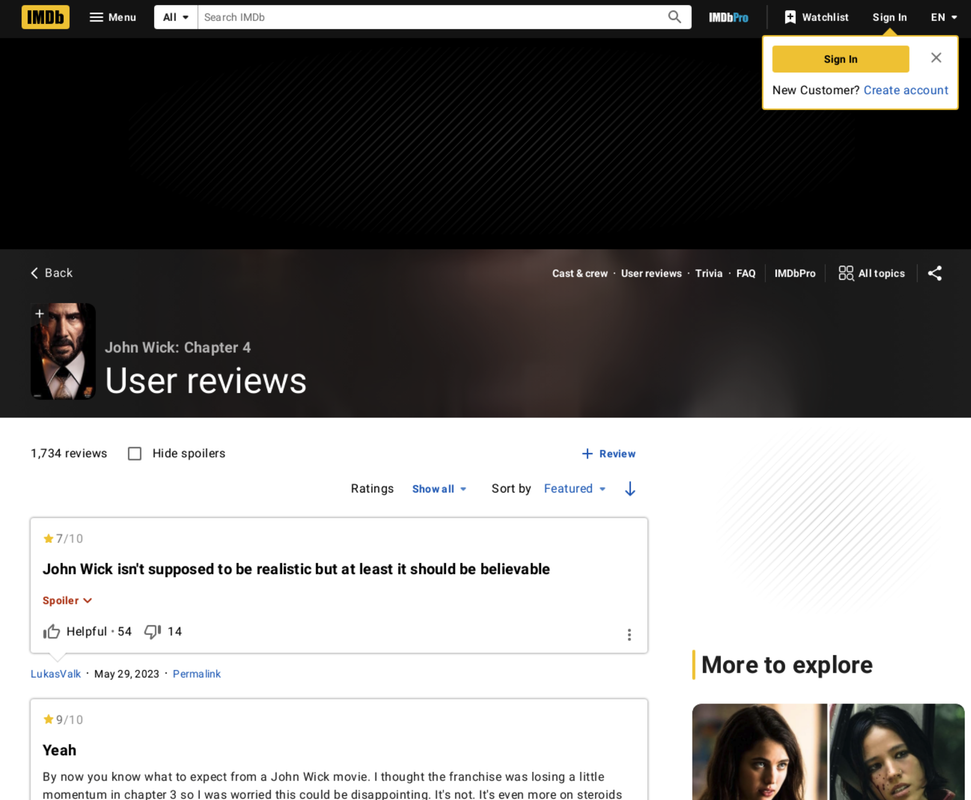 | "John Wick 4 has received a mix of enthusiastic accolades and critical remarks from viewers, reflecting its polarized reception \[...]" |
#### Other suggested use cases
- Find typos and grammatical errors across on a page
- Analyze competing content to find keywords or ideas
- Examine code examples in content to find errors or suggest improvements
### 🚀 How Fast does can I scrape websites?
There are two modes.
- The first one (default) takes screenshot, and makes sure all popups etc... are loaded.\
`~ 250 pages per hour`
- The fast one goes faster than flashlights... It's incredible, you should try it !\
`~ 10000 pages per minute`
Note: both modes will scale up to your openAI limitation, you don't have to worry about that.
### 🥢 Other Actors I should use ?
I developped a couple of Actors. Take a look [guillim's actors](https://apify.com/anchor) or my [portfolio](https://guillim.github.io/about). My focus is Linkedin, since it is "login protected", and many users need to access its information.
##### Scraping LinkedIn with GPT
- If you have a few LinkedIn **people url**, that you want to filter out using a ChatGPT prompt: [LinkedIn x GPT](https://apify.com/anchor/linkedin-gpt-prompt)
##### Scraping LinkedIn, big amount of pages
When you need to gather data, like more 50 records per day, it's recommended to avoid using your Linkedin cookies. You will need the following actors :
- Looking for many LinkedIn **company url**: [Mass company finder](https://apify.com/anchor/linkedin-company-url-finder)
- Looking for many LinkedIn **people url**: [Mass people finder](https://apify.com/anchor/linkedin-people-finder)
- You have many LinkedIn **people url**, now looking for their **information** like job, description, skills... : [Mass profile scrapper](https://apify.com/anchor/linkedin-profile-enrichment)
# Actor input Schema
## `startUrls` (type: `array`):
URLs you want your prompt to work on. Note that website with captcha might not work.
## `gpt_api_key` (type: `string`):
API key from OpenAI GPT
## `instructions` (type: `string`):
Instructions for the prompt, to let GPT know what to do. For example: 'List all the products that this company sells'
## `fast` (type: `boolean`):
Skip screenshots, and so on in order to be much faster. Useful for enormous amount of input
## Actor input object example
```json
{
"startUrls": [
{
"url": "https://salestoolsai.top/"
}
],
"gpt_api_key": "your_api_key",
"instructions": "Summarize what this website does in less than 30 words, and get the icon logo. Give the result in a text format",
"fast": false
}
```
# API
You can run this Actor programmatically using our API. Below are code examples in JavaScript, Python, and CLI, as well as the OpenAPI specification and MCP server setup.
## JavaScript example
```javascript
import { ApifyClient } from 'apify-client';
// Initialize the ApifyClient with your Apify API token
// Replace the '' with your token
const client = new ApifyClient({
token: '',
});
// Prepare Actor input
const input = {
"startUrls": [
{
"url": "https://salestoolsai.top/"
}
],
"gpt_api_key": "your_api_key",
"instructions": "Summarize what this website does in less than 30 words, and get the icon logo. Give the result in a text format",
"fast": false
};
// Run the Actor and wait for it to finish
const run = await client.actor("anchor/gpt-browser").call(input);
// Fetch and print Actor results from the run's dataset (if any)
console.log('Results from dataset');
console.log(`💾 Check your data here: https://console.apify.com/storage/datasets/${run.defaultDatasetId}`);
const { items } = await client.dataset(run.defaultDatasetId).listItems();
items.forEach((item) => {
console.dir(item);
});
// 📚 Want to learn more 📖? Go to → https://docs.apify.com/api/client/js/docs
```
## Python example
```python
from apify_client import ApifyClient
# Initialize the ApifyClient with your Apify API token
# Replace '' with your token.
client = ApifyClient("")
# Prepare the Actor input
run_input = {
"startUrls": [{ "url": "https://salestoolsai.top/" }],
"gpt_api_key": "your_api_key",
"instructions": "Summarize what this website does in less than 30 words, and get the icon logo. Give the result in a text format",
"fast": False,
}
# Run the Actor and wait for it to finish
run = client.actor("anchor/gpt-browser").call(run_input=run_input)
# Fetch and print Actor results from the run's dataset (if there are any)
print(f"💾 Check your data here: https://console.apify.com/storage/datasets/{run.default_dataset_id}")
for item in client.dataset(run.default_dataset_id).iterate_items():
print(item)
# 📚 Want to learn more 📖? Go to → https://docs.apify.com/api/client/python/docs/quick-start
```
## CLI example
```bash
echo '{
"startUrls": [
{
"url": "https://salestoolsai.top/"
}
],
"gpt_api_key": "your_api_key",
"instructions": "Summarize what this website does in less than 30 words, and get the icon logo. Give the result in a text format",
"fast": false
}' |
apify call anchor/gpt-browser --silent --output-dataset
```
## MCP server setup
```json
{
"mcpServers": {
"apify": {
"type": "http",
"url": "https://mcp.apify.com/?tools=fetch-actor-details,anchor/gpt-browser"
}
}
}
```
The hosted server signs you in with OAuth on first connect, so no API token belongs in this config. Clients without OAuth support can send an `Authorization: Bearer ` header instead, using a token from API & Integrations in Apify Console (https://console.apify.com/settings/integrations).
## OpenAPI specification
Download the OpenAPI definition: https://api.apify.com/v2/actors/veP5yZp3k5uPcOKhU/builds/TWB4cw8ihoWocfzB4/openapi.json