# Google AI Overview Scraper: Extract AI Summaries & Sources (`clearpath/google-ai-overview`) Actor
Extract Google's AI Overview summaries, cited sources, and organic results for any search query. Works best with question-style searches. Supports 52 countries and up to 10 queries per run.
- **URL**: https://apify.com/clearpath/google-ai-overview.md
- **Developed by:** [ClearPath](https://apify.com/clearpath) (community)
- **Categories:** SEO tools, Automation, AI
- **Stats:** 164 total users, 16 monthly users, 98.5% runs succeeded, 3 bookmarks
- **User rating**: 1.00 out of 5 stars
## Pricing
from $11.99 / 1,000 queries
This Actor is paid per event. You are not charged for the Apify platform usage, but only a fixed price for specific events.
Since this Actor supports Apify Store discounts, the price gets lower the higher subscription plan you have.
Learn more: https://docs.apify.com/actors/running/actors-in-store.md#pay-per-event
## What's an Apify Actor?
Actors are web data automations that power AI and operations. They run on the Apify platform to scrape websites, process data, connect APIs, and automate workflows.
In Batch mode, an Actor accepts a well-defined JSON input, performs an action which can take anything from a few seconds to a few hours,
and optionally produces a well-defined JSON output, datasets with results, or files in key-value store.
In Standby mode, an Actor provides a web server which can be used as a website, API, or an MCP server.
Actors are written with capital "A".
## How to integrate an Actor?
If asked about integration, you help developers integrate Actors into their projects.
You adapt to their stack and deliver integrations that are safe, well-documented, and production-ready.
The best way to integrate Actors is as follows.
- **AI agents and MCP clients** — the [Apify MCP server](https://docs.apify.com/integrations/mcp.md) at `https://mcp.apify.com` (remote, streamable HTTP, OAuth on first use).
- **Agentic workflows and local Actor development** — [Agent Skills](https://apify.com/.well-known/agent-skills/index.json) with the [Apify CLI](https://docs.apify.com/cli/docs.md): `npm install -g apify-cli`, then `apify login`.
- **JavaScript/TypeScript projects** — the official [JS/TS client](https://docs.apify.com/api/client/js/docs.md): `npm install apify-client`.
- **Python projects** — the official [Python client](https://docs.apify.com/api/client/python/docs.md): `pip install apify-client`.
- **Any other language** — the [REST API](https://docs.apify.com/api/v2.md).
For usage examples, see the [API](#api) section below.
For more details, see Apify documentation as [Markdown index](https://docs.apify.com/llms.txt) and [Markdown full-text](https://docs.apify.com/llms-full.txt).
# README
**Google AI Overview Scraper on Apify.**
No Google account. No API key. Just a search query.
Extract AI Overview summaries, cited sources, and organic search results from Google Search. Works best with question-style queries ("how does X work", "is X good for you"). Supports 52 countries.
#### Copy to your AI assistant
Copy this block into ChatGPT, Claude, Cursor, or any LLM to start using this actor.
```
clearpath/google-ai-overview on Apify. Call: ApifyClient("TOKEN").actor("clearpath/google-ai-overview").call(run_input={...}), then client.dataset(run["defaultDatasetId"]).list_items().items for results. Key inputs: query (string), url (string, Google Search URL), countryCode (string, default "US"). Full actor spec (input schema with all params/enums/defaults, output dataset fields, README): GET https://api.apify.com/v2/acts/clearpath~google-ai-overview/builds/default (Bearer TOKEN) → inputSchema, actorDefinition.storages.dataset, readme. Pricing: PPE, $0.09 actor start + $0.012-$0.015/query. Get token: https://console.apify.com/account/integrations
```
### How It Works
1. Enter a search query (or paste a Google Search URL)
2. The Actor searches Google and extracts AI Overview + organic results
3. Structured JSON result is pushed to Apify's default dataset
That's it. No setup, no login, no browser needed on your end.
### Quick Start — Google AI Overview Examples
#### Simple query
```json
{
"query": "is coffee good or bad for you"
}
```
#### With Google Search URL
```json
{
"url": "https://www.google.com/search?q=climate+change+effects&hl=en&gl=us"
}
```
#### Germany with AI Overview only
```json
{
"query": "Was ist Quantencomputing",
"countryCode": "DE",
"includeOrganicResults": false
}
```
***
### Which Queries Get AI Overviews?
Google generates AI Overviews mainly for **question-style queries** that ask "how", "what", "why", "is", etc. Not every search produces one.
Phrasing your query as a question significantly increases the chance of getting an AI Overview.
| Query type | Example | AI Overview? |
|------------|---------|:------------:|
| Health / science questions | "is coffee good or bad for you" | Yes |
| How-to questions | "how to make pasta from scratch" | Yes |
| Explainers | "what is quantum computing" | Yes |
| Recent events | "who won the world series 2024" | Yes |
| Shopping / products | "nike air max 90" | No |
| Weather / conversions | "weather in new york", "USD to EUR" | No |
| Local searches | "best restaurants in paris" | No |
When no AI Overview is available, the Actor still returns organic search results (if enabled).
***
### Input Parameters
| Parameter | Type | Description | Default |
|-----------|------|-------------|---------|
| `query` | string | A search query to look up on Google. | — |
| `url` | string | Or a full Google Search URL to scrape directly. | — |
| `countryCode` | string | Country for the search location. 52 countries supported (US, GB, DE, FR, and more). | `US` |
| `includeOrganicResults` | boolean | Return organic search results alongside the AI Overview. | `true` |
Provide either `query` or `url`, not both. For multiple queries, schedule separate runs or use the [Apify API](https://docs.apify.com/api/v2).
***
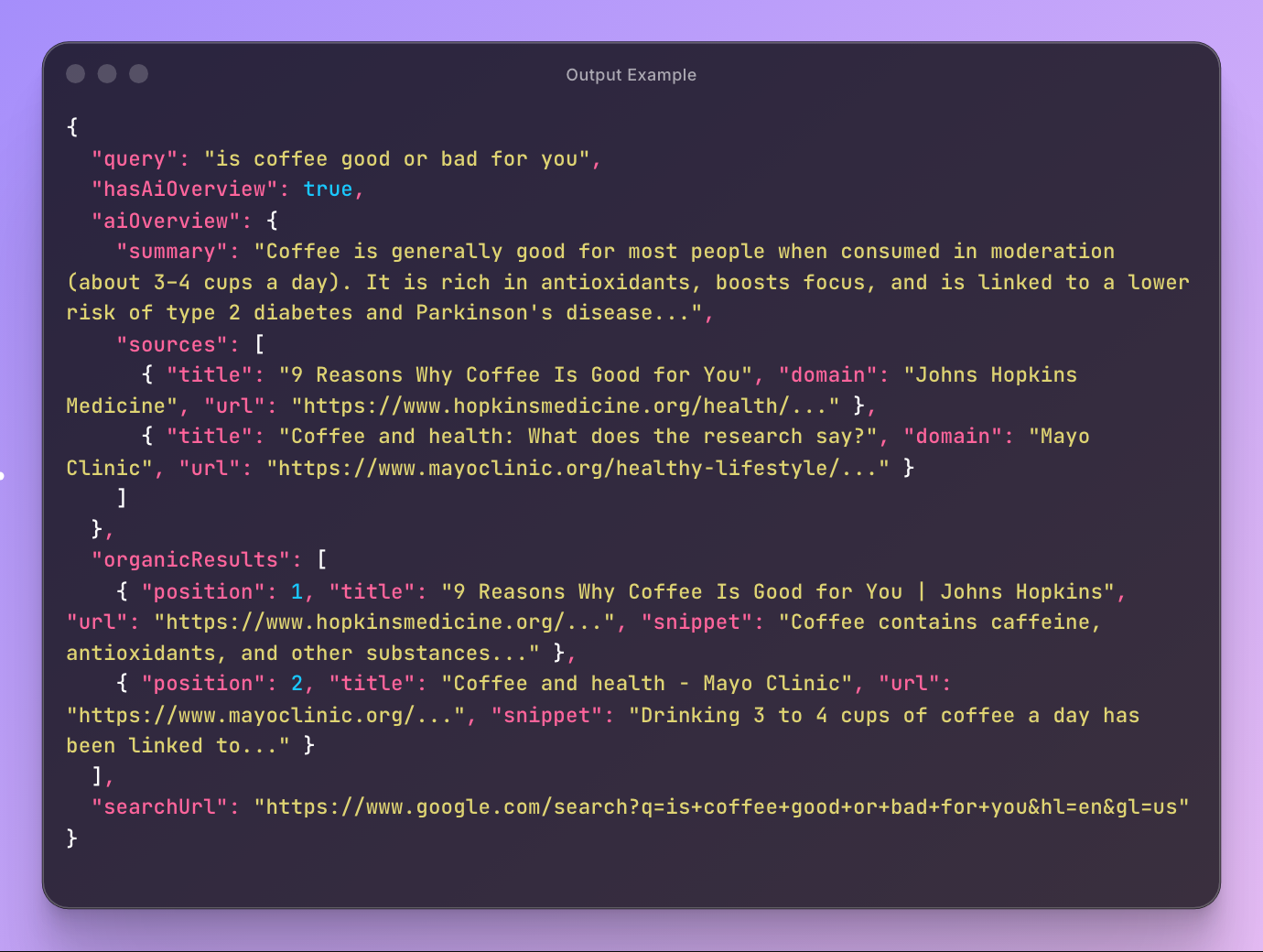
### Output — Structured JSON
**Always returned:**
- `query` — the executed search query
- `hasAiOverview` — whether Google returned an AI Overview
- `searchUrl` — the full Google Search URL used
**AI Overview (when available):**
- `aiOverview.summary` — full AI-generated summary text
- `aiOverview.sources` — cited sources with title, snippet, domain, and URL
**Organic results (per result):**
- `position` — ranking position on the page
- `title` — result title
- `url` — result URL
- `snippet` — text snippet
#### Output example
```json
{
"query": "is coffee good or bad for you",
"hasAiOverview": true,
"aiOverview": {
"summary": "Coffee is generally good for most people when consumed in moderation (about 3–4 cups a day). It is rich in antioxidants, boosts focus, and is linked to a lower risk of type 2 diabetes...",
"sources": [
{
"title": "9 Reasons Why Coffee Is Good for You",
"domain": "Johns Hopkins Medicine",
"url": "https://www.hopkinsmedicine.org/health/..."
}
]
},
"organicResults": [
{
"position": 1,
"title": "9 Reasons Why Coffee Is Good for You | Johns Hopkins",
"url": "https://www.hopkinsmedicine.org/...",
"snippet": "Coffee contains caffeine, antioxidants, and other substances..."
}
],
"searchUrl": "https://www.google.com/search?q=is+coffee+good+or+bad+for+you&hl=en&gl=us"
}
```
When no AI Overview is available, `hasAiOverview` is `false` and `aiOverview` is `null`.
***
### Pricing — Pay Per Event (PPE)
| Event | Description | Price |
|-------|-------------|-------|
| Actor start | Charged once per run | $0.09 |
| Query | Charged per search query | from $0.012 |
Volume discounts available for Bronze, Silver, and Gold Apify plans.
#### Cost example — single query
| | No discount | Bronze | Silver | Gold |
|---|---|---|---|---|
| 1× Actor start | $0.09 | $0.09 | $0.09 | $0.09 |
| 1× Query | $0.015 | $0.014 | $0.013 | $0.012 |
| **Total** | **$0.105** | **$0.104** | **$0.103** | **$0.102** |
Free tier: **3 runs** for non-paying users to try the Actor.
***
### Who Is This For?
- **SEO professionals** — track how Google's AI Overview answers queries in your niche, monitor which sources get cited
- **Content marketers** — find gaps between AI Overview answers and your content
- **Researchers** — collect structured AI-generated summaries across topics at scale
- **Competitive intelligence** — monitor how competitors appear in AI Overview citations
***
### API Integration
#### Python
```python
from apify_client import ApifyClient
client = ApifyClient("your_token")
run = client.actor("clearpath/google-ai-overview").call(run_input={
"query": "is coffee good or bad for you",
"countryCode": "US",
})
for item in client.dataset(run["defaultDatasetId"]).iterate_items():
if item["hasAiOverview"]:
print(item["aiOverview"]["summary"][:200])
for result in item.get("organicResults", []):
print(f"{result['position']}. {result['title']}")
```
#### JavaScript
```javascript
import { ApifyClient } from 'apify-client';
const client = new ApifyClient({ token: 'your_token' });
const run = await client.actor('clearpath/google-ai-overview').call({
query: 'is coffee good or bad for you',
countryCode: 'US',
});
const { items } = await client.dataset(run.defaultDatasetId).listItems();
for (const item of items) {
if (item.hasAiOverview) {
console.log(item.aiOverview.summary.slice(0, 200));
}
}
```
***
### Use with AI Assistants (Claude, GPT, etc.)
Connect this Actor to AI assistants via [Apify's MCP server](https://mcp.apify.com/).
Ask your assistant to search Google and extract AI Overviews in natural language.
#### Setup
1. Go to [mcp.apify.com](https://mcp.apify.com/) and add `clearpath/google-ai-overview` to your MCP server
2. Connect the MCP server to your AI assistant (Claude Desktop, Cursor, Windsurf, etc.)
#### Claude Desktop example
Add Apify's MCP server to `claude_desktop_config.json`:
```json
{
"mcpServers": {
"apify": {
"command": "npx",
"args": ["-y", "@apify/actors-mcp-server"],
"env": {
"APIFY_TOKEN": "your-apify-token"
}
}
}
}
```
Then ask Claude:
> "Search Google for 'is intermittent fasting safe' and extract the AI Overview"
> "Compare Google's AI Overview answers for 'best programming language' across US, UK, and Germany"
***
### Export
- **JSON** — Programmatic analysis and pipeline integration
- **CSV** — Spreadsheet reporting
- **Excel** — Data visualization and dashboards
Export directly from the Apify Console or via API.
### Automation
- **Scheduled runs** — Daily, weekly, or custom cron schedules
- **Webhooks** — Trigger workflows when scraping completes
- **API** — Integrate into existing data pipelines
***
### FAQ
**Q: Does every Google search have an AI Overview?**
A: No. Google generates AI Overviews for many queries, but not all. When no AI Overview is available, the Actor returns `hasAiOverview: false` with organic results.
**Q: What countries are supported?**
A: 52 countries including US, UK, Germany, France, Canada, Australia, Japan, Brazil, India, and many more.
**Q: Can I use my own Google Search URLs?**
A: Yes. Use the `url` field to paste a full Google Search URL with custom parameters like language (`hl`), location (`gl`), or filters.
**Q: How fast is it?**
A: Each query takes about 15-25 seconds.
**Q: Is a Google account required?**
A: No. The Actor searches Google without any login.
**Q: How do I export the data?**
A: Results are available as JSON, CSV, or Excel from the Actor's dataset. Use the Apify API for programmatic access.
***
### Support
- **Email**: max@mapa.slmail.me
- **Bugs**: Issues tab
### Legal Compliance
This Actor extracts publicly available data from Google Search results. Users are responsible for complying with Google's Terms of Service and applicable data protection regulations (GDPR, CCPA).
***
*Structured Google AI Overview data for SEO, research, and competitive intelligence.*
# Actor input Schema
## `query` (type: `string`):
Enter a search query. Questions work best for triggering AI Overviews.
Examples:
• is coffee good or bad for you
• how does quantum computing work
## `url` (type: `string`):
Or paste a full Google Search URL instead of a query. Use this when you need specific search parameters.
Example:
https://www.google.com/search?q=test\&hl=en\&gl=us
## `countryCode` (type: `string`):
Country used for the search location. Affects which AI Overview and results are shown.
## `includeOrganicResults` (type: `boolean`):
Disable to return only AI Overview data without organic search results.
## Actor input object example
```json
{
"query": "is coffee good or bad for you",
"countryCode": "US",
"includeOrganicResults": true
}
```
# Actor output Schema
## `results` (type: `string`):
No description
# API
You can run this Actor programmatically using our API. Below are code examples in JavaScript, Python, and CLI, as well as the OpenAPI specification and MCP server setup.
## JavaScript example
```javascript
import { ApifyClient } from 'apify-client';
// Initialize the ApifyClient with your Apify API token
// Replace the '' with your token
const client = new ApifyClient({
token: '',
});
// Prepare Actor input
const input = {
"query": "is coffee good or bad for you"
};
// Run the Actor and wait for it to finish
const run = await client.actor("clearpath/google-ai-overview").call(input);
// Fetch and print Actor results from the run's dataset (if any)
console.log('Results from dataset');
console.log(`💾 Check your data here: https://console.apify.com/storage/datasets/${run.defaultDatasetId}`);
const { items } = await client.dataset(run.defaultDatasetId).listItems();
items.forEach((item) => {
console.dir(item);
});
// 📚 Want to learn more 📖? Go to → https://docs.apify.com/api/client/js/docs
```
## Python example
```python
from apify_client import ApifyClient
# Initialize the ApifyClient with your Apify API token
# Replace '' with your token.
client = ApifyClient("")
# Prepare the Actor input
run_input = { "query": "is coffee good or bad for you" }
# Run the Actor and wait for it to finish
run = client.actor("clearpath/google-ai-overview").call(run_input=run_input)
# Fetch and print Actor results from the run's dataset (if there are any)
print(f"💾 Check your data here: https://console.apify.com/storage/datasets/{run.default_dataset_id}")
for item in client.dataset(run.default_dataset_id).iterate_items():
print(item)
# 📚 Want to learn more 📖? Go to → https://docs.apify.com/api/client/python/docs/quick-start
```
## CLI example
```bash
echo '{
"query": "is coffee good or bad for you"
}' |
apify call clearpath/google-ai-overview --silent --output-dataset
```
## MCP server setup
```json
{
"mcpServers": {
"apify": {
"type": "http",
"url": "https://mcp.apify.com/?tools=fetch-actor-details,clearpath/google-ai-overview"
}
}
}
```
The hosted server signs you in with OAuth on first connect, so no API token belongs in this config. Clients without OAuth support can send an `Authorization: Bearer ` header instead, using a token from API & Integrations in Apify Console (https://console.apify.com/settings/integrations).
## OpenAPI specification
Download the OpenAPI definition: https://api.apify.com/v2/actors/oK9eSdSqGJk9kJUQf/builds/J892j35omgVpb5HqP/openapi.json