# TikTok Explore Scraper (`clockworks/tiktok-explore-scraper`) Actor
Extract data from TikTok explore categories including post, author, video, and music data. Export scraped data, run the scraper via API, schedule and monitor runs or integrate with other tools.
- **URL**: https://apify.com/clockworks/tiktok-explore-scraper.md
- **Developed by:** [Clockworks](https://apify.com/clockworks) (Apify)
- **Categories:** Social media, Videos
- **Stats:** 409 total users, 77 monthly users, 100.0% runs succeeded, 11 bookmarks
- **User rating**: 4.82 out of 5 stars
## Pricing
from $0.50 / 1,000 videos
This Actor is paid per event. You are not charged for the Apify platform usage, but only a fixed price for specific events.
Since this Actor supports Apify Store discounts, the price gets lower the higher subscription plan you have.
Learn more: https://docs.apify.com/actors/running/actors-in-store.md#pay-per-event
## What's an Apify Actor?
Actors are web data automations that power AI and operations. They run on the Apify platform to scrape websites, process data, connect APIs, and automate workflows.
In Batch mode, an Actor accepts a well-defined JSON input, performs an action which can take anything from a few seconds to a few hours,
and optionally produces a well-defined JSON output, datasets with results, or files in key-value store.
In Standby mode, an Actor provides a web server which can be used as a website, API, or an MCP server.
Actors are written with capital "A".
## How to integrate an Actor?
If asked about integration, you help developers integrate Actors into their projects.
You adapt to their stack and deliver integrations that are safe, well-documented, and production-ready.
The best way to integrate Actors is as follows.
- **AI agents and MCP clients** — the [Apify MCP server](https://docs.apify.com/integrations/mcp.md) at `https://mcp.apify.com` (remote, streamable HTTP, OAuth on first use).
- **Agentic workflows and local Actor development** — [Agent Skills](https://apify.com/.well-known/agent-skills/index.json) with the [Apify CLI](https://docs.apify.com/cli/docs.md): `npm install -g apify-cli`, then `apify login`.
- **JavaScript/TypeScript projects** — the official [JS/TS client](https://docs.apify.com/api/client/js/docs.md): `npm install apify-client`.
- **Python projects** — the official [Python client](https://docs.apify.com/api/client/python/docs.md): `pip install apify-client`.
- **Any other language** — the [REST API](https://docs.apify.com/api/v2.md).
For usage examples, see the [API](#api) section below.
For more details, see Apify documentation as [Markdown index](https://docs.apify.com/llms.txt) and [Markdown full-text](https://docs.apify.com/llms-full.txt).
# README
### What is TikTok Explore Scraper?
TikTok Explore Scraper is a powerful and easy-to-use tool that allows you to extract data from TikTok explore categories. The data includes:
- **Posts data:** URL, cover image, text, number of diggs, shares, plays, comments, duration, author, location where it was created, if the post is an ad or not.
- **Authors data:** Name, nickname, whether it’s a verified account or not, signature, number of fans, videos, bio link.
- **Music data:** Name, author, album, whether it’s original sound or not, ID
- **Video data**: Duration, definition, format, height and weight.
### How to scrape TikTok with TikTok Explore Scraper?
TikTok Explore Scraper is designed to be user-friendly, offering a smooth start for those who have never extracted data from the web before. Here’s how you can use TikTok Explore Scraper:
1. [Create](https://console.apify.com/actors/qdfdPm13uGf2TeSnt?addFromActorId=qdfdPm13uGf2TeSnt) a free Apify account using your email.
2. Open [TikTok Explore Scraper.](https://apify.com/clockworks/tiktok-explore-scraper)
3. Choose one or multiple TikTok explore categories you want to get data about.
4. Click the “Start” button and wait for the data to be extracted.
5. Download your data in JSON, XML, CSV, Excel, or HTML.
If you want more guidance on how to use TikTok Explore Scraper, this [video tutorial](https://www.youtube.com/watch?v=DiG8U_P3KQk) shows you how to do it in just a few minutes.
https://www.youtube.com/watch?v=DiG8U\_P3KQk
### 🔼Input sample
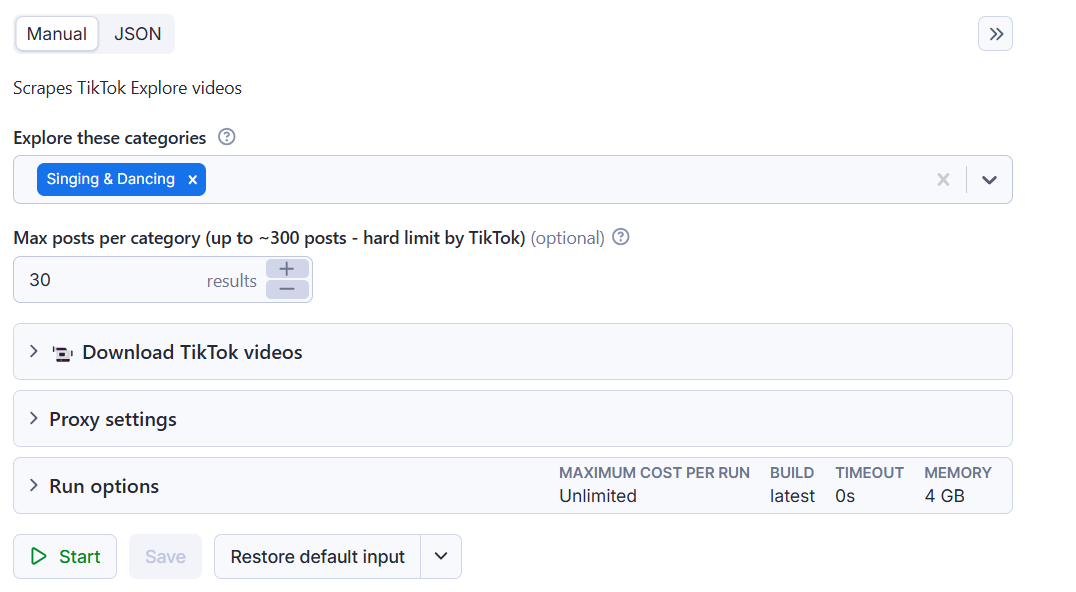
The input for TikTok Explore Scraper should be one or multiple **TikTok explore categories.** See the example below. In this run, TikTok Explore Scraper will get data from the `singing and dancing` TikTok category.
### 🔽Output sample
The results will be wrapped into a dataset which you can find in the **Storage** tab. Here's an excerpt from the data you'd get if you apply the input parameters above:
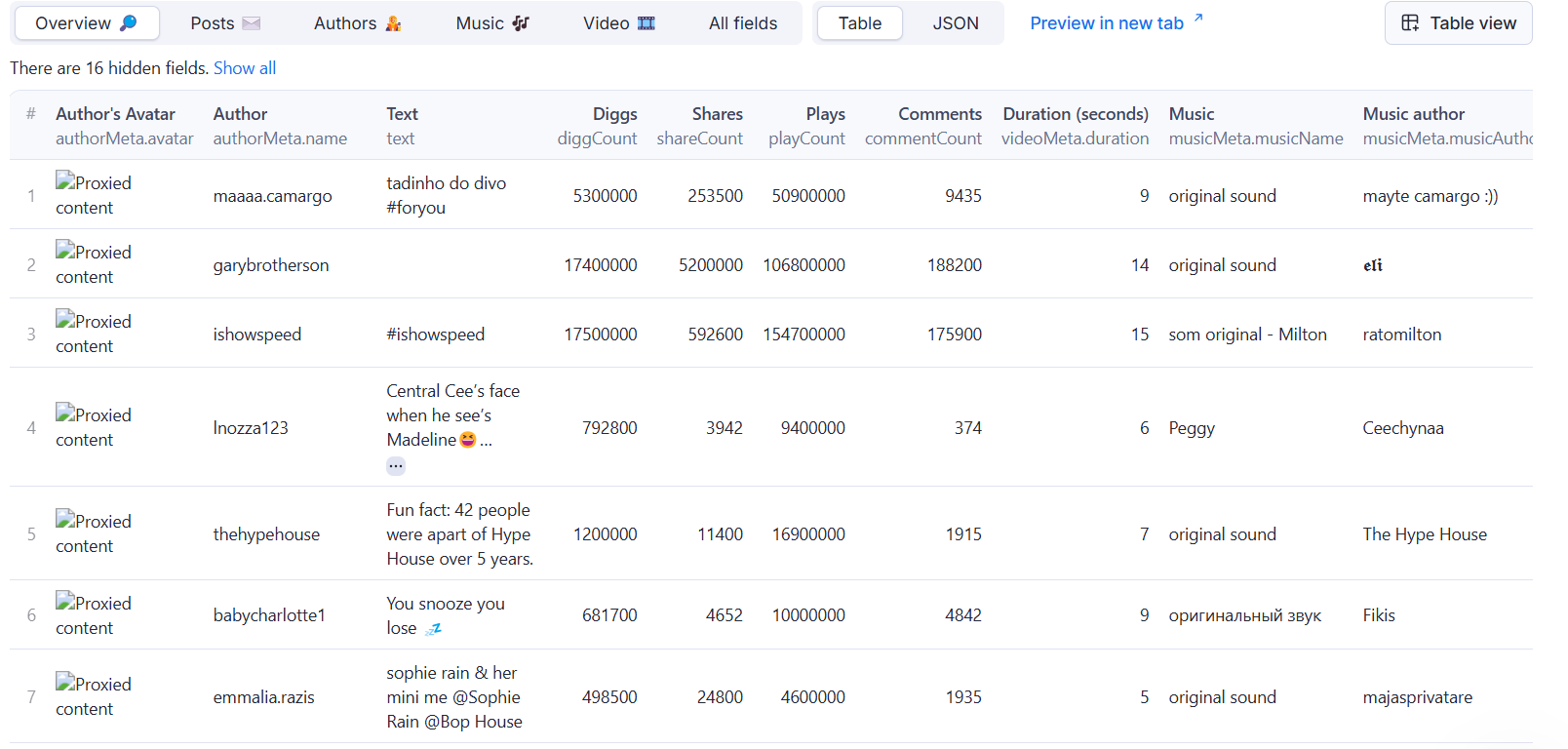
Of course, you can choose in which format you want to download your TikTok explore data: JSON, JSONL, Excel spreadsheet, HTML table, CSV, or XML.
### How can I use the data extracted from TikTok Explore?
The data extracted from TikTok Explore Scraper can be used for a variety of purposes, including:
✨ Conducting sentiment analysis
👩🔬 Obtaining data for research and **social listening experiments**
🦠 **Analyzing trends,** and viral campaigns
🥸 **Identifying unverified content** and inaccurate information with high public value
📚 Preparing for or analyzing a **TikTok marketing campaign**
👨🦲 Lead generation data enrichment
### Integrate TikTok Explore Scraper and automate your workflow
Last but not least, TikTok Explore Scraper can be connected with almost any cloud service or web app thanks to [integrations](https://apify.com/integrations) on the Apify platform.
These include:
- [Make](https://docs.apify.com/platform/integrations/make)
- [Zapier](https://docs.apify.com/platform/integrations/zapier)
- [Slack](https://docs.apify.com/platform/integrations/slack)
- [Airbyte](https://docs.apify.com/platform/integrations/airbyte)
- [GitHub](https://docs.apify.com/platform/integrations/github)
- [Google Drive](https://docs.apify.com/platform/integrations/drive)
- and [much more](https://docs.apify.com/platform/integrations).
Alternatively, you can use [webhooks](https://docs.apify.com/platform/integrations/webhooks) to carry out an action whenever an event occurs, e.g. get a notification whenever TikTok Explore Scraper successfully finishes a run.
### Scrape any TikTok data you need with dedicated scrapers
You can use the dedicated scrapers below if you want to **scrape specific TikTok data**. Each of them is built particularly for the relevant TikTok data scraping case, be it hashtags, search results, profiles, or all data at once. Feel free to browse them:
### Not your cup of tea? Build your own scraper.
TikTok Explore Scraper doesn’t exactly do what you need?
You can always build your own! Use one of [scraper templates](https://apify.com/templates) in Python, JavaScript, and TypeScript to get started. Take a look at a guide on [how to scrape TikTok using Python](https://blog.apify.com/tiktok-scraper-python/).
Alternatively, you can write it from scratch using our [open-source library Crawlee](https://crawlee.dev/). You can keep the scraper to yourself or make it public by adding it to Apify Store and [start making money](https://blog.apify.com/how-to-scrape-tiktok-tutorial/) on it.
Let us know if you need a [custom scraping solution](https://apify.com/custom-solutions).
### Your feedback
We’re always working on improving the performance of our Actors. So if you’ve got any technical feedback for TikTok Explore Scraper or simply found a bug, please create an issue on the Actor’s [Issues tab](https://apify.com/clockworks/tiktok-explore-scraper/issues/open) in Apify Console.
### ❓FAQ
#### How much does it cost to use TikTok Explore Scraper?
TikTok Explore Scraper uses the **Pay-per-event** pricing model. You’re charged with a fixed price for specific events. Your costs can, therefore, be easily calculated. It’ll cost you \*\*$\*\*0.03 for every time the Actor starts. An additional $0.003 is charged per dataset item. If you download scraped videos, it’ll cost you $0.001 per video.
#### How can I use TikTok Explore Scraper with the Apify API?
The Apify API gives you programmatic access to the Apify platform. [The API](https://apify.com/clockworks/tiktok-user-search-scraper/api/python) is organized around RESTful HTTP endpoints that enable you to manage, schedule, and run Apify actors. The API also lets you access any datasets, monitor actor performance, fetch results, create and update versions, and more.
To access the API using Node.js, use the `apify-client` NPM package. To access the API using Python, use the `apify-client` PyPI package.
Check out the [Apify API reference](https://docs.apify.com/api/v2) docs for full details or click on the [TikTok Explore Scraper API tab](https://apify.com/clockworks/tiktok-explore-scraper/api/python) for code examples.
#### Is it legal to scrape TikTok with TikTok Explore Scraper?
Our [TikTok scrapers](https://apify.com/store?search=tiktok), TikTok Explore Scraper included, are ethical and **do not extract any private user data, such as email addresses, gender, or location.** They can only extract what the user has chosen to share publicly. However, you should be aware that your results might contain personal data.
Personal data is protected by GDPR in the European Union and other laws and regulations around the world. You should not scrape personal data unless you have a legitimate reason to do so. If you’re unsure whether your reason is legitimate, consult your lawyers. You can also read our blog post on the [legality of web scraping](https://blog.apify.com/is-web-scraping-legal/) and [ethical scraping](https://blog.apify.com/what-is-ethical-web-scraping-and-how-do-you-do-it/).
### Error items
When the scraper cannot retrieve data for a given input — for example a profile is private or a post has been deleted — it pushes an **error item** to the dataset instead of silently skipping it. Normal output items are never affected; you can tell them apart by the presence of an `errorCode` field.
#### Error item structure
```json
{
"url": "https://www.tiktok.com/@someuser",
"input": "someuser",
"error": "Profile is private",
"errorCode": "PROFILE_PRIVATE"
}
```
#### Error codes reference
| `errorCode` | Meaning |
| -------------------------------- | -------------------------------------------------------------- |
| `NOT_FOUND` | Profile or hashtag does not exist |
| `POST_NOT_FOUND_OR_PRIVATE` | Post URL is gone or private |
| `POST_SENSITIVE` | Post is flagged as sensitive content |
| `NO_TRENDING_FOR_HASHTAG` | No ads found for this hashtag |
| `MUSIC_NOT_FOUND` | No videos found for the music tag |
| `SEARCH_QUERY_NOT_FOUND` | No videos found for the search query |
| `SEARCH_QUERY_PROFILE_NOT_FOUND` | No profiles found for the search query |
| `FILTER_NO_PASS` | Videos exist but none match the active date/popularity filters |
| `PROFILE_EMPTY` | Profile has no videos (or is behind a login wall) |
| `PROFILE_REPOSTS_EMPTY` | Profile has no reposts (or is behind a login wall) |
| `PROFILE_FOLLOWING_EMPTY` | Profile is not following anyone |
| `PROFILE_FOLLOWERS_EMPTY` | Profile has no followers |
| `PROFILE_PRIVATE` | Profile is private |
| `GOOGLE_RUN_NO_RESULTS` | Google-assisted run returned no results |
| `TRENDING_EMPTY` | Trending page returned no results |
| `INVALID_INPUT` | Actor failed due to bad configuration (run is also terminated) |
| `INVALID_URLS` | One or more start URLs were malformed |
# Actor input Schema
## `exploreCategoryTypes` (type: `array`):
Just select TikTok Explore categories and the scraper will collect information.
## `resultsPerPage` (type: `integer`):
Maximum number of posts that will be scraped from every Explore category.
## `shouldDownloadVideos` (type: `boolean`):
Tick to download TikTok videos. Note that this will increase time and costs needed to extract the data.
## `shouldDownloadCovers` (type: `boolean`):
Tick to download TikTok video cover images (thumbnails). Note that this will increase time and costs needed to extract the data.
## `shouldDownloadSubtitles` (type: `boolean`):
Tick to download TikTok video subtitles (only when present on the video). Note that this will increase time and costs needed to extract the data.
## `shouldDownloadSlideshowImages` (type: `boolean`):
Tick to download TikTok slideshow images. Note that this will increase costs and time required for scraping.
## `videoKvStoreIdOrName` (type: `string`):
Name (or ID) of the Key Value Store where the videos and other media like thumbnails will be stored. Omit to store in the default one. Using this option will provide a named Key-Value store can help bypass data retention and store the content forever until the store is manually deleted.
The Key-Value store's name can consist of a versatile combination of uppercase letters, lowercase letters, digits, or hyphens, all without any spaces.
## `proxyCountryCode` (type: `string`):
Country to use with proxy. Use it in case you want to scrape posts only available for some country. Proxies here use RESIDENTIAL group, which is slower and more expensive.
## Actor input object example
```json
{
"exploreCategoryTypes": [
"pc_web_explorePage_all"
],
"resultsPerPage": 100,
"shouldDownloadVideos": false,
"shouldDownloadCovers": false,
"shouldDownloadSubtitles": false,
"shouldDownloadSlideshowImages": false,
"proxyCountryCode": "None"
}
```
# Actor output Schema
## `dataset` (type: `string`):
Dataset containing all scraped data
# API
You can run this Actor programmatically using our API. Below are code examples in JavaScript, Python, and CLI, as well as the OpenAPI specification and MCP server setup.
## JavaScript example
```javascript
import { ApifyClient } from 'apify-client';
// Initialize the ApifyClient with your Apify API token
// Replace the '' with your token
const client = new ApifyClient({
token: '',
});
// Prepare Actor input
const input = {
"exploreCategoryTypes": [
"pc_web_explorePage_all"
],
"proxyCountryCode": "None"
};
// Run the Actor and wait for it to finish
const run = await client.actor("clockworks/tiktok-explore-scraper").call(input);
// Fetch and print Actor results from the run's dataset (if any)
console.log('Results from dataset');
console.log(`💾 Check your data here: https://console.apify.com/storage/datasets/${run.defaultDatasetId}`);
const { items } = await client.dataset(run.defaultDatasetId).listItems();
items.forEach((item) => {
console.dir(item);
});
// 📚 Want to learn more 📖? Go to → https://docs.apify.com/api/client/js/docs
```
## Python example
```python
from apify_client import ApifyClient
# Initialize the ApifyClient with your Apify API token
# Replace '' with your token.
client = ApifyClient("")
# Prepare the Actor input
run_input = {
"exploreCategoryTypes": ["pc_web_explorePage_all"],
"proxyCountryCode": "None",
}
# Run the Actor and wait for it to finish
run = client.actor("clockworks/tiktok-explore-scraper").call(run_input=run_input)
# Fetch and print Actor results from the run's dataset (if there are any)
print(f"💾 Check your data here: https://console.apify.com/storage/datasets/{run.default_dataset_id}")
for item in client.dataset(run.default_dataset_id).iterate_items():
print(item)
# 📚 Want to learn more 📖? Go to → https://docs.apify.com/api/client/python/docs/quick-start
```
## CLI example
```bash
echo '{
"exploreCategoryTypes": [
"pc_web_explorePage_all"
],
"proxyCountryCode": "None"
}' |
apify call clockworks/tiktok-explore-scraper --silent --output-dataset
```
## MCP server setup
```json
{
"mcpServers": {
"apify": {
"type": "http",
"url": "https://mcp.apify.com/?tools=fetch-actor-details,clockworks/tiktok-explore-scraper"
}
}
}
```
The hosted server signs you in with OAuth on first connect, so no API token belongs in this config. Clients without OAuth support can send an `Authorization: Bearer ` header instead, using a token from API & Integrations in Apify Console (https://console.apify.com/settings/integrations).
## OpenAPI specification
Download the OpenAPI definition: https://api.apify.com/v2/actors/qdfdPm13uGf2TeSnt/builds/XbEIGmTlIBNf4ix2m/openapi.json