# Monocle: The Monitor 🧐 (`cyberfly/listingmonitor`) Actor
Monitor ANYTHING 24/7. Content and listings. Compare results. Get mobile alerts. Trigger actions. Filter using keywords or custom conditions. Useful for listings, news, articles, products and more.
- **URL**: https://apify.com/cyberfly/listingmonitor.md
- **Developed by:** [Vasek Codey Vlcek](https://apify.com/cyberfly) (community)
- **Categories:** Automation, Integrations, News
- **Stats:** 56 total users, 0 monthly users, 100.0% runs succeeded, 4 bookmarks
- **User rating**: No ratings yet
## Pricing
Pay per usage
This Actor is paid per platform usage. The Actor is free to use, and you only pay for the Apify platform usage, which gets cheaper the higher subscription plan you have.
Learn more: https://docs.apify.com/actors/running/actors-in-store.md#pay-per-usage
## What's an Apify Actor?
Actors are web data automations that power AI and operations. They run on the Apify platform to scrape websites, process data, connect APIs, and automate workflows.
In Batch mode, an Actor accepts a well-defined JSON input, performs an action which can take anything from a few seconds to a few hours,
and optionally produces a well-defined JSON output, datasets with results, or files in key-value store.
In Standby mode, an Actor provides a web server which can be used as a website, API, or an MCP server.
Actors are written with capital "A".
## How to integrate an Actor?
If asked about integration, you help developers integrate Actors into their projects.
You adapt to their stack and deliver integrations that are safe, well-documented, and production-ready.
The best way to integrate Actors is as follows.
- **AI agents and MCP clients** — the [Apify MCP server](https://docs.apify.com/integrations/mcp.md) at `https://mcp.apify.com` (remote, streamable HTTP, OAuth on first use).
- **Agentic workflows and local Actor development** — [Agent Skills](https://apify.com/.well-known/agent-skills/index.json) with the [Apify CLI](https://docs.apify.com/cli/docs.md): `npm install -g apify-cli`, then `apify login`.
- **JavaScript/TypeScript projects** — the official [JS/TS client](https://docs.apify.com/api/client/js/docs.md): `npm install apify-client`.
- **Python projects** — the official [Python client](https://docs.apify.com/api/client/python/docs.md): `pip install apify-client`.
- **Any other language** — the [REST API](https://docs.apify.com/api/v2.md).
For usage examples, see the [API](#api) section below.
For more details, see Apify documentation as [Markdown index](https://docs.apify.com/llms.txt) and [Markdown full-text](https://docs.apify.com/llms-full.txt).
# README
## Monocle: Content & Listings Monitor 🧐
> Automated monitoring of listings and page contents with instant alerts and actions!
Monitor online:
- **content** 📋
- **listings** 📜
for
- **arrivals** ✨
- **updates** 📡
use (optional)
- **keywords** 🔑
- **filters** 🎯
get
- **actions** 🤖 ⚙️
- **alerts** 📢📱🔔
on changes of interest (e-mail and mobile push notifications).
Use **existing watchers** or create **your own** config easily.
### Examples
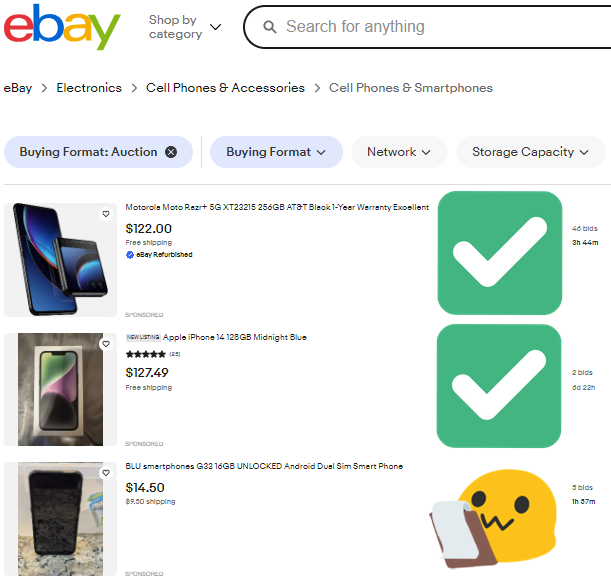
> Did you miss the **job** | **news** | **deal** | **offer** | **announcement** ?
>
> Forget about **checking** and **missing** anything ever again!
#### Listings
Before|➔|Change
:-:|:-:|:-:
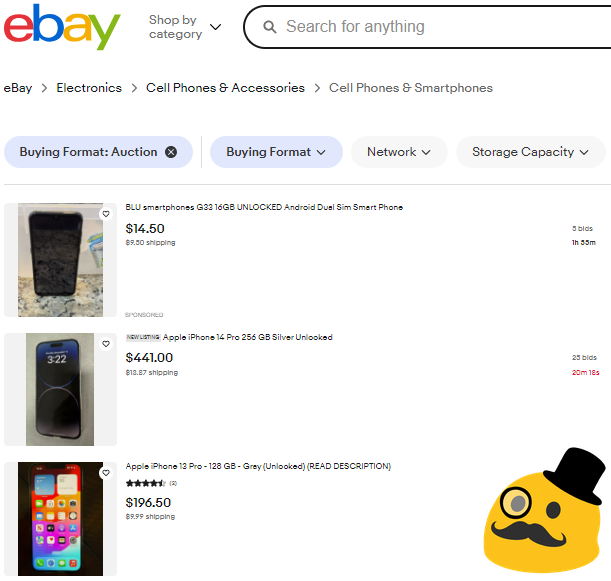|➔|
#### Articles
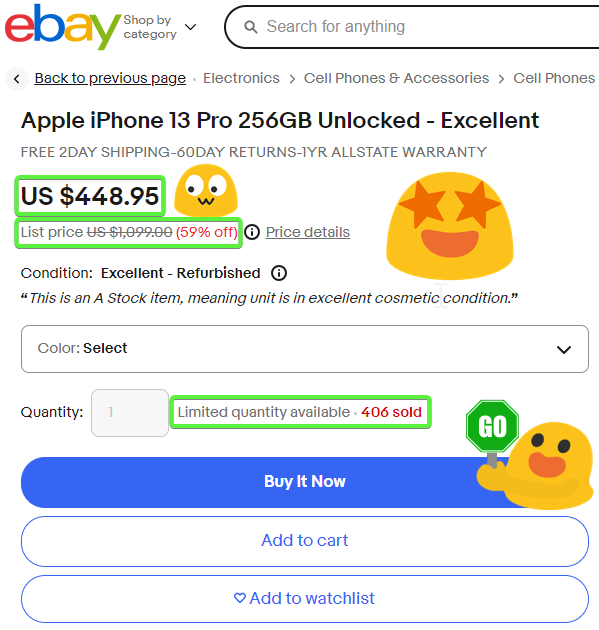
Before|➔|Change
:-:|:-:|:-:
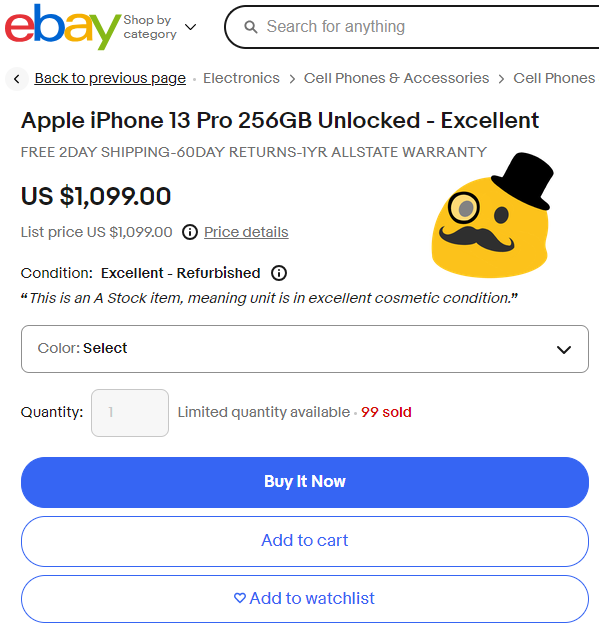|➔|
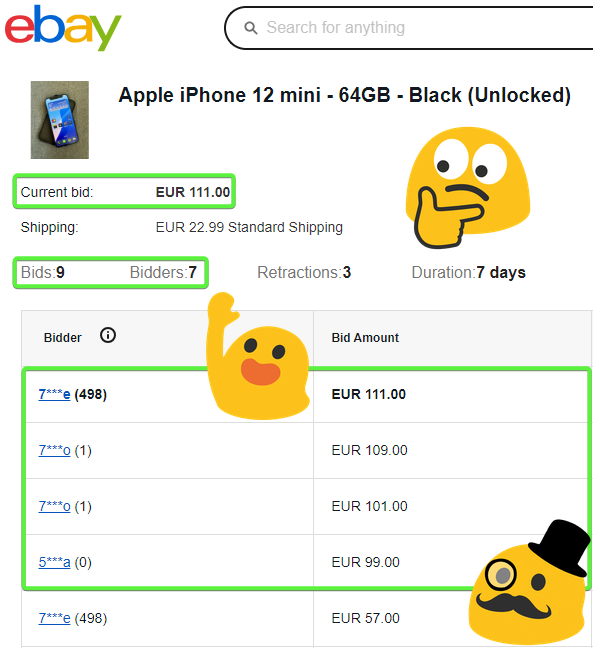
#### Updates
Before|➔|Change
:-:|:-:|:-:
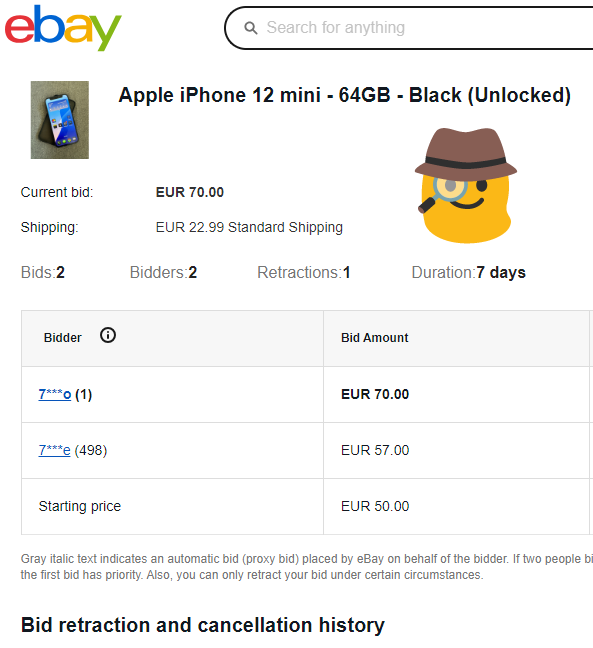|➔|
### Features
Monitor anything at all times while you kick back and relax! 🍿 🏖️ 🌴
#### Listings 📜
Monitor any lists, listings and listable items. Pagination is supported!
- jobs 🧰
- news 📺
- blogs ✍️
- issues 🛠️
- articles 📋
- products 🛒
- **anything**! 💡
#### Actions 🤖
##### Integrations ⚙️
- **custom actions** triggered by updates through integrations
##### Notifications 🔔
- real-time **mobile alerts** 📱 for audible feedback (or e-mail)
#### Filters 🎯
Filter the updates using **keywords** and **static filters**
Filter|➔|Result
:-:|:-:|:-:
"apify"|➔|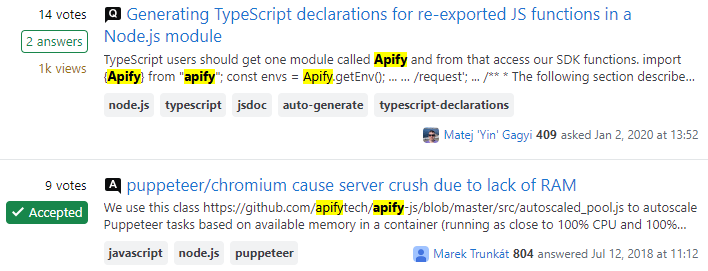
Track **changes over time** against previous records with advanced conditions and **dynamic filters**
Filters|➔|Result
:-:|:-:|:-:
`price < oldPrice * 0.7`|➔|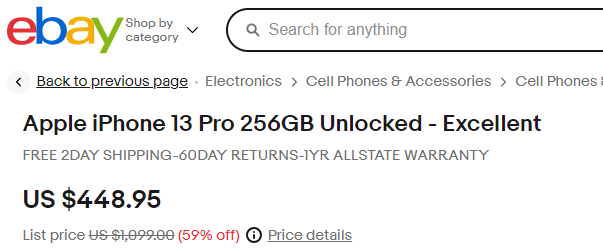
#### Pages 📃
Pagination support for listings spread across multiple pages.

#### Login 👱
Reuse user sessions where user authentication is required.
### Objectives 🏹
Watch and track:
- new items (e.g. articles, products etc.)
- any list of items that is updated regularly (news, jobs etc.)
- any change in items (e.g. price, availability, description etc.)
- any change based on absolute rules (e.g. price under a static limit)
- any change based on relative rules (e.g. price 50% lower than before)
### Motivation 🌱
> Have your watchdog keep an eye out for you!
- monitor new posts, articles and news feeds
- monitor inventory of available products
- monitor jobs with desired keywords
- monitor projects on marketplaces
- monitor reports in bug trackers
- monitor sales and discounts
- monitor your competitors
- ... etc.
### Roadmap 🗺️
- more default configs
- more notification services
- support for pagination - done! ✔️
- full login/session support with 2FA/MFA - 50%
- bypass browser using a parser for better efficiency
### Support
Need help? 🔥 Found a bug? 🐞 Get in touch! 👋🙂
Need more? 💯 Get a totally free [custom config](https://forms.gle/fN3JBcmdwMuVikst9) 🎁
### Selectors
Need help with page element selectors?
- Apify Academy - intro
- Apify Academy - guide
Even better - use this automatic helper:
- SelectorGadget - Chrome extension for automated visual element selection
> Click on a page element that you would like your selector to match (it will turn green). SelectorGadget will then generate a minimal CSS selector for that element, and will highlight (yellow) everything that is matched by the selector. Now **click on a highlighted element to reject it** (red), or **click on an unhighlighted element to add it** (green). Through this **process of selection and rejection**, SelectorGadget helps you to come up with the **perfect CSS selector** for your needs. Holding 'shift' while moving the mouse will let you select elements inside of other selected elements.
# Actor input Schema
## `config` (type: `string`):
Create a custom config, choose from the existing watchers or get in touch for more!
## `url` (type: `string`):
URL to start with (for custom configs)
## `includeUrl` (type: `boolean`):
Include the URL in each output result? You can use custom scraper instead with this extractor: `node.href` (URLs of links to list items) or `document.location.href` (URL of current page)
## `selectors` (type: `array`):
Content selectors to monitor for each element to monitor and compare against previous listings (e.g. date, title, headers, content, keywords)
## `scrapers` (type: `string`):
Content extractors to apply for each element to monitor and compare against previous listings (e.g. date, title, headers, content, keywords). CTRL + / on selection to un-comment the example code block.
## `watch` (type: `boolean`):
Run in default check mode (schedulable) or infinite watch mode (continuous) - latter might be more resource intensive
## `delay` (type: `integer`):
Amount of time to wait before next check (watch mode only)
## `limit` (type: `integer`):
Limit items to keep in dataset (history)
## `options.headless` (type: `boolean`):
Run browser in invisible headless mode without GUI - more efficient but may break on some websites
## `options.useChrome` (type: `boolean`):
Run full browser (Chrome instead of Chromium) - less efficient but may work better on some websites
## `options.useFingerprints` (type: `boolean`):
Use automatic fingerprint spoofing to prevent automation from being detected on sensitive websites
## `options.useTrafficBlocker` (type: `boolean`):
Use network traffic blocker for any fluff and media to save resources - may break on some websites
## `limits.alerts` (type: `integer`):
Limit amount of alerts for a single check (one check/watch cycle). Remaining items will only be stored in output without notification.
## `limits.results` (type: `integer`):
Limit amount of results for listings and pagination.
## `keywords` (type: `array`):
Filter items to match specific keywords. Use the more advanced filters for more refined conditions.
## `filters` (type: `string`):
Advanced alternative to keywords. Define exact rules to match each item against specified conditions. CTRL + / on selection to un-comment the example code block.
## `matcher` (type: `string`):
Define how to match updates with records for relative filters (compare against previous records). Declare static fields to consider items identical. Exclude dynamic fields to ignore them from comparison.
## `pages.enable` (type: `boolean`):
Enable automatic pagination
## `pages.retries` (type: `integer`):
Number of attempts to load more content through automatic pagination before considering results complete.
## `pages.selector` (type: `string`):
Pagination button selector (right arrow, load more etc.)
## `alerts.enable` (type: `boolean`):
Notify specified channels on updates
## `alerts.mail.enable` (type: `boolean`):
Enable channel
## `alerts.mail.address` (type: `string`):
E-mail address
## `alerts.ntfy.enable` (type: `boolean`):
Enable channel Ntfy
## `alerts.ntfy.channel` (type: `string`):
Ntfy topic
## `hooks.load` (type: `string`):
Action to perform on page load (e.g. confirm cookie consent dialog)
## `login.url` (type: `string`):
Login page in case website redirect between content and login page is not automatic
## `login.username` (type: `string`):
Encrypted username (if applicable)
## `login.password` (type: `string`):
Encrypted password (if applicable)
## `login.selectors.username` (type: `string`):
Username selector on the login screen (if applicable)
## `login.selectors.password` (type: `string`):
Password selector on the login screen (if applicable)
## `session` (type: `boolean`):
Store and reuse a login session for this website (if applicable)
## `cookies` (type: `array`):
Insert custom cookies from external browser to restore specific local state. Export cookies using browser extension EditThisCookie
## `proxy` (type: `object`):
Define proxy to pass data through
## Actor input object example
```json
{
"config": "HackerNews",
"includeUrl": false,
"selectors": [
"table table tr[class='athing'] td:nth-child(3) > span > a"
],
"scrapers": "// (input) => ({\r\n// title: {\r\n// selectors: [\"table table tr[class='athing'] td:nth-child(3) > span > a\"],\r\n// extractor: node => node.innerText,\r\n// },\r\n// links: {\r\n// contents: {\r\n// selectors: [\"table table tr[class='athing'] td:nth-child(3) > span > a\"],\r\n// extractor: node => node.href,\r\n// },\r\n// comments: {\r\n// selectors: [\"table table tr td[class='subtext'] span a[href^=item]:first-child\"],\r\n// extractor: node => node.href,\r\n// },\r\n// },\r\n// })",
"watch": false,
"delay": 300,
"limit": 1000,
"options.headless": false,
"options.useChrome": false,
"options.useFingerprints": false,
"options.useTrafficBlocker": true,
"limits.alerts": 10,
"limits.results": 100,
"keywords": [],
"filters": "// [\r\n// \t({title}) => title.length > 1, // absolute\r\n// \t({links}) => links.contents.includes('http'), // absolute\r\n// \t({price}, {price: oldPrice}) => price < oldPrice, // relative\r\n// ]",
"matcher": "// ({exclude, include}) => ({include}) // ignore fields in comparison with records\r\n// ({price, ...match}) => match // e.g. ignore dynamic field \"price\" from matching",
"pages.enable": false,
"pages.retries": 3,
"alerts.enable": true,
"alerts.mail.enable": false,
"alerts.ntfy.enable": false,
"hooks.load": "// async page => {\n// \tawait page.click('button[name=\"cookie-consent\"]').catch(error => null);\n// }",
"session": false,
"proxy": {
"useApifyProxy": false
}
}
```
# API
You can run this Actor programmatically using our API. Below are code examples in JavaScript, Python, and CLI, as well as the OpenAPI specification and MCP server setup.
## JavaScript example
```javascript
import { ApifyClient } from 'apify-client';
// Initialize the ApifyClient with your Apify API token
// Replace the '' with your token
const client = new ApifyClient({
token: '',
});
// Prepare Actor input
const input = {
"selectors": [
"table table tr[class='athing'] td:nth-child(3) > span > a"
],
"scrapers": `// (input) => ({
// title: {
// selectors: ["table table tr[class='athing'] td:nth-child(3) > span > a"],
// extractor: node => node.innerText,
// },
// links: {
// contents: {
// selectors: ["table table tr[class='athing'] td:nth-child(3) > span > a"],
// extractor: node => node.href,
// },
// comments: {
// selectors: ["table table tr td[class='subtext'] span a[href^=item]:first-child"],
// extractor: node => node.href,
// },
// },
// })`,
"limits.alerts": 10,
"limits.results": 100,
"filters": `// [
// ({title}) => title.length > 1, // absolute
// ({links}) => links.contents.includes('http'), // absolute
// ({price}, {price: oldPrice}) => price < oldPrice, // relative
// ]`,
"matcher": `// ({exclude, include}) => ({include}) // ignore fields in comparison with records
// ({price, ...match}) => match // e.g. ignore dynamic field "price" from matching`,
"pages.retries": 3,
"hooks.load": `// async page => {
// await page.click('button[name="cookie-consent"]').catch(error => null);
// }`,
"proxy": {
"useApifyProxy": false
}
};
// Run the Actor and wait for it to finish
const run = await client.actor("cyberfly/listingmonitor").call(input);
// Fetch and print Actor results from the run's dataset (if any)
console.log('Results from dataset');
console.log(`💾 Check your data here: https://console.apify.com/storage/datasets/${run.defaultDatasetId}`);
const { items } = await client.dataset(run.defaultDatasetId).listItems();
items.forEach((item) => {
console.dir(item);
});
// 📚 Want to learn more 📖? Go to → https://docs.apify.com/api/client/js/docs
```
## Python example
```python
from apify_client import ApifyClient
# Initialize the ApifyClient with your Apify API token
# Replace '' with your token.
client = ApifyClient("")
# Prepare the Actor input
run_input = {
"selectors": ["table table tr[class='athing'] td:nth-child(3) > span > a"],
"scrapers": """// (input) => ({\r
// title: {\r
// selectors: [\"table table tr[class='athing'] td:nth-child(3) > span > a\"],\r
// extractor: node => node.innerText,\r
// },\r
// links: {\r
// contents: {\r
// selectors: [\"table table tr[class='athing'] td:nth-child(3) > span > a\"],\r
// extractor: node => node.href,\r
// },\r
// comments: {\r
// selectors: [\"table table tr td[class='subtext'] span a[href^=item]:first-child\"],\r
// extractor: node => node.href,\r
// },\r
// },\r
// })""",
"limits.alerts": 10,
"limits.results": 100,
"filters": """// [\r
// \t({title}) => title.length > 1, // absolute\r
// \t({links}) => links.contents.includes('http'), // absolute\r
// \t({price}, {price: oldPrice}) => price < oldPrice, // relative\r
// ]""",
"matcher": """// ({exclude, include}) => ({include}) // ignore fields in comparison with records\r
// ({price, ...match}) => match // e.g. ignore dynamic field \"price\" from matching""",
"pages.retries": 3,
"hooks.load": """// async page => {
// \tawait page.click('button[name=\"cookie-consent\"]').catch(error => null);
// }""",
"proxy": { "useApifyProxy": False },
}
# Run the Actor and wait for it to finish
run = client.actor("cyberfly/listingmonitor").call(run_input=run_input)
# Fetch and print Actor results from the run's dataset (if there are any)
print(f"💾 Check your data here: https://console.apify.com/storage/datasets/{run.default_dataset_id}")
for item in client.dataset(run.default_dataset_id).iterate_items():
print(item)
# 📚 Want to learn more 📖? Go to → https://docs.apify.com/api/client/python/docs/quick-start
```
## CLI example
```bash
echo '{
"selectors": [
"table table tr[class='\''athing'\''] td:nth-child(3) > span > a"
],
"scrapers": "// (input) => ({\\r\\n// title: {\\r\\n// selectors: [\\"table table tr[class='\''athing'\''] td:nth-child(3) > span > a\\"],\\r\\n// extractor: node => node.innerText,\\r\\n// },\\r\\n// links: {\\r\\n// contents: {\\r\\n// selectors: [\\"table table tr[class='\''athing'\''] td:nth-child(3) > span > a\\"],\\r\\n// extractor: node => node.href,\\r\\n// },\\r\\n// comments: {\\r\\n// selectors: [\\"table table tr td[class='\''subtext'\''] span a[href^=item]:first-child\\"],\\r\\n// extractor: node => node.href,\\r\\n// },\\r\\n// },\\r\\n// })",
"limits.alerts": 10,
"limits.results": 100,
"filters": "// [\\r\\n// \\t({title}) => title.length > 1, // absolute\\r\\n// \\t({links}) => links.contents.includes('\''http'\''), // absolute\\r\\n// \\t({price}, {price: oldPrice}) => price < oldPrice, // relative\\r\\n// ]",
"matcher": "// ({exclude, include}) => ({include}) // ignore fields in comparison with records\\r\\n// ({price, ...match}) => match // e.g. ignore dynamic field \\"price\\" from matching",
"pages.retries": 3,
"hooks.load": "// async page => {\\n// \\tawait page.click('\''button[name=\\"cookie-consent\\"]'\'').catch(error => null);\\n// }",
"proxy": {
"useApifyProxy": false
}
}' |
apify call cyberfly/listingmonitor --silent --output-dataset
```
## MCP server setup
```json
{
"mcpServers": {
"apify": {
"type": "http",
"url": "https://mcp.apify.com/?tools=fetch-actor-details,cyberfly/listingmonitor"
}
}
}
```
The hosted server signs you in with OAuth on first connect, so no API token belongs in this config. Clients without OAuth support can send an `Authorization: Bearer ` header instead, using a token from API & Integrations in Apify Console (https://console.apify.com/settings/integrations).
## OpenAPI specification
Download the OpenAPI definition: https://api.apify.com/v2/actors/MLgjXeQeiJQt7qT5w/builds/hNoz7f2j0ARLFj3gk/openapi.json
 #### Filters 🎯
Filter the updates using **keywords** and **static filters**
Filter|➔|Result
:-:|:-:|:-:
"apify"|➔|
Track **changes over time** against previous records with advanced conditions and **dynamic filters**
Filters|➔|Result
:-:|:-:|:-:
`price < oldPrice * 0.7`|➔|
#### Pages 📃
Pagination support for listings spread across multiple pages.

#### Filters 🎯
Filter the updates using **keywords** and **static filters**
Filter|➔|Result
:-:|:-:|:-:
"apify"|➔|
Track **changes over time** against previous records with advanced conditions and **dynamic filters**
Filters|➔|Result
:-:|:-:|:-:
`price < oldPrice * 0.7`|➔|
#### Pages 📃
Pagination support for listings spread across multiple pages.
  #### Login 👱
Reuse user sessions where user authentication is required.
### Objectives 🏹
Watch and track:
- new items (e.g. articles, products etc.)
- any list of items that is updated regularly (news, jobs etc.)
- any change in items (e.g. price, availability, description etc.)
- any change based on absolute rules (e.g. price under a static limit)
- any change based on relative rules (e.g. price 50% lower than before)
### Motivation 🌱
> Have your watchdog keep an eye out for you!
- monitor new posts, articles and news feeds
- monitor inventory of available products
- monitor jobs with desired keywords
- monitor projects on marketplaces
- monitor reports in bug trackers
- monitor sales and discounts
- monitor your competitors
- ... etc.
### Roadmap 🗺️
- more default configs
- more notification services
- support for pagination - done! ✔️
- full login/session support with 2FA/MFA - 50%
- bypass browser using a parser for better efficiency
### Support
Need help? 🔥 Found a bug? 🐞 Get in touch! 👋🙂
Need more? 💯 Get a totally free [custom config](https://forms.gle/fN3JBcmdwMuVikst9) 🎁
### Selectors
Need help with page element selectors?
- Apify Academy - intro
- Apify Academy - guide
Even better - use this automatic helper:
- SelectorGadget - Chrome extension for automated visual element selection
> Click on a page element that you would like your selector to match (it will turn green). SelectorGadget will then generate a minimal CSS selector for that element, and will highlight (yellow) everything that is matched by the selector. Now **click on a highlighted element to reject it** (red), or **click on an unhighlighted element to add it** (green). Through this **process of selection and rejection**, SelectorGadget helps you to come up with the **perfect CSS selector** for your needs. Holding 'shift' while moving the mouse will let you select elements inside of other selected elements.
# Actor input Schema
## `config` (type: `string`):
Create a custom config, choose from the existing watchers or get in touch for more!
## `url` (type: `string`):
URL to start with (for custom configs)
## `includeUrl` (type: `boolean`):
Include the URL in each output result? You can use custom scraper instead with this extractor: `node.href` (URLs of links to list items) or `document.location.href` (URL of current page)
## `selectors` (type: `array`):
Content selectors to monitor for each element to monitor and compare against previous listings (e.g. date, title, headers, content, keywords)
## `scrapers` (type: `string`):
Content extractors to apply for each element to monitor and compare against previous listings (e.g. date, title, headers, content, keywords). CTRL + / on selection to un-comment the example code block.
## `watch` (type: `boolean`):
Run in default check mode (schedulable) or infinite watch mode (continuous) - latter might be more resource intensive
## `delay` (type: `integer`):
Amount of time to wait before next check (watch mode only)
## `limit` (type: `integer`):
Limit items to keep in dataset (history)
## `options.headless` (type: `boolean`):
Run browser in invisible headless mode without GUI - more efficient but may break on some websites
## `options.useChrome` (type: `boolean`):
Run full browser (Chrome instead of Chromium) - less efficient but may work better on some websites
## `options.useFingerprints` (type: `boolean`):
Use automatic fingerprint spoofing to prevent automation from being detected on sensitive websites
## `options.useTrafficBlocker` (type: `boolean`):
Use network traffic blocker for any fluff and media to save resources - may break on some websites
## `limits.alerts` (type: `integer`):
Limit amount of alerts for a single check (one check/watch cycle). Remaining items will only be stored in output without notification.
## `limits.results` (type: `integer`):
Limit amount of results for listings and pagination.
## `keywords` (type: `array`):
Filter items to match specific keywords. Use the more advanced filters for more refined conditions.
## `filters` (type: `string`):
Advanced alternative to keywords. Define exact rules to match each item against specified conditions. CTRL + / on selection to un-comment the example code block.
## `matcher` (type: `string`):
Define how to match updates with records for relative filters (compare against previous records). Declare static fields to consider items identical. Exclude dynamic fields to ignore them from comparison.
## `pages.enable` (type: `boolean`):
Enable automatic pagination
## `pages.retries` (type: `integer`):
Number of attempts to load more content through automatic pagination before considering results complete.
## `pages.selector` (type: `string`):
Pagination button selector (right arrow, load more etc.)
## `alerts.enable` (type: `boolean`):
Notify specified channels on updates
## `alerts.mail.enable` (type: `boolean`):
Enable channel
## `alerts.mail.address` (type: `string`):
E-mail address
## `alerts.ntfy.enable` (type: `boolean`):
Enable channel Ntfy
## `alerts.ntfy.channel` (type: `string`):
Ntfy topic
## `hooks.load` (type: `string`):
Action to perform on page load (e.g. confirm cookie consent dialog)
## `login.url` (type: `string`):
Login page in case website redirect between content and login page is not automatic
## `login.username` (type: `string`):
Encrypted username (if applicable)
## `login.password` (type: `string`):
Encrypted password (if applicable)
## `login.selectors.username` (type: `string`):
Username selector on the login screen (if applicable)
## `login.selectors.password` (type: `string`):
Password selector on the login screen (if applicable)
## `session` (type: `boolean`):
Store and reuse a login session for this website (if applicable)
## `cookies` (type: `array`):
Insert custom cookies from external browser to restore specific local state. Export cookies using browser extension EditThisCookie
## `proxy` (type: `object`):
Define proxy to pass data through
## Actor input object example
```json
{
"config": "HackerNews",
"includeUrl": false,
"selectors": [
"table table tr[class='athing'] td:nth-child(3) > span > a"
],
"scrapers": "// (input) => ({\r\n// title: {\r\n// selectors: [\"table table tr[class='athing'] td:nth-child(3) > span > a\"],\r\n// extractor: node => node.innerText,\r\n// },\r\n// links: {\r\n// contents: {\r\n// selectors: [\"table table tr[class='athing'] td:nth-child(3) > span > a\"],\r\n// extractor: node => node.href,\r\n// },\r\n// comments: {\r\n// selectors: [\"table table tr td[class='subtext'] span a[href^=item]:first-child\"],\r\n// extractor: node => node.href,\r\n// },\r\n// },\r\n// })",
"watch": false,
"delay": 300,
"limit": 1000,
"options.headless": false,
"options.useChrome": false,
"options.useFingerprints": false,
"options.useTrafficBlocker": true,
"limits.alerts": 10,
"limits.results": 100,
"keywords": [],
"filters": "// [\r\n// \t({title}) => title.length > 1, // absolute\r\n// \t({links}) => links.contents.includes('http'), // absolute\r\n// \t({price}, {price: oldPrice}) => price < oldPrice, // relative\r\n// ]",
"matcher": "// ({exclude, include}) => ({include}) // ignore fields in comparison with records\r\n// ({price, ...match}) => match // e.g. ignore dynamic field \"price\" from matching",
"pages.enable": false,
"pages.retries": 3,
"alerts.enable": true,
"alerts.mail.enable": false,
"alerts.ntfy.enable": false,
"hooks.load": "// async page => {\n// \tawait page.click('button[name=\"cookie-consent\"]').catch(error => null);\n// }",
"session": false,
"proxy": {
"useApifyProxy": false
}
}
```
# API
You can run this Actor programmatically using our API. Below are code examples in JavaScript, Python, and CLI, as well as the OpenAPI specification and MCP server setup.
## JavaScript example
```javascript
import { ApifyClient } from 'apify-client';
// Initialize the ApifyClient with your Apify API token
// Replace the '
#### Login 👱
Reuse user sessions where user authentication is required.
### Objectives 🏹
Watch and track:
- new items (e.g. articles, products etc.)
- any list of items that is updated regularly (news, jobs etc.)
- any change in items (e.g. price, availability, description etc.)
- any change based on absolute rules (e.g. price under a static limit)
- any change based on relative rules (e.g. price 50% lower than before)
### Motivation 🌱
> Have your watchdog keep an eye out for you!
- monitor new posts, articles and news feeds
- monitor inventory of available products
- monitor jobs with desired keywords
- monitor projects on marketplaces
- monitor reports in bug trackers
- monitor sales and discounts
- monitor your competitors
- ... etc.
### Roadmap 🗺️
- more default configs
- more notification services
- support for pagination - done! ✔️
- full login/session support with 2FA/MFA - 50%
- bypass browser using a parser for better efficiency
### Support
Need help? 🔥 Found a bug? 🐞 Get in touch! 👋🙂
Need more? 💯 Get a totally free [custom config](https://forms.gle/fN3JBcmdwMuVikst9) 🎁
### Selectors
Need help with page element selectors?
- Apify Academy - intro
- Apify Academy - guide
Even better - use this automatic helper:
- SelectorGadget - Chrome extension for automated visual element selection
> Click on a page element that you would like your selector to match (it will turn green). SelectorGadget will then generate a minimal CSS selector for that element, and will highlight (yellow) everything that is matched by the selector. Now **click on a highlighted element to reject it** (red), or **click on an unhighlighted element to add it** (green). Through this **process of selection and rejection**, SelectorGadget helps you to come up with the **perfect CSS selector** for your needs. Holding 'shift' while moving the mouse will let you select elements inside of other selected elements.
# Actor input Schema
## `config` (type: `string`):
Create a custom config, choose from the existing watchers or get in touch for more!
## `url` (type: `string`):
URL to start with (for custom configs)
## `includeUrl` (type: `boolean`):
Include the URL in each output result? You can use custom scraper instead with this extractor: `node.href` (URLs of links to list items) or `document.location.href` (URL of current page)
## `selectors` (type: `array`):
Content selectors to monitor for each element to monitor and compare against previous listings (e.g. date, title, headers, content, keywords)
## `scrapers` (type: `string`):
Content extractors to apply for each element to monitor and compare against previous listings (e.g. date, title, headers, content, keywords). CTRL + / on selection to un-comment the example code block.
## `watch` (type: `boolean`):
Run in default check mode (schedulable) or infinite watch mode (continuous) - latter might be more resource intensive
## `delay` (type: `integer`):
Amount of time to wait before next check (watch mode only)
## `limit` (type: `integer`):
Limit items to keep in dataset (history)
## `options.headless` (type: `boolean`):
Run browser in invisible headless mode without GUI - more efficient but may break on some websites
## `options.useChrome` (type: `boolean`):
Run full browser (Chrome instead of Chromium) - less efficient but may work better on some websites
## `options.useFingerprints` (type: `boolean`):
Use automatic fingerprint spoofing to prevent automation from being detected on sensitive websites
## `options.useTrafficBlocker` (type: `boolean`):
Use network traffic blocker for any fluff and media to save resources - may break on some websites
## `limits.alerts` (type: `integer`):
Limit amount of alerts for a single check (one check/watch cycle). Remaining items will only be stored in output without notification.
## `limits.results` (type: `integer`):
Limit amount of results for listings and pagination.
## `keywords` (type: `array`):
Filter items to match specific keywords. Use the more advanced filters for more refined conditions.
## `filters` (type: `string`):
Advanced alternative to keywords. Define exact rules to match each item against specified conditions. CTRL + / on selection to un-comment the example code block.
## `matcher` (type: `string`):
Define how to match updates with records for relative filters (compare against previous records). Declare static fields to consider items identical. Exclude dynamic fields to ignore them from comparison.
## `pages.enable` (type: `boolean`):
Enable automatic pagination
## `pages.retries` (type: `integer`):
Number of attempts to load more content through automatic pagination before considering results complete.
## `pages.selector` (type: `string`):
Pagination button selector (right arrow, load more etc.)
## `alerts.enable` (type: `boolean`):
Notify specified channels on updates
## `alerts.mail.enable` (type: `boolean`):
Enable channel
## `alerts.mail.address` (type: `string`):
E-mail address
## `alerts.ntfy.enable` (type: `boolean`):
Enable channel Ntfy
## `alerts.ntfy.channel` (type: `string`):
Ntfy topic
## `hooks.load` (type: `string`):
Action to perform on page load (e.g. confirm cookie consent dialog)
## `login.url` (type: `string`):
Login page in case website redirect between content and login page is not automatic
## `login.username` (type: `string`):
Encrypted username (if applicable)
## `login.password` (type: `string`):
Encrypted password (if applicable)
## `login.selectors.username` (type: `string`):
Username selector on the login screen (if applicable)
## `login.selectors.password` (type: `string`):
Password selector on the login screen (if applicable)
## `session` (type: `boolean`):
Store and reuse a login session for this website (if applicable)
## `cookies` (type: `array`):
Insert custom cookies from external browser to restore specific local state. Export cookies using browser extension EditThisCookie
## `proxy` (type: `object`):
Define proxy to pass data through
## Actor input object example
```json
{
"config": "HackerNews",
"includeUrl": false,
"selectors": [
"table table tr[class='athing'] td:nth-child(3) > span > a"
],
"scrapers": "// (input) => ({\r\n// title: {\r\n// selectors: [\"table table tr[class='athing'] td:nth-child(3) > span > a\"],\r\n// extractor: node => node.innerText,\r\n// },\r\n// links: {\r\n// contents: {\r\n// selectors: [\"table table tr[class='athing'] td:nth-child(3) > span > a\"],\r\n// extractor: node => node.href,\r\n// },\r\n// comments: {\r\n// selectors: [\"table table tr td[class='subtext'] span a[href^=item]:first-child\"],\r\n// extractor: node => node.href,\r\n// },\r\n// },\r\n// })",
"watch": false,
"delay": 300,
"limit": 1000,
"options.headless": false,
"options.useChrome": false,
"options.useFingerprints": false,
"options.useTrafficBlocker": true,
"limits.alerts": 10,
"limits.results": 100,
"keywords": [],
"filters": "// [\r\n// \t({title}) => title.length > 1, // absolute\r\n// \t({links}) => links.contents.includes('http'), // absolute\r\n// \t({price}, {price: oldPrice}) => price < oldPrice, // relative\r\n// ]",
"matcher": "// ({exclude, include}) => ({include}) // ignore fields in comparison with records\r\n// ({price, ...match}) => match // e.g. ignore dynamic field \"price\" from matching",
"pages.enable": false,
"pages.retries": 3,
"alerts.enable": true,
"alerts.mail.enable": false,
"alerts.ntfy.enable": false,
"hooks.load": "// async page => {\n// \tawait page.click('button[name=\"cookie-consent\"]').catch(error => null);\n// }",
"session": false,
"proxy": {
"useApifyProxy": false
}
}
```
# API
You can run this Actor programmatically using our API. Below are code examples in JavaScript, Python, and CLI, as well as the OpenAPI specification and MCP server setup.
## JavaScript example
```javascript
import { ApifyClient } from 'apify-client';
// Initialize the ApifyClient with your Apify API token
// Replace the '