# RedNote (Xiaohongshu) Note Detail Scraper - 500 Notes/60s (`zen-studio/rednote-note-detail-scraper`) Actor

Get the full detail of any Xiaohongshu (RedNote) note from one link: title, description, images, video stream URLs, like, collect, comment and share counts, author profile, tags, and location. Optionally download the MP4, cover, and gallery images to your storage. Export to JSON, CSV, or Excel.

- **URL**: https://apify.com/zen-studio/rednote-note-detail-scraper.md
- **Developed by:** [Zen Studio](https://apify.com/zen-studio) (community)
- **Categories:** Social media, Videos, Automation
- **Stats:** 984 total users, 397 monthly users, 98.6% runs succeeded, 2 bookmarks
- **User rating**: No ratings yet

## Pricing

from $7.99 / 1,000 note details

This Actor is paid per event. You are not charged for the Apify platform usage, but only a fixed price for specific events.
Since this Actor supports Apify Store discounts, the price gets lower the higher subscription plan you have.

Learn more: https://docs.apify.com/actors/running/actors-in-store.md#pay-per-event

## What's an Apify Actor?

Actors are web data automations that power AI and operations. They run on the Apify platform to scrape websites, process data, connect APIs, and automate workflows.
In Batch mode, an Actor accepts a well-defined JSON input, performs an action which can take anything from a few seconds to a few hours,
and optionally produces a well-defined JSON output, datasets with results, or files in key-value store.
In Standby mode, an Actor provides a web server which can be used as a website, API, or an MCP server.
Actors are written with capital "A".

## How to integrate an Actor?

If asked about integration, you help developers integrate Actors into their projects.
You adapt to their stack and deliver integrations that are safe, well-documented, and production-ready.
The best way to integrate Actors is as follows.

- **AI agents and MCP clients** — the [Apify MCP server](https://docs.apify.com/integrations/mcp.md) at `https://mcp.apify.com` (remote, streamable HTTP, OAuth on first use).
- **Agentic workflows and local Actor development** — [Agent Skills](https://apify.com/.well-known/agent-skills/index.json) with the [Apify CLI](https://docs.apify.com/cli/docs.md): `npm install -g apify-cli`, then `apify login`.
- **JavaScript/TypeScript projects** — the official [JS/TS client](https://docs.apify.com/api/client/js/docs.md): `npm install apify-client`.
- **Python projects** — the official [Python client](https://docs.apify.com/api/client/python/docs.md): `pip install apify-client`.
- **Any other language** — the [REST API](https://docs.apify.com/api/v2.md).

For usage examples, see the [API](#api) section below.

For more details, see Apify documentation as [Markdown index](https://docs.apify.com/llms.txt) and [Markdown full-text](https://docs.apify.com/llms-full.txt).

# README

## RedNote (Xiaohongshu / 小红书) Note Detail Scraper | Full Note, Video Streams, Subtitles, Image Downloads (2026)

<blockquote style="border-left:4px solid #4C945E;background:#F0FDF4;padding:12px 16px">
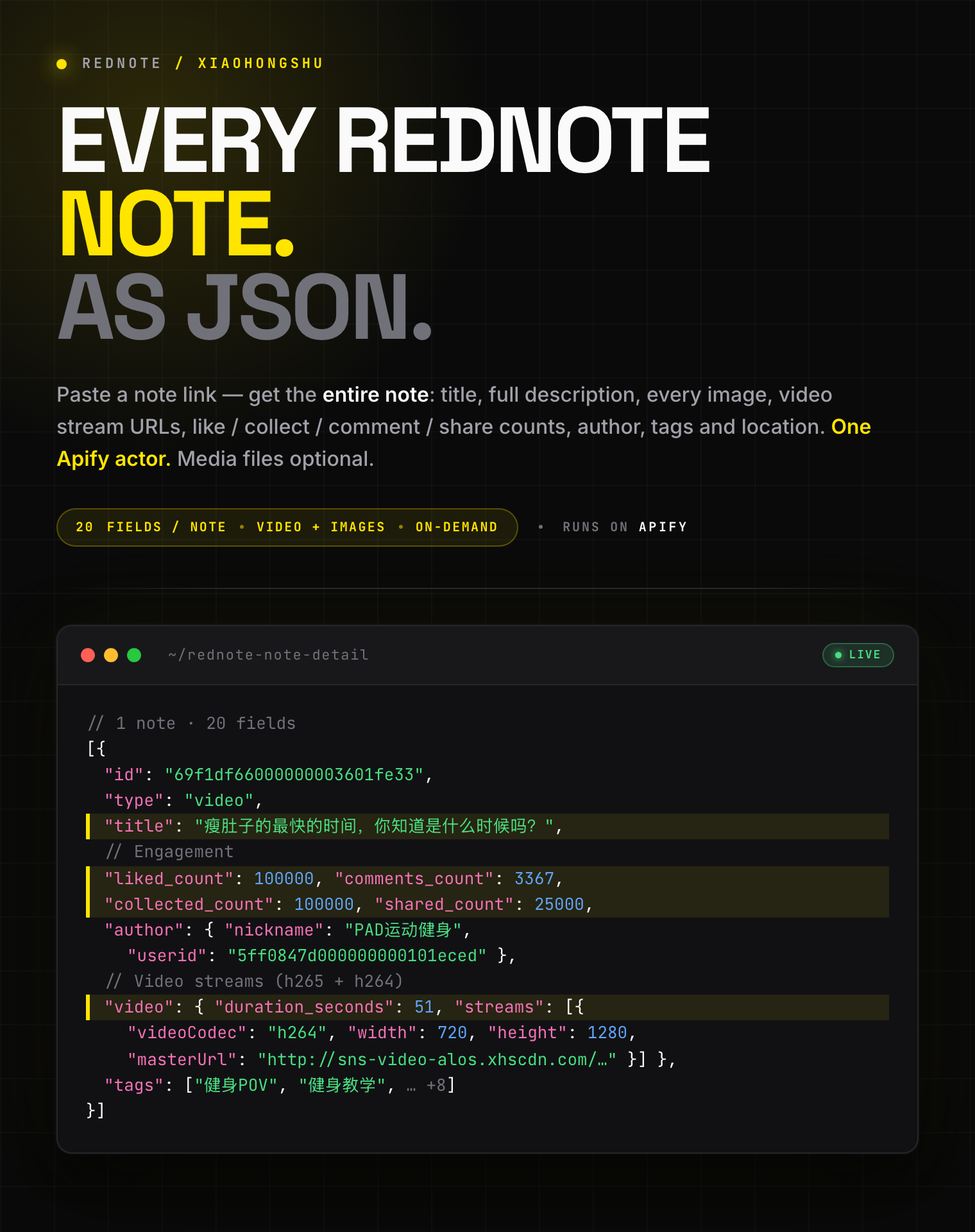
<span style="font-size:16px;font-weight:700;color:#1C1917">20 fields per note:</span> <span style="font-size:15px;color:#57534E"> title, full description, every image URL, video stream URLs (h265 + h264), native video subtitles (original transcript + auto-translated English), like / collect / comment / share counts, author profile, tags, and location from any Xiaohongshu (小红书) note. Optional MP4 and image file download.</span>
</blockquote>

![RedNote (Xiaohongshu) note detail scraper: full note JSON with video stream URLs, SRT subtitles, images, and engagement counts](https://iili.io/CKHRBNp.png)

<table>
<tr>
<td colspan="4" style="padding:10px 14px;background:#4C945E;border:none;border-radius:4px 4px 0 0">
<span style="color:#FAFAF9;font-size:14px;font-weight:700;letter-spacing:0.5px">Zen Studio · RedNote (小红书) suite</span>
<span style="color:#E8F5E9;font-size:13px">&nbsp;&nbsp;&bull;&nbsp;&nbsp;Search, note detail, comments, and profiles from Xiaohongshu</span>
</td>
</tr>
<tr>
<td style="padding:10px 12px;border:1px solid #E7E5E4;background:#D3EDD9;border-right:none;border-top:none;vertical-align:top;width:25%">
<span style="white-space:nowrap"><img src="https://apify-image-uploads-prod.s3.us-east-1.amazonaws.com/NWYsOG96fMDy8ycdf-actor-sAWbV6wp5XO5aEapx-C7gOsPJt9Q-xiaohongshu-search-scraper-logo-square.png" width="20" height="20" style="vertical-align:middle;border-radius:4px"> &nbsp;<a href="https://apify.com/zen-studio/rednote-note-detail-scraper" style="color:#4C945E;text-decoration:none;font-weight:700;font-size:13px">RedNote&nbsp;Note&nbsp;Detail</a></span><br>
<span style="color:#4C945E;font-size:11px;font-weight:600">&#10148; You are here</span>
</td>
<td style="background:#E8F5E9;padding:10px 12px;border:1px solid #E7E5E4;border-right:none;border-top:none;vertical-align:top;width:25%">
<span style="white-space:nowrap"><img src="https://apify-image-uploads-prod.s3.us-east-1.amazonaws.com/NWYsOG96fMDy8ycdf-actor-sAWbV6wp5XO5aEapx-C7gOsPJt9Q-xiaohongshu-search-scraper-logo-square.png" width="20" height="20" style="vertical-align:middle;border-radius:4px"> &nbsp;<a href="https://apify.com/zen-studio/rednote-search-scraper" style="color:#1C1917;text-decoration:none;font-weight:700;font-size:13px">RedNote&nbsp;Search</a></span><br>
<span style="color:#78716C;font-size:11px">500 notes / 30s, 24 fields</span>
</td>
<td style="background:#E8F5E9;padding:10px 12px;border:1px solid #E7E5E4;border-right:none;border-top:none;vertical-align:top;width:25%">
<span style="white-space:nowrap"><img src="https://apify-image-uploads-prod.s3.us-east-1.amazonaws.com/NWYsOG96fMDy8ycdf-actor-hO5NqsA6aC1bz3jra-MjB05eVFEt-xiaohongshu-search-scraper-logo-square.png" width="20" height="20" style="vertical-align:middle;border-radius:4px"> &nbsp;<a href="https://apify.com/zen-studio/rednote-comments-scraper" style="color:#1C1917;text-decoration:none;font-weight:700;font-size:13px">RedNote&nbsp;Comments</a></span><br>
<span style="color:#78716C;font-size:11px">Nested replies, IP city</span>
</td>
<td style="background:#E8F5E9;padding:10px 12px;border:1px solid #E7E5E4;border-top:none;vertical-align:top;width:25%">
<span style="white-space:nowrap"><img src="https://apify-image-uploads-prod.s3.us-east-1.amazonaws.com/NWYsOG96fMDy8ycdf-actor-sAWbV6wp5XO5aEapx-C7gOsPJt9Q-xiaohongshu-search-scraper-logo-square.png" width="20" height="20" style="vertical-align:middle;border-radius:4px"> &nbsp;<a href="https://apify.com/zen-studio/rednote-user-profile-scraper" style="color:#1C1917;text-decoration:none;font-weight:700;font-size:13px">RedNote&nbsp;User&nbsp;Profile</a></span><br>
<span style="color:#78716C;font-size:11px">Profile + every post, 68 fields</span>
</td>
</tr>
</table>

#### Copy to your AI assistant

```
zen-studio/rednote-note-detail-scraper on Apify. Returns the full detail of any Xiaohongshu (小红书) note from its share link or note URL: title, full description, every image URL, video stream URLs (h265 + h264), native video subtitles (original-language transcript plus auto-translated English and Chinese, as timestamped .srt links, when the video has them), like / collect / comment / share counts, author profile, tags, location. Optionally downloads the MP4, cover, and gallery images to your key-value store. Call ApifyClient("TOKEN").actor("zen-studio/rednote-note-detail-scraper").call(run_input={...}), then client.dataset(run["defaultDatasetId"]).list_items().items. noteUrls accepts xhslink.com / xhslink.cn share links or full note URLs that include their xsec_token. Full spec: GET https://api.apify.com/v2/acts/zen-studio~rednote-note-detail-scraper/builds/default (Bearer TOKEN) → inputSchema, actorDefinition.storages.dataset, readme. Token: https://console.apify.com/account/integrations
```

### Key Features

- **20 structured fields per note**: title, description, every image, video streams, engagement counts, author, tags, location
- **Video stream URLs**: direct MP4 links in h265 and h264, with a `url_720p` convenience link and per-stream codec, bitrate, and resolution
- **Native video subtitles**: the video's built-in subtitle track as timestamped `.srt` links, with the original-language transcript plus auto-translated English and Chinese, whenever the video has them
- **Optional media download**: save the actual MP4, cover frame, and gallery images to your key-value store before the source links expire
- **One link in, one row out**: paste a share link or note URL; each note runs independently and counts as one result
- **Free tier**: 15 lifetime runs, up to 20 notes per run, no credit card

### How to Scrape a Xiaohongshu Note

#### Basic: single note from a share link

```json
{
    "noteUrls": ["http://xhslink.com/o/6oKW7wkJf09"]
}
```

#### Multiple notes from full URLs

```json
{
    "noteUrls": [
        "https://www.xiaohongshu.com/discovery/item/69f1df66000000003601fe33?xsec_token=YB8dFv3w...&xsec_source=app_share",
        "https://www.xiaohongshu.com/explore/6a06c9360000000036001d5a?xsec_token=CBMGWfsL...&xsec_source=pc_search"
    ]
}
```

#### Download the video and its cover

```json
{
    "noteUrls": ["http://xhslink.com/o/6oKW7wkJf09"],
    "downloadVideos": true,
    "downloadCovers": true
}
```

#### Download a photo note's full gallery to a reusable store

```json
{
    "noteUrls": ["http://xhslink.com/o/6oKW7wkJf09"],
    "downloadImages": true,
    "mediaKvStoreName": "my-rednote-media"
}
```

#### Get a video's subtitles (transcript) as SRT files

```json
{
    "noteUrls": ["http://xhslink.com/o/6oKW7wkJf09"],
    "downloadSubtitles": true
}
```

### Video Subtitles & Transcripts

Many Xiaohongshu videos ship with a built-in subtitle track: the spoken words, timestamped. This scraper surfaces them on every video note, free.

- **In the data**: `video.subtitles` lists the available tracks keyed by language. `source` is the original-language transcript; `en-US` and `zh-CN` are auto-translated versions. Each track is a timestamped `.srt` link.
- **As files**: turn on **Download subtitles** to save those `.srt` files straight to your key-value store, so you keep the transcript even after the source links roll over. This download is free.
- **Use cases**: full-text search across a creator's videos, translation, captioning, summarizing, or feeding video speech into an LLM.

Subtitles depend on the video itself: talking, tutorial, and how-to videos almost always have them; purely visual clips set to music often don't. When a video has no subtitle track, `video.subtitles` is an empty object and no files are produced.

### Where Do I Get a Note Link?

The easiest source is the app's **Share → Copy link**, which gives you an `xhslink.com` or `xhslink.cn` link. A full `xiaohongshu.com` URL works too, and so does a bare 24-character note ID.

| Format | Example | Works |
|--------|---------|-------|
| Share link | `http://xhslink.com/o/6oKW7wkJf09`, `https://xhslink.cn/o/7AxkDPYQOTQ` | ✅ |
| Full URL with token | `https://www.xiaohongshu.com/discovery/item/<id>?xsec_token=...` | ✅ |
| `/explore/<id>` with token | `https://www.xiaohongshu.com/explore/<id>?xsec_token=...` | ✅ |
| Note URL without a token | `https://www.xiaohongshu.com/explore/<id>` | ✅ |
| Note opened from a profile | `https://www.xiaohongshu.com/user/profile/<user id>/<note id>?xsec_token=...` | ✅ |
| Bare 24-character ID | `6a06c9360000000036001d5a` | ✅ |
| Creator profile, no note | `https://www.xiaohongshu.com/user/profile/<user id>` | ❌ use the User Profile Scraper |
| Anything else | `demo_note_0000`, a search keyword | ❌ not a note reference |

You can also paste the whole share-text the app copies; the link inside it is detected automatically.

### Input Parameters

| Parameter | Type | Default | Description |
|-----------|------|---------|-------------|
| `noteUrls` | array | *required* | Xiaohongshu share links or full note URLs that include their `xsec_token`. Each note runs independently and counts as one result. |
| `downloadVideos` | boolean | `false` | Save each video note's MP4 to your key-value store. Image notes have no video. |
| `downloadCovers` | boolean | `false` | Save each video note's cover image (JPEG). |
| `downloadImages` | boolean | `false` | For image notes, save every gallery image (JPEG). No effect on video notes. |
| `downloadSubtitles` | boolean | `false` | Save each video note's subtitle tracks as `.srt` files (original transcript + any auto-translations). Free. |
| `mediaKvStoreName` | string | `""` | Save downloaded media to a named, persistent key-value store. Leave blank to use the run's default store. Letters, digits, and dashes only. |

### What Data Can You Extract from a Xiaohongshu Note?

Every dataset row is one note with rich, structured fields.

**Core fields:**

- `id`, `type` (`normal` or `video`), `title`, `desc`, `url`, `xsec_token`
- `timestamp`, `last_update_time` (Unix milliseconds), `ip_location`
- `ai_generated_flag`, `at_user_list`

**Engagement (`engagement`):**

- `liked_count`, `comments_count`, `collected_count`, `shared_count`

**Author (`author`):**

- `userid`, `nickname`, `avatar` (CDN URL), `xsec_token`

**Media:**

- `images[]`: every image with `url`, `url_pre`, `width`, `height`, `live_photo`, `live_photo_url`
- `video`: `duration_seconds`, `streams[]` (`codec`, `quality`, resolution, `fps`, `url`, `backup_urls`), a `url_720p` convenience link, and `subtitles`
- `video.subtitles`: native subtitle tracks keyed by language. `source` is the original-language transcript; `en-US` and `zh-CN` are auto-translations. Each is a list of `{ language, url, type, format }` where `url` is a timestamped `.srt`. Present when the video has subtitles, otherwise `{}`
- `tags[]`: topic and other tags with `id`, `name`, `type`

**Downloaded files (when enabled):**

- `videoFile`, `coverFile`, `imageFiles[]`: key-value store key, size, MIME type, and the source URL for each saved file
- `subtitleFiles[]`: one entry per saved `.srt` track, same fields. Free to download. The track is in the key, e.g. `<id>_subtitle_source.srt` (original), `<id>_subtitle_en-US.srt`, `<id>_subtitle_zh-CN.srt`

#### Output Example

```json
{
  "id": "69f1df66000000003601fe33",
  "type": "video",
  "title": "瘦肚子的最快的时间，你知道是什么时候吗？",
  "desc": "练前热身动作 - 三个动作各做30秒左右\n正式训练\n#健身POV[话题]# #健身教学[话题]#",
  "url": "https://www.xiaohongshu.com/discovery/item/69f1df66000000003601fe33?xsec_token=YB8dFv3w...&xsec_source=app_share",
  "xsec_token": "YB8dFv3wVEO6i_9lMS4rZrZXJv71XdlpWrT8TJkKHET74=",
  "timestamp": 1777459046000,
  "last_update_time": 1777459051000,
  "ip_location": "上海",
  "engagement": {
    "liked_count": 100000,
    "comments_count": 3367,
    "collected_count": 100000,
    "shared_count": 25000
  },
  "author": {
    "userid": "5ff0847d000000000101eced",
    "nickname": "PAD运动健身",
    "avatar": "https://sns-avatar-qc.xhscdn.com/avatar/1040g2jo31...jpg",
    "xsec_token": "ABmFY2_5n_PuwIaXcQnMBu_FEZ931s7vbp41QbKTgmzcQ="
  },
  "images": [
    {
      "url": "http://sns-webpic-qc.xhscdn.com/.../01e9f1df...!nd_dft_wlteh_jpg_3",
      "url_pre": "http://sns-webpic-qc.xhscdn.com/.../01e9f1df...!nd_prv_wlteh_jpg_3",
      "width": 720,
      "height": 1280,
      "live_photo": false,
      "live_photo_url": ""
    }
  ],
  "video": {
    "duration_seconds": 51,
    "url_720p": "http://sns-video-alos.xhscdn.com/stream/1/110/258/01e9f1df...258.mp4?sign=...",
    "streams": [
      {
        "url": "http://sns-video-alos.xhscdn.com/stream/1/110/258/01e9f1df...258.mp4?sign=...",
        "backup_urls": ["http://sns-video-hw.xhscdn.com/stream/1/110/258/01e9f1df...258.mp4?sign=..."],
        "quality": "HD",
        "width": 720,
        "height": 1280,
        "fps": 30,
        "duration": 51467,
        "format": "mp4",
        "codec": "h265",
        "size": 8556814,
        "avg_bitrate": 1330066
      }
      // ... more streams (h265 + h264)
    ],
    "subtitles": {
      "source": [
        { "language": "zh-CN", "url": "https://sns-subtitle-s10.xhscdn.com/subtitle/1/110/1/01e9f1df66...e_1.srt?sign=...&t=...", "type": 0, "format": 0 }
      ],
      "en-US": [
        { "language": "en-US", "url": "https://sns-subtitle-s10.xhscdn.com/subtitle/1/110/1/01e9f1df66...e_502.srt?sign=...&t=...", "type": 0, "format": 0 }
      ],
      "zh-CN": [
        { "language": "zh-CN", "url": "https://sns-subtitle-s10.xhscdn.com/subtitle/1/110/1/01e9f1df66...e_11.srt?sign=...&t=...", "type": 0, "format": 0 }
      ]
    }
  },
  "tags": [
    { "id": "5f7f...", "name": "健身POV", "type": "topic" },
    { "id": "5d09...", "name": "健身教学", "type": "topic" }
    // ... 8 more
  ],
  "at_user_list": [],
  "ai_generated_flag": null,
  "videoFile": {
    "kvStoreKey": "69f1df66000000003601fe33.mp4",
    "kvStoreId": "Q11ZEQN9Usl2fKunQ",
    "kvUrl": "https://api.apify.com/v2/key-value-stores/Q11ZEQN9Usl2fKunQ/records/69f1df66000000003601fe33.mp4",
    "sizeBytes": 8556814,
    "mimeType": "video/mp4",
    "sourceUrl": "http://sns-video-alos.xhscdn.com/stream/1/110/258/01e9f1df...258.mp4?sign=..."
  },
  "coverFile": {
    "kvStoreKey": "69f1df66000000003601fe33_cover.jpg",
    "kvStoreId": "Q11ZEQN9Usl2fKunQ",
    "kvUrl": "https://api.apify.com/v2/key-value-stores/Q11ZEQN9Usl2fKunQ/records/69f1df66000000003601fe33_cover.jpg",
    "sizeBytes": 131408,
    "mimeType": "image/jpeg",
    "sourceUrl": "http://sns-webpic-qc.xhscdn.com/.../01e9f1df...!nd_dft_wlteh_jpg_3"
  },
  "imageFiles": null,
  "subtitleFiles": [
    {
      "kvStoreKey": "69f1df66000000003601fe33_subtitle_source.srt",
      "kvStoreId": "Q11ZEQN9Usl2fKunQ",
      "kvUrl": "https://api.apify.com/v2/key-value-stores/Q11ZEQN9Usl2fKunQ/records/69f1df66000000003601fe33_subtitle_source.srt",
      "sizeBytes": 1791,
      "mimeType": "application/x-subrip",
      "sourceUrl": "https://sns-subtitle-s10.xhscdn.com/subtitle/1/110/1/01e9f1df66...e_1.srt?sign=...&t=..."
    }
    // ... one entry per language track (source, en-US, zh-CN)
  ],
  "_input": "http://xhslink.com/o/6oKW7wkJf09"
}
```

`videoFile`, `coverFile`, `imageFiles`, and `subtitleFiles` are `null` unless you turn on the matching download toggle.

### Advanced Usage

#### Archive a video note before its links expire

```json
{ "noteUrls": ["http://xhslink.com/o/6oKW7wkJf09"], "downloadVideos": true, "downloadCovers": true, "mediaKvStoreName": "rednote-archive" }
```

#### Bulk-fetch a known set of notes

```json
{
  "noteUrls": [
    "https://www.xiaohongshu.com/discovery/item/69f1df66000000003601fe33?xsec_token=YB8dFv3w...&xsec_source=app_share",
    "https://www.xiaohongshu.com/discovery/item/6a06c9360000000036001d5a?xsec_token=CBMGWfsL...&xsec_source=app_share"
  ]
}
```

#### Pull just the metadata, skip media files

```json
{ "noteUrls": ["http://xhslink.com/o/6oKW7wkJf09"] }
```

### Pricing: Pay Per Event (PPE)

**From $7.99 to $9.99 per 1,000 notes, depending on your Apify plan.** Each note returned counts as one billable result. Media downloads are optional add-ons, billed only for files actually saved.

| Your Apify plan | Per 1,000 notes |
|-----------------|-----------------|
| Free | $9.99 |
| Bronze | $8.99 |
| Silver | $8.79 |
| Gold and above | $7.99 |

Optional media downloads (Free-plan rate; higher plans get the same tier discount):

| Add-on | Per 1,000 |
|--------|-----------|
| Video downloaded (MP4) | $4.99 |
| Image downloaded (cover or gallery, JPEG) | $1.99 |
| Subtitle file downloaded (SRT) | Free |

### FAQ

**What is RedNote (Xiaohongshu / Little Red Book)?**
RedNote is the international name of Xiaohongshu (小红书, literally "Little Red Book", often abbreviated XHS), China's leading lifestyle and social-commerce platform. A "note" is its core content unit: a short video or image gallery with a caption, comments, and engagement counts.

**Which note link formats are accepted?**
`xhslink.com` and `xhslink.cn` share links, full `xiaohongshu.com` URLs (`/discovery/item/<id>`, `/explore/<id>`, or `/user/profile/<user id>/<note id>` as the site writes it when you open a note from a creator's profile, with or without an `xsec_token`), and bare 24-character note IDs. You can also paste the whole share-text the app copies. Anything that isn't one of these, a placeholder string, a search keyword, or a profile link with no note in it, is skipped.

**Do I need the access token?**
No. A link that carries its `xsec_token` is the most direct route to a note, but token-less links and bare note IDs are resolved as well. The app's Share → Copy link always includes a token.

**What's the difference between a video note and an image note?**
Video notes have a populated `video` object with stream URLs; their `images` array holds a single cover frame. Image notes have `video: null` and a multi-image `images` gallery.

**Why are the media URLs time-limited?**
Xiaohongshu's image and video CDN links are signed and expire a few hours after they are issued. Turn on the download toggles to save the actual files to your key-value store while the links are still valid.

**Are engagement counts exact?**
Counts are returned as integers. Large counts that Xiaohongshu rounds for display (e.g. `10万+`) become best-effort integers (`100000`).

**Where do downloaded files go?**
Into your run's key-value store by default, or a named store you set with `mediaKvStoreName`. Each `videoFile` / `coverFile` / `imageFiles[]` entry includes the store key and a direct record URL.

**Can I download images from a video note?**
`downloadCovers` saves a video note's cover frame. `downloadImages` applies to image notes only.

**Do videos include subtitles or a transcript?**
Yes, when the video has them. Each video note carries a `video.subtitles` map with the original-language transcript (`source`) plus auto-translated `en-US` and `zh-CN` tracks, each a timestamped `.srt` link. Turn on **Download subtitles** to also save the `.srt` files to your key-value store, free. Talking and tutorial videos almost always have subtitles; purely visual clips set to music often don't, in which case `video.subtitles` is empty.

**Does downloading subtitles cost extra?**
No. Subtitle `.srt` files are saved free of charge. Only video and image downloads carry a per-file fee.

**What happens if a note is removed or the link expired?**
That note is skipped with a short note in the log, and the run continues with the rest.

**How fresh is the data?**
Live from Xiaohongshu at run time, no cache.

**Do I need a Xiaohongshu account or cookies?**
No. Paste share links and run; no account, cookie export, or QR login is involved. The access token inside each share link is all the actor needs.

**How do I export the data?**
The dataset downloads as JSON, CSV, Excel, XML, or HTML from the run's Storage tab, or via the Apify API. Downloaded media files sit in your key-value store with direct record URLs.

**How do I find notes at scale, or get comments and author history?**
Chain the suite: [RedNote Search Scraper](https://apify.com/zen-studio/rednote-search-scraper) finds notes by keyword and its `url` field already carries the required `xsec_token`, this actor fetches the full detail, [RedNote Comments Scraper](https://apify.com/zen-studio/rednote-comments-scraper) pulls the threads, and [RedNote User Profile Scraper](https://apify.com/zen-studio/rednote-user-profile-scraper) returns the author's complete back-catalogue.

**Is it legal to scrape Xiaohongshu notes?**
The actor fetches publicly shared notes only, via their own share links. You are responsible for complying with Xiaohongshu's terms of service and applicable data protection law (GDPR, CCPA, PIPL), and for respecting creators' rights when storing or reusing downloaded media.

### More Zen Studio scrapers for Chinese platforms

**🎬 Short-video & social**

- <img src="https://apify-image-uploads-prod.s3.us-east-1.amazonaws.com/NWYsOG96fMDy8ycdf-actor-euYaQMbH2g53W4ds2-Woud1TIQ7x-kwai-scraper-logo.jpg" width="16" height="16" style="vertical-align:middle;border-radius:3px"> **Kwai (Brazil)**
  - [Kwai Search Scraper](https://apify.com/zen-studio/kwai-search-scraper)
  - [Kwai Comments Scraper](https://apify.com/zen-studio/kwai-comments-scraper)
- <img src="https://apify-image-uploads-prod.s3.us-east-1.amazonaws.com/NWYsOG96fMDy8ycdf-actor-mHKEEgoDqr6btQQer-fUs5ZquIeN-xiaohongshu-search-scraper-logo-square.png" width="16" height="16" style="vertical-align:middle;border-radius:3px"> **RedNote 小红书**
  - [RedNote User Profile Scraper](https://apify.com/zen-studio/rednote-user-profile-scraper)
  - [RedNote Search Scraper](https://apify.com/zen-studio/rednote-search-scraper)
  - [RedNote Comments Scraper](https://apify.com/zen-studio/rednote-comments-scraper)
  - [RedNote Product Search Scraper](https://apify.com/zen-studio/rednote-product-search-scraper)
  - [RedNote Product Reviews Scraper](https://apify.com/zen-studio/rednote-product-reviews-scraper)
  - [RedNote Live Recorder](https://apify.com/zen-studio/rednote-live-recorder)
  - [RedNote Product Detail Scraper](https://apify.com/zen-studio/rednote-product-detail-scraper)
- <img src="https://apify-image-uploads-prod.s3.us-east-1.amazonaws.com/NWYsOG96fMDy8ycdf-actor-3TJaaOJDU1AMiOoJM-Vu2eVr0P6N-douyin-profile-scraper-logo.png" width="16" height="16" style="vertical-align:middle;border-radius:3px"> **Douyin 抖音**
  - [Douyin Search Scraper](https://apify.com/zen-studio/douyin-search-scraper)
  - [Douyin Profile Scraper](https://apify.com/zen-studio/douyin-profile-scraper)
  - [Douyin Video Scraper](https://apify.com/zen-studio/douyin-video-scraper)
  - [Douyin Comments Scraper](https://apify.com/zen-studio/douyin-comments-scraper)
  - [Douyin Transcripts Scraper](https://apify.com/zen-studio/douyin-transcripts-scraper)
  - [Douyin Creator Rankings Scraper](https://apify.com/zen-studio/douyin-xingtu-rankings-scraper)
  - [Douyin Live Recorder](https://apify.com/zen-studio/douyin-live-recorder)
  - [Douyin Hot Search Scraper](https://apify.com/zen-studio/douyin-hot-search-scraper)
  - [Douyin Product Search Scraper](https://apify.com/zen-studio/douyin-product-search-scraper)
- <img src="https://apify-image-uploads-prod.s3.us-east-1.amazonaws.com/NWYsOG96fMDy8ycdf-actor-dexCSKEZtKS8hg4fT-lD4weyiYga-shigua-____-scraper-logo.jpg" width="16" height="16" style="vertical-align:middle;border-radius:3px"> **Xigua 西瓜视频**
  - [Xigua Video Search Scraper](https://apify.com/zen-studio/xigua-video-search-scraper)
  - [Xigua Video Detail Scraper](https://apify.com/zen-studio/xigua-video-detail-scraper)
- <img src="https://apify-image-uploads-prod.s3.us-east-1.amazonaws.com/NWYsOG96fMDy8ycdf-actor-oSxuPDE1h3HAsHZSu-x3uV98mgTe-bilibili-scraper-logo.png" width="16" height="16" style="vertical-align:middle;border-radius:3px"> **Bilibili 哔哩哔哩**
  - [Bilibili Video Scraper](https://apify.com/zen-studio/bilibili-video-scraper)
  - [Bilibili Danmaku Scraper](https://apify.com/zen-studio/bilibili-danmaku-scraper)

**🛒 E-commerce**

- <img src="https://apify-image-uploads-prod.s3.us-east-1.amazonaws.com/NWYsOG96fMDy8ycdf-actor-yK9Fwkji44bQkuS7P-f1uyK15FaQ-naver-shopping-scraper.png" width="16" height="16" style="vertical-align:middle;border-radius:3px"> **Naver Search 네이버 검색**
  - [Naver Search Scraper](https://apify.com/zen-studio/naver-search-scraper)
- <img src="https://apify-image-uploads-prod.s3.us-east-1.amazonaws.com/NWYsOG96fMDy8ycdf-actor-LwARSYSMWLBZfXfdr-FrDaNbQarB-shopee-scraper-logo.png" width="16" height="16" style="vertical-align:middle;border-radius:3px"> **Shopee**
  - [Shopee Product Detail Scraper](https://apify.com/zen-studio/shopee-product-detail-scraper)
  - [Shopee Product Reviews Scraper](https://apify.com/zen-studio/shopee-product-reviews-scraper)
  - [Shopee Product Scraper](https://apify.com/zen-studio/shopee-product-scraper)
- <img src="https://apify-image-uploads-prod.s3.us-east-1.amazonaws.com/NWYsOG96fMDy8ycdf-actor-PsAKYWM55HG4AHXjK-ItywU7Bp0s-taobao-search-scraper-logo.png" width="16" height="16" style="vertical-align:middle;border-radius:3px"> **Taobao 淘宝**
  - [Taobao Search Scraper](https://apify.com/zen-studio/taobao-search-scraper)
  - [Taobao Product Detail Scraper](https://apify.com/zen-studio/taobao-detail-scraper)
  - [Taobao Seller Products Scraper](https://apify.com/zen-studio/taobao-seller-products-scraper)
- <img src="https://apify-image-uploads-prod.s3.us-east-1.amazonaws.com/NWYsOG96fMDy8ycdf-actor-uZy6tbKLKnSVtT4BN-emXnT123uR-jd-com-scraper-logo-square.png" width="16" height="16" style="vertical-align:middle;border-radius:3px"> **JD.com 京东**
  - [JD.com Search Scraper](https://apify.com/zen-studio/jd-com-search-scraper)
- <img src="https://apify-image-uploads-prod.s3.us-east-1.amazonaws.com/NWYsOG96fMDy8ycdf-actor-ghXSMZcW3GxsCrkiR-5hnvsKv4Yt-1688-wholesale-scraper-logo.png" width="16" height="16" style="vertical-align:middle;border-radius:3px"> **1688 阿里巴巴**
  - [1688 Wholesale Scraper](https://apify.com/zen-studio/1688-wholesale-scraper)
  - [Alibaba Scraper](https://apify.com/zen-studio/alibaba-scraper)
  - [1688 Reviews Scraper](https://apify.com/zen-studio/1688-reviews-scraper)
- <img src="https://apify-image-uploads-prod.s3.us-east-1.amazonaws.com/NWYsOG96fMDy8ycdf-actor-5QcLc4BHaLMBUKYs3-f3CWQ60Row-goofish-search-scraper-logo.png" width="16" height="16" style="vertical-align:middle;border-radius:3px"> **Goofish 闲鱼**
  - [Goofish (Xianyu) Search Scraper](https://apify.com/zen-studio/goofish-xianyu-search-scraper)
  - [Goofish (Xianyu) Seller Scraper](https://apify.com/zen-studio/goofish-xianyu-seller-scraper)
  - [Goofish (Xianyu) Item Detail Scraper](https://apify.com/zen-studio/goofish-xianyu-item-detail-scraper)
  - [Goofish (Xianyu) Item Comments & Q\&A Scraper](https://apify.com/zen-studio/goofish-xianyu-item-comments-scraper)
  - [Goofish (Xianyu) Reverse Image Search Scraper](https://apify.com/zen-studio/goofish-xianyu-visual-search-scraper)
- <img src="https://apify-image-uploads-prod.s3.us-east-1.amazonaws.com/NWYsOG96fMDy8ycdf-actor-0hS9yNh3RU8DC6puG-LozxRJkdHN-coupang-review-scraper-logo.png" width="16" height="16" style="vertical-align:middle;border-radius:3px"> **Coupang 쿠팡**
  - [Coupang Review Scraper](https://apify.com/zen-studio/coupang-review-scraper)
  - [Coupang Search Scraper](https://apify.com/zen-studio/coupang-search-scraper)
  - [Coupang Product Detail Scraper](https://apify.com/zen-studio/coupang-detail-scraper)

**🏠 Real estate & autos**

- <img src="https://apify-image-uploads-prod.s3.us-east-1.amazonaws.com/NWYsOG96fMDy8ycdf-actor-1tAzNSf8Kz0v7Q2Lr-AINJ7FsZVU-anjuke-scraper-logo.jpg" width="16" height="16" style="vertical-align:middle;border-radius:3px"> **Anjuke 安居客**
  - [Anjuke For-Sale Listings Scraper](https://apify.com/zen-studio/anjuke-real-estate-scraper)
  - [Anjuke New-Home Scraper](https://apify.com/zen-studio/anjuke-new-home-scraper)
  - [Anjuke Rental Listings Scraper](https://apify.com/zen-studio/anjuke-rent-scraper)
  - [Anjuke Listing Detail Scraper](https://apify.com/zen-studio/anjuke-sale-detail-scraper)
- <img src="https://apify-image-uploads-prod.s3.us-east-1.amazonaws.com/NWYsOG96fMDy8ycdf-actor-32OkWqsiUywoq2ci3-7JhFlW1qg3-58__-real-estate-scraper-logo.jpg" width="16" height="16" style="vertical-align:middle;border-radius:3px"> **58.com 58同城**
  - [58.com Real Estate Scraper](https://apify.com/zen-studio/58-real-estate-scraper)
- <img src="https://apify-image-uploads-prod.s3.us-east-1.amazonaws.com/NWYsOG96fMDy8ycdf-actor-ytaE4YpSmjXDmibPv-L1UMPHa2bO-che168-autohome-scraper-logo.png" width="16" height="16" style="vertical-align:middle;border-radius:3px"> **Autohome 汽车之家**
  - [Autohome (Che168) Used-Car Scraper](https://apify.com/zen-studio/che168-car-scraper)

### Support

- **Bugs**: Issues tab
- **Features**: Issues tab

### Legal Compliance

Extracts publicly available data. Users must comply with Xiaohongshu's terms and data protection regulations (GDPR, CCPA, PIPL).

***

*Get the full detail of any Xiaohongshu (小红书) note from its share link: title, description, every image, video stream URLs, engagement counts, author profile, tags, location, with optional MP4 and image download.*

# Actor input Schema

## `noteUrls` (type: `array`):

Xiaohongshu note links. Each runs independently and counts as one result.<br><br>• Share link: <code>http://xhslink.com/o/XXXXXXX</code> or <code>https://xhslink.cn/o/XXXXXXX</code><br>• Full URL: <code>https://www.xiaohongshu.com/discovery/item/\<id>?xsec\_token=...\&xsec\_source=...</code><br>• Note opened from a creator's profile: <code>https://www.xiaohongshu.com/user/profile/\<user id>/\<note id>?xsec\_token=...</code><br>• Bare note ID: <code>6a06c9360000000036001d5a</code> (24 hex characters)<br><br>You can also paste the whole share-text the app copies; the link inside it is detected automatically.

## `downloadVideos` (type: `boolean`):

Save each video note's MP4 to your key-value store. Adds <b>$4.99 per 1,000 videos</b> downloaded. Image notes have no video.

## `downloadCovers` (type: `boolean`):

Save each video note's cover image. Adds <b>$1.99 per 1,000 images</b> downloaded.

## `downloadImages` (type: `boolean`):

For image notes, save every gallery image. Adds <b>$1.99 per 1,000 images</b> downloaded. Has no effect on video notes.

## `downloadSubtitles` (type: `boolean`):

Save each video note's subtitle tracks as <code>.srt</code> files (original transcript plus any auto-translated languages). <b>Free</b> — no extra charge. Only video notes that have subtitles produce files.

## `mediaKvStoreName` (type: `string`):

Save downloaded media to a <b>named, persistent</b> key-value store you can reuse across runs. Leave blank to use this run's default store (deleted after the platform retention period). Letters, digits, and dashes only (max 63 characters).

## Actor input object example

```json
{
  "noteUrls": [
    "http://xhslink.com/o/6oKW7wkJf09"
  ],
  "downloadVideos": false,
  "downloadCovers": false,
  "downloadImages": false,
  "downloadSubtitles": false,
  "mediaKvStoreName": ""
}
```

# Actor output Schema

## `results` (type: `string`):

Dataset of notes — one row per note.

# API

You can run this Actor programmatically using our API. Below are code examples in JavaScript, Python, and CLI, as well as the OpenAPI specification and MCP server setup.

## JavaScript example

```javascript
import { ApifyClient } from 'apify-client';

// Initialize the ApifyClient with your Apify API token
// Replace the '<YOUR_API_TOKEN>' with your token
const client = new ApifyClient({
    token: '<YOUR_API_TOKEN>',
});

// Prepare Actor input
const input = {
    "noteUrls": [
        "http://xhslink.com/o/6oKW7wkJf09"
    ]
};

// Run the Actor and wait for it to finish
const run = await client.actor("zen-studio/rednote-note-detail-scraper").call(input);

// Fetch and print Actor results from the run's dataset (if any)
console.log('Results from dataset');
console.log(`💾 Check your data here: https://console.apify.com/storage/datasets/${run.defaultDatasetId}`);
const { items } = await client.dataset(run.defaultDatasetId).listItems();
items.forEach((item) => {
    console.dir(item);
});

// 📚 Want to learn more 📖? Go to → https://docs.apify.com/api/client/js/docs

```

## Python example

```python
from apify_client import ApifyClient

# Initialize the ApifyClient with your Apify API token
# Replace '<YOUR_API_TOKEN>' with your token.
client = ApifyClient("<YOUR_API_TOKEN>")

# Prepare the Actor input
run_input = { "noteUrls": ["http://xhslink.com/o/6oKW7wkJf09"] }

# Run the Actor and wait for it to finish
run = client.actor("zen-studio/rednote-note-detail-scraper").call(run_input=run_input)

# Fetch and print Actor results from the run's dataset (if there are any)
print(f"💾 Check your data here: https://console.apify.com/storage/datasets/{run.default_dataset_id}")
for item in client.dataset(run.default_dataset_id).iterate_items():
    print(item)

# 📚 Want to learn more 📖? Go to → https://docs.apify.com/api/client/python/docs/quick-start

```

## CLI example

```bash
echo '{
  "noteUrls": [
    "http://xhslink.com/o/6oKW7wkJf09"
  ]
}' |
apify call zen-studio/rednote-note-detail-scraper --silent --output-dataset

```

## MCP server setup

```json
{
    "mcpServers": {
        "apify": {
            "type": "http",
            "url": "https://mcp.apify.com/?tools=fetch-actor-details,zen-studio/rednote-note-detail-scraper"
        }
    }
}

```

The hosted server signs you in with OAuth on first connect, so no API token belongs in this config. Clients without OAuth support can send an `Authorization: Bearer <APIFY_API_TOKEN>` header instead, using a token from API & Integrations in Apify Console (https://console.apify.com/settings/integrations).

## OpenAPI specification

Download the OpenAPI definition: https://api.apify.com/v2/actors/KUsXYaUL4BmKEjYjf/builds/Runtc8fgRgM6fmz6X/openapi.json
