


 本文介绍了Hive中各种表的创建方法,包括管理表、外部表、分区表等,并详细解释了不同表类型的特性和使用场景。此外还提供了具体的创建语法示例。
目前在hive中常用的数据类型有:
- BIGINT – 主要用于状态,类别,数量的字段, 如status/option/type/quantity
- DOUBLE – 主要用于金额的字段, 如fee/price/bid
- STRING – 除上述之外的字段基本都使用String, 尤其是id和日期时间这样的字段LIKE 允许用户复制现有的表结构,但是不复制数据。如果文件数据是纯文本,可以使用 STORED AS TEXTFILE。如果数据需要压缩,使用 STORED AS SEQUENCE 。表名和列名不区分大小写,SerDe 和属性名区分大小写。表和列的注释是字符串。
CREATE [EXTERNAL] TABLE [IF NOT EXISTS] table_name
   [(col_name data_type [COMMENT col_comment], ...)]
   [COMMENT table_comment]
   [PARTITIONED BY (col_name data_type [COMMENT col_comment], ...)]
   [CLUSTERED BY (col_name, col_name, ...)
   [SORTED BY (col_name [ASC|DESC], ...)] INTO num_buckets BUCKETS]
   [ROW FORMAT row_format]
   [STORED AS file_format]
   [LOCATION hdfs_path]
阿里巴巴数据库常用间隔符的读取:
常用间隔符一般是Ascii码5,Ascii码7等。
在hive中Ascii码5用’\005’表示, Ascii码7用’\007’表示,依此类推。
创建数据库,切换数据库
CREATE TABLE 创建一个指定名字的表。如果相同名字的表已经存在,则抛出异常;用户可以用 IF NOT EXIST 选项来忽略这个异常。
eg:
create database testdb2; #创建数据库
use testdb2;    #进入数据表
创建管理表
如果要将自定义间隔符的文件读入一个表,需要通过创建表的语句来指明输入文件间隔符,然后load data到这个表。
eg1:
create table emp(
empno int,
empname string,
job string,
mgr int,
hiredate string,
salary double,
comm double,
deptno int)
row format delimited
fields terminated by '\t';
#------------------------------------------------------#
eg2:
create table xiaojun
(id int,cont string)
row format delimited
fields terminated by '\005' stored as textfile;

#-----------------------------------
load data local inpath '/opt/test/emp.txt' overwrite into table emp; #加载数据
创建一个表指定存储格式
CREATE TABLE employess(
name String,
salary Float,
subordinates ARRAY<STRING>,
deductions MAP<STRING,FLOAT>,
address STRUCT<street:STRING,city:STRING,zip:INT>
)
ROW FORMAT DELIMITED
FIELDS TERMINATED BY '\001'
COLLECTION ITEMS TERMINATED BY '\002'
MAP KEYS TERMINATED BY '\003'
LINES TERMINATED BY '\n'
STORED AS TEXTFILE;

eg3:
#创建表
hive (default)> create table xiong
> (id int ,name string,
> age int,tel string)
> ROW FORMAT delimited FIELDS terminated by ‘\t’
> STORED AS TEXTFILE;
OK
Time taken: 1.373 seconds #生成数据
    kwang9:workSpace$ cat xiong.txt
1       xiong     25      13188888888888
2       test    30      13888888888888
3       zs      34      899314121
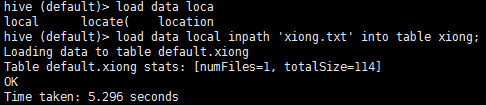

使用external建表和普通建表区别
1.指定一个位置,而不使用默认的位置。

对于使用create external table 建表完成后,再drop掉表,表中的数据还在文件系统中。
使用普通的建表DROP后则找不到

创建外部表
为什么需要外部表?
使外部表变成便于阅读的文件,让别人来调用创建外部表时直接指定表位置
EXTERNAL 关键字可以让用户创建一个外部表,在建表的同时指定一个指向实际数据的路径(LOCATION),Hive 创建内部表时,会将数据移动到数据仓库指向的路径;若创建外部表,仅记录数据所在的路径,不对数据的位置做任何改变。在删除表的时候,内部表的元数据和数据会被一起删除,而外部表只删除元数据,不删除数据。
eg:
create external table emp_ext(
empno int,
empname string,
job string,
mgr int,
hiredate string,
salary double,
comm double,
deptno int)
row format delimited
fields terminated by '\t'
location '/user/hive/warehouse/testdb2.db/emp_ext/';
#-----------------------------------------

CREATE EXTERANL TABLE IF NOT EXISTS mydb.employees3 like mydb.employees
location '/user/hive/warehouse/testdb2.db/emp_ext/'

上传数据文件到指定路径
hdfs dfs -mkdir /user/hive/warehouse/testdb2.db/emp_ext   # 创建路径
hdfs dfs -put emp.txt /user/hive/warehouse/testdb2.db/emp_ext/  #指定文件
创建分区表
有分区的表可以在创建的时候使用 PARTITIONED BY 语句。一个表可以拥有一个或者多个分区,每一个分区单独存在一个目录下。而且,表和分区都可以对某个列进行 CLUSTERED BY 操作,将若干个列放入一个桶(bucket)中。也可以利用SORT BY 对数据进行排序。这样可以为特定应用提高性能。
eg1:
CREATE TABLE c02_clickstat_fatdt1
(yyyymmdd  string,
 id              INT,
 ip               string,
 country          string,
 cookie_id        string,
 page_id          string  ,
 clickstat_url_id int,
 query_string     string,
 refer            string
)PARTITIONED BY(dt STRING)
row format delimited fields terminated by '\005' stored as textfile;

eg2:
注:分区字段不能与表中其他字段重复,否则报错
FAILED: SemanticException [Error 10035]: Column repeated in partitioning columns 加载数据
从本地拷贝emp.txt到分区表目录中
load data local inpath '/opt/test/emp.txt' into table emp_part partition (year='2016', month='3');
load data local inpath '/opt/test/emp.txt' into table emp_part partition (year='2016', month='4');
用hdfs中指定位置的数据,增加分区表中数据,此操作不会移动数据文件到分区表目录中
alter table emp_part add partition (year='2016', month='5') location '/data';
把hdfs中指定位置的数据移动到分区表目录中,增加数据
load data inpath '/emp.txt' into table emp_part partition (year='2016', month='6');
其他创表方式
create-as
create table emp3
as
select * from emp;
create-like # 复制一个空表
CREATE TABLE IF NOT EXISTS mydb.employees2
like mydb.employees;

create table emp4 like emp;
load data local inpath '/opt/test/emp.txt' overwrite into table emp4;





 扫一扫
扫一扫


 1415
1415

 被折叠的 条评论
为什么被折叠?
被折叠的 条评论
为什么被折叠?
 到【灌水乐园】发言





