飞塔防火墙主备IPsec双线路SD-WAN配置实战指南
1.1 网络环境描述
Hub节点:单条ISP线路接入Internet,作为总部中心节点
Spoke节点:双条ISP线路接入Internet,作为分支机构节点
外网网段:

Hub端外网:120.120.120.1/255.255.255.0

Spoke端外网:100.100.100.1/255.255.255.0   200.200.200.2/255.255.255.0

内网网段:

Hub端内网:192.168.1.0/24(示例)

Spoke端内网:192.168.2.0/24(需保护网段)

VPN 隧道 IP:

Hub端隧道 IP :10.10.10.1

Spoke端隧道IP:10.10.10.20
BGP 信息

Hub端 : AS 65000 RR

Spoke端 :AS 65000 RR Client
路由协议:BGP动态路由协议,实现自动路由学习和主备负载
1.2 设计目标
建立Hub-Spoke间双IPsec VPN隧道
通过BGP实现路由自动传播
利用SD-WAN进行智能选路和主备负载
确保链路冗余和高可用性

HUB 端配置
1.基本配置
配置接口 IP 和路由


对应命令行 BGP路由
config router bgp
    set as 65000
    set router-id 10.10.10.1
    set ibgp-multipath enable
    set additional-path enable
    set graceful-restart enable
    config neighbor-group
        edit "spoke"
            set capability-graceful-restart enable
            set next-hop-self enable
            set soft-reconfiguration enable
            set remote-as 65000
            set additional-path both
            set route-reflector-client enable
        next
    end
    config neighbor-range
        edit 1
            set prefix 10.10.10.0 255.255.255.0
            set max-neighbor-num 100
            set neighbor-group "spoke"
        next
    end
    config network
        edit 5
            set prefix 10.10.10.1 255.255.255.255
        next
        edit 12
            set prefix 192.168.1.0 255.255.255.0
        next
    end
2.配置 IPSEC VPN
创建 IPSEC VPN。
对应命令行 ipsec一阶段配置
config vpn ipsec phase1-interface
    edit "HUB"
        set type dynamic
        set interface "port2"
        set ike-version 2
        set local-gw 120.120.120.1
        set peertype any
        set net-device disable
        set exchange-interface-ip enable
        set proposal des-md5 des-sha1
        set add-route disable
        set dpd on-idle
        set dhgrp 5
        set psksecret ENC EpzoIoSLDuPWNObR8nM/7GRq2WpFS7sYB0k9qqvAJniy4FaposkE/5JHrkLSGd6v66ZhY7K8h+N50EnDEGFHVYTZz/saBBZhKmWnvHrIyKw+CaakDGcY27vPprVrsBgD49hcF3Sydig0ThpI/SaBHtBsDB/njHC1xmt7RmHcKNCZRQRwmA302fLAgm+2MOmuCT5eSA==
        set dpd-retryinterval 10
    next
end

对应cli ipsec二阶段配置
config vpn ipsec phase2-interface
    edit "HUB"
        set phase1name "HUB"
        set proposal des-sha512
        set keepalive enable
        set route-overlap allow
    next
end
3.配置 VPN 接口 IP
HUB 端的”对端网关 IP“ 10.10.10.254 是不被 Spoke 所使用的预留 IP,IPsec Tunnel 是一个点对点的隧道,但是 ADVPN 中这条隧道需要同时对应多个 SPOKE,因此不能将 Remote IP 写成一个存在的 SPOKE 端 IP。
4.配置策略
配置全通策略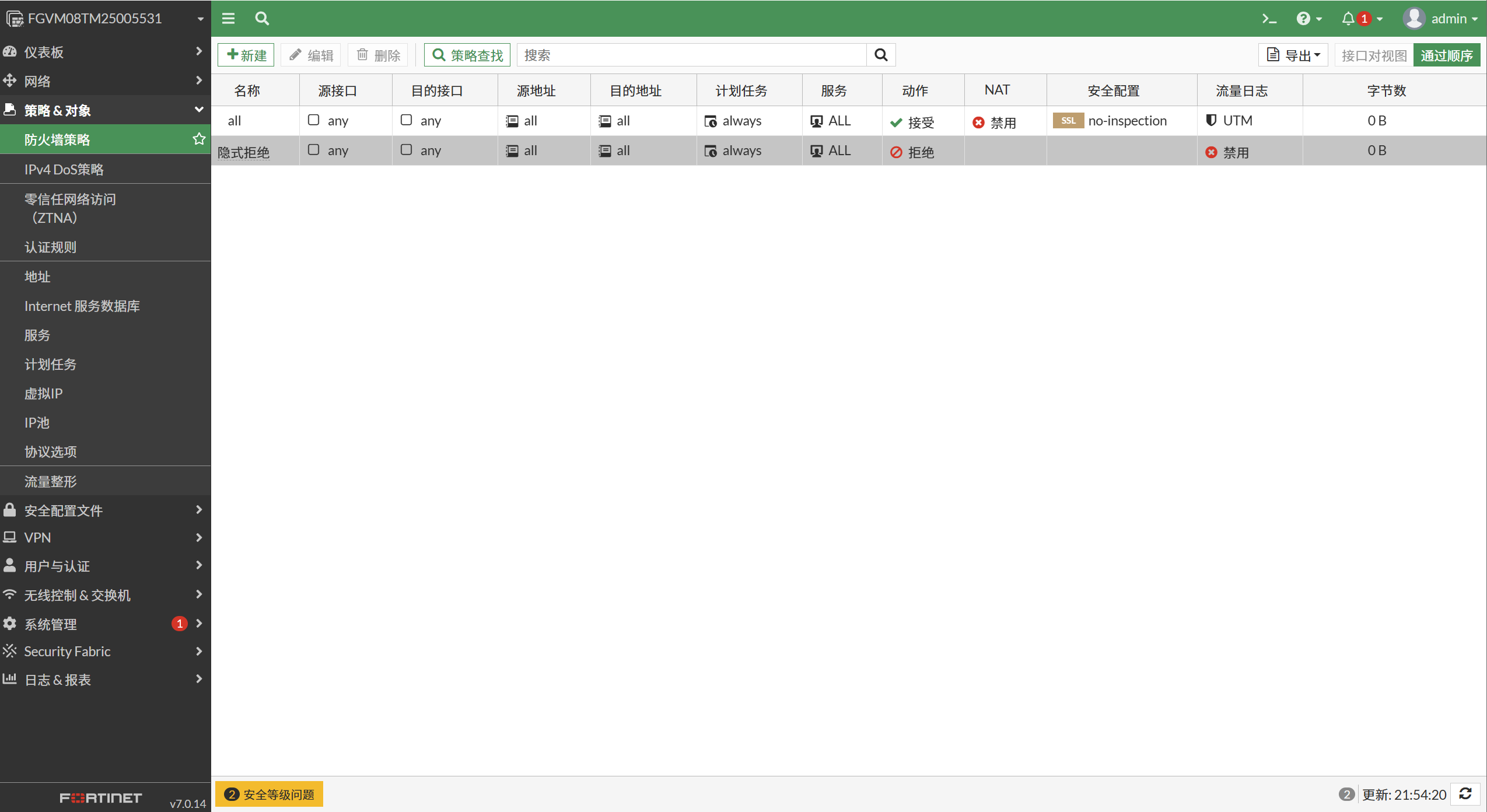](https://i-blog.csdnimg.cn/direct/d78c3ecf8f41401fa5ccd23ae4b49518.png)
SPOKE 配置
1.基本配置
将Internet接口加入sdwan区域


配置接口 IP 和路由

 对应命令行 BGP路由
config router bgp
    set as 65000
    set router-id 10.10.10.20
    set ibgp-multipath enable
    set tag-resolve-mode merge
    set graceful-restart enable
    config neighbor
        edit "10.10.10.1"
            set capability-graceful-restart enable
            set next-hop-self enable
            set soft-reconfiguration enable
            set interface "look"
            set remote-as 65000
            set route-map-in "set-tag"
            set update-source "look"
            set additional-path both
            set route-reflector-client enable
        next
    end
    config network
        edit 2
            set prefix 192.168.2.0 255.255.255.0
        next
        edit 3
            set prefix 10.10.10.20 255.255.255.255
        next
    end
2.配置 IPSEC VPN
To-HUB vpn 配置
对应命令行 配置
config vpn ipsec phase1-interface
    edit "To_HUB"
        set interface "port2"
        set ike-version 2
        set peertype any
        set net-device disable
        set exchange-interface-ip enable
        set exchange-ip-addr4 10.10.10.20
        set proposal des-md5
        set localid "SH"
        set dhgrp 5
        set remote-gw 120.120.120.1
        set psksecret ENC 8bkkSJDuRyC7xeVYxqUzapoal5VZfO47FLoWPqo/ynIk2hJryw48cMffOXHV3DB2TWcSQMT/0nwbqVY3Yf7J/x9mkUCSB07DGDjHhihjKeLtoMaO/xZYPCvYHU3NtMixNOeLnW/kGYCjbN4F+Mn8KLImmBiAtiNctFekJUO7CeXmhQfc547clPjDH7saX/RuKe7vdg==
        set dpd-retryinterval 5
    next
end
config vpn ipsec phase2-interface
    edit "上海职场"
        set phase1name "To_HUB"
        set proposal des-sha512
        set auto-negotiate enable
    next
end
To-HUB-2 vpn 配置 对应命令行 配置
    edit "To_HUB-2"
        set interface "port3"
        set ike-version 2
        set peertype any
        set net-device disable
        set exchange-interface-ip enable
        set proposal des-md5
        set localid "SH-2"
        set dhgrp 5
        set remote-gw 120.120.120.1
        set monitor "To_HUB"   // 使用 IPSEC monitor 的方法,实现主备vpn
        set psksecret ENC 5DcPsR4l9q3nywSXo74RVZdyYEbDWFo0kG2VZWJnrqWwb5O9xSfoDtFDHt5ZZMoTe9klCbzU0iy8Y6WHhAjKoUeWo/S9sSAQvNfOEkExyZk1GmAC08USumbEkawPdwrD8DEAzMwFAZJ6OX4CCPdJa011xvd6e39UtDMjtlnW2q3I2CEpxgqF7Xi0fn2ddN4oNKcVfA==
        set dpd-retryinterval 5
    next
end
config vpn ipsec phase2-interface
    edit "上海职场-2"
        set phase1name "To_HUB-2"
        set proposal des-sha512
        set auto-negotiate enable
    next
end
3.配置 VPN 接口 IP,启动子网重叠IP
config system settings
    set allow-subnet-overlap enable
end
To_HUB

To_HUB-2
4.配置策略
配置全通策略

查看 VPN 状态和路由表
1.HUB 端 VPN 状态和路由表

FGVM08TM25005531 # diagnose vpn ike gateway  list

vd: root/0
name: HUB_0
version: 2
interface: port2 4
addr: 120.120.120.1:500 -> 100.100.100.1:500
tun_id: 10.10.10.20/::10.0.0.30
remote_location: 0.0.0.0
network-id: 0
virtual-interface-addr: 10.10.10.1 -> 10.10.10.20
created: 505s ago
peer-id: SH
peer-id-auth: no
PPK: no
IKE SA: created 1/1  established 1/1  time 10/10/10 ms
IPsec SA: created 1/1  established 1/1  time 0/0/0 ms

  id/spi: 33 f285ebb94c5361b4/8d4f6b74014f0ef9
  direction: responder
  status: established 505-505s ago = 10ms
  proposal: des-md5
  child: no
  SK_ei: 864b0e2670db9109
  SK_er: ce0964af33a99a88
  SK_ai: f7c8ff80c878b74c-c69c6276c6c4c866
  SK_ar: ecbbb6a402ab21b8-855a311751c72de3
  PPK: no
  message-id sent/recv: 0/33
  lifetime/rekey: 86400/85624
  DPD sent/recv: 00000000/00000000
  peer-id: SH
查看路由表
FGVM08TM25005531 #  get router info routing-table  all
Codes: K - kernel, C - connected, S - static, R - RIP, B - BGP
       O - OSPF, IA - OSPF inter area
       N1 - OSPF NSSA external type 1, N2 - OSPF NSSA external type 2
       E1 - OSPF external type 1, E2 - OSPF external type 2
       i - IS-IS, L1 - IS-IS level-1, L2 - IS-IS level-2, ia - IS-IS inter area
       * - candidate default

Routing table for VRF=0
S*      0.0.0.0/0 [10/0] via 120.120.120.2, port2, [1/0]
C       1.1.1.0/24 is directly connected, port4
C       10.10.10.0/24 is directly connected, HUB
C       10.10.10.1/32 is directly connected, HUB
B       10.10.10.20/32 [200/0] via 10.10.10.20 (recursive is directly connected, HUB), 00:00:31
C       120.120.120.0/24 is directly connected, port2
C       192.168.1.0/24 is directly connected, port3
B       192.168.2.0/24 [200/0] via 10.10.10.20 (recursive is directly connected, HUB), 00:00:31
C       192.168.50.0/24 is directly connected, port1
从 HUB 端分别 ping SPOKE 的隧道接口地址。
FGVM08TM25005531 # execute ping-options source 10.10.10.1
FGVM08TM25005531 # execute ping 10.10.10.20
PING 10.10.10.20 (10.10.10.20): 56 data bytes
64 bytes from 10.10.10.20: icmp_seq=0 ttl=255 time=2.4 ms
64 bytes from 10.10.10.20: icmp_seq=1 ttl=255 time=1.3 ms
64 bytes from 10.10.10.20: icmp_seq=2 ttl=255 time=1.6 ms
64 bytes from 10.10.10.20: icmp_seq=3 ttl=255 time=1.7 ms
64 bytes from 10.10.10.20: icmp_seq=4 ttl=255 time=1.8 ms

--- 10.10.10.20 ping statistics ---
5 packets transmitted, 5 packets received, 0% packet loss
round-trip min/avg/max = 1.3/1.7/2.4 ms
2.SPOKE 端 VPN 状态

FGVM08TM25005531 (root) # diagnose vpn  ike gateway  list

vd: root/0
name: To_HUB
version: 2
interface: port2 4
addr: 100.100.100.1:500 -> 120.120.120.1:500
tun_id: 120.120.120.1/::120.120.120.1
remote_location: 0.0.0.0
network-id: 0
virtual-interface-addr: 10.10.10.20 -> 10.10.10.1
created: 543s ago
peer-id: 120.120.120.1
peer-id-auth: no
PPK: no
IKE SA: created 1/1  established 1/1  time 0/0/0 ms
IPsec SA: created 1/1  established 1/1  time 0/0/0 ms

  id/spi: 22 f285ebb94c5361b4/8d4f6b74014f0ef9
  direction: initiator
  status: established 543-543s ago = 0ms
  proposal: des-md5
  child: no
  SK_ei: 864b0e2670db9109
  SK_er: ce0964af33a99a88
  SK_ai: f7c8ff80c878b74c-c69c6276c6c4c866
  SK_ar: ecbbb6a402ab21b8-855a311751c72de3
  PPK: no
  message-id sent/recv: 33/0
  lifetime/rekey: 86400/85556
  DPD sent/recv: 0000019d/0000019d
  peer-id: 120.120.120.1
查看路由表
FGVM08TM25005531 (root) # get router info routing-table all
Codes: K - kernel, C - connected, S - static, R - RIP, B - BGP
       O - OSPF, IA - OSPF inter area
       N1 - OSPF NSSA external type 1, N2 - OSPF NSSA external type 2
       E1 - OSPF external type 1, E2 - OSPF external type 2
       i - IS-IS, L1 - IS-IS level-1, L2 - IS-IS level-2, ia - IS-IS inter area
       * - candidate default

Routing table for VRF=0
S*      0.0.0.0/0 [1/0] via 100.100.100.2, port2, [1/0]
                  [1/0] via 200.200.200.1, port3, [10/0]
C       2.2.2.0/24 is directly connected, 12330
C       3.3.3.3/32 is directly connected, ssl
C       10.10.1.0/24 is directly connected, port4
S       10.10.10.0/24 [5/0] via To_HUB tunnel 120.120.120.1, [1/0]
S       10.10.10.1/32 [15/0] via To_HUB tunnel 120.120.120.1, [1/0]
C       10.10.10.20/32 is directly connected, To_HUB
                       is directly connected, To_HUB-2
                       is directly connected, look
C       100.100.100.0/24 is directly connected, port2
B       192.168.1.0/24 [200/0] via 10.10.10.1 tag 1 (recursive via To_HUB tunnel 120.120.120.1), 00:01:12
C       192.168.2.0/24 is directly connected, port5
C       192.168.50.0/24 is directly connected, port1
C       200.200.200.0/24 is directly connected, port3
从 SPOKE 端 ping HUB 的隧道地址
FGVM08TM25005531 (root) # execute ping-options source 10.10.10.20
FGVM08TM25005531 (root) # execute ping 10.10.10.1
PING 10.10.10.1 (10.10.10.1): 56 data bytes
64 bytes from 10.10.10.1: icmp_seq=0 ttl=255 time=1.7 ms
64 bytes from 10.10.10.1: icmp_seq=1 ttl=255 time=1.7 ms
64 bytes from 10.10.10.1: icmp_seq=2 ttl=255 time=1.7 ms
64 bytes from 10.10.10.1: icmp_seq=3 ttl=255 time=1.5 ms
64 bytes from 10.10.10.1: icmp_seq=4 ttl=255 time=1.7 ms

--- 10.10.10.1 ping statistics ---
5 packets transmitted, 5 packets received, 0% packet loss
round-trip min/avg/max = 1.5/1.6/1.7 ms
业务测试
1.HUB 端业务测试ping Spoke业务网关
FGVM08TM25005531 # execute ping-options source 192.168.1.1
FGVM08TM25005531 # execute ping 192.168.2.1
PING 192.168.2.1 (192.168.2.1): 56 data bytes
64 bytes from 192.168.2.1: icmp_seq=0 ttl=255 time=1.7 ms
64 bytes from 192.168.2.1: icmp_seq=1 ttl=255 time=2.2 ms
64 bytes from 192.168.2.1: icmp_seq=2 ttl=255 time=1.5 ms
64 bytes from 192.168.2.1: icmp_seq=3 ttl=255 time=1.5 ms
64 bytes from 192.168.2.1: icmp_seq=4 ttl=255 time=1.4 ms

--- 192.168.2.1 ping statistics ---
5 packets transmitted, 5 packets received, 0% packet loss
round-trip min/avg/max = 1.4/1.6/2.2 ms
2.Spoke 端业务测试ping HUB业务网关
FGVM08TM25005531 (root) # execute ping-options source 192.168.2.1
FGVM08TM25005531 (root) # execute ping 192.168.1.1
PING 192.168.1.1 (192.168.1.1): 56 data bytes
64 bytes from 192.168.1.1: icmp_seq=0 ttl=255 time=23.7 ms
64 bytes from 192.168.1.1: icmp_seq=1 ttl=255 time=1.8 ms
64 bytes from 192.168.1.1: icmp_seq=2 ttl=255 time=1.3 ms
64 bytes from 192.168.1.1: icmp_seq=3 ttl=255 time=1.5 ms
64 bytes from 192.168.1.1: icmp_seq=4 ttl=255 time=1.6 ms

--- 192.168.1.1 ping statistics ---
5 packets transmitted, 5 packets received, 0% packet loss
round-trip min/avg/max = 1.3/5.9/23.7 ms
抓包来看业务优先走To-HUB
FGVM08TM25005531 (root) # diagnose sniffer packet any "host 192.168.2.1 and icmp" 4
Using Original Sniffing Mode
interfaces=[any]
filters=[host 192.168.2.1 and icmp]
8.402531 To_HUB out 192.168.2.1 -> 192.168.1.1: icmp: echo request
8.404099 To_HUB in 192.168.1.1 -> 192.168.2.1: icmp: echo reply
9.403004 To_HUB out 192.168.2.1 -> 192.168.1.1: icmp: echo request
9.404510 To_HUB in 192.168.1.1 -> 192.168.2.1: icmp: echo reply
10.403635 To_HUB out 192.168.2.1 -> 192.168.1.1: icmp: echo request
10.405589 To_HUB in 192.168.1.1 -> 192.168.2.1: icmp: echo reply
11.404209 To_HUB out 192.168.2.1 -> 192.168.1.1: icmp: echo request
11.406063 To_HUB in 192.168.1.1 -> 192.168.2.1: icmp: echo reply
12.404736 To_HUB out 192.168.2.1 -> 192.168.1.1: icmp: echo request
12.406182 To_HUB in 192.168.1.1 -> 192.168.2.1: icmp: echo reply
给Spoke To_HUB口down开观察 是否切换到To_HUB-2 线路上去
当 dpd 设置重试次数为 3,重试时间间隔为 5s 时,主备切换丢 6 个包。


腾讯云面向开发者汇聚海量精品云计算使用和开发经验,营造开放的云计算技术生态圈。
更多推荐
 25
25 0
0- 0


 已为社区贡献4条内容

所有评论(0)