Graph Data Structure: Exploring Adjacency List and Adjacency Matrix (DFS and BFS)


Graphs are a fundamental data structure used to represent relationships between pairs of objects. They consist of vertices (nodes) and edges (connections between nodes). Graphs can be represented in different ways, two of the most common being adjacency lists and adjacency matrices.
Adjacency List: click
An adjacency list is a collection of lists or arrays used to represent a graph. Each vertex in the graph is associated with a list of its neighboring vertices. Here’s how it works:
- For each vertex in the graph, there is a corresponding list of adjacent vertices.
- The adjacency list can be implemented using an array of linked lists, where each index in the array represents a vertex, and the linked list at that index contains the neighboring vertices.
- Alternatively, it can be implemented using a dictionary or hashmap, where the keys represent vertices and the values represent lists of adjacent vertices.
class graph{
    constructor(){
        this.list = {};
    }
    addVertex(vertex){
        if(!this.list[vertex]){
            this.list[vertex]=[];
        }
    }
    addEdge(vertex1,vertex2){
        if(this.list[vertex1] && this.list[vertex2]){
            this.list[vertex1].push(vertex2);
            this.list[vertex2].push(vertex1);
        }
    }
    removeEdge(vertex1, vertex2){
        if(this.list[vertex1] && this.list[vertex2]){
            this.list[vertex1] = this.list[vertex1].filter(v=>v!=vertex2);
            this.list[vertex2] = this.list[vertex2].filter(v=>v!=vertex1);
        }
    }
    removeVertex(vertex){
        while(this.list[vertex].length){
            const vertex2 = this.list[vertex].pop();
            this.removeEdge(vertex,vertex2);
        }
        delete this.list[vertex];

    }
    displayEdge(vertex){
        return this.list[vertex];
    }
    display(){
        for(let vertex in this.list){
            console.log(vertex + "->" + this.list[vertex]);
        }
    }
}


const g = new graph();
g.addVertex("a");
g.addVertex("b");
g.addVertex("c");
console.log(g);
g.addEdge("a","c")
g.addEdge("a","b")
g.addEdge("b","c")
console.log(g);
// g.removeEdge("a","c")
// console.log(g);
// g.removeVertex("a")
console.log(g);
console.log("display edge : " + g.displayEdge("a"));
g.display()
Advantages of Adjacency List:
- Memory Efficiency: Adjacency lists are memory-efficient for sparse graphs (graphs with relatively few edges) because they only store information about existing connections.
- Easy to Iterate: It’s straightforward to iterate over the neighbors of a vertex in an adjacency list, as the neighbors are stored as a list or array.
- Efficient for Storing Sparse Graphs: If the graph has few edges relative to the number of vertices, adjacency lists can provide significant memory savings compared to adjacency matrices.
Disadvantages of Adjacency List:
- Slower Edge Lookup: Determining whether an edge exists between two vertices can be slower in adjacency lists compared to adjacency matrices, especially for dense graphs.
- Less Efficient for Dense Graphs: For dense graphs (graphs with many edges), adjacency lists can consume more memory and be less efficient than adjacency matrices.
Adjacency Matrix: click
An adjacency matrix is a 2D array used to represent a graph. Each cell in the matrix represents a connection between two vertices. Here’s how it works:
- Rows and columns of the matrix represent vertices.
- The value at matrix[i][j] indicates whether there is an edge between vertex i and vertex j. Typically, this value is either 1 (indicating an edge) or 0 (indicating no edge).
- For weighted graphs, the values can represent the weights of the edges instead of just indicating their presence.
class graph{
    constructor(){
        this.matrix=[];
        this.vertexNames = [];
    }
    addVertex(name){
        let index = this.matrix.length;
        this.vertexNames[index] = name;
        this.matrix[index]=[];
        for(let i=0;i<=index;i++){
            if(this.matrix[i][index] === undefined){
                this.matrix[i][index]=0;
            }
            if(this.matrix[index][i]===undefined){
                this.matrix[index][i]=0;
            }
        }
    }
    removeVertex(name){
        let index = this.vertexNames.indexOf(name);
        if(index!==-1){
            this.matrix.splice(index,1);
            this.vertexNames.splice(index,1);
            // for (let i = 0; i < this.matrix.length; i++) {
            //     this.matrix[i].splice(index, 1);
            // }
        }
    }
    addEdge(name1,name2){
        let index1 = this.vertexNames.indexOf(name1);
        let index2 = this.vertexNames.indexOf(name2)
        if(index1!==-1 && index2!==-1){
            this.matrix[index1][index2]=1;
            this.matrix[index2][index1] = 1;
        }
    }
    removeEdge(name1,name2){
        let index1 = this.vertexNames.indexOf(name1);
        let index2 = this.vertexNames.indexOf(name2);
        if(index1 !== -1 && index2 !== -1){
            this.matrix[index1][index2]=0;
            this.matrix[index2][index1]=0;
        }
    }
    getEdges(name){
        let index = this.vertexNames.indexOf(name);
        let edge = [];
        if(index !== -1){
            for(let i=0;i<this.matrix[index].length;i++){
                if(this.matrix[index][i]==1){
                    edge.push(this.vertexNames[i])
                }
            }
        }
        return edge;
    }
    display(){
        for(let vertex in this.list){
            console.log(vertex + "->" + this.list[vertex]);
        }
    }
}

const g = new graph();
g.addVertex("a");
g.addVertex("b");
g.addVertex("c");
console.log(g);
g.addEdge("b","c")
g.addEdge("b","a")
console.log(g);
// g.removeEdge("b","c")
// console.log(g);
console.log(g.getEdges("c"))
g.display()
Advantages of Adjacency Matrix:
- Fast Edge Lookup: Checking whether an edge exists between two vertices is efficient in adjacency matrices, as it requires constant time (O(1)).
- Efficient for Dense Graphs: Adjacency matrices are memory-efficient for dense graphs, as they only store information about existing connections and can be more compact than adjacency lists for dense graphs.
- Suitable for Small Graphs: For small graphs, adjacency matrices can offer simplicity and ease of implementation.
Disadvantages of Adjacency Matrix:
- Memory Inefficiency for Sparse Graphs: Adjacency matrices can be memory-inefficient for sparse graphs, as they allocate space for all possible connections between vertices, even if many of those connections do not exist.
- Slower Iteration Over Neighbors: It can be less efficient to iterate over the neighbors of a vertex in an adjacency matrix, as you need to scan an entire row or column to find adjacent vertices.
- Limited Scalability: Adjacency matrices can become impractical for very large graphs due to their space requirements, especially if the graph is sparse.
Depth-First Search (DFS) and Breadth-First Search (BFS):
Get Ajith R’s stories in your inbox
Join Medium for free to get updates from this writer.
DFS and BFS are two common algorithms used to traverse and search graphs.
Depth-First Search (DFS):
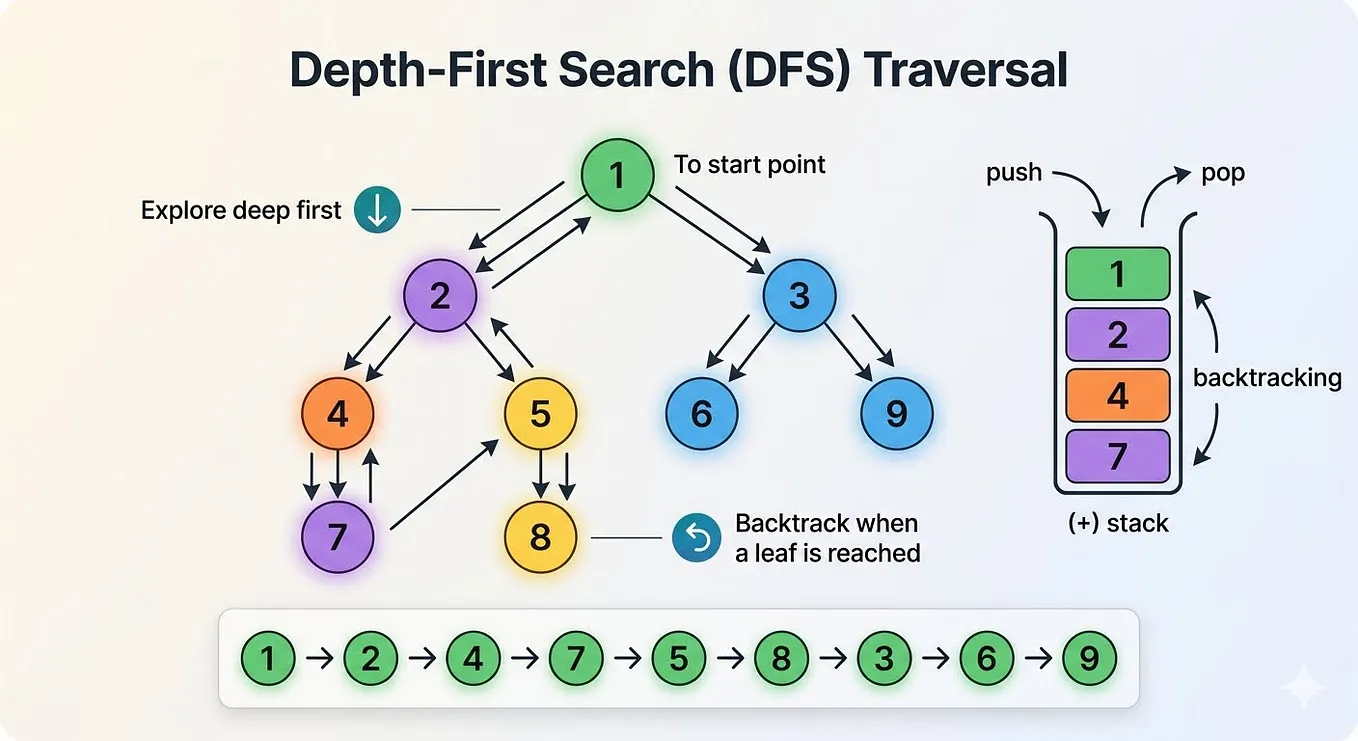
- DFS explores as far as possible along each branch before backtracking.
- It starts at a selected vertex and explores as far as possible along each branch before backtracking.
- It uses a stack (or recursion) to keep track of the vertices to visit next.
class graph{
    constructor(){
        this.list = {};
    }
    addVertex(vertex){
        if(!this.list[vertex]){
            this.list[vertex] = [];
        }
    }
    addEdge(vertex1,vertex2){
        if(this.list[vertex1] && this.list[vertex2]){
            this.list[vertex1].push(vertex2);
            this.list[vertex2].push(vertex1);
        }
    }
    removeEdge(vertex1,vertex2){
        if(this.list[vertex1] && this.list[vertex2]){
            this.list[vertex1] = this.list[vertex1].filter(v=>v!==vertex2)
            this.list[vertex2] = this.list[vertex2].filter(v=>v!==vertex2)
        }
    }
    removeVertex(vertex){
        while(this.list[vertex].length){
            const vertex2 = this.list[vertex].pop()
            this.removeEdge(vertex,vertex2);
        }
        delete this.list[vertex];
    }
    DFS(vertex, visited={}){
        visited[vertex]=true;
        console.log(vertex);
        for(let i=0;i<this.list[vertex].length;i++){
            let neighbor = this.list[vertex][i];
            if(!visited[neighbor]){
                this.DFS(neighbor,visited);
            }
        }
    }
}


const g = new graph();
g.addVertex("a");
g.addVertex("b");
g.addVertex("c");
g.addVertex("d");
g.addVertex("e");
g.addVertex("f");
g.addVertex("g");
console.log(g);
g.addEdge("a","c")
g.addEdge("a","b")
g.addEdge("a","d")
g.addEdge("a","e")
g.addEdge("a","f")
g.addEdge("a","g")
g.addEdge("b","c")
g.addEdge("b","d")
g.addEdge("b","e")
g.addEdge("b","f")
g.addEdge("b","g")
console.log(g);
g.DFS("a");
Breadth-First Search (BFS):
- BFS explores all neighbor vertices at the present depth before moving to the vertices at the next depth level.
- It starts at a selected vertex and explores all of its neighbors before moving to the next level of neighbors.
- It uses a queue to keep track of the vertices to visit next.
class graph{
    constructor(){
        this.list = {};
    }
    addVertex(vertex){
        if(!this.list[vertex]){
            this.list[vertex] = [];
        }
    }
    addEdge(vertex1,vertex2){
        if(this.list[vertex1] && this.list[vertex2]){
            this.list[vertex1].push(vertex2);
            this.list[vertex2].push(vertex1);
        }
    }
    removeEdge(vertex1,vertex2){
        if(this.list[vertex1] && this.list[vertex2]){
            this.list[vertex1] = this.list[vertex1].filter(v=>v!==vertex2);
            this.lsit[vertex2] = this.list[vertex2].filter(v=>v!==vertex1);
        }
    }
    removeVertex(vertex){
        while(this.list[vertex].length){
            const vertex2 = this.list[vertex].pop();
            this.removeEdge(vertex,vertex2);
        }
        delete this.list[vertex];
    }
    BFS(start){
        let queue = [start];
        let visited = {};
        let result = [];
        while(queue.length){
            let currentVertex = queue.shift();
            result.push(currentVertex);
            this.list[currentVertex].forEach(neighbour=>{
                if(!visited[neighbour]){
                    visited[neighbour] = true;
                    queue.push(neighbour)
                }
            });
        }
        return result;
    }
}

const g = new graph();
g.addVertex("a");
g.addVertex("b");
g.addVertex("c");
g.addVertex("d");
g.addVertex("e");
g.addVertex("f");
g.addVertex("g");
console.log(g);
g.addEdge("a","c")
g.addEdge("a","b")
g.addEdge("a","d")
g.addEdge("a","e")
g.addEdge("a","f")
g.addEdge("a","g")
g.addEdge("b","c")
g.addEdge("b","d")
g.addEdge("b","e")
g.addEdge("b","f")
g.addEdge("b","g")
g.addEdge("c","d")
g.addEdge("c","e")
g.addEdge("c","f")

console.log(g);
console.log(g.BFS("a"))
Advantages of DFS:
- Simplicity: DFS is simple to implement using recursion or a stack.
- Memory Efficiency: DFS typically requires less memory compared to BFS, especially in scenarios with deep graphs.
Advantages of BFS:
- Optimality: BFS guarantees the shortest path between two vertices in an unweighted graph.
- Suitability for Finding Shortest Paths: BFS is ideal for finding shortest paths in unweighted graphs.
Disadvantages of DFS:
- Non-Optimal for Shortest Paths: DFS does not guarantee the shortest path between two vertices.
- Stack Overflow: In recursive implementations, DFS can lead to stack overflow errors for deep graphs.
Disadvantages of BFS:
- Memory Consumption: BFS may consume more memory compared to DFS, especially for wide graphs with many vertices at the same depth level.
- Less Efficient for Dense Graphs: BFS can be less efficient for dense graphs compared to DFS due to its memory consumption and queue operations.
In conclusion, both adjacency lists and adjacency matrices offer different trade-offs in terms of memory usage and efficiency, and the choice between them depends on the characteristics of the graph being represented. Similarly, DFS and BFS provide different approaches to graph traversal, each with its own advantages and disadvantages, making them suitable for different applications and scenarios.