My Local Ham Radio AI Sounded Convincing. That Was the Problem.
How Consigliere di Stazione moved from a single LLM prompt to live NOAA and POTA data, full-log statistics, RAG, and a deterministic safety net.

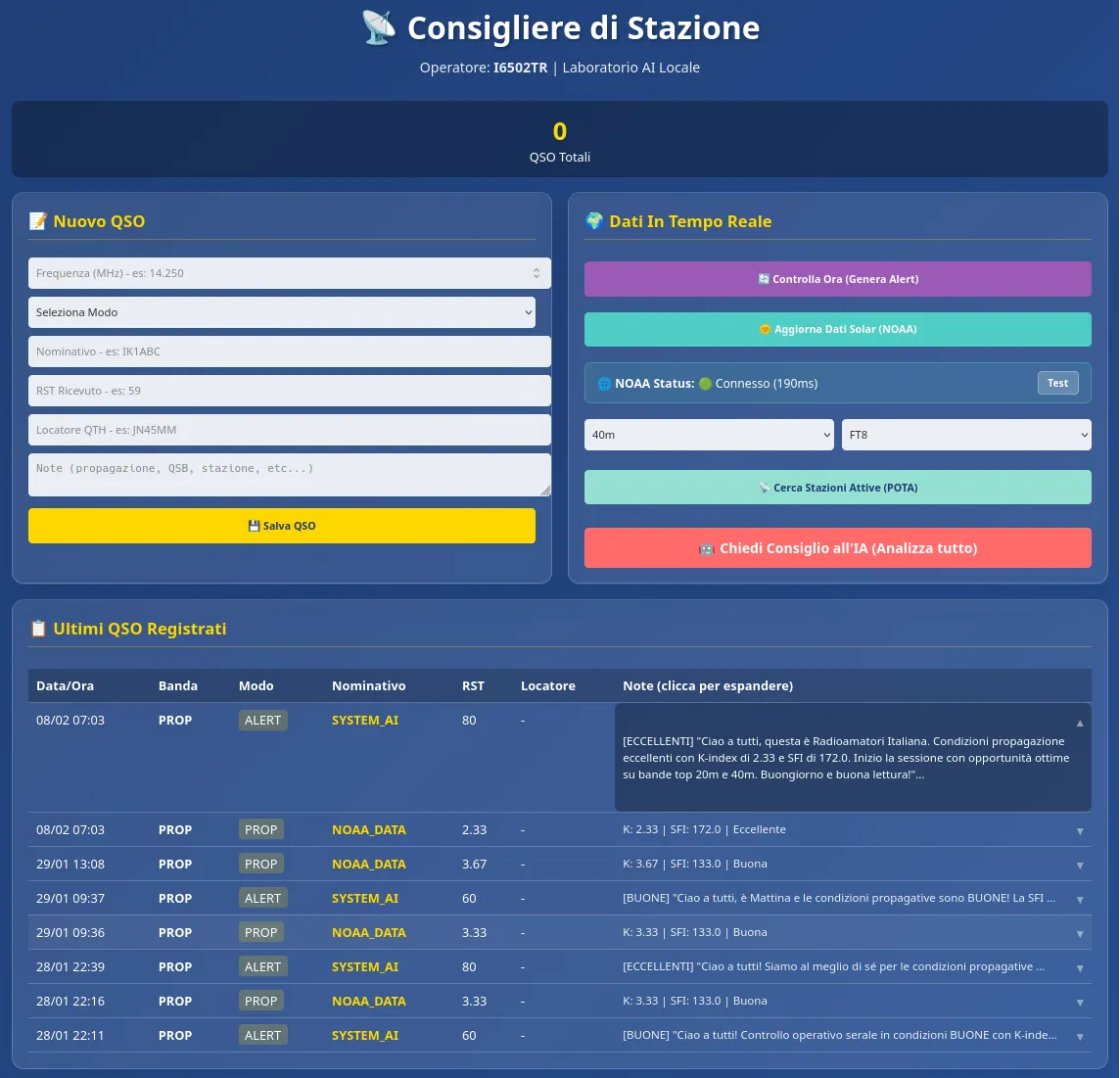
A few months ago I wrote about Consigliere di Stazione, the local logbook and radio advisor I was building for my shack. The idea was simple: keep the QSO log on my machine, read current solar data, look at POTA activity, and ask a local model for an operational suggestion.
The first version worked. It logged contacts, talked to NOAA and Ollama, and produced advice that sounded like it came from someone who knew radio.
Then I started testing it properly.
One evening the K-index was around 2.7 and the application had real POTA spots on 20 metres in front of it. The model still suggested avoiding 20 metres because the number of spots supposedly indicated a noisy band.
That conclusion had no basis in the data. POTA spots tell you that stations are active. They do not measure local noise. The sentence was fluent, plausible and wrong.
That was the useful failure.
A better model was not enough
My first reaction was the obvious one: improve the model and give it better technical context. The current setup uses Qwen 3.5 through Ollama, with an optional RAG service built around a local technical corpus.
The RAG helps. It gives the model something better than its general training memory when it needs to talk about propagation or operating practice. But retrieval does not turn a language model into an instrument. A model can receive the right document and still connect two facts that should not be connected.
So I changed the job.
The model is no longer asked to discover the radio situation by itself. Python and SQLite prepare the situation first. The model can explain it, but it does not get to invent the measurements.
Collect the evidence before asking for prose
When the operator requests an alert or a recommendation, the application now gathers the data it needs directly.
From NOAA it reads the current K-index and Solar Flux Index. From POTA it fetches activity across all recognised bands, not only the ten spots currently visible in the dashboard. If the operator has entered a Maidenhead locator, the application calculates distance, azimuth and direction for spots that include a valid locator.
The QSO history is handled differently too. The old approach looked at a recent slice of contacts. That was easy, but it could confuse a short run of activity with the operator’s real habits.
The current version asks SQLite to aggregate the complete manual log, with no artificial time or row limit. It calculates counts by band and mode without loading thousands of individual QSOs into memory and without placing the full log in the prompt.
That distinction matters for both scale and privacy. The model sees a useful summary, not a dump of someone’s operating history.
Two buttons, two different questions
The dashboard has two controls that look similar but answer different questions.
Controlla Ora (Genera Alert) looks only at the current situation. It reads NOAA, checks POTA across the bands, uses the QTH where possible and may save a technical alert. It does not consult manually entered QSOs.
Chiedi Consiglio all’IA (usa anche il tuo storico) starts from the same live data, then adds aggregate statistics from every manual QSO in the database. The result is shown on screen and is not saved as a contact.
Neither button requires the user to refresh NOAA or run a POTA search first. They make the required calls themselves and reuse short caches when the data is still fresh: 60 seconds for NOAA and 30 for POTA.
Get Andrea M’s stories in your inbox
Join Medium for free to get updates from this writer.
This sounds like a small interface detail. It removed an entire class of ambiguous prompts. The program now knows whether the operator is asking “what is happening now?” or “what makes sense now, given how I usually operate?”
The model gets checked after it answers
The generation path now has three levels:
1. swlbot RAG with the technical corpus and local model;
2. Qwen directly through Ollama if the RAG is unavailable or rejected;
3. deterministic local rules if no generated answer is trustworthy.
The important part is what happens between those levels.
Every generated answer passes through a local guard. If it mentions a frequency that is not present in the current evidence, or makes an unsupported claim about MUF, noise, DX or an opening, the application rejects it and moves to the next fallback.
The interface says what happened. “CONSIGLIO QWEN SENZA RAG” means Qwen answered without consulting the corpus. “CONSIGLIO QWEN DOPO VERIFICA RAG” means the RAG response failed validation and Qwen reformulated the verified data. “CONSIGLIO LOCALE DOPO VERIFICA AI” means the generated text did not pass and the operator is seeing only the deterministic result.
I would rather show an unglamorous rule-based sentence than a beautiful explanation built on a frequency that was never in the input.
Local does not mean disconnected
The QSO database stays on the user’s computer. Qwen and the RAG normally run on localhost. NOAA and POTA are public external services, so live solar data and current spots naturally require an Internet connection.
Those requests do not contain the QSO log.
If someone deliberately configures the AI endpoints on another machine, the operational summary sent there may include the operator’s QTH, aggregate band and mode statistics, and current NOAA and POTA data. The current prompt does not include individual QSO records.
That is a more accurate privacy statement than simply saying the application never talks to anything outside the computer. The log is local. The model can be local. Live data still has to come from somewhere.
The boring features became important
While the advisor was getting stricter, the logbook also grew up.
The dashboard still shows the latest ten contacts, but there is now a complete history with search, band and mode filters, 50-row pages, editing and controlled deletion. Manual QSOs can be exported as CSV or ADIF. A SQLite backup captures the whole state, including settings and technical records, while the application is open.
The server listens only on 127.0.0.1 by default. LAN access has to be enabled deliberately, because the application does not have accounts or authentication and should not be exposed to the Internet.
None of these features makes a good AI demo. They do make the program safer to use for six months without wondering where the log went or how to move it elsewhere.
Still a work in progress
I do not consider the local AI integration finished. The RAG corpus, retrieval choices, validation rules and model behaviour all need more real operating time.
What changed is the standard I use to judge it. A response is not good because it sounds like an experienced operator. It is good when I can trace its claims back to the data the application actually had.
That is also why Consigliere di Stazione still works when Ollama and the RAG are absent. The logbook, NOAA, POTA and the deterministic advisor remain available. The model is an extra layer, not the foundation holding the application up.
Version 1.1.0, the Windows executable and its SHA-256 checksum are available on the GitHub Releases page. The project Wiki explains installation, the two controls, database locations, requirements and each fallback label without assuming the reader already knows Python or Ollama.
The old goal has not changed: a useful companion in the shack that keeps your log under your control.
It is simply less willing to pretend it knows something.
Made in Italy 🇮🇹