CDS Core Data Service

If you’ve ever waited minutes for an SAP report to run, watched a consultant write 500 lines of ABAP just to join three tables, or wondered how modern SAP apps feel “instant,” this post is for you.
What is CDS View?
CDS (Core Data Services) is a way to define data models directly at the database level.
In simple terms:
- CDS Views help you combine data from multiple tables
- They run directly on SAP HANA database
- They improve performance and readability
Before CDS
You go to different shops to buy items

With CDS
You go to one supermarket and get everything

That's exactly what CDS does - it combines multiple tables into one view.
Why CDS Views?
- CDS Views are used to create efficient, reusable, and structured data models at the database level. They improve performance by pushing data processing to the database, reduce the need for complex ABAP code, and minimize multiple database calls.
- CDS Views also support annotations, associations, and built-in authorization, making them ideal for modern SAP development, especially for SAP HANA and Fiori applications. Overall, CDS Views enable cleaner code, better performance, and easier maintenance
CDS Architecture (Code Pushdown Concept)
CDS Views follow the Code Pushdown concept, which is one of the most important advantages of using CDS.
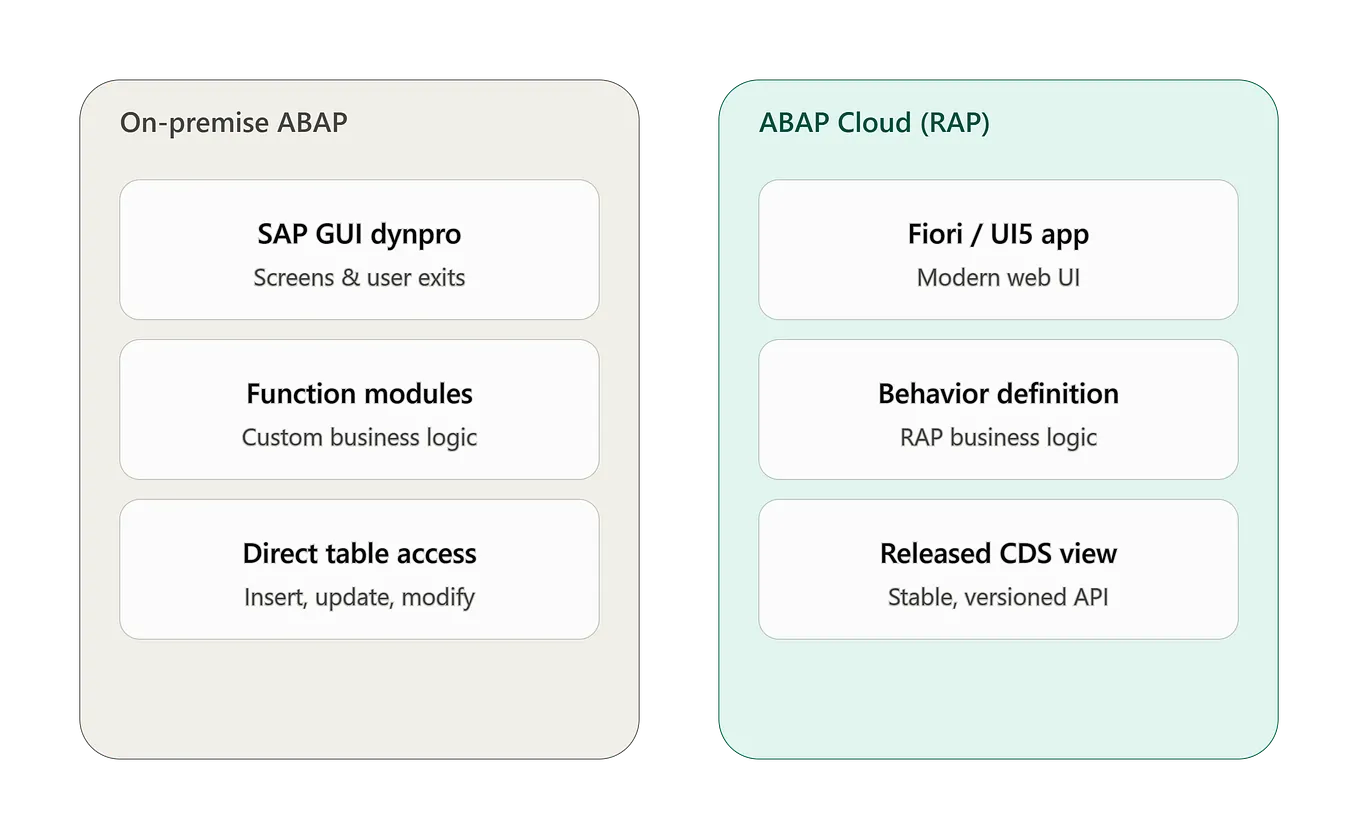
Before CDS
Database → ABAP → Processing → UI
- Data is fetched from database and the processing happens in ABAP layer
- More data transfer therefore slower in performance
With CDS
Database → Processing → UI
- Processing happens directly in the database
- Less data transfer therefore faster in performance
- Reduced application server load
This approach is called Code Pushdown.
What does Code Pushdown mean?
- Data processing happens in SAP HANA Database
- Less load on Application Server
- Reduced data movement
- Faster performance
- Better scalability
Real Time Example
  Requirement:
    Vendor Name
    Invoice Amount
    Posting Date

Before CDS:
    Fetch all records from database
    Apply filters in ABAP
    More processing time
    Slower performance

With CDS:
    Apply filters directly in database
    Fetch only required data
    Less processing time
    Faster performance
Types of CDS Views
- SAP follows the Virtual Data Model (VDM) architecture to organize CDS Views in a structured and reusable manner. VDM consists of three main types of views: Basic Views, Composite Views, and Consumption Views.
- Basic Views, also known as Interface Views, are used to fetch data directly from database tables and act as the foundation for building other views, such as retrieving vendor, customer, or material master data.
- Composite Views are built on top of Basic Views and are used to combine multiple views, apply joins, associations, and business logic, for example combining vendor, invoice, and payment data.
- Consumption Views are the final layer used for reporting, analytics, and Fiori applications; these views include UI annotations, authorizations, and are designed for end-user consumption.
- This layered architecture improves reusability, enhances performance, simplifies maintenance, and provides a clean and scalable data modeling approach in SAP CDS development.
Annotations in CDS
- Annotations in CDS Views are used to provide additional information and control the behavior of the CDS view without changing the actual business logic.
- They help define how the CDS view should behave in terms of UI, authorization, performance, metadata, and OData exposure.
- Annotations are written using the @ symbol and placed above the CDS view definition or fields. By using annotations, developers can control labels, security checks, UI behavior, and data exposure in a structured and standardized way. This makes CDS Views more powerful, readable, and easier to maintain.
Common / Basic Annotations in CDS
@AbapCatalog.sqlViewName
This annotation defines the technical SQL view name created in the database. It is mandatory for classic CDS views (not required for view entities). This name is used internally by SAP to access the CDS view at the database level.
@AbapCatalog.sqlViewName: 'ZVENDORREP'@EndUserText.label
This annotation provides a description or label for the CDS view. It helps users understand the purpose of the view in a readable format and appears in SAP tools and UI applications.
@EndUserText.label: 'Vendor Report'@AccessControl.authorizationCheck
This annotation is used to enable authorization checks for CDS views. It ensures that users can only access data they are authorized to see.
Get Asmamalica’s stories in your inbox
Join Medium for free to get updates from this writer.
Values:
#CHECK– Authorization check enabled#NOT_REQUIRED– No authorization check#PRIVILEGED_ONLY– Restricted access
@AccessControl.authorizationCheck: #CHECK@OData.publish
This annotation is used to expose CDS view as an OData service automatically. This allows the CDS view to be consumed in SAP Fiori apps or external applications.
@OData.publish: trueAssociations in CDS
- Associations in CDS Views are used to define relationships between different data sources in a simpler and more efficient way. They are often referred to as smart joins because they allow developers to connect related data without writing complex join statements. Unlike traditional joins, associations are lazy loaded, meaning data is only fetched when it is actually required, which improves performance and reduces unnecessary data processing.
- Associations help create readable, modular, and reusable data models by linking one CDS view to another using a defined relationship. These associations also support navigation, allowing developers to easily access related data fields from associated views.
Example Scenario
Consider a situation where you want to link Supplier data with Invoice data. Instead of writing complex joins, you can define an association between the supplier and invoice views. This makes the code cleaner and easier to understand
association [0..1] to I_Supplier as a
 on $projection.Supplier = a.Supplier
Association Cardinality
Associations use cardinality to define relationships between data
- [0..1] → Zero or one record
- [1..1] → Exactly one record
- [0..*] → Zero to many records
- [1..*] → One to many records
Joins in CDS
Joins in CDS Views are used to combine data from multiple tables or views based on a common field. CDS supports Inner Join, Left Outer Join, and Right Outer Join, allowing developers to retrieve related data efficiently at the database level. Using joins in CDS helps reduce multiple database calls, improves performance, and simplifies ABAP logic by handling data combination directly in the database.
| Join Type        | Description                                                       | When to Use                         | Result                    |
| ---------------- | ----------------------------------------------------------------- | ----------------------------------- | ------------------------- |
| Inner Join       | Returns only matching records from both tables                    | When data must exist in both tables | Matching records only     |
| Left Outer Join  | Returns all records from left table and matching from right table | When left table data is mandatory   | All left + matching right |
| Right Outer Join | Returns all records from right table and matching from left table | When right table data is mandatory  | All right + matching left |
define view ZFI_VENDOR_INVOICE
as select from bseg as a
inner join lfa1 as b
on a.lifnr = b.lifnr
{
a.belnr,
a.bukrs,
a.wrbtr,
b.name1
}
What Happens Here
BSEG contains invoice details
LFA1 contains vendor details
Join is done using LIFNR (Vendor Number)
Only matching records are returnedAggregations in CDS
Aggregations in CDS Views are used to perform calculations on multiple records and return summarized results. Instead of displaying every individual record, aggregation functions help combine data into meaningful totals, averages, counts, or maximum and minimum values. This is very useful in reporting, analytics, and dashboards.
CDS supports the following aggregation functions:
- SUM → Adds values
- COUNT → Counts records
- AVG → Calculates average
- MAX → Finds highest value
- MIN → Finds lowest value
Example Scenario
Suppose if the invoice data has like this:

| Vendor   | Invoice Amount |
| -------- | -------------- |
| Vendor A | 20000          |
| Vendor A | 30000          |
| Vendor B | 50000          |
| Vendor B | 25000          |

If you use SUM aggregation, CDS will calculate:

| Vendor   | Total Invoice Amount |
| -------- | -------------------- |
| Vendor A | 50000                |
| Vendor B | 75000                |

This means:
  CDS groups data by Vendor
  Then calculates SUM of Invoice Amount
  Returns summarized results
--------------------------------------------------------------------------
define view ZFI_VENDOR_TOTAL
  as select from bseg
{
    lifnr,
    sum( wrbtr ) as TotalAmount
}
group by lifnr
Parameters in CDS
- Parameters in CDS Views allow users to pass input values dynamically at runtime. This helps in filtering data directly at the database level and improves performance by retrieving only the required data.
- Instead of fetching all records and filtering later in ABAP, parameters allow filtering at the database itself, which reduces data transfer and speeds up execution.
Example Scenario
    Suppose you want to fetch invoice data for a specific fiscal year.
    Instead of retrieving all years, you can pass the year as a parameter.

define view ZFI_VENDOR_PARAM
 with parameters p_gjahr : gjahr
 as select from bseg
{
 lifnr,
 wrbtr,
 gjahr
}
where gjahr = :p_gjahr
Calculated Fields in CDS
Calculated fields allow you to perform calculations directly in CDS Views. This eliminates the need for additional ABAP logic and keeps calculations at the database level.
Example Scenario
    Suppose you want to calculate tax on invoice amount:

define view ZFI_CALCULATION
 as select from bseg
{
 lifnr,
 wrbtr,
 wrbtr * 0.18 as TaxAmount
}
Authorization in CDS (DCL)
Authorization in CDS Views is handled using Data Control Language (DCL). It allows developers to restrict data access based on user roles.This improves security and ensures users see only relevant data.
Example Scenario
    User A → Company Code 1000
    User B → Company Code 2000
You can restrict access using DCL.

define role ZFI_ROLE
{
 grant select on ZFI_VENDOR
 where bukrs = '1000';
}