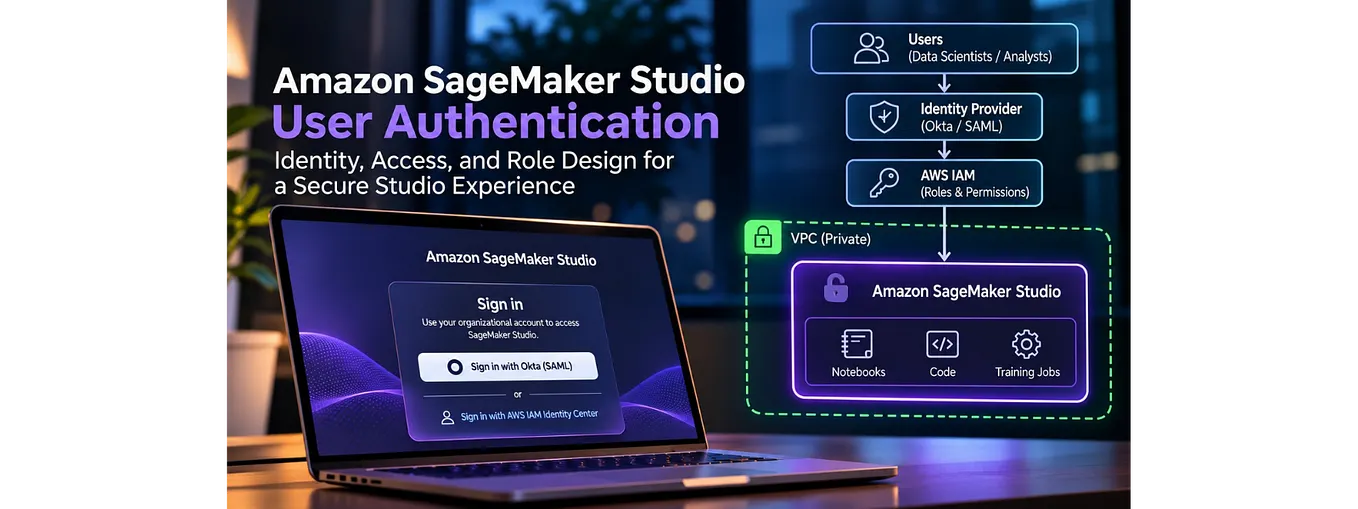
Securing Amazon SageMaker

Part 1: Private Networking with VPC-Only Mode

Introduction
In Amazon SageMaker AI the secure deployment mode is SageMaker VPC-only mode. SageMaker VPC-only mode sends all SageMaker Studio traffic through your VPC’s private subnets instead of the public internet. To use it, you need private subnets, VPC DNS support and DNS hostnames enabled, and a VPC endpoint for every AWS service Studio calls. You will also need interface endpoints with private DNS turned on, plus an S3 gateway endpoint. Any service without an endpoint has no private path, so calls to it fail unless the subnets also have an internet route.
Amazon SageMaker, now called SageMaker AI, is a fully managed cloud service that, in my opinion, is designed to help data scientists and data explorers build, train, and deploy models on AWS. I’ve used the service for years, creating IaC and workflows directly with the SageMaker API, and indirectly as a compute backend for orchestration services like Airflow, Kubeflow, and MLflow. Across multiple deployments and integrations, I’ve applied AWS’s recommended security practices, and I’d like to share and explain those configurations for anyone looking to lock down their deployment.
What is SageMaker VPC-only mode?
VPC-only mode is a SageMaker domain configuration that sends all traffic through your VPC’s private subnets. There are a few areas to consider when securing SageMaker with a VPC-only mode configuration, but the first area I’d consider is networking. In order to really understand what needs to be secured, we should first discuss how SageMaker Studio’s traffic flows.
How does SageMaker Studio traffic flow by default?
First, you need to understand how the SageMaker domain service is designed by default, and then it will help explain how SageMaker’s network traffic flows through the AWS network.
SageMaker Studio is made up of three parts:
- SageMaker Domain — the overall logical separation for resources and features. I typically create one per team.
- SageMaker Studio — inside the domain, this layer is the UI where you access those features.
- SageMaker Spaces — within Studio, a space is where each user works. You can have private spaces for each user as well as shared spaces for better collaboration.
These resources are hosted and managed by AWS. While you can make some configuration changes and minor updates, you, the admin, don’t fully manage them, and you won’t see them in your VPC. Typically, when you open a user space and launch a notebook to get started with your code, you run commands like pip installs and resource queries, and all of that traffic goes out through the public internet and back into the AWS cloud. Think about it: queries to S3, CloudWatch, EFS, and other services travel over the internet and then come back into AWS. The traffic is typically encrypted in transit, but it still leaves the AWS network.

Viewing the diagram, you can now see how VPC-only traffic never leaves the AWS network. It uses only internal traffic paths.
Why keep SageMaker traffic off the public internet?
You want to keep SageMaker traffic private because information that crosses a public network can be intercepted. If you’re running algorithms or moving data back and forth through S3, some of that data could be sensitive or highly privileged. You don’t want it exposed on a public network, where a bad actor could gain access to it or take advantage of your project’s network communication.
What does sending SageMaker traffic through private subnets really mean?
Sending SageMaker traffic through private subnets ensures that you only use AWS’s network, which keeps that communication from ever leaving AWS’s cloud. When you deploy SageMaker in VPC-only mode, traffic is contained privately. It works through VPC endpoints ( AWS PrivateLink) and private DNS.
How to enable private communication in your VPC
In your VPC’s network IaC, set enable_dns_support and enable_dns_hostnames to true.
resource "aws_vpc" "main" {
  cidr_block           = "10.0.0.0/16"

  # Controls whether the AWS DNS server is enabled
  enable_dns_support   = true # Defaults to true, explicitly set here for clarity

  # Required for interface endpoint private DNS
  enable_dns_hostnames = true

  tags = {
    Name = "main-vpc"
  }
}
These two settings let your VPC use AWS’s internal DNS. Understand that doing this alone doesn’t change anything. The change comes from the next step: deploying interface VPC endpoints in your private subnets.
Each endpoint creates ENIs in your VPC with private IP addresses, and when you create it with private DNS enabled, AWS creates a hidden Route53 private hosted zone for that service’s public name (for example, logs.us-east-1.amazonaws.com) and points it at those private IPs. You won't see these zones in Route53. Each endpoint gets its own zone, so every service you add an endpoint for resolves privately, and every service you don't still resolves to its public address.
resource "aws_vpc_endpoint" "cloudwatch_logs" {
  vpc_id              = var.vpc_id
  service_name        = "com.amazonaws.${var.aws_region}.logs" # e.g. com.amazonaws.us-east-1.logs
  vpc_endpoint_type   = "Interface"

  # Assign a security group
  security_group_ids  = [aws_security_group.vpc_endpoint_logs.id]

  # Specify the private subnets where AWS should place the ENIs
  subnet_ids          = var.private_subnet_ids

  # CRITICAL: Enables Private DNS (automatically creates the Route 53 Private Hosted Zone)
  private_dns_enabled = true

  tags = {
    Name = "cloudwatch-logs-interface-endpoint"
  }
}
Be sure to set private_dns_enabled to true. That triggers the creation of the records and ensures the Route 53 Resolver uses your private network path.
Which VPC endpoints does SageMaker Studio need in VPC-only mode?
These are the endpoints I deploy for every VPC-only SageMaker domain. Replace <region> with your AWS Region.
- SageMaker API (
com.amazonaws.<region>.sagemaker.api) and SageMaker AI runtime (com.amazonaws.<region>.sagemaker.runtime): Studio can't run notebooks, train, or host models without them. AWS docs - SageMaker Studio (
aws.sagemaker.<region>.studio): the Studio UI and its applications. Note the different prefix: it starts withaws.sagemaker, notcom.amazonaws. AWS docs - Amazon S3 (
com.amazonaws.<region>.s3, gateway endpoint): datasets, model artifacts, and ECR image layers. See the S3 section for why a gateway endpoint. AWS docs - Amazon ECR API (
com.amazonaws.<region>.ecr.api) and Amazon ECR Docker (com.amazonaws.<region>.ecr.dkr): pull custom Studio images and your own training and inference containers. Both are needed, and image layers come from S3 through the S3 endpoint. AWS docs
Honorable mentions
Add these when your workloads use the service:
- SageMaker with MLflow (
aws.sagemaker.<region>.experiments): private access to MLflow tracking servers. Like the Studio endpoint, it uses theaws.sagemakerprefix. AWS docs - AWS Secrets Manager (
com.amazonaws.<region>.secretsmanager): database passwords, API keys, and private repository credentials used from notebooks. AWS docs - AWS KMS (
com.amazonaws.<region>.kms): customer managed keys for encrypting EFS volumes, S3 objects, and training job storage. AWS docs - AWS Service Catalog (
com.amazonaws.<region>.servicecatalog): required to use SageMaker Projects, which provision MLOps templates through Service Catalog. AWS docs - Amazon DynamoDB (
com.amazonaws.<region>.dynamodb, gateway endpoint): like S3, DynamoDB supports a free gateway endpoint for workloads that read or write tables. AWS docs
Should SageMaker use an S3 gateway or interface endpoint?
S3 is the one service where you choose between two endpoint types, and for SageMaker, the default should be an S3 gateway endpoint. A gateway endpoint doesn’t create ENIs or DNS records. Instead, AWS adds a route for S3’s prefix list to the route tables of your private subnets, so S3 traffic from that VPC goes straight to S3 over the AWS network. Gateway endpoints have no hourly or per-GB charge, which matters when training jobs, pipelines, and notebooks pull multi-gigabyte datasets. Because there’s no NAT gateway in the path, there are no NAT data-processing charges either.
Lock the S3 gateway endpoint down with an endpoint policy
By default, an S3 gateway endpoint allows access to any bucket in any account. Attach a VPC endpoint policy that only allows your organization’s data buckets, so a notebook can’t copy data to a personal or unknown bucket. The endpoint policy is written in IAM policy language, but it’s attached to the endpoint, not to a user or role, and it applies to every request that goes through that endpoint.
Get Christopher B. London’s stories in your inbox
Join Medium for free to get updates from this writer.
Two things to watch for when you write the allow list:
- AWS-owned buckets SageMaker depends on. Pulling container images from ECR downloads the image layers from an AWS-owned bucket (
prod-<region>-starport-layer-bucket). If that bucket isn't allowed, Studio apps and training jobs fail to start. Some SageMaker features, such as JumpStart, also read from AWS-owned buckets. - Cross-account buckets. If your execution roles need to read buckets in other accounts, those buckets must be in the endpoint policy too. The IAM permissions alone aren’t enough.
An S3 gateway endpoint policy only controls traffic that goes through that endpoint. To fully block data exfiltration, pair it with bucket policies that require your endpoint (the aws:SourceVpce condition key) and keep your SageMaker subnets free of any NAT or internet route.
When to use an S3 interface endpoint instead
An S3 gateway endpoint only serves traffic that starts inside its own VPC, in the same Region. Traffic arriving from on-premises, from peered VPCs, or through Transit Gateway can’t use it. For those situations, use an S3 interface endpoint, which works like any other interface endpoint, with ENIs and private IPs, and has hourly and per-GB charges.
You can run both in the same VPC. When you create the S3 interface endpoint, turn on “Enable private DNS only for inbound endpoint”. Traffic from outside the VPC then uses the interface endpoint, while SageMaker inside the VPC keeps using the free gateway endpoint.
Let’s recap
OK, enough networking. Here’s what VPC-only mode needs:
- Make sure you have private subnets.
- Set
enable_dns_supportandenable_dns_hostnamestotruein your VPC. - Deploy your VPC endpoints.
- Configure security groups with the proper allowed traffic:
- TCP 443 (HTTPS) from your Studio security group to the interface VPC endpoints’ security group.
- TCP 2049 (NFS) between the domain and its Amazon EFS volume.
- TCP 8192–65535 within the Studio security group, for traffic between the Jupyter Server and Kernel Gateway apps.
The AWS-hosted SageMaker resources are now ready to communicate over the AWS internal network.
Can you switch an existing SageMaker domain to VPC-only mode?
Yeah. You don’t have to rebuild the domain. AWS has the option to switch an existing domain to VPC-only mode with the AWS API/CLI, by setting the domain’s AppNetworkAccessType to VpcOnly:
aws sagemaker update-domain \
  --domain-id <domain-id> \
  --app-network-access-type VpcOnly

# Confirm the change
aws sagemaker describe-domain --domain-id <domain-id> \
  --query AppNetworkAccessType
In Terraform, the same setting is app_network_access_type = "VpcOnly" on the aws_sagemaker_domain resource.
There’s a catch: the UpdateDomain API only lets you change the network access type when no apps in the domain are InService, Pending, or Deleting. As a best practice, before you switch:
- Have users save their work and back up anything important in their spaces.
- Stop every running app in every user and shared space, and wait until none are still deleting.
Then run the update, and your traffic should now flow over the private network.
How to test that SageMaker traffic stays private
A quick way to test is to launch a terminal in a Studio space and run nslookup against a service name:
e.g. nslookup logs<region>.amazonaws.com.
It should return a private IP address in your subnet.
S3 is the exception. Because S3 uses a gateway endpoint, nslookup s3.<region>.amazonaws.com still returns public IP addresses, and that's expected. A gateway endpoint works through your route tables, not DNS. To check it, look at the route table for your private subnets; you should see a route to the S3 prefix list ( pl-...) that targets your gateway endpoint ( vpce-...).
Now that SageMaker is deployed in VPC-only mode and communicating over the AWS network, next we’ll cover securing user authentication.
Next: Part 2 — Securing SageMaker Domain user authentication
Originally published at https://londonhouse.github.io on October 18, 2026.