How I Evaluated the RAG Pipeline I Built for AI-Powered Bug Reporting System
Part 2: Measuring Retrieval Quality, LLM Accuracy, and Bug Report Reliability

Read Part 1 here: Automating Bug Reporting with AI and RAG Pipelines
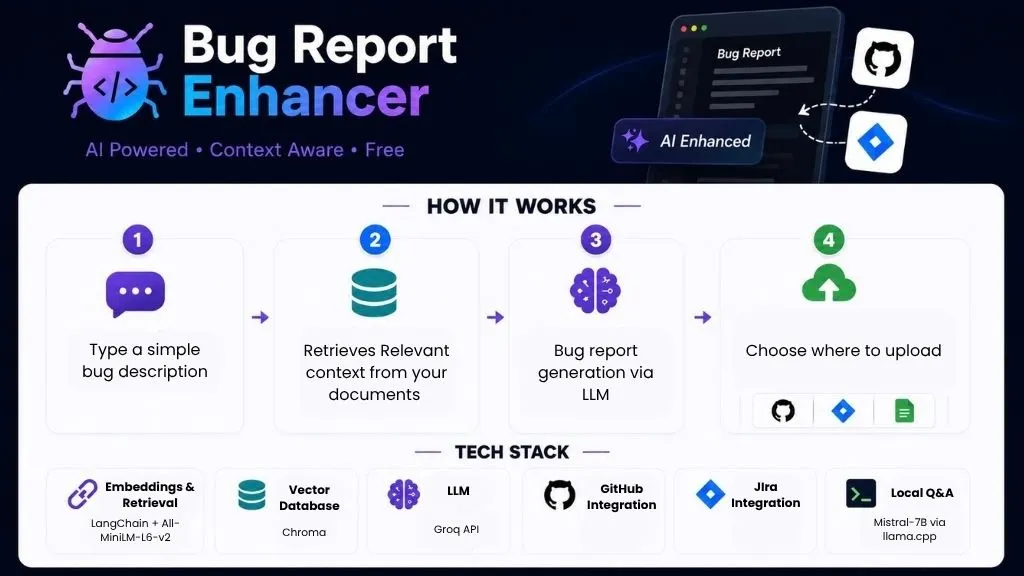
In Part 1, I built an AI-powered bug reporting tool that transforms plain English bug descriptions into structured, context-aware reports and uploads them directly to GitHub Issues or Jira.
The system was generating good results.
But “looks good” wasn’t enough for me.
I needed a way to measure whether the RAG pipeline was actually working reliably.
So I designed an evaluation framework. By introducing ground truth test cases, measurable metrics, and scores I could track across iterations. In this article, I’ll walk through how I built an evaluation suite for an AI system, what I measured, what failed, and what I fixed.
Why Evaluating AI Systems Is Different
When you test traditional software, the output is deterministic. Given input A, you always get output B. Pass or fail.
AI systems don’t work that way. Given the same input, the output varies. It’s probabilistic, not deterministic. “Does it work?” is the wrong question. The right questions are:
- Is it retrieving the right information?
- Is it generating accurate output?
- Is it filling the template correctly?
These are different questions that need different measurement approaches. I built one script for each.
The Three-Layer Evaluation Suite
eval/
├── test_dataset.json        ← 10 ground truth test cases
├── run_retrieval_eval.py    ← Layer 1: Is RAG finding the right files?
├── run_ragas_eval.py        ← Layer 2: Is the LLM output any good?
└── run_report_eval.py       ← Layer 3: Is the template filled correctly?
Three layers, three different measurement approaches, three sets of scores. Let me walk through each one.
Layer 1 - RAG Retrieval Accuracy
The first thing to test is whether the retrieval is working. Before worrying about what the LLM generates, you need to know: is it even finding the right documents?
My project indexes two files:
LOGIN_FEATURES.md: frontend feature specsopenapi.json: backend API documentation
For a frontend bug about role-based access control, the system should retrieve chunks from LOGIN_FEATURES.md. For a backend bug about a failing API endpoint, it should retrieve from openapi.json.
I created 10 test cases in test_dataset.json , each with a bug description and the expected source file:
{
  "id": "TC006",
  "type": "backend",
  "bug_description": "Login API returns 200 with incorrect password instead of 401",
  "expected_chunks": ["openapi.json"],
  "expected_severity": "critical",
  "ground_truth": "POST /api/auth/login must return 401 for invalid credentials per the API spec."
}
Then run_retrieval_eval.py runs each bug description through Chroma, checks whether the expected file appeared in the top 6 retrieved chunks, and reports precision.
Results:
TC001  ✅  LOGIN_FEATURES.md  score:0.85  [HIGH]
TC004  ✅  LOGIN_FEATURES.md  score:1.4   [LOW]
TC007  ✅  openapi.json       score:1.16  [MEDIUM]

...
Precision : 100%
Avg score : 1.07
100% precision, the right file was retrieved every time. But one test case (TC004 “Role badge not displayed in navbar”) scored LOW confidence with a similarity score of 1.48. The description was too vague and barely appeared in the feature file.
This is actually a valuable finding. The confidence scorer correctly flagged it as uncertain. A real user would see the LOW warning and know to either add more context to their description or add more documentation to the knowledge base.
That’s the retrieval eval working as intended, not just measuring success, but surfacing uncertainty.
Layer 2 - RAGAS: Measuring LLM Output Quality
Retrieval accuracy tells you the right files were found. But it doesn’t tell you whether the LLM used that information faithfully and relevantly. That’s what RAGAS measures.
RAGAS (Retrieval Augmented Generation Assessment) is an open-source framework specifically designed to evaluate RAG pipelines. It measures three things:
Faithfulness: Does every statement in the generated report trace back to the retrieved context? Or is the LLM hallucinating information not in the documents?
Answer Relevancy: Does the generated output actually address the input question? A response can be faithful but still miss the point.
Context Precision: Of the chunks retrieved, how many were actually relevant to answering the question? This measures retrieval quality at a more granular level than my Layer 1 check.
Each metric scores from 0 to 1. Higher is better.
Running RAGAS requires an LLM to act as the evaluator, it reads the generated report and judges it against the retrieved context. I used OpenAI’s gpt-4o-mini for evaluation while keeping Groq for generation.
Get Tasnim Fariyah’s stories in your inbox
Join Medium for free to get updates from this writer.
Results:

Answer Relevancy at 0.739 is solid, the reports are addressing the right bug. Faithfulness at 0.308 looks low, but there’s important context here.
RAGAS penalizes any statement in the generated report that can’t be word-for-word traced to the retrieved chunks. My chunks are 500 tokens each. The LLM makes reasonable inferences, connecting “3 failed attempts” from the spec to “account lockout vulnerability” in the report, which RAGAS counts against faithfulness because it’s not literally in the chunk text.
Context Precision at 0.557 tells a related story. Of the 6 chunks retrieved per bug description, only about 55% were genuinely useful for generating the answer. The other 45% were adjacent sections that Chroma pulled in but the LLM didn’t really need. With only two documents indexed and chunks at 500 tokens, Chroma doesn’t have much to choose from, so it retrieves broadly rather than precisely.
Both scores point to the same root cause: chunk size is too small.
Smaller chunks mean more chunks retrieved to cover a topic, more noise in the context, and more LLM inferences that RAGAS can’t verify word-for-word. Three metrics pointing at the same fix is a much stronger signal than one.
Here’s exactly how I plan to fix it:
- Increase chunk size from 500 to 800–1000 tokens Larger chunks give each retrieved piece more context. Instead of retrieving a fragment of the login spec, the system retrieves the whole relevant section. Fewer inferences needed, higher faithfulness, higher precision.
- Reduce TOP_K from 6 to 4 Currently retrieving 6 chunks per query. With larger chunks, 4 will cover more ground than 6 small ones did, and with less noise. Fewer irrelevant chunks means Context Precision goes up directly.
- Add more specific documents to
data/Right now Chroma has only two files to choose from. Adding more targeted docs, separate files per feature area rather than one large PRD, gives the retrieval engine more precise targets. A bug about checkout would retrieve a checkout-specific doc instead of pulling loosely related auth chunks.
After making these changes the plan is to re-run all three eval scripts and compare against the current baseline:
Current baseline (chunk_size=500, TOP_K=6, 2 docs):
 Faithfulness : 0.308
 Answer Relevancy : 0.739
 Context Precision : 0.557
 Overall : 0.552
Having this baseline number is the whole point. Without it, changing chunk size is a guess. With it, the next eval run will tell me exactly whether it helped, by how much, and whether it introduced any regressions in retrieval accuracy.
Layer 3 - Bug Report Generation Quality
RAGAS measures output quality in abstract terms. But what I also care about is: did the LLM fill the template correctly? Did it infer the right severity? Did it identify the right component?
run_report_eval.py answers these questions with rule-based checks, no LLM needed, no API costs, runs in seconds.
For each test case it generates a fresh bug report and checks:
- Template completeness: are all required sections present? Are there unfilled placeholder fields like
<!-- e.g. -->still in the output? - Severity accuracy: does the extracted severity match the expected severity in the test dataset?
- Priority accuracy: does P0/P1/P2/P3 match?
- Component accuracy: does the report mention the right affected component?
- Title quality: does the title have the correct
[FE]or[BE]prefix?
First run results (Prompt v1):

Severity accuracy at 50% was the problem. Looking at the failures, a clear pattern emerged, the LLM was defaulting to High/P1 for almost everything. TC003 (unauthorized access to protected routes) should be Critical/P0. TC004 (cosmetic badge missing) should be Low/P3. Both came back as High/P1.
This is a prompt engineering problem. The severity guidelines in the prompt were too generic.
Prompt Iteration: From v1 to v2
This is where having an eval suite pays off. Instead of guessing whether a prompt change helped, I could measure it.
I updated prompts/v1_frontend_bug.txt with explicit severity examples:
Critical = authentication broken, data loss, unauthorized access
           to protected routes (e.g. Customer accessing Merchant pages)
High     = named feature completely broken but app still loads
Medium   = feature partially works, affects subset of users
Low      = cosmetic only, no functional impact
           (e.g. badge not displayed, label missing)
Saved it as prompts/v2_frontend_bug.txt. Updated prompt_config.json to point to v2. Re-ran the eval.
Prompt v2 results:

17 point improvement in overall score. Severity accuracy up 20 points. Component accuracy at 100%.
That’s the feedback loop working: measure → identify issue → fix prompt → measure again → confirm improvement.
Every prompt change is logged because every run records which version was used in logs/retrieval_log.jsonl. Full traceability across all runs.
Try It Yourself
The full project including the evaluation suite is open source:
github.com/tfariyah31/bug-report-enhancer
Part 1 of this series covers building the bug report pipeline from scratch, RAG architecture, Jira ADF conversion and prompt versioning.
GitHub Repo: Bug Report Enhancer
LinkedIn: Tasnim Fariyah
Thanks for reading!