Kotlin Gpio project. Servo Motor SG90. Actuator controlling: (Working with IO lines on Raspberry Pi using Pi4J Kotlin/Java langs and remote compiling / debugging to any ARM GPIO compatible hardware. Advanced AI features): Lesson 10

5 min readMar 1, 2025
LESSON 10: Servo Motor SG90. Actuator controlling
https://github.com/RoboticsLife/Lesson10-Gpio-Kotlin-Pi4J
Step 1: Add SG90 Servo motor (Actuator) type of device’s part to Json configuration
   "servos": [
    {
      "name": "Simple servo example SG-90",
      "hardwareModel": "SG-90",
      "hardwareVersion": "",
      "pin": 18,
      "installedServoPosition": 0
    }
  ]
Step 2: Add servo motor type to local data class
package brain.data

import com.fasterxml.jackson.annotation.JsonIgnoreProperties

@JsonIgnoreProperties(ignoreUnknown = true)
data class Configuration(
    val configName: String? = null,
    val configDescription: String? = null,
    val configVersion: String? = null,
    val hardwareModel: String? = null,
    val hardwareModelCode: Int? = null,
    val hardwareType: String? = null,
    val hardwareTypeCode: Int? = null,
    val leds: List<LedConfig?>? = null,
    val buttons: List<ButtonConfig?>? = null,
    val buzzers: List<BuzzerConfig?>? = null,
    val distanceSensors: List<DistanceSensorConfig?>? = null,
    val displays: List<DisplayConfig?>? = null,
    val servos: List<ServoConfig?>? = null,
) {
    @JsonIgnoreProperties(ignoreUnknown = true)
    data class ButtonConfig(
        val name: String?,
        val pin: Int?,
        val pullResistance: Int?
    )

    @JsonIgnoreProperties(ignoreUnknown = true)
    data class LedConfig(
        val name: String?,
        val pin: Int?
    )

    @JsonIgnoreProperties(ignoreUnknown = true)
    data class BuzzerConfig(
        val name: String?,
        val pin: Int?
    )

    @JsonIgnoreProperties(ignoreUnknown = true)
    data class DistanceSensorConfig(
        val name: String?,
        val hardwareModel: String?,
        val hardwareVersion: String?,
        val pinTrigger: Int?,
        val pinEcho: Int?,
        val installedSensorPosition: Int?,
        val movingAngle: Int? = 0
    )

    @JsonIgnoreProperties(ignoreUnknown = true)
    data class DisplayConfig(
        val name: String?,
        val hardwareModel: String?,
        val hardwareVersion: String?,
        val pin01: Int?,
        val pin02: Int?,
        val pin03: Int?,
        val pin04: Int?,
        val pin05: Int?,
        val pin06: Int?,
        val pin07: Int?,
        val pin08: Int?,
        val pin09: Int?,
        val pin10: Int?,
        val pin11: Int?,
        val pin12: Int?,
    )

    @JsonIgnoreProperties(ignoreUnknown = true)
    data class ServoConfig(
        val name: String?,
        val hardwareModel: String?,
        val hardwareVersion: String?,
        val pin: Int?,
        val installedServoPosition: Int?
    )
}
Step 3: Create Servo Motor Interface and implement a specific type of it for SG90
package avatar.hardware.parts

import brain.data.Configuration

interface Servo {

    fun actuatorServoGetCurrentAngle(): Float

    fun actuatorServoGetAngleRangeLimit(): Float

    fun actuatorServoMoveToAngle(angle: Float = 0f, customMovingTimeInMillis: Int? = 0): Boolean


    companion object {
        const val NAME_HARDWARE_MODEL_SG90 = "SG90"


        fun isConfigurationValid(servoConfig: Configuration.ServoConfig): String {

            if (servoConfig.hardwareModel
                    ?.filterNot { it == ' ' || it == '-' || it == '_' || it == ',' || it == '.' }?.lowercase()
                    ?.contains(NAME_HARDWARE_MODEL_SG90.filterNot { it == ' ' || it == '-' || it == '_' || it == ',' || it == '.' }
                        .lowercase()) == true) {
                return NAME_HARDWARE_MODEL_SG90
            } else if (false) {
                //TODO add other types implementations
                return ""
            } else return ""
        }
    }
}
package avatar.hardware.parts
import brain.data.Configuration
import com.pi4j.context.Context
import com.pi4j.io.pwm.Pwm
import com.pi4j.io.pwm.PwmType
import kotlinx.coroutines.*
import kotlin.math.abs
class ServoSG90(pi4j: Context, servoConfig: Configuration.ServoConfig): Servo {
lateinit var pwm: Pwm
private var threadScope: Job? = null
private var customTimeMoveThreadScope: Job? = null
private var currentPositionInDegrees: Float = 0f
init {
buildServo(pi4j, servoConfig)
moveToDefaultAngle()
}
private fun buildServo(pi4j: Context, servoConfig: Configuration.ServoConfig) {
val params = Pwm.newConfigBuilder(pi4j)
.id("BCM${servoConfig.pin}")
.name(servoConfig.name)
.address(servoConfig.pin)
.pwmType(PwmType.HARDWARE)
.initial(0)
.frequency(DEFAULT_FREQUENCY)
.shutdown(0)
.build()
pwm = pi4j.create(params)
}
private fun moveToDefaultAngle() {
actuatorServoMoveToAngle(angle = 0f)
}
private fun moveToAngleForCustomTime(angle: Float, customMovingTimeInMillis: Int) {
if (customMovingTimeInMillis == 0) return
val filteredAngle =
if (angle > DEFAULT_MAX_ANGLE) DEFAULT_MAX_ANGLE else if (angle < DEFAULT_MIN_ANGLE) DEFAULT_MIN_ANGLE else angle
val angleMovementRange = currentPositionInDegrees - filteredAngle
val range = abs(if (filteredAngle % 1 > 0) angleMovementRange.toInt() + 1 else angleMovementRange.toInt())
customTimeMoveThreadScope?.cancel()
customTimeMoveThreadScope = CoroutineScope(Job() + Dispatchers.IO).launch {
for (i in 1..range) {
delay((customMovingTimeInMillis / range).toLong())
actuatorServoMoveToAngle(
angle = if (currentPositionInDegrees < filteredAngle) currentPositionInDegrees + 1.0f else currentPositionInDegrees - 1.0f
)
}
}
}
override fun actuatorServoGetCurrentAngle(): Float {
return currentPositionInDegrees
}
override fun actuatorServoGetAngleRangeLimit(): Float {
return DEFAULT_ANGLE_RANGE
}
override fun actuatorServoMoveToAngle(angle: Float, customMovingTimeInMillis: Int?): Boolean {
if (customMovingTimeInMillis != null && customMovingTimeInMillis > 0) {
moveToAngleForCustomTime(angle, customMovingTimeInMillis)
} else {
val filteredAngle =
if (angle > DEFAULT_MAX_ANGLE) DEFAULT_MAX_ANGLE else if (angle < DEFAULT_MIN_ANGLE) DEFAULT_MIN_ANGLE else angle
threadScope?.cancel()
threadScope = CoroutineScope(Job() + Dispatchers.IO).launch {
currentPositionInDegrees = filteredAngle
val dutyCycleByOnDegree = (DEFAULT_MAX_DUTY_CYCLE - DEFAULT_MIN_DUTY_CYCLE) / DEFAULT_ANGLE_RANGE
pwm.on(DEFAULT_START_POSITION_DUTY_CYCLE + filteredAngle * dutyCycleByOnDegree)
delay(20)
}
return true
}
return false
}
companion object {
//from SG90 datasheet
const val DEFAULT_FREQUENCY: Int = 50
const val DEFAULT_MIN_ANGLE: Float = -90.0f
const val DEFAULT_MAX_ANGLE: Float = 90.0f
const val DEFAULT_ANGLE_RANGE: Float = 180f
const val DEFAULT_MIN_DUTY_CYCLE: Float = 2.0f
const val DEFAULT_MAX_DUTY_CYCLE: Float = 12.0f
const val DEFAULT_START_POSITION_DUTY_CYCLE: Float =
(DEFAULT_MAX_DUTY_CYCLE - DEFAULT_MIN_DUTY_CYCLE) / (DEFAULT_ANGLE_RANGE / DEFAULT_MAX_ANGLE) + DEFAULT_MIN_DUTY_CYCLE
const val SPEED_PER_DEGREE_IN_MILLIS: Float = 100.0f / 60.0f
}
}Get Oleksandr Neiko (Robotics/Senior Android Engineer)’s stories in your inbox
Join Medium for free to get updates from this writer.
Step 4: Add functions to Circuit body type Interface and implement it
package avatar.hardware.types.circuitboard.data

import avatar.body.BodyPrototype
import avatar.hardware.HardwareTypes
import avatar.hardware.parts.Button
import avatar.hardware.parts.Buzzer
import avatar.hardware.parts.Led

data class BodyCircuitBoard(
    override var type: HardwareTypes.Type = HardwareTypes.Type.CIRCUIT_BOARD,
    val leds: MutableList<Led> = mutableListOf(),
    val buttons: MutableList<Button> = mutableListOf(),
    val buzzers: MutableList<Buzzer> = mutableListOf(),
    val distanceSensors: MutableList<DistanceSensor> = mutableListOf(),
    val displays: MutableList<Display> = mutableListOf(),
    val servos: MutableList<Servo> = mutableListOf(),

): BodyPrototype()
package avatar.hardware.types.circuitboard
import avatar.hardware.Body
interface CircuitBoard: Body {
fun getLedsCount(): Int
fun ledOn(ledPosition: Int = 0, durationInMillis: Long = 0L): Boolean
fun ledOff(ledPosition: Int = 0): Boolean
fun addButtonListeners(buttonPosition: Int = 0, actionHigh: () -> Unit, actionLow: () -> Unit): Boolean
fun buzzerSoundOn(buzzerPosition: Int = 0, durationInMillis: Long = 0L): Boolean
fun buzzerSoundOff(buzzerPosition: Int = 0): Boolean
fun stopDistanceMeasuring(sensorPosition: Int = 0): Boolean
fun getDistanceMeasuringState(sensorPosition: Int = 0): Boolean
fun displayPrint(displayPosition: Int = 0, outFloat: Float? = null, string: String? = null, printTimeInMillis: Int? = 0): Boolean
fun actuatorServoGetCurrentAngle(servoPosition: Int = 0): Float
fun actuatorServoGetAngleRangeLimit(servoPosition: Int = 0): Float
fun actuatorServoMoveToAngle(servoPosition: Int = 0, angle: Float = 0f, customMovingTimeInMillis: Int? = 0): Boolean
} private fun initHardware() {
//PARSE CONFIG
/** init Servos */
configuration.servos?.forEach {
if (it?.pin != null) {
when (Servo.isConfigurationValid(it)) {
Servo.NAME_HARDWARE_MODEL_SG90 ->
body.servos.add(ServoSG90(pi4J, it))
}
}
}
////////////////
override fun actuatorServoGetCurrentAngle(servoPosition: Int): Float {
if (servoPosition < 0) return Float.POSITIVE_INFINITY
if (servoPosition < body.servos.size) {
return body.servos[servoPosition].actuatorServoGetCurrentAngle()
}
return Float.POSITIVE_INFINITY
}
override fun actuatorServoGetAngleRangeLimit(servoPosition: Int): Float {
if (servoPosition < 0) return Float.POSITIVE_INFINITY
if (servoPosition < body.servos.size) {
return body.servos[servoPosition].actuatorServoGetAngleRangeLimit()
}
return Float.POSITIVE_INFINITY
}
override fun actuatorServoMoveToAngle(servoPosition: Int, angle: Float, customMovingTimeInMillis: Int?): Boolean {
if (servoPosition < 0) return false
if (servoPosition < body.servos.size) {
return body.servos[servoPosition].actuatorServoMoveToAngle(angle, customMovingTimeInMillis)
}
return false
}Step 5: Main thread logic. Control Servo Motor movements and using custom time settings movements for slower pivots.
   (avatar.body as CircuitBoard).actuatorServoMoveToAngle(0, 90f)
   delay(2000)
   (avatar.body as CircuitBoard).actuatorServoMoveToAngle(0, -90f, 4000)
* Additional settings: remote compiling / debugging setup
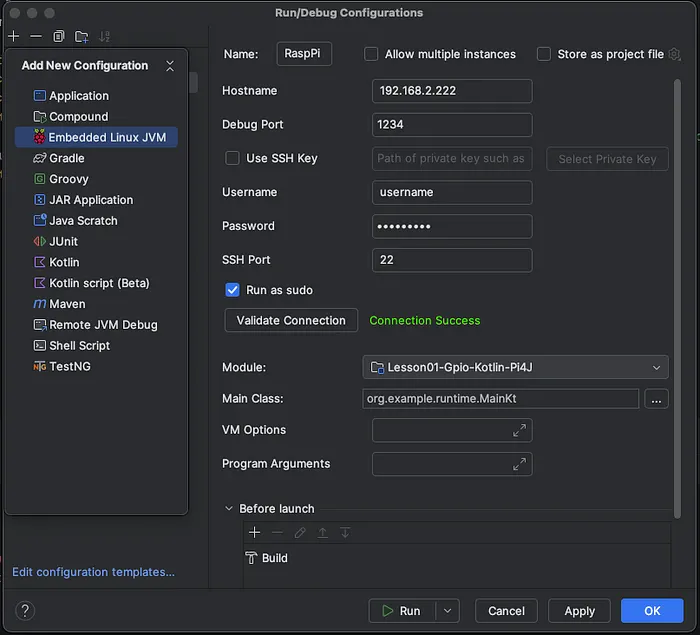
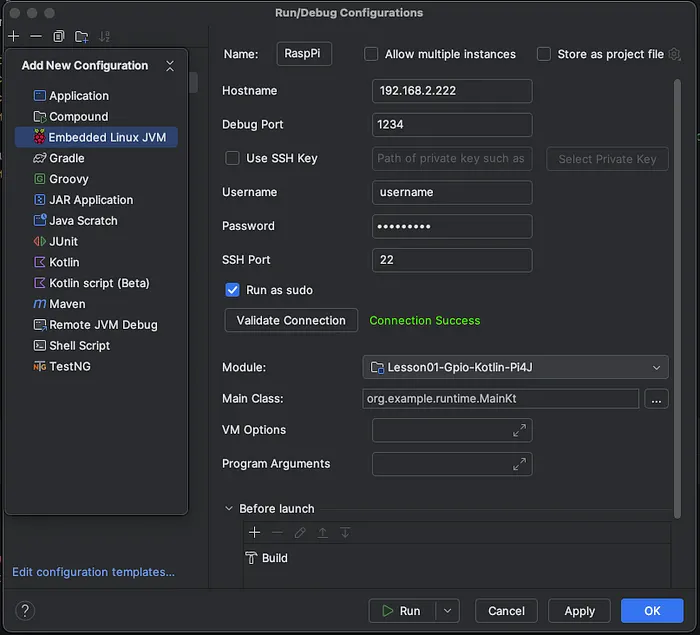
Add new launch configuration to IntelliJ IDEA

fill IP / port adress to Raspberry PI. Username & password as sudo connection. Add Main Kotlin class and project module.