6 Best IT Documentation Software Tools (2026)

Ask ten IT teams what “IT documentation” means, and you’ll get three different answers.
- One team means the network diagram, the password vault, and the asset inventory.
- Another means the internal wiki where policies and notes live.
- A third means the click-by-click runbook that shows a new hire exactly how to reset an account or close a ticket in the system you just rolled out.
Those are three different jobs, and most tools only do one of them well.
That’s the single most important thing to know before you buy: the best IT documentation software for asset records is almost never the best tool for capturing procedures, and neither one is a wiki.
It matters because the cost of getting it wrong is real. When the one person who knows how everything works is out, things break. And documentation decays the moment you write it, which is why so many runbooks point to a server that was decommissioned two quarters ago.
That pain spikes at a predictable moment: a system rollout. A new ERP, a CRM migration, and an EHR go-live. Suddenly, nobody can find or do anything, and the procedures live only in the head of whoever set it up.
This guide breaks the category into the three jobs it actually covers, then names the best tool for each.
Job 1: Capture step-by-step procedures and runbooks
This is the documentation that shows someone how to do a task in a system: the password reset, the new-user provisioning flow, the month-end process in the finance app. Asset databases and wikis assume this content already exists. These tools create it.
1. Tango
Best for: turning a process you do once into a runbook anyone can follow, especially during a software rollout.
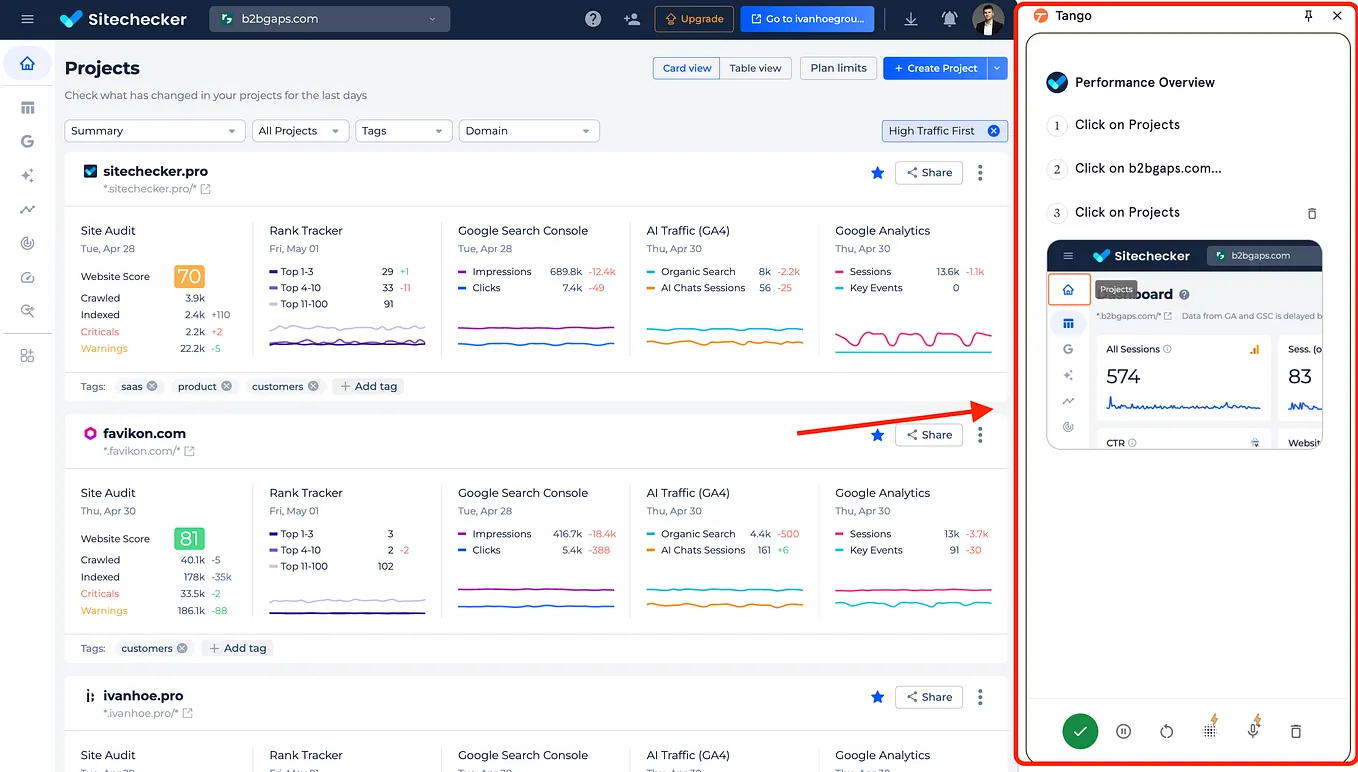
Tango is a workflow documentation and digital adoption platform. You click through a process one time, and Tango captures each step automatically, building a polished guide with screenshots and instructions, with no manual screenshotting.

Each guide can also become an on-screen walkthrough that steps a teammate through the task inside the actual application.
That fits the way IT documentation pain usually shows up. When you stand up or support a new system, the vendor’s training is generic, and the edge cases are yours to document.

Tango lets you build the runbook as you do the work, so the “how” stops living in one admin’s head.
Top use cases: creating and managing SOPs, improving employee onboarding and building interactive user manuals.
What sets it apart for IT and Ops teams:
- On-screen redaction (Secure Blur). Sensitive fields, credentials, and PII can be blurred locally as you capture, which matters when a runbook touches an admin console or a regulated system. This is a key differentiator in banking, healthcare, and insurance.
- Guide Me and Sidekick. Instead of a static PDF, Tango can walk a user through the steps in-app, where the work actually happens.
- Branching across guides and step-level analytics, so you can see where people get stuck and which procedures are actually used.
- Durability. Because guides are structural rather than a recorded video, they don’t go stale the way a screen-recording does. As one customer put it, videos get outdated, but a structural guide just needs the changed step swapped out.

Honest gaps
Tango is not an asset inventory or a password vault. If you need a CMDB-style record of every device, license, and credential, pair Tango with one of the asset tools below. Desktop capture is also slower than browser capture, and some workflows benefit from a quick review after capture to clean up steps.
Pricing

A free plan covers individual use with capture limits. Paid plans are per user (around $22/user/month on annual billing), with an Enterprise tier that unlocks in-app guidance, SSO/SCIM, and the security controls regulated buyers need. Enterprise pricing is not listed publicly.
Tango G2 Rating: 4.7/5 across 505 reviews.
Job 2: Document IT assets, configurations, and credentials
This is the “single source of truth” layer: hardware and software inventories, network configurations, vendor records, and securely stored passwords, all linked together. This is what most people picture when they hear “IT documentation software,” and it’s a category Tango deliberately doesn’t compete in. If this is your primary need, start here.
2. IT Glue
Best for: MSPs and IT teams that need structured asset, configuration, and password documentation with deep PSA/RMM integrations.
IT Glue (a Kaseya company) is the incumbent leader for MSP documentation. It’s built around structured asset types, relationship mapping that links devices to passwords to vendors, host-proof password storage, audit trails, and out-of-the-box templates. It’s SOC 2 Type II certified and integrates tightly with tools like Datto RMM, ConnectWise, and Autotask.

The honest caveat for internal IT teams: IT Glue is built MSP-first, and that shows. A community-bank reviewer running a proof of concept noted that the structured templates were immediately useful for audits, but the platform’s workflow assumptions were aimed at MSPs, and the per-user cost added up fast for an internal team. Several reviewers also flagged search as inconsistent on large datasets.
Pricing. No free plan. Basic starts at $29/user/month with a 5-user minimum (about $145/month floor), Select at $38, and Enterprise at $44, with 1 to 4 user options priced higher per seat. Expect a one-time onboarding fee.

It Glue G2 Rating: 4.6/5 across 704 reviews.
3. Hudu
Best for: teams that want IT Glue’s substance, asset management, password storage, knowledge base, without the minimums or onboarding fees.
Get Ivan Palii’s stories in your inbox
Join Medium for free to get updates from this writer.
Hudu is the challenger that’s grown quickly as a cost-effective alternative to IT Glue. It covers the same core: custom asset layouts, secure password and OTP storage with granular permissions, SOPs and knowledge base articles, and integrations with the PSA/RMM tools IT teams already run. A distinctive option is self-hosting at the same price as cloud, which appeals to teams that don’t want documentation living on someone else’s servers.

The known weak spots: the mobile app lags the web experience (reviewers cite session and editing issues), and like IT Glue, maintenance is fully manual. Setup is also real work, since you design your own templates and structure up front.
Pricing. Around $27/user/month billed annually ($30 monthly), with no user minimums and a free trial. The Radar network-discovery add-on is roughly $9 to $10 per company per month. Self-hosted and cloud cost the same.
Hudu G2 Rating: 4.7/5 across 357 reviews.
Job 3: Organize everything in a wiki or knowledge base
This is where policies, notes, and reference material live and get searched. These tools are strong at organizing and finding content, but they don’t capture procedures for you, and they aren’t purpose-built for IT assets. They’re the connective tissue around the other two jobs.
4. Confluence
Best for: teams already in the Atlassian ecosystem that want a general-purpose wiki.
Confluence is one of the most widely deployed wiki and knowledge base tools, and it can absolutely hold IT documentation: runbooks, policies, meeting notes, and project plans, with version history, granular permissions, and tight Jira integration. For an IT team already living in Jira, it’s the path of least resistance.

The caveats are that it’s a general-purpose wiki adapted for IT documentation, not built for it, so there’s no asset modeling or procedure capture. Reviewers consistently mention a learning curve for non-technical users, slower performance on very large spaces, and per-user costs that climb as the team grows.
Pricing. Free for up to 10 users; Standard around $5.42/user/month; Premium around $10.44/user/month; Enterprise is custom and billed annually.
Confluence G2 Rating: 4.1/5 across 4363 reviews.
Also, check a comparison: Tango vs Confluence.
5. Document360
Best for: teams that need a governed, AI-searchable knowledge base with strong version control and workflows.
Document360 is a dedicated knowledge base platform aimed at organizations that need structure and governance: role-based access, review workflows, granular version history, and an AI search that answers questions from your own docs. It handles internal wikis, SOPs, and customer-facing help centers, and it’s a strong fit when content quality control matters across many contributors.

The trade-offs: its per-project pricing model can get expensive if you need multiple knowledge bases, the most useful AI search sits behind higher tiers, and smaller teams may find it heavier than they need.
Pricing. Quote-based with a 14-day free trial. Published paid tiers have historically started around $199/month for the Professional plan, scaling by project count and tier.
Document360 G2 Rating: 4.7/5 across 524 reviews.
Also, check the comparison: Tango vs Document360.
6. BookStack
Best for: teams that want a free, self-hosted wiki with full control over their data.
BookStack is open-source documentation software you host yourself. It’s free under the MIT license, organizes content in a simple books-chapters-pages structure, and gives you complete control: your data stays on your own infrastructure, there are no per-user fees, and there’s no vendor to trust with sensitive internal documentation. For a budget-conscious or privacy-conscious IT team with the ability to self-host, it’s a genuinely strong option.

The trade-offs are the flip side of “free.” You’re responsible for hosting, updates, and maintenance; there’s no asset or credential management; and there’s no procedure-capture engine. It’s a clean wiki, nothing more, which is exactly the point.
Pricing. Free and open-source. Your only costs are hosting and the time to run it.
BookStack G2 Rating: only 1 review with a 3.5 rating.
How to choose the right IT documentation tool
Match the tool to the job, then to your buyer:
- You need to show people how to do things in your systems (onboarding, runbooks, a new rollout): start with Tango.
- You need a single source of truth for assets, configs, and passwords: choose IT Glue if you’re an MSP with a Kaseya stack, or Hudu if you’re an internal IT team that wants the same structure without the minimums.
- You need a place to organize and search everything: Confluence if you’re already in Atlassian, Document360 if governance and AI search matter, BookStack if you want free and self-hosted.
Most teams end up using two of these together: one tool to capture procedures, one to store assets or organize the wiki. The mistake is buying an asset platform and expecting it to write your runbooks, or buying a wiki and expecting it to keep itself current.
A practical tip: whatever you choose, the documentation only earns its keep when the whole team reaches for it without being told to. Tools that put the guidance where work happens, in the browser and in the app, get used. Tools that make people leave their workflow to go read a doc tend to gather dust.