DEEPER DIVE INTO FUNCTIONS


I started this function javascript series a while ago and if you haven’t seen the first part, you can read it here. I broke down the concept of functions and made it very easy to understand. This is an extension of the other article and i’ll recommend you read it first before this one.
There are different ways to write JavaScript functions. in this deeper dive series, We will be looking at three ways of writing functions. These three types are:
- Function Declarations
- Function Expressions
- Arrow Function
Are you ready? Let’s go!
Function Declarations
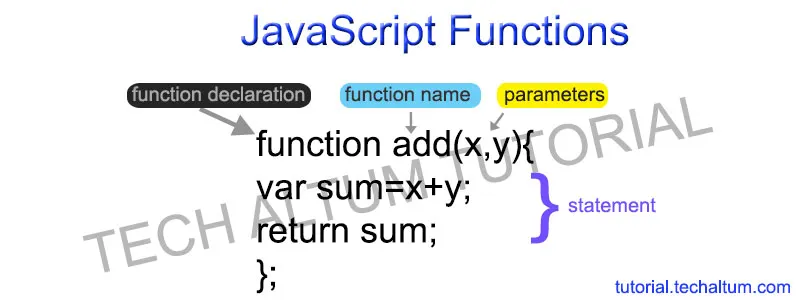
A function declaration, also known as function definition or statement, is a way of providing sets of instructions to be carried out in a program when executed. It is a way of saving a function with a particular parameter so it can be called (invoked) when needed to perform the task for which it was defined.
We use the function keyword to declare a function. Same like we declare a variable 😊
So let’s declare another function to calculate the age based on the birth year.
//Function declaration
function calculateAge(birthyear) {
    return 2023 - birthyear;
}

const myAge= calculateAge(1999);
console.log(myAge)
what have we achieved here?
- We have created a function by giving it the name calculateAge to calculate the age.
- And we have given the function parameter as birthyear. that's the input data that we will be taking to calculate the age.
- We will be returning the results by subtracting the birthyear from the current year to calculate the age.
- Then, we stored this function in another variable (myAge) and called the function, and we have given the actual data to calculate the age inside the calculateAge.
FUNCTION EXPRESSION
Now that we have successfully declared functions, let us look at how to express functions using the previous example.
/Function expression
const calculateAge2 = function(birthyear) {
    return 2023 - birthyear;
}

const age2 = calculateAge2(1999);
console.log(age2)
Earlier, we started with the function keyword. But with function expression, we write the function as an expression. Remember that an expression produces a value, so we must create a variable to store that value.
- First, we create a variable to store the function (
calculateAge2), which will be the actual function. - Then, we write the function as same as before, in here, we omitted the function name. This then call as an anonymous function. But you can use this with a function name as well.
- Next, we add the function parameters, function body, and then call the function.
There’s one major difference between these two. And that is, we can actually call function declaration before it is defined in the code. We call this hoisting. Function declarations are hoisted, but expressions are not!
Get JENNIFER JOSEPH’s stories in your inbox
Join Medium for free to get updates from this writer.
you can learn more about javascript hoisting here.
ARROW FUNCTIONS
Arrow functions are simply a new syntax for writing anonymous functions. it was introduced in ECMA2015.
They have a lot of features that separate them from the original function keyword in JavaScript, but in many cases they can be a drop-in replacement for anonymous functions.
Some of the features may be confusing or even intimidating for new developers, but I think that if you break down the new syntax and learn the new features step-by-step you'll find yourself wanting to use them all the time.
Arrow functions are also popularly known as FAT FUNCTIONS or LAMBDA FUNCTIONS. So, don’t get surprised when someone throws either of these terms at you because it is a mere test of how deeply you have read about arrow functions.
It inherits the name “fat” from the fat arrow( => )used in its syntax and it inherits the name “Lambda” because Lambda functions is a generic term used across many programming languages to denote functions that offer a simple syntax or can be written as an anonymous function(without a name). Arrow functions do work on similar grounds, hence the name.
The key benefit to arrow functions to me is that they are easier to write and easier to read than the typical function syntax. Instead of having to write function everywhere and have it distract you while you're reasoning about code, your eyes can move over the gentler () => syntax more efficiently.
let’s take an example:
const calculateNewAge = birthyear => 2023 - birthyear;

const myNewAge= calculateNewAge(1999);

console.log(myNewAge)
what did we dohere?
- We created a variable (
calculateNewAge) to store the function the same as before since the arrow function is also a function expression. - Then, we have added the
birthyearbecause we want to calculate the birth year. - Then, we added an arrow (
=>), and that's the reason we call thisarrow function. - Then, we simply wrote what we wanted to return (
2023 - birthyear). - Then, we have called the function the same as earlier.
As you can see, this code is a lot easier and faster to write. And one of the reasons for that is that we don’t need the curly braces like previously to define a code block for the function body. And another reason is that return actually happens implicitly here; it automatically returns the value without explicitly defining the return keyword.
So this is actually just the simplest form!
it can get more complicated when we have a lot of parameters to work with.
Let’s say that we need to check whether how many years I have before my silver birthday. To do that, I need my birth year and my name as parameters. And then, I want to check my current age and then check it against my silver year, which would be 25. Then, produce a result saying that how many more years I have before my silver birthday.
const silverBirthday = (birthyear, firstName) => {
 const age = 2023 - birthyear;
 const birthday = 25 - age;
 return `${firstName} will celebrate golden birthday in ${birthday} year!`;
};
const birthday = silverBirthday(1999, 'jennifer');
console.log(birthday);
So in here, we have wrapped the parameters in parenthesis and wrapped our code in curly braces, same as we have done in function declarations and expressions. That's the only difference that you will see between simple and complex arrow functions.
I hope you enjoyed this awesome read!
This link will take you deeper into anonymous functions.