From Client - Server Communication to Secure API Design: A Developer’s Guide to HTTP, REST, JWT, and OAuth

Understanding how modern applications communicate, how APIs are designed, and how authentication works - from fundamentals to real-world system design.
Whenever we open a website, log into an application, search for something, or submit a form, multiple components communicate behind the scenes.
A frontend sends a request. A backend processes it. A database stores or retrieves information. Finally, the application displays the result.
At first glance, this seems straightforward.
But when we start designing applications ourselves, several questions arise:
- How exactly do clients and servers communicate?
- What is an API, and why do we need one?
- Why does HTTP have different methods and status codes?
- How do we design APIs from business requirements?
- If HTTP is stateless, how do applications remember users?
- What is the difference between cookies, sessions, JWT, and OAuth?
- How do these decisions affect scalability and security?
While exploring API design and system design, I realized that understanding individual concepts is only the beginning. The real value comes from understanding how they fit together to build reliable, secure, and scalable applications.
In this article, I’ll connect these concepts using a practical example: a React frontend communicating with a FastAPI backend and a PostgreSQL database.
Let’s start from the fundamentals.
1. Understanding the Client - Server Model
Most modern web applications follow a client–server architecture.
The client is the application that requests a service or resource.
The server is the system that processes the request and provides a response.
For example:
User
  |
  v
React Frontend (Client)
  |
  | HTTP Request
  v
FastAPI Backend (Server)
  |
  | Database Query
  v
PostgreSQL
  |
  | Query Result
  v
FastAPI Backend
  |
  | HTTP Response
  v
React Frontend
Imagine a user opening their profile page.
The React frontend requests the profile information from FastAPI. FastAPI retrieves the required data from PostgreSQL and returns it to the frontend.
The frontend then renders the profile.
Why separate clients and servers?
This separation provides several advantages:
Independent development: Frontend and backend teams can work independently.
Security: The client doesn’t need direct access to the database.
Scalability: Backend services can be scaled independently.
Reusability: The same backend can serve web, mobile, and other clients.
However, the client and server need an agreed way to communicate.
That’s where APIs come in.
2. What Is an API?
API stands for Application Programming Interface.
An API defines how one software component can interact with another.
In a web application, an API commonly defines the operations a client can request from a backend.
For example:
GET /api/users/101 HTTP/1.1The backend might respond:
{
  "id": 101,
  "name": "Alex",
  "email": "alex@example.com"
}
The frontend doesn’t need to know how the backend queries PostgreSQL or structures its internal business logic.
It only needs to understand the API contract.
API vs HTTP vs Client-Server Architecture
These three concepts are related but different.
Client-server architecture defines the relationship between systems requesting and providing services.
API defines the interface or contract between software components.
HTTP is a protocol commonly used to exchange API requests and responses.
An API is not necessarily a separate server or physical intermediary. It is an interface that software exposes.
Also, not every API uses HTTP. APIs can use technologies such as gRPC, GraphQL over HTTP, WebSockets, or language-level function interfaces.
3. API as a Contract
One of the most important concepts in API design is understanding that an API is a contract between independent systems.
Suppose a React frontend expects:
{
  "user_id": 101,
  "name": "Alex"
}
But the backend changes its response to:
{
  "user_id": 101,
  "full_name": "Alex"
}
If the frontend still expects name, it may display undefined.
The backend might be working correctly from its own perspective, but the API contract has changed.
An API contract generally defines:
- Endpoint and HTTP method
- Path and query parameters
- Request headers and body
- Response structure
- Status codes and error responses
- Authentication and authorization requirements
Why API contracts matter
Clear contracts allow frontend and backend teams to develop independently, reduce integration problems, and help maintain backward compatibility.
Tools such as OpenAPI describe HTTP API contracts in a machine-readable format. Swagger UI can provide interactive documentation based on those descriptions.
An API isn’t merely an endpoint. It’s a contract that allows independent systems to communicate and evolve without unexpectedly breaking one another.
4. Why Does HTTP Exist?
HTTP stands for Hypertext Transfer Protocol.
It is an application-layer protocol that standardizes communication between clients and servers.
Without a common protocol, different applications would need custom agreements for formatting requests, identifying operations, reporting errors, and exchanging data.
HTTP provides a standardized structure for these interactions.
What HTTP provides
HTTP defines concepts such as:
- Request methods
- Request and response headers
- Status codes
- Message bodies
- Resource identifiers
- Caching semantics
What HTTP is not
HTTP is not a programming language, database, web server, authentication system, or encryption mechanism.
It also doesn’t define the business logic of an application.
HTTP/1.1 and HTTP/2 typically use TCP as their transport, while HTTP/3 uses QUIC over UDP.
HTTPS adds TLS protection to HTTP communication.
5. How HTTP Request-Response Communication Works
HTTP commonly follows a request-response interaction.
The client sends a request, and the server sends a response.
Consider this request:
POST /api/users HTTP/1.1
Host: api.example.com
Content-Type: application/json
Accept: application/json
{
"name": "Alex",
"email": "alex@example.com"
}The server processes the request and responds:
HTTP/1.1 201 Created
Content-Type: application/json
{
"id": 101,
"name": "Alex",
"email": "alex@example.com"
}Let’s understand the structure.
HTTP request structure
An HTTP/1.1 request consists of:
Request line: Specifies the HTTP method, request target, and protocol version.
Headers: Provide metadata such as content type, authentication credentials, and accepted response formats.
Blank line: Separates the headers from the message body.
Body: Contains optional request data.
For example:
GET /api/users/101/orders?status=completed&page=1 HTTP/1.1
Host: api.example.com
Authorization: Bearer <access_token>
Here:
/api/users/101/orders is the resource path.
101 is a path parameter identifying the user.
status=completed and page=1 are query parameters used for filtering and pagination.
The examples above show HTTP/1.1’s textual message format. HTTP/2 and HTTP/3 use different wire formats while preserving the core HTTP semantics.
HTTP response structure
A response contains a status code, headers, and an optional body.
For example:
HTTP/1.1 404 Not Found
Content-Type: application/json
{
"error": {
"code": "USER_NOT_FOUND",
"message": "The requested user does not exist"
}
}The status code communicates the general outcome, while the body can provide application-specific details.
6. Understanding HTTP Methods
HTTP methods describe the intended operation on a resource.
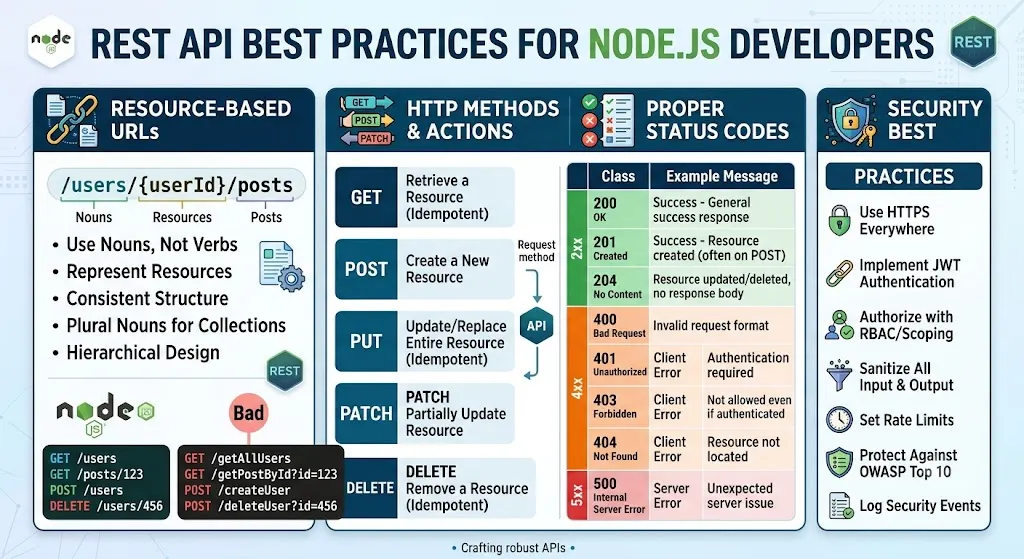
The five most commonly used methods are GET, POST, PUT, PATCH, and DELETE.
GET - Retrieve data
GET /api/products/101Used to retrieve a resource without intending to modify server state.
POST - Create resources or trigger operations
POST /api/orders
Content-Type: application/json
{
"product_id": 101,
"quantity": 2
}POST is commonly used for resource creation and business operations.
PUT - Replace a resource
PUT /api/users/101
Content-Type: application/json{
"name": "Alex",
"email": "alex@example.com"
}PUT generally represents replacement of the target resource’s state.
PATCH - Partially update a resource
PATCH /api/users/101
Content-Type: application/json{
"name": "Alex Smith"
}PATCH is useful when only selected fields need to change.
DELETE - Remove a resource
DELETE /api/users/101DELETE requests removal of the target resource.
What about HEAD, OPTIONS, CONNECT, and TRACE?
HTTP also defines additional methods.
HEAD: Similar to GET, but the response has no message body. Useful for checking resource metadata.
OPTIONS: Describes communication options for a resource. Browsers also use it for certain CORS preflight requests.
CONNECT: Establishes a tunnel through an HTTP proxy.
TRACE: Diagnostic method that reflects a request along the path. It is commonly disabled because of security concerns.
For most REST API development, the five core methods are the starting point, with OPTIONS and HEAD also worth understanding.
7. Safe Methods and Idempotency
This is where HTTP becomes especially important for system design.
Two concepts often come up: safety and idempotency.
A safe method is intended only to retrieve information, not change application state.
An idempotent method has the same intended server-side effect whether the same request is executed once or multiple times.
Consider:
DELETE /api/users/101The first request may delete the user.
A second identical request may return 404 Not Found.
The response can differ, but the intended final state is the same: the resource is absent.
Now consider:
POST /api/ordersIf the client retries this request, the backend might create two orders.
That’s why POST is not idempotent by default.
HTTP method properties
- GET: Safe and idempotent
- HEAD: Safe and idempotent
- OPTIONS: Safe and idempotent
- PUT: Idempotent, but not safe
- DELETE: Idempotent, but not safe
- POST: Neither by default
- PATCH: Not guaranteed to be idempotent
Why does idempotency matter?
Imagine a payment or order API.
The client sends a request, the server successfully creates the order, but the response is lost because of a network timeout.
The client retries.
Without duplicate protection, two orders might be created.
One solution is an idempotency key.
POST /api/orders
Idempotency-Key: order-request-123
Content-Type: application/json{
"product_id": 101,
"quantity": 2
}The backend records the key and its associated operation so an equivalent retry can return the previous result instead of creating another order.
This requires careful server-side implementation, including concurrency handling and key expiration policies.
Idempotency is not merely an interview definition. It directly affects the reliability of real-world systems.
8. HTTP Status Codes
HTTP status codes communicate the outcome of a request.
They are grouped into five categories.
1xx - Informational
Examples include:
100 Continue:The client can continue sending the request.
101 Switching Protocols:The protocol is being switched.
2xx - Success
200 OK: Request succeeded.
201 Created: Resource created successfully.
202 Accepted: Request accepted for processing, but processing may not be complete.
204 No Content: Request succeeded without a response body.
3xx - Redirection and caching
301 Moved Permanently: Permanent redirect.
302 Found: Temporary redirect.
304 Not Modified: Cached representation can be reused.
307 Temporary Redirect: Temporary redirect preserving the request method.
308 Permanent Redirect: Permanent redirect preserving the request method.
4xx - Client errors
400 Bad Request: Invalid request.
401 Unauthorized: Missing or invalid authentication.
403 Forbidden:Access denied.
404 Not Found: Resource not found.
405 Method Not Allowed: HTTP method not supported for the resource.
409 Conflict:Request conflicts with the resource's current state.
422 Unprocessable Content: Request content cannot be processed semantically.
429 Too Many Requests: Rate limit exceeded.
5xx - Server errors
500 Internal Server Error: Unexpected server failure.
502 Bad Gateway: Gateway received an invalid upstream response.
503 Service Unavailable: Service temporarily unavailable.
504 Gateway Timeout:Gateway did not receive an upstream response in time.
Why accurate status codes matter
Suppose an API returns 200 OK for every request, even when the operation fails.
Clients then need to inspect custom response fields to determine whether something succeeded.
Using appropriate status codes makes APIs more predictable and easier to integrate, monitor, and debug.
9. HTTP Headers - Metadata That Controls Communication
HTTP headers carry information about the request or response.
Consider:
POST /api/orders HTTP/1.1
Content-Type: application/json
Accept: application/json
Authorization: Bearer <access_token>Each header serves a different purpose.
Common HTTP headers
Content-Type: Describes the format of the message body.
Accept: Describes the response formats the client accepts.
Authorization: Carries authentication credentials.
Cookie: Sends browser cookies to the server.
Set-Cookie: Instructs the browser to store a cookie.
Cache-Control: Defines caching behavior.
ETag: Identifies a representation version for cache validation.
If-None-Match: Allows conditional requests using an ETag.
Origin: Identifies the origin of a browser request.
Location: Provides a resource or redirect URL in relevant responses.
Retry-After: Communicates when a client should retry in supported scenarios.
Example: caching with ETag
The server returns:
HTTP/1.1 200 OK
ETag: "version-7"Later, the client sends:
GET /api/products/101
If-None-Match: "version-7"If the representation hasn’t changed, the server can respond:
HTTP/1.1 304 Not ModifiedThis reduces unnecessary data transfer.
What about CORS?
CORS (Cross-Origin Resource Sharing) is a browser-enforced mechanism that controls whether frontend JavaScript can access responses from another origin.
For certain cross-origin requests, browsers first send an OPTIONS preflight request.
The server responds with headers such as:
Access-Control-Allow-Origin: https://app.example.com
Access-Control-Allow-Methods: GET, POST, PUT
Access-Control-Allow-Headers: Authorization, Content-TypeCORS is not an authentication or authorization mechanism.
Backend security checks are still required.
10. HTTP vs HTTPS
HTTP defines application communication.
HTTPS protects HTTP communication using TLS (Transport Layer Security).
TLS provides three important security properties:
Confidentiality: Protects data from being read by network observers.
Integrity: Detects unauthorized modification of transmitted data.
Server authentication: Helps clients verify the identity of the server they are connecting to.
Consider an API request:
GET /api/profile
Authorization: Bearer <access_token>Over unencrypted HTTP, the token may be exposed to someone observing the network.
HTTPS protects the HTTP headers and body in transit.
However, HTTPS does not automatically prevent application vulnerabilities, token theft from compromised clients, or broken authorization logic.
Is HTTPS stateless?
Yes.
HTTPS is still HTTP, so HTTP’s stateless request semantics remain unchanged.
TLS maintains cryptographic connection state, but that is different from application-level user sessions.
11. HTTP Is Stateless - So How Do Applications Remember Users?
One of the most interesting aspects of HTTP is that it is stateless.
Each request is independent, and HTTP doesn’t automatically remember previous application interactions.
For example:
Request 1 → Login
Request 2 → Fetch profile
Request 3 → Fetch ordersHTTP doesn’t automatically transfer login information from Request 1 to Request 2.
But real applications need continuity.
They need to remember logged-in users, shopping carts, preferences, and ongoing workflows.
Applications achieve this by adding state management on top of HTTP.
Get Laxman Naik’s stories in your inbox
Join Medium for free to get updates from this writer.
Common mechanisms include:
- Cookies
- Server-side sessions
- Tokens
- Databases
- Browser storage
The protocol remains stateless even when the application maintains state.
12. Cookies vs Session Stores
Cookies and sessions are closely related but serve different purposes.
Cookies
A cookie is data stored by the browser and sent with matching HTTP requests.
For example:
Set-Cookie: session_id=abc123; HttpOnly; Secure; SameSite=LaxOn a later request, the browser may send:
Cookie: session_id=abc123Session stores
A session store is server-side storage that maintains session information.
For example, Redis might contain:
{
"session_id": "abc123",
"user_id": 101,
"role": "admin"
}In practice, the session ID is often used as a lookup key rather than stored as a field inside the value.
Session-based authentication flow
User logs in
|
v
Backend verifies credentials
|
v
Backend creates session
|
v
Session stored in Redis
|
v
Session ID sent in cookie
|
v
Browser sends cookie on later requests
|
v
Backend retrieves session
|
v
User identifiedThe browser holds the session identifier.
The backend maintains the trusted session information.
Why use a shared session store?
Suppose a backend runs on three instances behind a load balancer.
If each instance stores sessions only in local memory, a request routed to another instance may not find the user’s session.
A shared Redis session store allows all instances to retrieve the same session data.
Cookie security
Authentication cookies should use appropriate protections.
HttpOnly prevents browser JavaScript from reading the cookie.
Secure restricts transmission to secure connections.
SameSite helps control cross-site cookie behavior.
Session-based authentication may also require CSRF protection, session rotation, and proper server-side invalidation during logout.
13. Authentication Using HTTP Headers
Modern APIs frequently authenticate requests using the Authorization header.
Example:
GET /api/projects
Authorization: Bearer <access_token>The backend extracts the credential and validates it.
Common authentication schemes include:
Basic Authentication
Authorization: Basic <base64_credentials>Bearer Token Authentication
Authorization: Bearer <access_token>API Key Authentication
X-API-Key: <api_key>API keys often identify an application or service, while access tokens can represent users or services with particular permissions.
Authentication vs Authorization
These concepts must be separated.
Authentication asks: Who are you?
Authorization asks: What are you allowed to access?
Suppose a user sends:
DELETE /api/projects/501
Authorization: Bearer <access_token>The backend first verifies the credential.
Then it checks whether the identified user has permission to delete project 501.
A valid token doesn’t automatically grant permission to every resource.
This is particularly important for preventing Broken Object Level Authorization (BOLA), where a user attempts to access another user’s resources by changing an identifier in the URL.
14. What Is JWT?
JWT stands for JSON Web Token.
A JWT is a compact format for representing claims.
A typical signed JWT consists of three parts:
HEADER.PAYLOAD.SIGNATUREHeader
{
"alg": "RS256",
"typ": "JWT"
}Payload
{
"sub": "user-101",
"iss": "https://identity.example.com",
"aud": "api://projects",
"scope": "projects.read",
"exp": 1794000000
}Common claims include:
sub — Subject.
iss — Issuer.
aud — Audience.
exp — Expiration time.
iat — Issued-at time.
scope — Granted scopes, when used.
Signature
The signature allows a backend to verify the token’s integrity and authenticity when the signing key and algorithm are trusted.
A typical signed JWT is encoded, not encrypted.
Its payload can be decoded, so secrets should not be placed inside it.
How JWT-based API authentication works
User authenticates
|
v
Trusted system issues JWT
|
v
Client receives token
|
v
Client sends Bearer token
|
v
Backend validates JWT
|
v
Backend checks permissions
|
v
Protected resource returnedJWTs can enable stateless token validation because the backend may not need a central session lookup for every request.
However, token revocation and logout can become more complicated.
That’s why JWT isn’t automatically better than server-side sessions.
15. What Is OAuth 2.0?
This is a common source of confusion.
JWT and OAuth 2.0 are not alternatives.
JWT is a token format.
OAuth 2.0 is an authorization framework.
OAuth defines how an application obtains limited access to protected resources.
Imagine a third-party application that wants to access your calendar.
Instead of giving it your account password, you authorize the application to access specific calendar resources.
OAuth defines the framework for obtaining and using that authorization.
OAuth 2.0 roles
Resource Owner: The entity capable of granting access.
Client: The application requesting access.
Authorization Server: The system issuing access tokens.
Resource Server: The API hosting protected resources.
An OAuth access token may be a JWT or an opaque token.
OAuth does not require JWT.
16. Where Does OpenID Connect Fit?
OAuth 2.0 primarily addresses authorization.
It does not independently define a complete standardized protocol for user login.
OpenID Connect (OIDC) adds an authentication layer on top of OAuth 2.0.
It is commonly used for enterprise SSO and sign-in through identity providers such as Microsoft Entra ID and Google.
Access Token vs ID Token vs Refresh Token
Access Token
Used to access protected APIs.
ID Token
Used by the client application to receive standardized information about the authenticated user.
Refresh Token
Used to obtain new access tokens without requiring the user to log in again every time.
These tokens serve different purposes.
An ID token should not be used as a substitute for an access token when calling a protected API.
17. How OAuth, OIDC, JWT, and HTTP Headers Work Together
Let’s connect everything using an enterprise application built with React, FastAPI, and Microsoft Entra ID.
Step 1: User initiates login
React redirects the user to Microsoft Entra ID.
Step 2: Authentication
OIDC provides standardized user authentication.
Step 3: Authorization Code Flow
OAuth 2.0 Authorization Code Flow with PKCE is used to obtain tokens securely.
Step 4: Access token issuance
Microsoft Entra ID issues an access token.
In this example, assume the access token is a JWT.
Step 5: API request
React sends the token to FastAPI.
GET /api/projects
Authorization: Bearer <access_token>Step 6: Backend validation
FastAPI validates the token signature, issuer, audience, expiration, and required scopes or roles.
Step 7: Resource authorization
FastAPI checks whether the user is permitted to access the requested project.
Step 8: Database access
FastAPI retrieves the authorized data from PostgreSQL.
Step 9: Response
HTTP/1.1 200 OK
Content-Type: application/json{
"project_id": 501,
"name": "Data Platform"
}Each technology has a distinct responsibility.
HTTP carries the request.
HTTPS protects the communication.
OIDC authenticates the user.
OAuth defines how authorized access is obtained.
JWT may represent the access token.
The Authorization header carries the token.
FastAPI validates credentials and enforces permissions.
PostgreSQL stores application data.
Understanding these responsibilities makes authentication architecture much easier to reason about.
18. When Should You Use JWT, OAuth, or Sessions?
The choice depends on the application’s requirements.
Simple application with custom login
Server-side sessions with secure cookies may be sufficient.
JWT-based tokens are also an option when self-contained token validation is useful.
Enterprise SSO
OAuth 2.0 with OIDC is generally appropriate when users authenticate through Microsoft Entra ID or another enterprise identity provider.
Third-party delegated access
OAuth 2.0 provides a standardized authorization framework.
Machine-to-machine communication
OAuth 2.0 Client Credentials can be used when services need access to protected APIs without an interactive user.
Microservices
Signed JWT access tokens can help multiple services validate tokens independently, provided token audience, trust boundaries, expiration, and revocation requirements are handled correctly.
Traditional browser applications
Server-side sessions with secure cookies remain a strong choice, particularly when centralized session invalidation is important.
The right question isn’t simply, “Should I use JWT or OAuth?”
It’s:
What are my authentication, authorization, session management, security, and scalability requirements?
19. Designing APIs From Business Requirements
Now that we understand how APIs communicate and how they are secured, let’s look at how to design them.
Suppose we’re building an e-commerce application.
Users should be able to:
- Browse products
- View product details
- Place orders
- View order history
- Cancel eligible orders
We also need nonfunctional requirements:
- Secure access
- Pagination
- Reliable order creation
- Reasonable response times
- Backward compatibility
- Support for future growth
Step 1: Identify resources
The main resources are:
Products, users, orders, order items, and payments.
Step 2: Design resource-oriented endpoints
A possible API design:
GET /api/v1/products
GET /api/v1/products/{product_id}POST /api/v1/orders
GET /api/v1/orders
GET /api/v1/orders/{order_id}POST /api/v1/orders/{order_id}/cancel
Use clear resource names rather than endpoints such as:
/getAllProducts
/createNewOrder
/deleteOrderByIdFor business actions such as cancellation, an action-oriented POST endpoint can be appropriate.
Step 3: Define request contracts
For order creation:
POST /api/v1/orders
Authorization: Bearer <access_token>
Idempotency-Key: order-123
Content-Type: application/json{
"items": [
{
  "product_id": 101,
  "quantity": 2
}
],
"shipping_address_id": 55
}The backend should validate product availability, quantities, and address ownership.
It should calculate prices from trusted server-side data rather than blindly accepting totals supplied by the client.
Step 4: Define response contracts
HTTP/1.1 201 Created
Content-Type: application/json
{
"order_id": 501,
"status": "pending",
"total_amount": 2999.00,
"currency": "INR"
}Step 5: Define consistent errors
{
  "error": {
    "code": "ORDER_NOT_CANCELLABLE",
    "message": "This order has already shipped"
  }
}
Step 6: Plan pagination
For large datasets:
GET /api/v1/orders?limit=20&offset=0Offset pagination is simple, while cursor-based pagination may be more suitable for large or frequently changing datasets.
Step 7: Plan asynchronous processing
Suppose report generation takes several minutes.
Instead of keeping the HTTP request open:
POST /api/v1/reportsThe backend can return:
HTTP/1.1 202 Accepted
Location: /api/v1/reports/job-123
The client can then check the job status through a separate endpoint.
Step 8: Consider API versioning
For example:
/api/v1/products
/api/v2/products
Versioning helps manage breaking changes, although URL-based versioning is only one possible strategy.
The objective is to let clients evolve without unnecessary disruption.
20. Why API Design Matters in System Design
API design is not just about choosing endpoint names.
Every design decision can affect the behavior of a distributed system.
Scalability
Stateless request handling allows a load balancer to distribute requests across multiple backend instances without requiring requests to reach a particular instance.
Shared session storage is another option when server-side sessions are needed.
Reliability
Retries and timeouts can cause duplicate operations if APIs are not designed carefully.
Idempotency mechanisms are particularly important for orders, payments, and other operations with significant side effects.
Performance
Pagination prevents clients from retrieving unnecessarily large datasets.
Caching reduces repeated processing and data transfer.
Asynchronous processing prevents long-running operations from occupying synchronous request paths.
Security
Authentication identifies the caller.
Authorization determines which operations and resources the caller may access.
HTTPS protects data in transit.
Rate limiting helps control excessive requests.
Input validation helps protect the application from malformed or malicious data.
Maintainability
Clear resource naming, consistent responses, documented contracts, and backward-compatible evolution make APIs easier to maintain.
Observability
Useful status codes, request identifiers, structured logging, metrics, and tracing help teams investigate failures across services.
One particularly important lesson is that a successful HTTP response doesn’t necessarily guarantee a successful business operation, and a network timeout doesn’t necessarily mean the operation failed.
The server might have completed an operation before the response was lost.
This is why retries, idempotency, and operation status tracking matter.
21. Common Misconceptions Worth Remembering
Here are some distinctions I found particularly useful while learning these concepts.
HTTP is stateless, but applications can maintain state.
HTTPS adds transport security, not automatic user authentication.
An API is a contract, not necessarily a separate server.
GET is intended to be safe, while POST is not idempotent by default.
A valid access token does not guarantee permission to access every resource.
Cookies and sessions are not the same thing.
JWT is a token format, not an authentication protocol.
OAuth 2.0 is an authorization framework, not a JWT replacement.
OpenID Connect provides standardized authentication on top of OAuth 2.0.
OAuth access tokens do not have to be JWTs.
JWT payloads are usually readable, even when the token is signed.
CORS is a browser security mechanism, not backend authorization.
Stateless services can still use databases and persistent business data.
An HTTP timeout doesn’t prove that a business operation failed.
These distinctions may seem small, but they become extremely important when designing production systems.
Final Thoughts
My biggest takeaway from exploring API design is that building an endpoint and designing an API are two very different things.
Building an endpoint means implementing a route that accepts a request and returns a response.
Designing an API means thinking about the entire communication contract:
How will clients interact with it?
How will errors be represented?
How will authentication and authorization work?
What happens when requests are retried?
How will the API behave under load?
How will it evolve without breaking existing clients?
And how will different services communicate securely and reliably?
The complete picture looks something like this:
Client Application
       |
       | HTTPS Request
       | Method + Path + Headers + Body
       v
API Gateway / Load Balancer
       |
       v
Backend API
       |
       | Validate authentication
       | Check authorization
       | Validate request
       | Execute business logic
       |
       +------> Database / Cache
       |
       +------> Other Services
       |
       v
HTTP Response
       |
       | Status + Headers + Body
       v
Client Application
Once we understand how the pieces fit together, HTTP methods, status codes, API contracts, cookies, sessions, JWT, OAuth, and system design stop feeling like unrelated topics.
They become parts of one larger system.
Good API design isn’t just about making systems communicate. It’s about making them communicate predictably, securely, efficiently, and reliably.
And that’s what turns a working API into a production-ready one.
I’m continuing to explore backend engineering, API design, low-level design, and distributed systems, and sharing my learnings along the way.
If you’re working with APIs, I’d love to hear your thoughts: Which API design decision has caused the most interesting challenges in your projects?