Solr: Insert Document
In this article, lets discuss about inserting document in Solr collection.
As a DBA maintaining Solr environment, you might not be asked to insert document into the Solr collection. You can 100% be sure it is the responsibility of the developer who design an ETL or micorservices or any other methods to push documents into the Solr collection.
However, there are scenarios where you are summoned to insert a document manually. There can be incidents where you have a doubt if CDCR is working. You can insert a dummy test document into the Source cluster and check if the test document replicates to Target cluster.
Well, this article will help you solve all these issues and give you peace of mind.
Run the below command in weburl to open Solr Admin UI
http://localhost:8983/solr/#/~cloud

SOLUTION:
Open Solr Admin UI
Click Collections
Click Collection Selector drop down menu
Get Madhu’s stories in your inbox
Join Medium for free to get updates from this writer.
Select collection name from drop down menu.

On Solr Admin UI
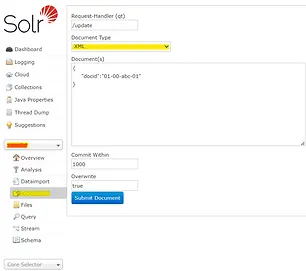
Click Documents
Click Document Type drop down menu
Select JSON from drop down menu

Enter the document details & click Submit Document

After you click Submit Document, Status: success that appears on the right side of the screen confirms that the document is inserted successfully.

Your issue is solved here.