Best AI video editor for talking-head videos in 2026?

Talking-head videos are deceptively difficult to edit.
The footage can look simple with one person, one camera, and one message.
Yet anyone who has worked with interviews, founder videos, podcasts, courses, or YouTube content knows how much time disappears inside a single recording.
- There are pauses that should go.
- Pauses that should stay.
- Repeated answers.
- Sentences that start weakly and end well.
- Tangents. A useful explanation hidden behind two minutes of context.
- A point that needs product footage, a quote, a caption, or one clean visual to make sense.
The hardest part is deciding what the viewer should hear, see, and understand when the video is over.
That is why the best AI video editor for talking-head videos should not only remove silence or add captions. It should help with the actual work of shaping the recording, while still leaving the editor in control of the final result.
ChatCut is built for that kind of work.
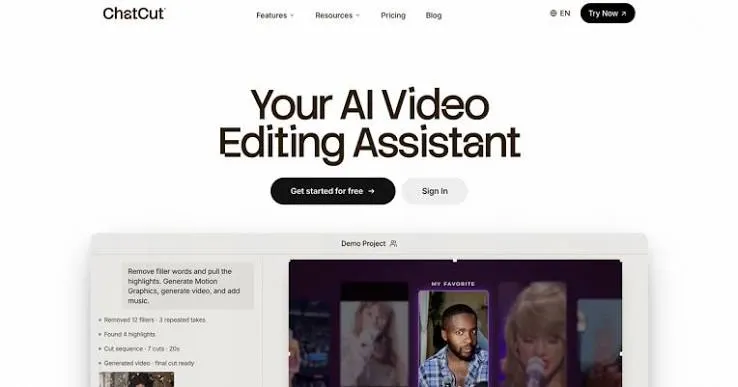
It lets you work through a video in plain language, then keeps the result on an editable timeline. You can clean up a recording, find useful sections, make clips, add captions, bring in B-roll, create different versions, and keep adjusting the cut as the story becomes clearer.
What makes talking-head videos hard to edit?
A talking-head recording often contains more than one video.
A 30-minute founder interview could become:
- A full YouTube video
- A short LinkedIn cut
- Three social clips
- A product launch video
- A customer proof asset
- A video for a sales page
The footage does not need to be edited once. It needs to be understood first and properly.
That means finding the strongest idea, deciding what to leave out, and building versions that fit the place where they will be watched.
A lot of editing tools are good at one small piece of this process. They can create captions, remove pauses, or apply a template. Those functions are useful, but they are not the whole job.
The work gets difficult when you need to move from a long recording to a clear edit without losing the speaker’s voice or making the video feel overworked.
What to look for in an AI video editor for talking-head videos?
A useful editor should help you get through the repetitive parts of the process without taking away your ability to make decisions.
Here is what matters.
Transcript-based editing
The transcript should be connected to the recording, not treated as a separate document.
When you remove a sentence or select a section of text, the related video and audio should change with it. That makes it easier to find repeated ideas, cut false starts, tighten long answers, and build a shorter version of a conversation.
ChatCut keeps the transcript connected to the underlying footage, so text-based changes can become actual edits in the project.
Control over pacing
Silence removal is helpful until it makes someone sound rushed.
Get Muhammad Bin Habib’s stories in your inbox
Join Medium for free to get updates from this writer.
A good talking-head video needs rhythm. Some pauses are dead space. Others give an idea room to land. Some answers need tightening. Others need the full explanation because the context is the point.
ChatCut can remove long pauses and repetitive sections, but the project remains editable. You can review the cut, restore what matters, and shape the pace instead of accepting a version that feels mechanically clean but humanly flat.
Captions that support the video
Captions should make the video easier to follow. They should not turn every sentence into a visual emergency.
For talking-head content, captions work best when they are accurate, readable, and used alongside a sensible edit. ChatCut can create editable captions as part of the same workflow, so they do not need to be handled in another tool after the cut is done.
Short clips without losing the original context
A strong sentence does not always make a strong clip.
Sometimes it needs the line before it. Sometimes it needs a visual example. Sometimes the clip needs a new opening so a viewer who has never seen the full interview understands why they should care.
ChatCut helps turn longer recordings into shorter versions, but the editor can still review the selection, adjust the opening, and build a clip that stands on its own.
Support visuals and B-roll
Talking-head footage becomes tiring when the screen never changes. It becomes worse when the screen changes for no reason.
The best support visuals clarify the point being made. A product recording can show what the speaker is describing. A generated visual can fill a gap where no footage exists. A motion graphic can make an important idea easier to understand.
ChatCut lets users add B-roll, generate images or video, use product footage, and create motion graphics inside the edit. That makes it easier to keep visuals connected to the actual story rather than treating them as decoration.
Different versions from one recording
One recording should not require five separate editing projects.
A founder video may need a landscape version for YouTube, a vertical social clip, a shorter sales asset, and a cut for a product page. The core material stays the same. The audience and format change.
ChatCut makes it easier to create and manage those versions from the same project, instead of starting from a blank timeline every time.
Why ChatCut is a strong choice for talking-head editing?
ChatCut is not built around the idea that a prompt should replace the whole editing process.
It is built around the reality that editing has a lot of repetitive work before the important decisions can happen.
You can ask ChatCut to:
- Remove long silences and repeated takes
- Find strong parts of an interview
- Create a shorter version of a recording
- Add and edit captions
- Reframe footage for vertical video
- Add product recordings and B-roll
- Generate missing images or video assets
- Add motion graphics, music, voiceover, or sound effects
- Export the final project or continue refining it on a multi-track timeline
The value is not that every edit happens automatically.
The value is that you spend less time doing work that adds little judgment, and more time making sure the video says the right thing.
For founder videos, podcasts, interviews, courses, and creator content, that is usually the difference between a recording that stays in a folder and a video that actually gets used.
Try ChatCut’s AI video editor if you want a faster way to edit talking-head footage without losing control of the cut.