Day 4 of building my RAG chatbot

After setting up my development environment, processing a university brochure, and generating embeddings, it was time to bring everything together.
Day 4 was about turning individual components into a working RAG application.
Until Day 3, I had been working on preparing the knowledge source. Now I needed to build the complete pipeline that could accept a user’s question, retrieve relevant information from the document, send that information to a language model, and display a grounded answer through a web interface.
This was the point where the project started to feel like a real application rather than a collection of scripts.
1. Revisiting the RAG Architecture
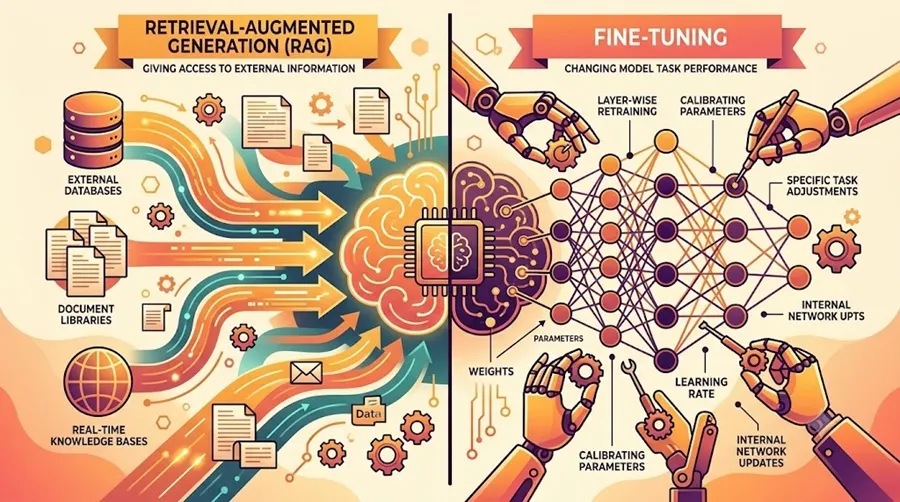
Before integrating the components, I needed to understand how data would flow through the application. The architecture I implemented was:
User Question → Query Embedding → Similarity Search → Top-K Retrieval → Context Construction → Groq LLM → Answer with Sources
Each component has a specific responsibility.
- Embedding model: Converts the user’s question into a numerical vector.
- Retrieval layer: Compares the query vector against the document chunk embeddings.
- Context builder: Collects the most relevant text chunks and their source page numbers.
- LLM layer: Uses the retrieved context to formulate a natural-language answer.
- Streamlit frontend: Provides the interface for asking questions and inspecting the retrieved sources.
The important distinction is that the language model does not need to answer every question from its general training knowledge. The application first retrieves relevant passages from the selected document and supplies them as context.
2. Implementing Semantic Retrieval with Python and NumPy
I used the sentence-transformers/all-MiniLM-L6-v2 model to represent text as numerical embeddings. The document embeddings had already been generated and saved in week01/output/embeddings.json. Rather than recomputing every document embedding for each question, the application loads the existing data and generates an embedding only for the incoming query.
The retrieval process works as follows:
- Convert the user’s question into an embedding.
- Compare it with the stored embeddings of the document chunks.
- Calculate cosine similarity to estimate how closely each chunk matches the query.
- Rank the chunks by similarity.
- Return the top five chunks for the RAG pipeline.
In rag_pipeline.py, I implemented the retrieval logic in a separate function:
def retrieve_chunks(question, top_k=TOP_K):
    # Embed the question
    # Calculate cosine similarity
    # Rank chunks by similarity
    # Return the top-k results
    ...
The snippet illustrates the function’s role; the complete implementation is available in the project repository. I also retained the filtering logic that excludes a table-of-contents chunk from retrieval. This helped avoid returning a contents page instead of the actual section containing the information.
One lesson from this stage was that semantic similarity is not the same as answer correctness. The quality of the final answer depends heavily on whether retrieval finds the right passages.
3. Connecting the Retrieval Pipeline to Groq
Once retrieval was working, I needed a language model to turn the retrieved passages into a readable answer. I integrated the Groq API using the Python groq SDK and selected the model openai/gpt-oss-20b. The integration is handled in rag_pipeline.py, keeping the retrieval and answer-generation logic separate from the user interface. The answer-generation function constructs a context from the retrieved chunks, including their source PDF page numbers. It then sends the context and user’s question to the model through the chat completions API.
Conceptually, the request contains:
- System instructions: Answer using the supplied document context and identify relevant source pages.
- User question: The information the user wants to find.
- Retrieved context: The text passages selected by semantic search.
The model is instructed to stay grounded in the supplied context rather than inventing missing details. I also configured the generation temperature to 0.2 to encourage relatively consistent responses. The API key is loaded from a local .env file through python-dotenv, rather than being hardcoded into the Python source files. This separation matters for two reasons: credentials are easier to manage, and the application code can be shared without exposing the API key.
4. Building the Web Interface with Streamlit
The next challenge was making the pipeline usable without running a Python script manually for every question. For this, I used Streamlit, a Python framework for building interactive web applications.
I created app.py as the frontend and kept rag_pipeline.py responsible for retrieval and generation. This separation makes the project easier to understand, test, and extend.
The Streamlit application includes:
- A chat-style interface for entering questions and displaying responses.
- Session-state-based conversation history.
- An assistant response generated by the RAG pipeline.
- An expandable “View retrieved sources” section.
- Source page numbers, similarity scores, and retrieved text for inspection.
The frontend calls the pipeline through a single entry point:
answer, retrieved_chunks = answer_question(question)This function returns both the generated answer and the retrieved chunks. That is useful because the user can read the answer while also inspecting the evidence selected by the retrieval layer. Streamlit’s chat elements and session state make it possible to build this interactive experience using Python, without creating a separate JavaScript frontend. The official documentation explains the underlying chat-interface approach using components such as st.chat_input and st.chat_message.
5. Testing the Complete Application
With the interface connected to the backend, I tested the complete workflow in the browser. The source document was a University brochure.
Test 1: Admission Eligibility
Question: What is the minimum percentage required for admission to M.Sc. Informatics?
Get Nitisha Aggarwal’s stories in your inbox
Join Medium for free to get updates from this writer.
The chatbot retrieved the relevant admission passage and returned the minimum eligibility percentage of 50% for the Unreserved (UR) category, citing page 11 of the PDF.

This test checked whether the system could retrieve a specific fact and connect the generated response to its source.
Test 2: CUET-PG Cutoff and Interview Criteria
Question: What are the CUET-PG cutoff criteria and interview marks for admission?
The brochure states that admission depends on CUET-PG performance and university norms, with final selection based on cutoff and interview marks.

The brochure states that admission depends on CUET-PG performance and university norms, with final selection based on cutoff and interview marks. However, the brochure did not provide the exact numerical cutoff or interview weightage in the retrieved passage. The chatbot correctly communicated that limitation instead of inventing figures.
What These Tests Demonstrated
The tests helped verify that the major components were connected:
- The question could be converted into an embedding.
- Relevant document passages could be retrieved.
- The Groq model could generate an answer from the supplied context.
- The Streamlit interface could display the answer and supporting passages.
They were functional tests of the workflow, not a comprehensive evaluation of retrieval precision or answer accuracy across a large test set. Improving those measurements is one of the next steps.
6. Understanding the Complete Code Structure
I organized the project so that the main responsibilities were separated.
RAG-Chatbot/
│
├── app.py                  # Streamlit web interface
├── rag_pipeline.py         # Retrieval and answer generation
├── test_groq.py            # Groq connection test
├── README.md               # Project documentation
├── .gitignore              # Files excluded from Git
├── .env                    # Local API credentials
│
└── week01/
    ├── documents/          # Source documents
    ├── output/             # Extracted text, chunks, embeddings
    ├── embed_chunks.py     # Embedding generation
    └── search_chunks.py    # Initial semantic search experiment
The .env file and generated document data are kept out of version control through .gitignore. The exact set of tracked files is controlled by Git, so sensitive files must be checked before committing or pushing.
This organization also makes it easier to improve retrieval without rewriting the frontend, or redesign the frontend without changing the underlying retrieval algorithm.
7. Debugging, Dependencies, and Model Integration
The final integration stage also involved troubleshooting.
I worked through environment and package setup issues, tested the Groq connection separately, and checked model availability before connecting it to the full pipeline. Keeping a dedicated test_groq.py script was useful because it allowed me to isolate API connectivity problems from retrieval or Streamlit problems. I also learned that an API integration involves more than installing a package. The credentials, selected model ID, request format, and application code must all work together.
Testing these pieces separately made the debugging process more manageable.
8. Preparing the Project for GitHub
Once the chatbot was working in the browser, I prepared the project for sharing.
This included:
- Reviewing
.gitignoreto exclude.env, Python cache files, and generated document outputs. - Writing
README.mdwith the project overview, architecture, technologies, setup instructions, and sample questions. - Checking the files included in the Git commit.
- Committing the application code and documentation.
The project was committed locally with the message:
Build University of Delhi RAG chatbot
The final Git check showed the intended files in the commit: .gitignore, README.md, app.py, rag_pipeline.py, and test_groq.py.
I then completed the GitHub publishing step, making the repository available for others to inspect. Publishing the source code is separate from deploying the Streamlit application to a public hosting service.
9. What I Learned from Building the End-to-End Pipeline
This four-day project helped me connect several concepts that I had previously explored individually.
Embeddings are only one part of a RAG system. They provide a way to compare questions with document passages, but they do not generate answers by themselves.
Retrieval quality directly affects generation quality. If the wrong chunks are selected, even a capable language model may produce an incomplete or irrelevant answer.
Source visibility improves debuggability. Showing retrieved passages, similarity scores, and page numbers makes it easier to understand why the system generated a particular response.
A working interface is part of the engineering process. Streamlit helped me turn a Python pipeline into an interactive application that could be tested with realistic questions.
Version control is more than uploading files. Documentation, careful staging, and excluding credentials are essential parts of preparing a project for others to use.
Final Reflection
Over four days, I went from configuring Python and debugging my development environment to building a working RAG chatbot with semantic search, a hosted LLM, a Streamlit interface, source inspection, and GitHub version control.
The most valuable outcome was not simply that the chatbot worked. It was learning how the components fit together, how to isolate problems during integration, and how to test the system against the actual information in its source document.
This concludes my four-day build milestone, but the next phase is about making the retrieval more accurate, the evaluation more systematic, and the application more reliable.
Follow the Journey
- Day 1: Getting Python, Anaconda, and VS Code to Work Together
- Day 2: Document Processing: Text Extraction, Chunking, and Embeddings
- Day 3: From Text Chunks to Numerical Vectors
- Day 4: From Semantic Retrieval to a Working RAG Chatbot — this article.