Learn Microsoft Access tips for database development, from Experts

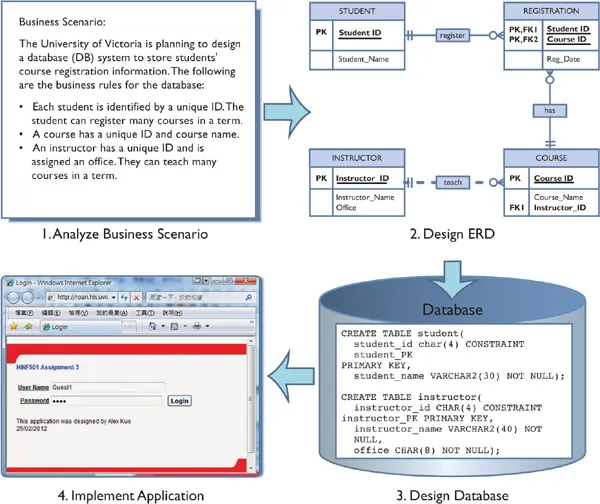
Database development is a process of obtaining real-world data, analyzing the requirement, designing the data in line with it, and generating a structured and meaningful output.
This article aims to give a basic concept of developing a database and the importance of normalization for designing tables and reports in Microsoft Access.
What complicates a database?
For instance, a hotel provides its customers with food, drink, and accommodation and wants to record what each one spends on each cost category so that each client can be presented with an itemized bill of their expenses.

Characteristics of a database
How you would design the table depends primarily on the requirements. But, keeping in mind the following factors can surely guide you:
· Completeness — Each user can access the required data. And there should be the scope of ad hoc queries, which may not be explicitly given as part of a statement of data requirements.
· Integrity — Data should be both consistent, accurate, and authentic.
· Flexibility — Database always a chance of evolving; it should have the scope of satisfying changing user requirements (without much effort).
· Efficiency — Response times for accessing the data should be within control.
· Ease of use — Data should be flexible enough so that it can be accessed and operated in the required ways.
To start with, that’s a lot of things to keep in mind! But, a good database should ideally have all the above-mentioned characters.
Let’s now check out the factors which, if set straight, can help you to design a good database with minimal efforts.
Essential factors for designing a database
Normalization
Normalization is the process of creating and organizing tables in a manner to reduce redundancy and data dependency. It divides larger tables into smaller tables and links them using relationships.
A table that isn’t normalized will not only be too long in size, but it will also be too complicated to handle. Let us consider a Student’s data:

Branch and HOD though the same for all, appear multiple times, causing data redundancy.
Now, if 100 more students get admitted to the same branch, then the branch and hod info will appear for 100 more times each — imagine the size of the database! And what if Mr.X resigns or a few students decide to move to some other branch?
Types of normalization
Normalization is used to organize and optimize a database. We implement the process using relationships and rules.
Get Office Accelerators’s stories in your inbox
Join Medium for free to get updates from this writer.
The rules are known as ‘normal forms,’ and there are five normal forms used with Microsoft Access. Each rule must satisfy its preceding normal form before it is implemented.
First Normal Form(1NF):
A record or field should contain only one piece of information. Analysis of data, querying, and filtering would be a breeze in this case. If data of a similar type is placed in one field, say two phone numbers of a single person in the same field, then sorting or querying it would be not very easy. This needs to be separated meaningfully, and we can perform better actions on data, thus simplified. Simplification of data by implementing 1NF can be achieved using the below steps:
- Eliminate multiple columns for similar data in individual tables
- Create an individual table for each set of related data
- Identify each table using a primary key
Second Normal Form (2NF):
Key fields are unique to each record. Key fields can be a single field or multiple fields, depending on the data. And all data in that record should be dependent on the unique key. If no dependency is seen, such fields should be moved to relevant or separate tables eliminating the duplicate data in the table. This is known as 2NF and can be implemented by following the below steps:
· Separate tables are to be created for a set of values that apply to multiple records
· Establish a relationship between these tables using a foreign key.
Third Normal Form (3NF):
Redundancy should be eliminated by placing such info into separate tables. When a data field has the same type of information associated with it each time it is used and has one or more fields of association, then that data can be separated as another table. The third normal form can be achieved as below:
· Fields not dependent on the key are to be eliminated.
Fourth Normal Form (4NF):
It is implemented rarely, and its implementation requires to break down of data into tables such that no transitive dependencies are to be present, i.e., BCNF and no multi-valued dependencies should exist.
Fifth Normal form (5NF):
Reducing tables such that their join results in no loss of data can be said as 5NF.

Tables and relationships
Two tables are said to be related when the foreign key of one table refers to the primary key of another table. Tables are split down for simplicity during normalization and are connected to each other using relationships to link data. Relationships help establish a connection between multiple tables and combine data in a meaningful manner, along with maintaining their consistency. One-to-one, one-to-many, many-to-many relationships can be established between tables.
Importance
We can reap the benefits of data integrity when these relationships are implemented on data. MS Access provides various ways to synchronize your data across all tables, depending on the relationship. Enforce referential integrity, Cascade Update related fields, Cascade Delete related Records, options make this possible.
Primary and secondary keys
Primary Key: A unique value field throughout the table is known as the primary key. Since primary keys are unique for each record, they can be used as a reference to the complete record. It can be created automatically by Access, or we can specify any field as a primary key during table creation. Though automated primary keys can be overridden, doing so is not recommended.
Secondary Key: It can be a combination of one or more columns and may be unique or may not be unique though it is referred to as a key. It is optional and is enforced only through the index. Its scope is limited to the same table it is present in. Though Secondary key is sometimes confused with ‘candidate key’ or ‘alternate key,’ they all have a different meaning.