Building AJAX-Based Employee Status Updates in Oracle APEX Using apex.server.process()
Modern web applications are expected to respond quickly to user actions without unnecessarily reloading the entire page.
Oracle APEX provides several features for creating responsive applications, and one of the most useful JavaScript APIs for server-side communication is apex.server.process().
The apex.server.process() API allows JavaScript running in the browser to call an APEX Ajax Callback process on the server. This makes it possible to execute PL/SQL, update database records, return information to the browser, and refresh only the required part of the page.
In this article, we will build a simple employee management example using an APEX_EMPLOYEES table.
The application will allow a user to:
- Select an employee
- Display the employee’s current status
- Update the employee’s status
- Display a success message
- Refresh only the employee report without reloading the entire page
1. Understanding the Use Case
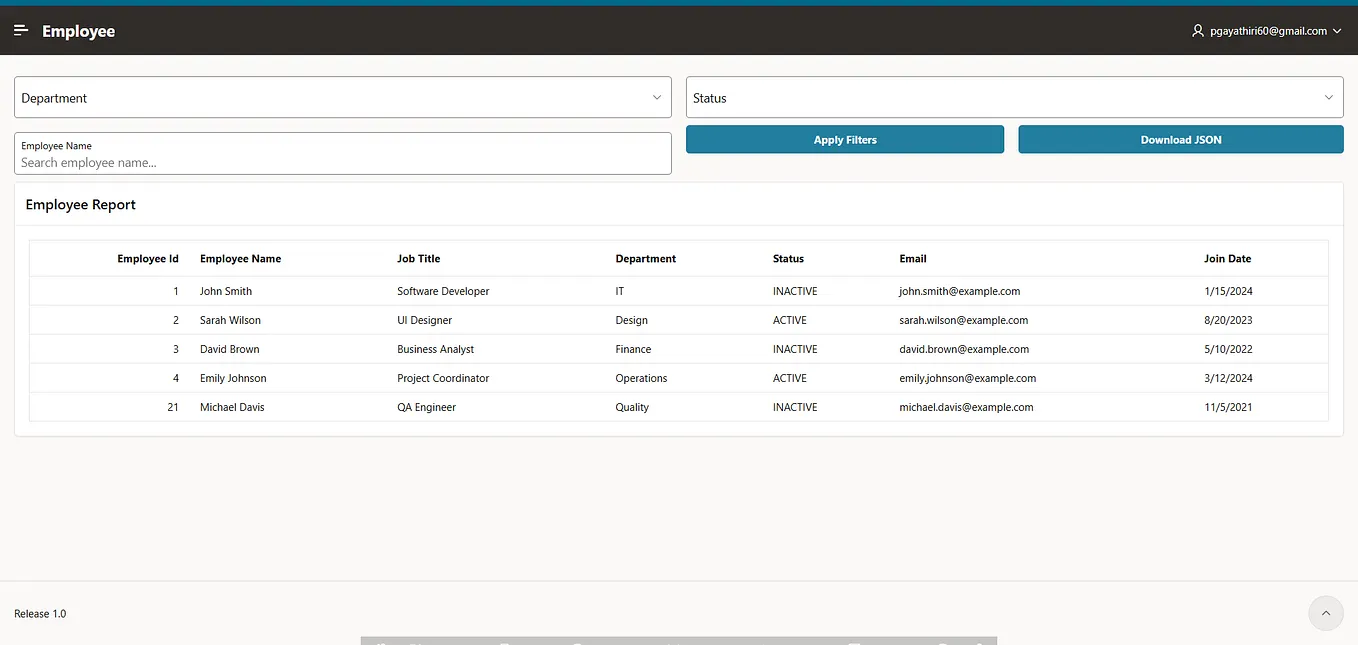
For this example, we will use an employee table containing the following columns:EMPLOYEE_IDUnique employee identifier,EMPLOYEE_NAMEEmployee name,JOB_TITLEEmployee's job title,DEPARTMENTEmployee department,STATUSCurrent employee status,EMAILEmployee email address,JOIN_DATEEmployee joining date
The requirement is simple:
- Select an employee.
- Display the employee’s current status.
- Click Update Status.
- Update the employee status in the database.
- Display a success message.
- Refresh the employee report without submitting the entire page.
2. Creating the Employee Select List
Create a Select List item named:
P7_EMPLOYEE_IDThe List of Values can use the following SQL:
SELECT
    employee_name AS display_value,
    employee_id   AS return_value
FROM apex_employees
ORDER BY employee_name;
The user sees the employee name, while APEX stores the corresponding EMPLOYEE_ID.
For example:
Employee
┌──────────────────────────────┐
│ Emily Johnson             ▼  │
└──────────────────────────────┘
Internally:
P7_EMPLOYEE_ID = 4This separation between the display value and return value is useful when working with database records.
3. Displaying the Current Employee Status
Create a Display Only item named:
P7_STATUSThe source can be:
SELECT status
FROM apex_employees
WHERE employee_id = :P7_EMPLOYEE_ID;
Now create a Dynamic Action on:
P7_EMPLOYEE_IDConfigure it as follows:
Event:
ChangeSelection Type:
Item(s)Item:
P7_EMPLOYEE_IDCreate a True Action:
Set ValueConfigure the Set Value action as:
Set Type:
SQL StatementSQL Statement:
SELECT status
FROM apex_employees
WHERE employee_id = :P7_EMPLOYEE_ID;
Items to Submit:
P7_EMPLOYEE_IDAffected Item:
P7_STATUSNow, whenever the user selects another employee, the current status is automatically retrieved.
The interaction looks like this:
Select Employee
       ↓
P7_EMPLOYEE_ID changes
       ↓
Dynamic Action executes
       ↓
Status is retrieved from database
       ↓
P7_STATUS is updated
4. Creating the AJAX Callback
The next step is to create the server-side process responsible for updating the employee status.
In Page Designer, create a process under Processing.
Set the process type to:
Ajax CallbackGive it the following name:
UPDATE_EMPLOYEE_STATUSThe Ajax Callback contains the PL/SQL required to update the employee.
BEGIN
UPDATE apex_employees
       SET status =
           CASE
               WHEN status = 'ACTIVE' THEN 'INACTIVE'
               ELSE 'ACTIVE'
           END
     WHERE employee_id = TO_NUMBER(apex_application.g_x01);
COMMIT;
END;
The important part here is:
apex_application.g_x01This value is supplied by JavaScript when apex.server.process() is called.
5. Passing Data from JavaScript to PL/SQL
The employee ID is passed from JavaScript using x01.
For example:
apex.server.process(
    "UPDATE_EMPLOYEE_STATUS",
    {
        x01: employeeId
    }
);
Suppose the selected employee is:
Emily Johnson
Employee ID: 4
The JavaScript request sends:
x01 = 4The Ajax Callback receives this value through:
apex_application.g_x01Therefore, this condition:
WHERE employee_id = TO_NUMBER(apex_application.g_x01)identifies the employee that needs to be updated.
This provides a simple way to pass values from the browser to server-side PL/SQL.
6. Calling the AJAX Process
Create a button with the Static ID:
UPDATE_STATUSThe button will trigger the JavaScript code.
$("#UPDATE_STATUS").on("click", function () {
var employeeId =
        apex.item("P7_EMPLOYEE_ID").getValue();
        apex.server.process(
        "UPDATE_EMPLOYEE_STATUS",
        {
            x01: employeeId
        },
        {
            success: function () {
                apex.message.showPageSuccess(
                    "Employee status updated successfully."
                );
        },error: function (xhr, status, error) {
                console.log("Error:", error);
                console.log("Response:", xhr.responseText);}
        }
    );
});
There are three important parts in this code.
Getting the Employee ID
var employeeId =
    apex.item("P7_EMPLOYEE_ID").getValue();
This retrieves the selected employee ID from the APEX item.
Calling the Ajax Callback
apex.server.process(
    "UPDATE_EMPLOYEE_STATUS",
    {
        x01: employeeId
    }
);
This calls the server-side Ajax Callback and passes the employee ID.
Displaying the Success Message
apex.message.showPageSuccess(
    "Employee status updated successfully."
);
This displays a success notification after the server-side operation completes.
Get Pgayathiri’s stories in your inbox
Join Medium for free to get updates from this writer.
The process name in JavaScript:
UPDATE_EMPLOYEE_STATUSmust exactly match the name of the Ajax Callback process created in APEX.
7. How the AJAX Request Works
When the Update Status button is clicked, the following sequence takes place:
User clicks Update Status
          ↓
JavaScript gets P7_EMPLOYEE_ID
          ↓
apex.server.process()
          ↓
UPDATE_EMPLOYEE_STATUS
          ↓
PL/SQL executes
          ↓
APEX_EMPLOYEES is updated
          ↓
Success callback executes
          ↓
Success message is displayed
For example, suppose the selected employee is:
David Brown
Employee ID: 3
Status: INACTIVE
The JavaScript sends:
x01 = 3The server executes the equivalent update:
UPDATE apex_employees
SET status =
    CASE
        WHEN status = 'ACTIVE' THEN 'INACTIVE'
        ELSE 'ACTIVE'
    END
WHERE employee_id = 3;
The status changes from:
INACTIVE → ACTIVE8. Displaying the Employee Report
Create a Classic Report named:
Employee ListThe report can use the following SQL:
SELECT
    employee_id,
    employee_name,
    job_title,
    department,
    status,
    email,
    join_date
FROM apex_employees
ORDER BY employee_id;
The report displays the current records from the database.
9. Refreshing Only the Report
One of the major benefits of apex.server.process() is that we do not need to reload the entire page.
Give the Employee List region the following Static ID:
employee_reportAfter the Ajax process successfully updates the database, refresh the report using:
apex.region("employee_report").refresh();Update the success callback:
success: function () {
apex.message.showPageSuccess(
        "Employee status updated successfully."
    );
apex.region("employee_report").refresh();
}
Now the complete flow is:
Button Click
     ↓
JavaScript
     ↓
Ajax Callback
     ↓
PL/SQL
     ↓
Database Update
     ↓
Success Message
     ↓
Employee Report Refresh
Only the required report region is refreshed.
The entire page does not need to reload.
10. Refreshing the Report Using a Dynamic Action
The report refresh can also be implemented using an APEX Dynamic Action.
For the Update Status button:
Event
  ↓
Click
  ↓
True Action
  ↓
Refresh
  ↓
Employee List
This approach can be useful when the refresh logic does not need to be controlled directly from JavaScript.
However, when the refresh should happen only after a successful Ajax request, calling:
apex.region("employee_report").refresh();inside the success callback provides direct control over the interaction.
11. Complete Interaction
The final application contains two main interactions.
Selecting an Employee
P7_EMPLOYEE_ID
       ↓
Change Event
       ↓
Dynamic Action
       ↓
Set Value
       ↓
SELECT status
       ↓
P7_STATUS
Updating the Employee
Update Status
       ↓
JavaScript
       ↓
apex.server.process()
       ↓
UPDATE_EMPLOYEE_STATUS
       ↓
PL/SQL
       ↓
APEX_EMPLOYEES
       ↓
Status Updated
       ↓
Success Message
       ↓
Employee Report Refresh
This creates a responsive user experience without requiring a full page submission.
12. Before and After
Before Clicking Update Status
Employee
David Brown
Current Status
INACTIVEEmployee List:
David Brown INACTIVEAfter Clicking Update Status
Employee
David Brown
Current Status
INACTIVE✓ Employee status updated successfully.
Employee List:
David Brown ACTIVEThe database record has been updated, and the report reflects the latest value.
13. Why Use apex.server.process()?
Using an AJAX Callback is useful when an application needs to perform server-side processing without submitting the entire page.
Common use cases include:
- Updating individual records
- Assigning tasks
- Changing record status
- Saving inline changes
- Executing PL/SQL logic
- Loading additional information
- Performing server-side calculations
- Updating dashboard information
- Processing custom buttons
- Refreshing individual APEX regions
Instead of performing a complete page submission, only the required server-side operation is executed.
This can make an APEX application feel more responsive and interactive.
14. AJAX vs Full Page Submission
A traditional page submission follows a flow similar to:
Button Click
     ↓
Submit Page
     ↓
Process Page
     ↓
Database Update
     ↓
Complete Page Reload
With apex.server.process():
Button Click
     ↓
JavaScript
     ↓
apex.server.process()
     ↓
Ajax Callback
     ↓
PL/SQL
     ↓
Database Update
     ↓
Refresh Required Region
The second approach is particularly useful when only a small part of the page needs to change.
For example, if only one report needs to display updated information, there is no need to reload unrelated page components.
15. Error Handling
AJAX requests should also handle errors.
The error callback can be used to identify problems:
error: function (xhr, status, error) {console.log("Error:", error);
    console.log("Response:", xhr.responseText);
}
For a production application, the error can be presented to the user through an APEX error message while detailed information can be logged for troubleshooting.
Server-side validation is also important.
Values received from the browser should not automatically be considered valid. The server-side process should validate the input before performing database operations.
16. Key Takeaways
apex.server.process() provides a straightforward way to connect client-side JavaScript with server-side PL/SQL in Oracle APEX.
In this example, we covered:
- Creating an Ajax Callback process
- Calling an APEX process using JavaScript
- Passing values using
x01 - Reading values through
apex_application.g_x01 - Performing database updates using PL/SQL
- Using Dynamic Actions
- Displaying server-side results in APEX
- Refreshing an individual report region
- Handling AJAX success and error scenarios
The overall pattern can be reused for many enterprise Oracle APEX applications where a user action needs server-side processing without a complete page submission.
Conclusion
apex.server.process() is a useful Oracle APEX API for building responsive, server-driven interactions.
By combining JavaScript, Ajax Callback processes, PL/SQL, and region refreshes, an APEX application can perform database operations while updating only the required parts of the user interface.
The employee status example demonstrates the complete pattern:
Select Employee
      ↓
Display Current Status
      ↓
Click Update
      ↓
JavaScript
      ↓
apex.server.process()
      ↓
Ajax Callback
      ↓
PL/SQL
      ↓
Database Update
      ↓
Success Message
      ↓
Refresh Report
This approach can be extended to more complex scenarios such as task assignment, approval workflows, inline editing, dashboard interactions, and other data-driven Oracle APEX applications.
If you are building Oracle APEX applications and want to create more responsive user experiences, understanding apex.server.process() is an important step toward reducing unnecessary page submissions and creating smoother client-server interactions.