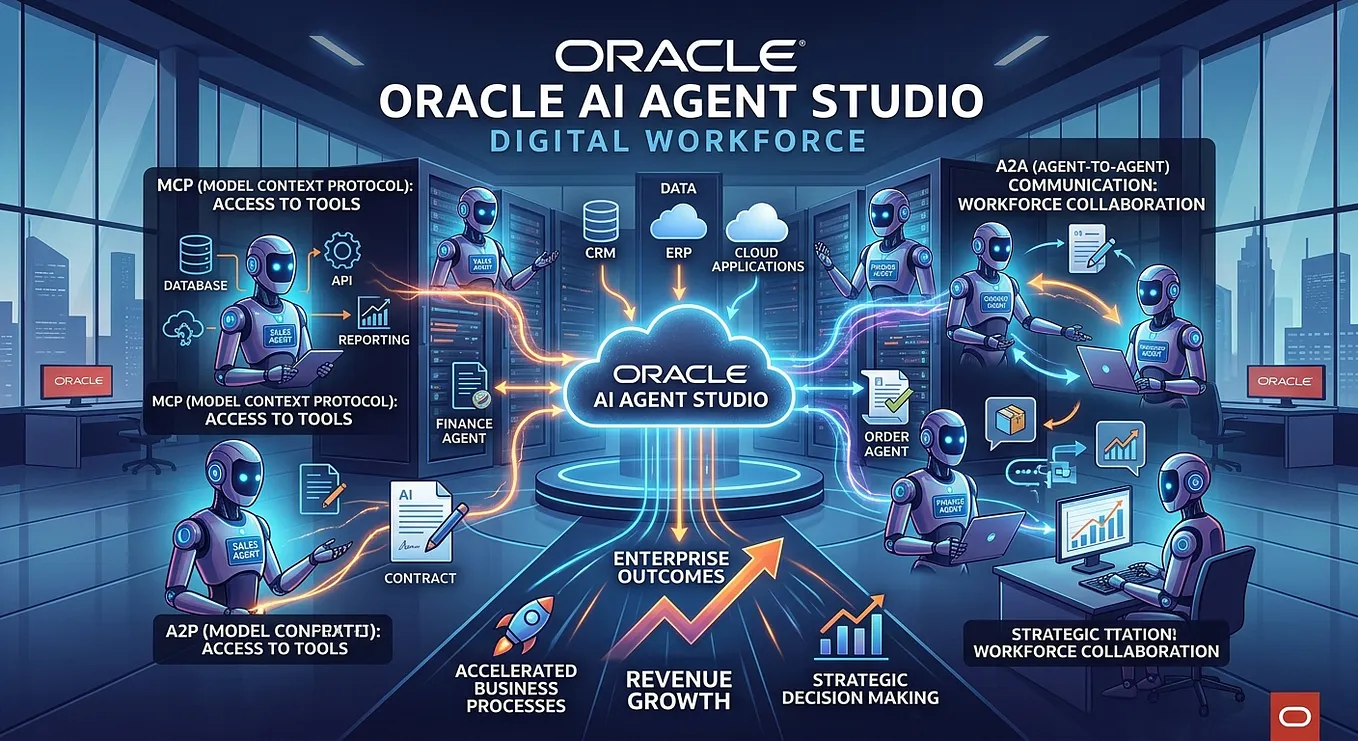
Configuring A2A in Oracle AI Agent Studio

Part 2 of 3: From AI Agents to a Digital Workforce
This is Part 2 of a three-part series on MCP and A2A in Oracle AI Agent Studio.
Part 1 — Understanding the Digital Workforce (Link)
Part 2 — Configuring A2A in Oracle AI Agent Studio (this article)
Part 3 — Invoking Oracle Agents from External Agentic Platforms

In Part 1, we explored the idea of a Digital Workforce — a coordinated ecosystem of specialized AI Agents that collaborate across applications and departments, much like human teams do today. We walked through a Lead-to-Cash scenario where a Sales Agent, an Order Agent, a Subscription Agent, and a Revenue Recognition Agent each played a distinct role in executing a business process end-to-end.
The question we left unanswered was the practical one: how does one actually make an Oracle AI Agent Studio agent participate in that kind of collaboration?
That’s what this article is about.
From Concept to Configuration
In human organizations, making someone part of a team involves a few things: giving them a clear job description, making them discoverable to colleagues, and establishing a shared language for how people can reach them and assign them work.
A2A does the same thing — but for AI Agents.
When we configure A2A for an agent in Oracle AI Agent Studio, we’re essentially doing three things:
- Publishing the agent so it can be discovered by other agents and platforms
- Defining what the agent can do in a machine-readable format others can interpret
- Establishing how it should be invoked — including authentication, input formats, and task management
Let’s walk through each of these.
The Agent Card: The Agent’s Digital Identity
In A2A, every agent publishes an Agent Card — a machine-readable JSON document that acts as its complete professional profile.
Think of it as a LinkedIn profile for your AI Agent. It tells any other agent or platform exactly what this agent is capable of, what inputs it accepts, whether it can stream responses, and critically, how to invoke it.
In Oracle AI Agent Studio, the Agent Card is accessible through a standard .well-known endpoint:
GET https://{pod_host}/api/fusion-ai/orchestrator/a2a/v1/{AGENT_CODE}/.well-known/agent.jsonA well-formed Agent Card for an Order Management Agent in our Lead-to-Cash scenario captures capabilities like streaming support, accepted input modes (text), authentication schemes (Bearer), and a skills definition that describes what the agent actually does. The more precisely this is defined, the better other agents — or orchestration platforms like watsonx Orchestrate or LangGraph — can discover and correctly invoke it.
As of Release 26C, Oracle now auto-populates Agent Card skills directly from the agent schema we define within AI Agent Studio. This removes manual effort and ensures the Agent Card stays synchronized with the agent’s actual capabilities as it evolves — a meaningful quality-of-life improvement for teams managing agent libraries at scale.
The Four-Step A2A Flow
Once an agent is configured and its Agent Card is published, the A2A interaction follows a consistent four-step pattern:
Step 1 — Discover
External agents and platforms query the Agent Catalog (also called the Agent Registry) to find agents that match what they’re looking for. Semantic search is now live — you no longer need to know the exact agent name; a description of the capability is sufficient.
POST /api/fusion-ai/orchestrator/a2a/v1/agents/search
Body: { "query": "order management" }
Step 2 — Retrieve the Agent Card
Once discovered, the invoking agent fetches the full Agent Card to understand the agent’s capabilities, endpoint, and authentication requirements before making any calls.
Step 3 — Send Message (Invoke)
The invoking agent sends a structured request to the agent’s endpoint. The request carries the user prompt or task instruction along with any contextual parameters. The response returns a task id.
POST /api/fusion-ai/orchestrator/a2a/v1/{AGENT_CODE}
Body: { "method": "message/send", "params": { "message": { "role": "user", "parts": [{ "text": "Create sales order for Opportunity #OPP-10234" }] } } }
Step 4 — Poll for Results
Enterprise tasks rarely resolve in milliseconds. A2A’s asynchronous model acknowledges this. The invoking agent uses the returned task id to poll for status — from working to completed — and retrieves the result when ready. Streaming support for results is also now live, enabling more responsive interactions for agents that benefit from incremental output.
Get Dhinesh Rajagopalan’s stories in your inbox
Join Medium for free to get updates from this writer.
This asynchronous pattern is one of A2A’s most valuable characteristics for enterprise use cases. A Revenue Recognition Agent doesn’t need to hold an open connection waiting for an upstream Order Agent to finish. It sends the request, manages other work, and checks back when it’s ready.
How To: Screenshots for Guidance
A few handy links for JWT generation for use in the Postman Payload:
A Note on Authentication
Security in an agent-to-agent world is non-negotiable.
Oracle AI Agent Studio uses OAuth 2.0 Bearer tokens for A2A authentication, backed by OCI IAM and IDCS. When configuring agents for A2A, it’s important to ensure the invoking identity has the appropriate roles and that token exchange is set up correctly — particularly for cross-platform integrations where an external orchestrator is invoking a Fusion agent on behalf of a business user.
This is also where the architecture starts to matter significantly. Agents should be invoked as the actual end user where possible, not as a generic service account — both for audit traceability and for Fusion’s role-based data security to function correctly.
Bringing This Back to Lead-to-Cash
Returning to our scenario: when the Sales Agent in Salesforce closes a deal and needs to initiate an order in Oracle Fusion, the A2A flow is what makes this work in a standards-compliant, governance-ready way.
The Sales Agent doesn’t need to know the internal API structure of Oracle Fusion Order Management. It queries the Agent Catalog, discovers the Order Agent, reads its Agent Card, sends a message with the closed opportunity context, and waits for confirmation. The Order Agent handles everything inside Oracle Fusion — and in turn, delegates to the Subscription Agent via the same protocol.
Each hand-off is standardized. Each step is auditable. Each agent stays within its area of expertise.

What 26C Delivers: A Platform Coming of Age
If 26B was about introducing the Digital Workforce concept, Release 26C is about making it production-ready. Several platform-level capabilities have landed that change the maturity profile of agent development significantly.
The Debugger
Until 26C, troubleshooting an agent workflow meant publish, test in conversation, guess why it went wrong, and repeat. The new Debugger changes this fundamentally. It provides node-level visibility into execution paths — inputs, outputs, context variables, and LLM reasoning — with the ability to set breakpoints, step through execution, and rerun from any specific node without replaying the entire flow.
For implementation teams, this is the single feature that most immediately improves agent quality. You can now show a client exactly why an agent made a particular routing decision — and fix it before go-live.
The CLI and VS Code Extension
AI Agent Studio now ships with a command-line interface and a VS Code extension, enabling developers to create, edit, validate, and test agent artifacts locally. This moves Oracle AI agent development from a browser-only activity into a proper software development lifecycle — with version control, peer review, and the ability to pair with tools like Claude Code for natural-language-assisted artifact creation.
For programs managing ten or more agents across an ERP transformation, this matters significantly.
Policy Models
AI agents are probabilistic by nature. For compliance, approval thresholds, and financial controls, that’s a problem.
Policy Models introduce a deterministic guardrail layer inside AI Agent Studio. You define your business rules — eligibility criteria, budget limits, approval hierarchies — and AI Agent Studio generates executable code that implements them. At runtime, a dedicated Policy Node invokes the policy without an LLM in the loop. The agent handles orchestration; the policy model handles the rule.
In a Lead-to-Cash context, this is how you enforce credit limits on the Order Agent or validate subscription eligibility before the Subscription Agent commits a contract — deterministically, not probabilistically.
Long-Running Sessions
Previously, complex agent interactions had to be completed in a single session. Release 26C removes this constraint. Agents can now maintain extended, multi-day sessions — pausing on approvals, waiting for upstream data, or resuming after a user steps away — with full conversational context preserved.
This is the foundation for agents that mirror how finance and operations professionals actually work: across multiple interactions, over days, on a single business task. Period-end close assistance, multi-step procurement reviews, and invoice dispute resolution are all use cases that simply couldn’t be handled reliably before this.
Long-Term Memory
Agents now support two forms of persistent memory. Episodic memory stores automatically generated summaries of past interactions per user per agent, with semantic search at the start of each new conversation to inject relevant context. User preferences — how a particular user likes agents to respond — are stored and shared across agents, not just the one that learned them.
The practical effect: agents stop feeling like they’re meeting the user for the first time on every session. For knowledge-intensive finance processes where context accumulates over months, this is a meaningful shift in usability.
One Migration Note
Release 26C also officially deprecates AI Configurator — the HCM Experience Design Studio prompt editor. All prompt configuration, editing, and agent management now happens exclusively inside AI Agent Studio. If you have prompts configured in AI Configurator in your environment, prioritize auditing and migrating them before your 26C upgrade window. The old tool remains temporarily accessible for copy-paste, but it’s going away.
Up Next: Part 3
In Part 3, we’ll move from Oracle AI Agent Studio as the host of agents to Oracle Fusion agents being invoked from external agentic platforms — specifically, how orchestrators like IBM Consulting Advantage, watsonx Orchestrate, LangGraph, and AWS Bedrock AgentCore can act as the conductor to build industry grade workflows leveraging Oracle Fusion agents over A2A.
The agent is configured. The card is published. The platform is production-ready.
In Part 3, we dial in from the outside.