Portra Film and Lightra Presets

日本語はnoteに:

Lightroom Presets: Lightra / Lightri-X
PayPal: $70 USD
Lightra and Lightri-X are original Lightroom presets designed to easily recreate the look of Kodak Portra 400 and Tri-X 400 films using either the desktop version of Lightroom/Camera Raw or the free Lightroom Mobile app. They work beautifully with JPEGs or RAW files shot on iPhone, other smartphones, or digital cameras.
These presets are finely tuned to match the natural tones of my own home-scanned film negatives, offering a faithful color and contrast balance. They’re also useful for previewing how your shots might look before shooting on actual film.
For smartphone users, simply shoot in JPEG, import to Lightroom Mobile, apply the preset, and share directly — no need to export a new edited version to your camera roll. Just treat it like posting text to social media. For more refined editing, a slight adjustment of white balance, exposure, or contrast will be enough.
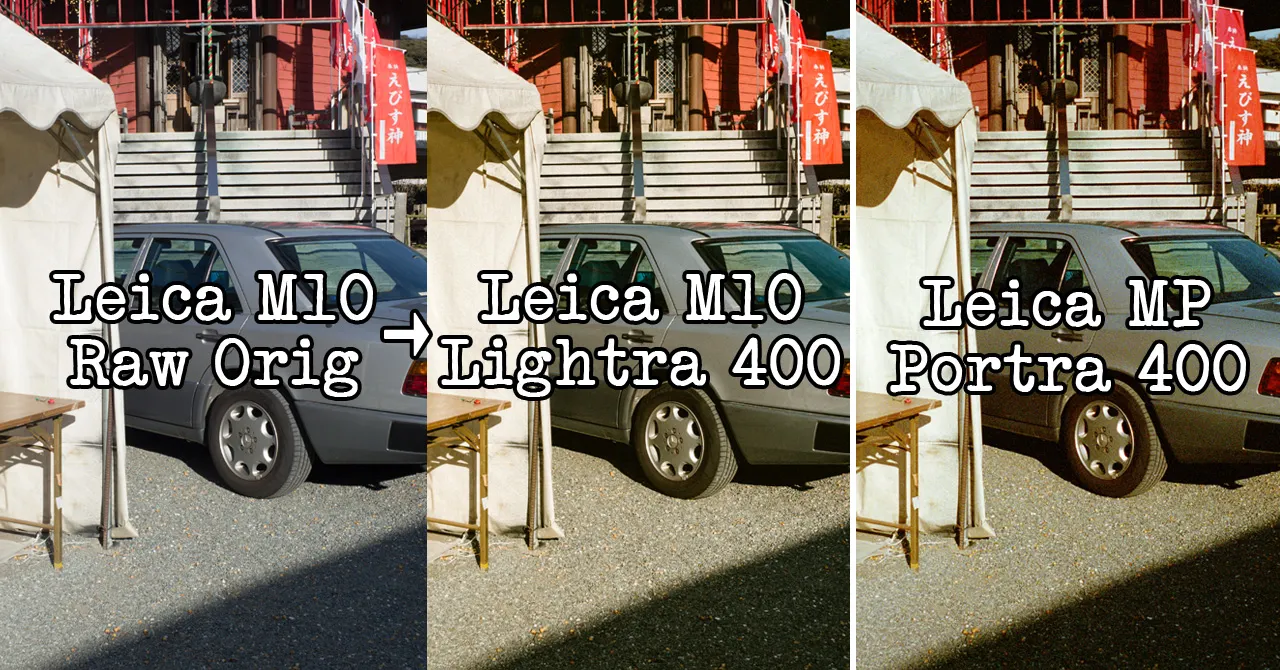
In this article, I’ve compared photos taken with digital cameras (Leica M9-P and Leica M10-R BP) processed with the Lightra preset, alongside photos of the same scenes shot on film with a Leica MP + Kodak Portra 400. The images are shown in order: Digital Original → Lightra → Portra. The lenses used were both Summicron 35mm, 6-element and 7-element versions.
Applying the preset adjusts the base tones and colors toward a film-like look, so with just a light tweak of white balance or tone, you can easily “Portra-fy” your digital photos. I hope this comparison helps as a reference when considering purchasing the preset.
Get Shin Noguchi’s stories in your inbox
Join Medium for free to get updates from this writer.
Original: digital image
Lightra: preset applied + fine adjustments
Portra cropped: film image cropped for digital comparison
Portra non-cropped: full, uncropped film original


Here’s a screen recording showing the quick process of shooting with an iPhone and sharing it on social media using Lightra.