🗄️ ServiceNow Tables, Fields & Dot-Walking Explained: The Data Foundation Every Developer Must Know

Before you can build workflows, automate anything, or write a single line of script in ServiceNow, you need to understand where the data actually lives. That’s Tables. Everything in ServiceNow — every incident, every user, every asset — is just a row in a table somewhere. Master this concept, and everything else in ServiceNow starts making sense. 🧠
Let’s break down Tables, Table Fields, Field Types, Reference Tables, and the powerful (but often confusing) concept of Dot-Walking. 👇
🗂️ What Is a Table in ServiceNow?
A Table in ServiceNow is exactly what it sounds like — a database structure made up of rows (records) and columns (fields), just like a spreadsheet, but connected to the entire platform’s logic, security, and UI.
Every module you use — Incident, Problem, Change Request, User, Asset — is backed by a table.
Key table concepts:
- 🧾 Base Table — the parent table other tables can extend from (e.g.,
Task [task]is the base table for Incident, Problem, and Change) - 🧬 Extended Table — a table that inherits fields from a base table, then adds its own (e.g.,
Incident [incident]extendsTask) - 🏷️ Table Label vs. Name — the label is what users see (“Incident”), the name is the backend identifier (
incident) used in scripts and APIs
🎯 Why it matters: Understanding table hierarchy (parent-child relationships) is critical — a Business Rule on the Task table runs on Incidents, Problems, AND Changes, since they all extend it.
📋 Table Fields — The Columns That Hold Your Data
A Field (also called a Column or Element) is a single piece of data captured within a table — like Short Description, Priority, or Assigned To on the Incident table.
Every field has:
- 🏷️ Column Label — the friendly display name
- ⚙️ Column Name — the backend name, always prefixed with
u_for custom fields (e.g.,u_department) - 📏 Max Length — how much data the field can store
- 🔒 Mandatory / Read-only / Active attributes — controlling behavior on forms
🎯 Why it matters: Fields are where business logic actually hooks in — Business Rules, Client Scripts, and UI Policies almost always trigger off changes to specific fields.
🧩 Field Types — Choosing the Right Data Container
ServiceNow gives you a rich set of field types, each suited to a different kind of data. Picking the right type isn’t cosmetic — it directly affects validation, performance, and how the platform renders the field on forms.

🎯 Why it matters: Choosing String instead of Reference for something like "Assigned To" would break relational integrity — you'd lose the ability to link to actual User records, run reports, or dot-walk (more on that below👇).
🔗 Reference Fields & Reference Tables — Connecting Data Across the Platform
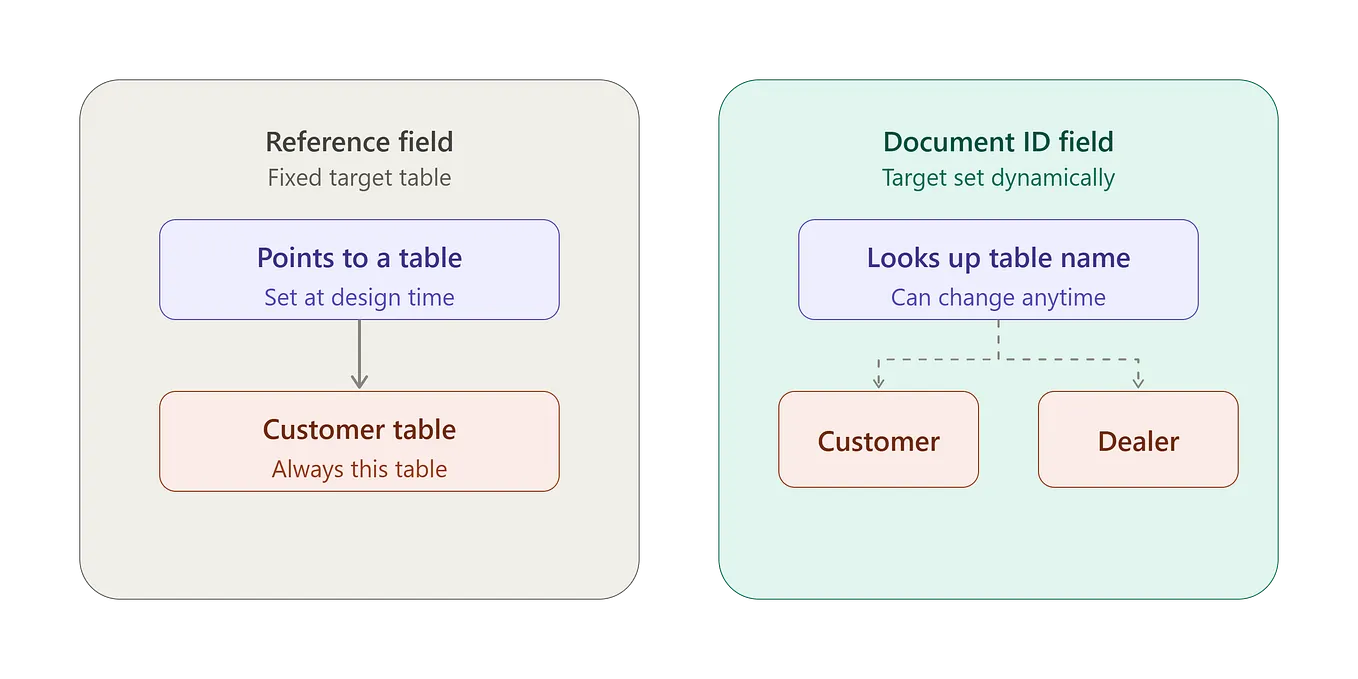
This is where ServiceNow really starts to feel powerful. A Reference Field doesn’t store raw text — it stores a pointer (sys_id) to a record in another table, called the Reference Table.
Example: The Assigned To field on Incident is a Reference field pointing to the sys_user table. So instead of typing a name as plain text, you're linking directly to a real User record — with all their attributes (email, manager, department) instantly accessible.
Get Shubh Prakash Shukla’s stories in your inbox
Join Medium for free to get updates from this writer.
Key parts of a Reference field:
- 🎯 Reference Table — which table the field points to (e.g.,
sys_user,cmdb_ci) - 🔍 Reference Qualifier — a filter that restricts which records show up in the lookup (e.g., only “Active” users)
- 🧹 Display Value — what shows on the form (usually the
Namefield of the referenced record)
🎯 Why it matters: Reference fields are what make ServiceNow relational instead of flat — they let one record “know about” another, enabling reporting, automation, and dot-walking across the entire data model.
🚶♂️ Dot-Walking — Traversing Relationships Like a Pro
Dot-Walking is the technique of accessing fields on a related table through a Reference field — using dots (.) to "walk" from one table to another without writing a single query.
Example: If Incident.caller_id is a Reference field pointing to sys_user, you can dot-walk like this:
incident.caller_id.department.nameHere’s what’s happening step by step:
- 🎫 Start at the Incident record
- 🚶 Walk to
caller_id→ lands you on a User record - 🚶 Walk to
department→ lands you on a Department record - 🎯 Grab the
namefield from that Department record
All of this happens without writing a single JOIN query — the platform handles the relationship traversal for you.
Where you’ll use dot-walking:
- 🧮 Reports & Filters — filter Incidents by
Caller > Department > Name - 📜 Business Rules / Scripts —
var dept = current.caller_id.department.name; - 📊 List Views — add dot-walked columns like
Assigned to.Managerdirectly to a list - 🔔 Notifications — personalize emails using dot-walked values like
${caller_id.manager.email}
⚠️ Performance tip: Dot-walking is powerful, but each “walk” is effectively a database join under the hood. Excessive dot-walking (4–5 levels deep) inside scripts, especially in loops, can slow things down — use it wisely and prefer GlideRecord queries for heavy logic.
💡 Best Practices Cheat Sheet
- ✅ Always check if a base table already has the field you need before creating a custom one
- ✅ Use Reference fields (not String) whenever data should link to another table
- ✅ Set a Reference Qualifier to keep lookup lists clean and relevant
- ✅ Use dot-walking in reports, filters, and notifications — it’s free and readable
- ✅ Avoid deep dot-walking chains inside scripts that run in loops — cache the value in a variable instead
- ✅ Name custom fields clearly with the
u_prefix and a meaningful label
🌟 The Big Picture
Tables, Fields, Reference Tables, and Dot-Walking together form the relational backbone of ServiceNow. Once you truly understand how tables connect to each other, you stop seeing ServiceNow as “just a ticketing tool” and start seeing it as a fully connected data platform — where one record can intelligently pull information from dozens of related records without any heavy coding. 🔗✨