What Actually Happens When You Type a Website and Press Enter 💻

A Software Engineer’s Behind-the-Scenes Explanation

As engineers, we type URLs all day — but rarely stop to think about what actually happens when we hit Enter.
So let’s walk through it the way a system actually works, using real-world comparisons that make it easy to visualize.

🧭 Step 1: The Browser Acts Like a Prepared Assistant
Before talking to the internet, your browser checks locally:
“Do I already know this?”
It looks in:
- Browser cache
- OS cache
- Network cache
📦 Real-world analogy:
This is like checking your phone contacts before asking someone else for a number.
If the IP address is cached, the browser skips DNS entirely — performance win.
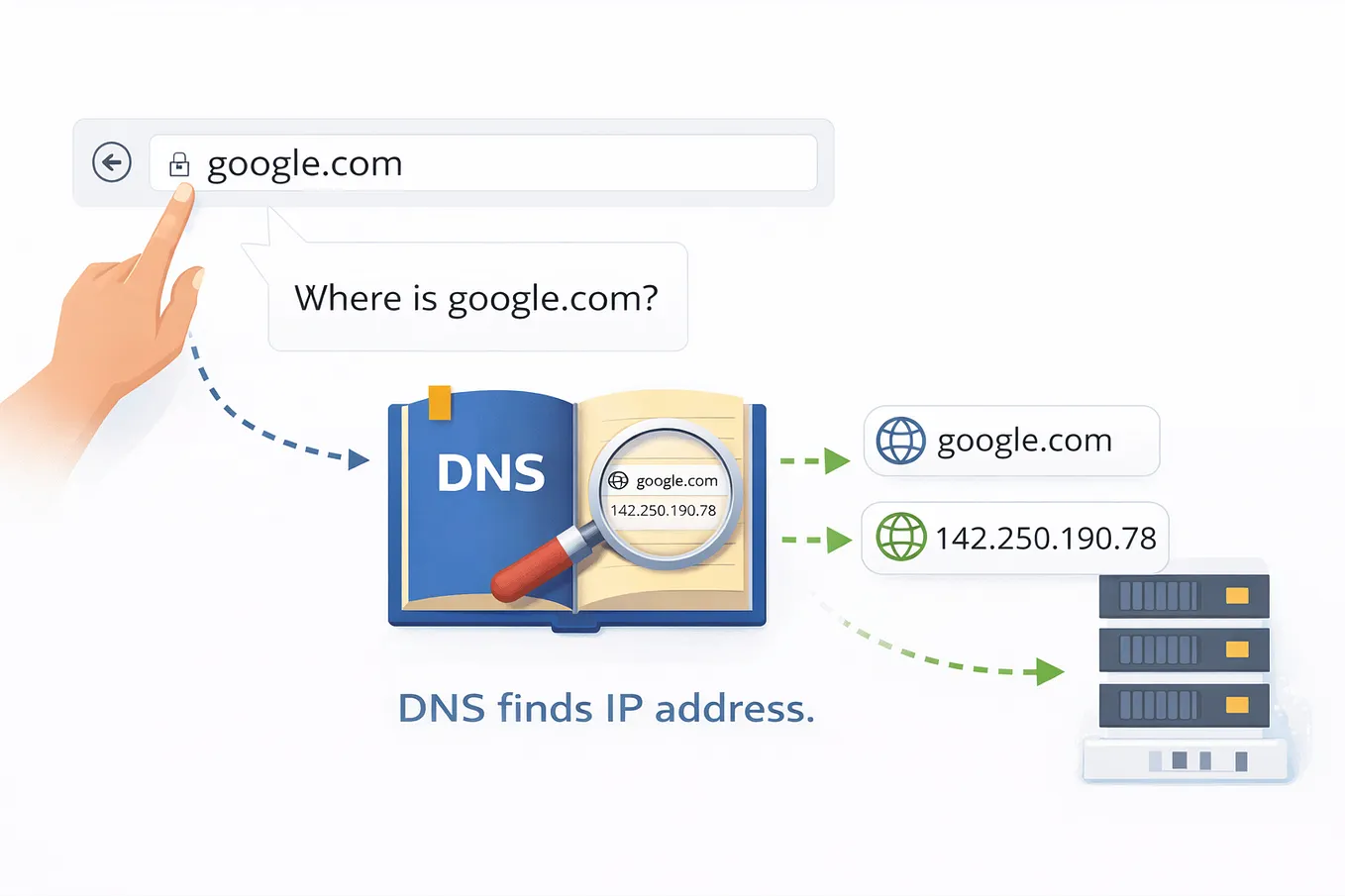
🌍 Step 2: DNS = Internet Phone Book
If the browser doesn’t know the IP, it performs a DNS lookup.
“What’s the IP address for google.com?”
DNS resolution happens in layers:
- Resolver
- Root server
- TLD server (
.com) - Authoritative server
📞 Real-world analogy:
DNS is like asking:
“Who has Google’s phone number?”
Each level points you closer until someone gives you the exact number.
Now the browser has:
142.250.xxx.xxx🔐 Step 3: HTTPS = Secure Contract Before Talking
Before any data is exchanged, HTTPS kicks in.
This includes:
- Certificate verification
- Key exchange
- Encryption setup
🛂 Real-world analogy:
Before entering a secure office:
- You show ID
- Security verifies it
- You’re given a temporary badge
Only then can you talk freely — securely.
📤 Step 4: HTTP Request = Official Order Slip
Now the browser sends an HTTP request:
GET / HTTP/1.1
Host: google.com
It includes:
- Method (GET)
- Headers (browser info, language)
- Cookies (session, auth)
📝 Real-world analogy:
This is like submitting a formal order slip at a restaurant.
Clear, structured, and expected.
⚖️ Step 5: Load Balancer = Traffic Dispatcher
You’re not hitting a single machine.
Companies like Google and Amazon operate at massive scale.
Your request first hits a load balancer.
Get Sonyta Nget’s stories in your inbox
Join Medium for free to get updates from this writer.
🚦 Real-world analogy:
Think of airport security directing passengers to different lines to prevent congestion.
The load balancer decides:
“This request goes to Server A, not Server B.”
🧩 Step 6: Backend = Assembly Line

Once inside, backend systems kick in:
- Authentication service
- Business logic
- Database queries
- Other microservices
🏭 Real-world analogy:
Like a factory assembly line:
- One station checks identity
- Another fetches data
- Another applies rules
Each service does one job well.
📥 Step 7: Response = Packaged Result
The backend returns:
- HTML (structure)
- CSS (style)
- JavaScript (logic)
- Assets (images, fonts)
📦 Real-world analogy:
The kitchen finishes your meal, plates it, and sends it out — not ingredients, but a complete dish.
🎨 Step 8: Browser Rendering = Construction Crew
The browser now becomes a renderer:
- Builds DOM
- Builds CSSOM
- Creates render tree
- Executes JavaScript
- Paints pixels
🏗 Real-world analogy:
Blueprints (HTML) + paint plans (CSS) + machines (JS) → finished building.
This is why heavy JavaScript can slow pages down.
🔁 Step 9: Modern Web Never Stops
Even after load:
- API calls continue
- UI updates dynamically
- Analytics events fire
📡 Real-world analogy:
Like a smart store constantly adjusting prices and recommendations as you walk around.
⚡ All This Happens in Milliseconds
From DNS to rendering, everything completes in under a second — often much less.
Yet it involves:
- Networking
- Security
- Distributed systems
- Frontend pipelines
🎯 Why Engineers Should Care
Understanding this helps you:
- Debug latency issues
- Design scalable systems
- Answer interview questions clearly
- Build faster user experiences
Every time you press Enter, you’re triggering a globally distributed system that works flawlessly — because thousands of engineers designed it to.