cpp_022: Passing by Value vs. Passing by Reference in C++
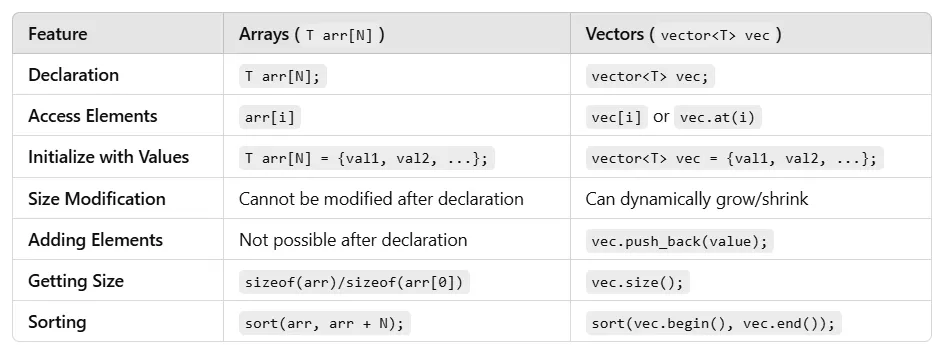
In my previous posts, we explored the fundamentals of functions, arrays, and vectors in C++. During those discussions, I briefly mentioned passing by value and passing by reference when working with these constructs.
Today, I want to dive deeper and provide an organized post on these two critical concepts in C++ function calls. We’ll examine how passing by value and passing by reference work with regular variables, arrays, and vectors, using clear examples to demonstrate their behavior, memory usage, and practical implications.1. Introduction to Passing by Value and Passing by Reference
1. Introduction to Passing by Value and Passing by Reference
When you pass data to a function in C++, you can do so in two main ways: by value or by reference.
- Pass by Value: The function receives a copy of the data. Changes to this copy don’t affect the original variable outside the function.
- Pass by Reference: The function works directly with the original data via its memory address. Any changes made inside the function affect the original variable.
These methods apply to all types of data — scalars (like int), arrays, and vectors. Let’s break it down step-by-step, starting with a simple variable, then moving to arrays and vectors, with examples to clarify how memory is handled in each case.
2. Passing a Scalar Variable (e.g., int x = 10)
Let’s start with a regular int variable and see how it behaves when passed by value and by reference.
#include <iostream>
using namespace std;

void modifyValue(int x) {
    x = 50; // Modify the copy
    cout << "Inside function, x = " << x << endl;
}

int main() {
    int x = 10;
    cout << "Before function, x = " << x << endl;
    modifyValue(x); // Pass x by value
    cout << "After function, x = " << x << endl;
    return 0;
}Output:
Before function, x = 10
Inside function, x = 50
After function, x = 10Explanation:
- When x is passed by value, the function modifyValue gets a copy of x’s value (10). This copy occupies a new memory location separate from the original x in main.
- Inside the function, changing x to 50 only affects the copy. The original x in main remains unchanged at 10.
- Memory Insight: If x is an int (typically 4 bytes), the copy creates a new 4-byte slot in the function’s stack frame. The original x and the copy are distinct, so modifying one doesn’t touch the other.
- Use Case: Pass by value is great when you want to protect the original data from changes, like when displaying or computing with a variable without altering it.
Example 2: Pass by Reference
#include <iostream>
using namespace std;

void modifyReference(int &x) {
    x = 50; // Modify the original
    cout << "Inside function, x = " << x << endl;
}

int main() {
    int x = 10;
    cout << "Before function, x = " << x << endl;
    modifyReference(x); // Pass x by reference
    cout << "After function, x = " << x << endl;
    return 0;
}Output:
Before function, x = 10
Inside function, x = 50
After function, x = 50Explanation:
- Using &x in the function parameter means x is passed by reference. The function works directly with the original x’s memory address, not a copy.
- Changing x to 50 inside modifyReference updates the x in main because they share the same memory location.
- Memory Insight: No new copy is made — both the function and main access the same 4-byte int in memory. This saves space and allows direct modifications.
- Use Case: Pass by reference is ideal when you need to modify the original variable, like updating a counter or settings.
Key Difference: Pass by value creates a duplicate (safe but uses extra memory), while pass by reference uses the original (efficient but changes persist).
3. Passing an Array
Arrays in C++ are different because they’re inherently tied to memory addresses. Let’s see how passing an array works with both methods.
Example 3: Pass by Value (Simulated with a Copy)
Arrays can’t be passed by value directly in C++ — the language passes them as pointers by default, which behaves like a reference. To simulate pass by value, you’d need to copy the array explicitly, but let’s first show the default behavior and then contrast it with a true copy.
#include <iostream>
using namespace std;

void modifyArray(int arr[], int size) {
    arr[0] = 999; // Modify the array
    cout << "Inside function, arr[0] = " << arr[0] << endl;
}

int main() {
    int arr[] = {1, 2, 3};
    cout << "Before function, arr[0] = " << arr[0] << endl;
    modifyArray(arr, 3); // Pass array (behaves like reference)
    cout << "After function, arr[0] = " << arr[0] << endl;
    return 0;
}Output:
Before function, arr[0] = 1
Inside function, arr[0] = 999
After function, arr[0] = 999Explanation:
- When you pass an array (arr[]), C++ passes a pointer to the array’s first element, not a copy. This acts like pass by reference — changes to arr inside modifyArray affect the original array.
- Memory Insight: The function receives a pointer (e.g., 8 bytes on a 64-bit system) to the array’s memory address. No new array is created, so the original array’s data (e.g., 12 bytes for three ints) is modified directly.
- Why No True Pass by Value?: Copying an entire array for pass by value would be inefficient (e.g., duplicating 12 bytes for three ints), so C++ avoids it by default.
Example 4: Simulating Pass by Value with a Copy
To pass an array by value, you’d need to create a copy manually:
#include <iostream>
using namespace std;


void modifyArrayCopy(int arr[], int size) {
    int copy[size]; // Create a local copy
    for (int i = 0; i < size; i++) {
        copy[i] = arr[i];
    }
    copy[0] = 999; // Modify the copy
    cout << "Inside function, copy[0] = " << copy[0] << endl;
}

int main() {
    int arr[] = {1, 2, 3};
    cout << "Before function, arr[0] = " << arr[0] << endl;
    modifyArrayCopy(arr, 3);
    cout << "After function, arr[0] = " << arr[0] << endl;
    return 0;
}Output:
Before function, arr[0] = 1
Inside function, copy[0] = 999
After function, arr[0] = 1Explanation:
- Here, we explicitly copy the array inside the function. Changes to copy don’t affect the original arr.
- Memory Insight: The copy creates a new array in the function’s stack (12 bytes for three ints), separate from the original array’s memory. This uses more memory but protects the original data.
- Use Case: Rarely used for arrays due to inefficiency, but possible if you need to preserve the original array.
4. Passing a Vector
Vectors (std::vector) are more modern and flexible than arrays. They can be passed by value or reference, unlike arrays.
Example 5: Pass by Value
#include <iostream>
#include <vector>
using namespace std;

void modifyVector(vector<int> vec) {
    vec[0] = 999; // Modify the copy
    cout << "Inside function, vec[0] = " << vec[0] << endl;
}

int main() {
    vector<int> vec = {1, 2, 3};
    cout << "Before function, vec[0] = " << vec[0] << endl;
    modifyVector(vec); // Pass vector by value
    cout << "After function, vec[0] = " << vec[0] << endl;
    return 0;
}Output:
Before function, vec[0] = 1
Inside function, vec[0] = 999
After function, vec[0] = 1Explanation:
- Passing vec by value creates a full copy of the vector, including its internal array and metadata (size, capacity, etc.).
- Changes to vec inside modifyVector only affect the copy, leaving the original unchanged.
- Memory Insight: A vector with three int s might use ~24 bytes (12 for data, plus overhead). Copying duplicates this, so the function gets a new ~24-byte object. This is memory-intensive for large vectors.
- Use Case: Use pass by value for vectors when you need to manipulate a temporary copy without altering the original.
Example 6: Pass by Reference
#include <iostream>
#include <vector>
using namespace std;

void modifyVectorRef(vector<int> &vec) {
    vec[0] = 999; // Modify the original
    cout << "Inside function, vec[0] = " << vec[0] << endl;
}

int main() {
    vector<int> vec = {1, 2, 3};
    cout << "Before function, vec[0] = " << vec[0] << endl;
    modifyVectorRef(vec); // Pass vector by reference
    cout << "After function, vec[0] = " << vec[0] << endl;
    return 0;
}Output:
Before function, vec[0] = 1
Inside function, vec[0] = 999
After function, vec[0] = 999Explanation:
- Using &vec passes the vector by reference, so the function accesses the original vector’s memory.
- Changes to vec inside modifyVectorRef update the original vector in main.
- Memory Insight: No copy is made — the function uses the same ~24-byte vector object. This is efficient, especially for large vectors.
- Use Case: Pass by reference for vectors when you need to modify the original, like sorting or adding elements.
5. Summary and When to Use Each
Pass by Value:
- Variables: Safe for small data (e.g., int), protects the original.
- Arrays: Not practical (requires manual copying), rarely used.
- Vectors: Safe but costly for large vectors due to copying.
Pass by Reference:
- Variables: Efficient for modifications, use when changes are needed.
- Arrays: Default behavior in C++, always modifies the original unless copied.
- Vectors: Efficient for modifications or large data, avoids copying overhead.
Pro Tip: For vectors, consider using const references (e.g., const vector<int> &vec) when you want to read data without copying or modifying it. This approach combines the efficiency of pass-by-reference with the safety of preventing unintended changes, making it a go-to choice for many C++ programmers.
Get CodeAddict’s stories in your inbox
Join Medium for free to get updates from this writer.
A const reference allows a function to access the original data (like a regular reference) but prohibits any modifications, ensuring the data remains unchanged. For vectors, which can hold large amounts of data, passing by value creates a full copy — potentially consuming significant memory and slowing your program. Passing by non-const reference avoids copying but risks accidental changes. A const reference strikes the perfect balance: it’s memory-efficient (no copy) and safe (no changes).
Example 7: const Reference with a Vector
#include <iostream>
#include <vector>
using namespace std;

void printVector(const vector<int> &vec) {
    // vec[0] = 999; // Error: cannot modify const reference
    cout << "Inside function, vec[0] = " << vec[0] << endl;
}

int main() {
    vector<int> vec = {1, 2, 3};
    cout << "Before function, vec[0] = " << vec[0] << endl;
    printVector(vec); // Pass vector by const reference
    cout << "After function, vec[0] = " << vec[0] << endl;
    return 0;
}Output:
Before function, vec[0] = 1
Inside function, vec[0] = 1
After function, vec[0] = 1Explanation:
- The const vector<int> &vec parameter means the function receives a reference to the original vector, avoiding a copy. The const keyword ensures the function can only read vec, not modify it (e.g., trying to change vec[0] causes a compiler error).
- Use Case: Ideal for functions that need to inspect or display vector data, like calculating sums or printing elements, without altering the vector.
With Scalars:
const references aren’t just for vectors — they work with scalars too. For an int, the memory savings are minimal (4 bytes vs. a pointer), but it’s still good practice for consistency and clarity.
void printValue(const int &x) {
    // x = 50; // Error: cannot modify const reference
    cout << "x = " << x << endl;
}
Calling printValue(10) passes x efficiently and safely.
With Arrays:
void printArray(const int arr[], int size) {
    // arr[0] = 999; // Error: cannot modify const array
    cout << "arr[0] = " << arr[0] << endl;
}
This ensures the array isn’t modified, while still accessing the original memory (no copy).