Software System Security — Glossary of Security Terms


For Data Security (Database/System Data/Information) in detail, Please refer my this article https://medium.com/@sujit.udhane/database-server-system-data-system-information-how-security-gets-compromised-how-to-take-care-673cd2aee17e
For Application Security in detail, Please refer my this article https://medium.com/@sujit.udhane/application-web-mobile-server-security-how-security-gets-compromised-how-to-take-care-of-5190744b7600
For Network Security in detail, Please refer my this article
https://medium.com/@sujit.udhane/network-security-how-security-gets-compromised-how-to-take-care-of-security-how-to-test-96fc3c9e0eb8
For Infra Security (EMail Server) in detail, Please refer my this article
https://medium.com/@sujit.udhane/infra-security-email-server-how-security-gets-compromised-how-to-take-care-of-security-how-to-9a0bee99660d
For Infra Security (Web aka HTTP Server) in detail, Please refer my this article
https://medium.com/@sujit.udhane/infra-security-web-server-aka-http-server-how-security-gets-compromised-how-to-take-care-of-db556ef17088
1.What constitutes system security?
Preliminarily below components
-Infra (Virtual Machine/Operating System/Servers/Containers/Storage/etc)
-Networking (Hosts/Ports/Network Routers/Network Switches/etc.)
-Application (Web Application/Mobile Application/APIs/etc.)
-Data (Database server/Information [such as Transactional Data aka Application Data]/Backup Data/Information in Data Warehouse/User or Application Sensitive Information/etc.)
2.What is Trojan Horse?
-A Trojan horse is not a virus. It is a destructive program that looks like a genuine application. Unlike viruses, Trojan horses do not replicate themselves but they can be just as destructive. Trojans also open a backdoor entry to your computer or machine which gives malicious users/programs access to your system, allowing confidential and personal information to be stolen.
3.What is Virus?
-A computer virus attaches itself to a program or file so it can spread from one computer to another, leaving infections as it travels. Much like human viruses, computer viruses can range in severity: Some viruses cause only mildly annoying effects while others can damage your hardware, software or files. Almost all viruses are attached to an executable file, which means the virus may exist on your computer but it cannot infect your computer unless you run or open the malicious program. It is important to note that a virus cannot be spread without a human action, (such as running an infected program) to keep it going. People continue the spread of a computer virus, mostly unknowingly, by sharing infecting files or sending emails with viruses as attachments in the email.
4.What is Worm?
-A worm is similar to a virus by its design, and is considered to be a subclass of a virus. Worms spread from computer to computer, but unlike a virus, it has the capability to travel without any help from a person. A worm takes advantage of file or information transport features on your system, which allows it to travel unaided. The biggest danger with a worm is its capability to replicate itself on your system, so rather than your computer sending out a single worm, it could send out hundreds or thousands of copies of itself, creating a huge devastating effect. One example would be for a worm to send a copy of itself to everyone listed in your e-mail address book. Then, the worm replicates and sends itself out to everyone listed in each of the receiver’s address books, and the manifest continues on down the line. Due to the copying nature of a worm and its capability to travel across networks the end result in most cases is that the worm consumes too much system memory (or network bandwidth), causing Web servers, network servers and individual computers to stop responding. In more recent worm attacks such as the much-talked-about Blaster Worm. The worm has been designed to tunnel into your system and allow malicious users to control your computer remotely.
5.What is Buffer Overflow?
-Buffers are memory storage regions that temporarily hold data while it is being transferred from one location to another. A buffer overflow (or buffer overrun) occurs when the volume of data exceeds the storage capacity of the memory buffer. As a result, the program attempting to write the data to the buffer overwrites adjacent memory locations.
For example, a buffer for log-in credentials may be designed to expect username and password inputs of 8 bytes, so if a transaction involves an input of 10 bytes (that is, 2 bytes more than expected), the program may write the excess data past the buffer boundary.
Buffer overflows can affect all types of software. They typically result from malformed inputs or failure to allocate enough space for the buffer. If the transaction overwrites executable code, it can cause the program to behave unpredictably and generate incorrect results, memory access errors, or crashes.
6.What is DoS Attack?
-A Denial-of-Service (DoS) attack is an attack meant to shut down a machine or network, making it inaccessible to its intended users. DoS attacks accomplish this by flooding the target with traffic, or sending it information that triggers a crash. In both instances, the DoS attack deprives legitimate users (i.e. employees, members, or account holders) of the service or resource they expected.
7.What is DDoS Attack?
-A common type of cyber attack comes in the form of a Denial of Service (DoS), Distributed Denial of Service (DDoS), or brute-force attempting to overwhelm your security.
The nature of these attacks is to use several different computers to make repeated requests against your server.
This causes the server to run out of processing cycles, memory, or network bandwidth, causing the website to crash
8.How are the bot threats?
-Bad bots are ones that hoard resources, perform account takeovers and credential stuffing, launch DDoS attacks, and steal intellectual property or impact your business intelligence.
9.What is a Secure Socket Layer?
-SSL, or Secure Sockets Layer, is an encryption-based Internet security protocol. It was first developed by Netscape in 1995 for the purpose of ensuring privacy, authentication, and data integrity in Internet communications. Further details can be found at below url
https://www.cloudflare.com/learning/ssl/what-is-ssl/
10.What is Transport Layer Security?
-Transport Layer Security, or TLS, is a widely adopted security protocol designed to facilitate privacy and data security for communications over the Internet. A primary use case of TLS is encrypting the communication between web applications and servers, such as web browsers loading a website. TLS can also be used to encrypt other communications such as email, messaging, and voice over IP (VoIP).Further details can be found at below url
https://www.cloudflare.com/learning/ssl/transport-layer-security-tls/
11.What is Firewall?
-A firewall is a network security device that monitors incoming and outgoing network traffic and permits or blocks data packets based on a set of security rules. Its purpose is to establish a barrier between your internal network and incoming traffic from external sources (such as the internet) in order to block malicious traffic like viruses and hackers.
12.What is Web Application Firewall (WAF) ?
-A ‘web application firewall (WAF)’ is an application firewall for HTTP applications. It applies a set of rules to an HTTP conversation. Generally, these rules cover common attacks such as Cross-site Scripting (XSS) and SQL Injection.
While proxies generally protect clients, WAFs protect servers. A WAF is deployed to protect a specific web application or set of web applications. A WAF can be considered a reverse proxy.
WAFs may come in the form of an appliance, server plugin, or filter, and may be customized to an application. The effort to perform this customization can be significant and needs to be maintained as the application is modified.
13.What is Static Application Security Testing (SAST)?
-SAST tools can be thought of as white-hat or white-box testing, where the tester knows information about the system or software being tested, including an architecture diagram, access to source code, etc. SAST tools examine source code (at rest) to detect and report weaknesses that can lead to security vulnerabilities.
Get Sujit Udhane’s stories in your inbox
Join Medium for free to get updates from this writer.
Source-code analyzers can run on non-compiled code to check for defects such as numerical errors, input validation, race conditions, path traversals, pointers and references, and more. Binary and byte-code analyzers do the same on built and compiled code. Some tools run on source code only, some on compiled code only, and some on both.
14.What is Dynamic Application Security Testing (DAST)?
-In contrast to SAST tools, DAST tools can be thought of as black-hat or black-box testing, where the tester has no prior knowledge of the system. They detect conditions that indicate a security vulnerability in an application in its running state. DAST tools run on operating code to detect issues with interfaces, requests, responses, scripting (i.e., JavaScript), data injection, sessions, authentication, and more.
DAST tools employ fuzzing: throwing known invalid and unexpected test cases at an application, often in large volume.
15.What is Interactive Application Security Testing (IAST)?
-Hybrid approaches have been available for a long time, but more recently have been categorized and discussed using the term IAST. IAST tools use a combination of static and dynamic analysis techniques. They can test whether known vulnerabilities in code are actually exploitable in the running application.
IAST tools use knowledge of application flow and data flow to create advanced attack scenarios and use dynamic analysis results recursively: as a dynamic scan is being performed, the tool will learn things about the application based on how it responds to test cases. Some tools will use this knowledge to create additional test cases, which then could yield more knowledge for more test cases and so on. IAST tools are adept at reducing the number of false positives, and work well in Agile and DevOps environments where traditional stand-alone DAST and SAST tools can be too time intensive for the development cycle.
16.What is Mobile Application Security Testing (MAST)?
-MAST Tools are a blend of static, dynamic, and forensics analysis. They perform some of the same functions as traditional static and dynamic analyzers but enable mobile code to be run through many of those analyzers as well. MAST tools have specialized features that focus on issues specific to mobile applications, such as jail-breaking or rooting of the device, spoofed WI-FI connections, handling and validation of certificates, prevention of data leakage, and more.
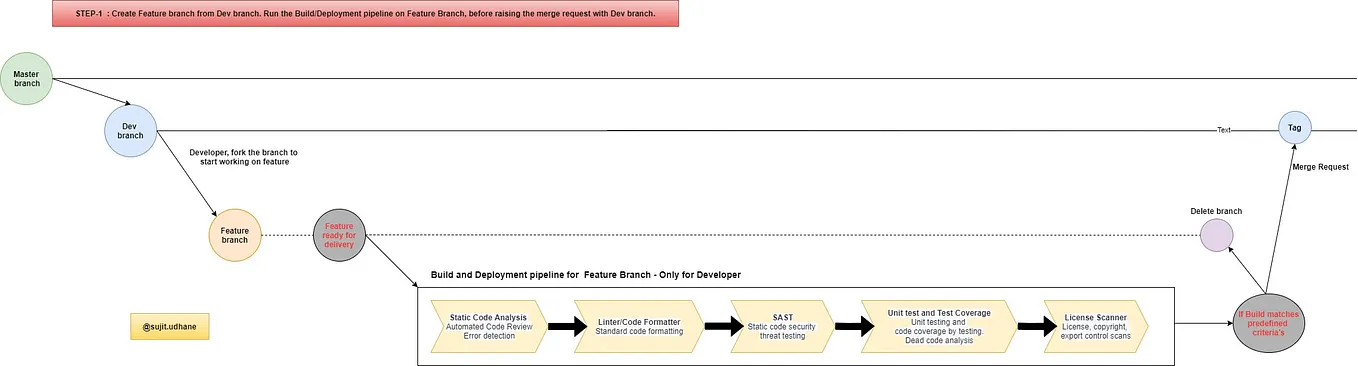
17.How should Security Testing be stacked up in CI/CD pipeline?
- Please refer this URL for more details
18.What is encryption?
- Encryption takes readable data and alters it so that it appears random. Encryption requires the use of an encryption key: a set of mathematical values that both the sender and the recipient of an encrypted message know.
Although encrypted data appears random, encryption proceeds in a logical, predictable way, so that a party receiving the encrypted data and in possession of the key used to encrypt the data can decrypt the data, turning it back into plaintext. Truly secure encryption will be complex enough that a third party is highly unlikely to decrypt the ciphertext by brute force — in other words, by guessing.
Data can be encrypted “at rest,” when it is stored, or “in transit,” while it is being transmitted somewhere else.
More can be learned from this URL https://www.cloudflare.com/learning/ssl/what-is-encryption/
19.What are the Security Risks of Cloud Computing?
-The main security risks of cloud computing are:
- Compliance violations
- Identity theft
- Malware infections and data breaches
- Diminished customer trust and potential revenue loss
Some details about the above security concerns:
1.Loss of data
By its very nature, cloud computing involves some ceding of control from the customer to the service provider. While this leaves users more time and financial resources to focus on other facets of the business, there is always the risk that sensitive data is in somebody else’s hands. If the security of a cloud service is breached, hackers could potentially gain access to intellectual property or other personal files.
2.Malware infections
Due to the high volume of data stored on the cloud, which requires an internet connection to store this data, anybody using cloud services is potentially at risk of cyberattacks. An increasingly common threat is Distributed Denial of Service (DDoS) attacks, whereby hackers send unprecedented volumes of traffic to a web-based application, thereby crashing the servers.
3.Legal/compliance issues
With increasing legislation on data protection, from GDPR in Europe to HIPAA for healthcare, staying compliant is becoming more difficult. Companies must have steadfast rules governing who can access what data and what they can do with it. With cloud computing’s easy access to data on a large scale, it can be difficult to keep track of who can access this information.
20.What is hacking?
-Hacking is an unauthorized entry into a network or a computer to steal or manipulate information, data or files. The person involved in this process is named as a hacker. Computer hacking is done using several types of programs such as Rootkit, Trojan, Keylogger etc. Hackers also employ techniques like browser hijacks, spoofing, phishing etc. to capture a user’s personal or financial details.
21.What are computer security threats?
-Computer Security Threats are possible dangers that can affect the smooth functioning of your PC. These may be a small piece of adware or a harmful Trojan malware. In the present age, computer security threats are constantly increasing as the world is going digital.Types of Computer Security Threats — There are several types of computer security threats such as Trojans, Virus, Adware, Malware, Rootkit, hackers and much more. Check some of the most harmful types of computer Security Threats.
22.What is phishing?
-It is defined as a fraud attempt to obtain sensitive credentials such as username, password and financial details from online users. Attackers may target victims via phishing emails. Clicking on such unsolicited emails, you will land upon a counterfeit web page that will appear genuine by its look and feel. These websites float fake offers to lure users & encourage them to submit their financial & personal information, which can be misused by the attacker.
If you found this article, please clap.
That’s all for now… Many more security related articles covering the depth about each topic coming on your way.
Links referred for the article
2)https://www.akamai.com/us/en/resources/data-security-in-cloud-computing.jsp
4)https://www.forcepoint.com/cyber-edu/firewall
5)https://www.websecurity.digicert.com/security-topics/difference-between-virus-worm-and-trojan-horse
6)https://www.imperva.com/learn/application-security/buffer-overflow/
7)https://www.reveantivirus.com/en/computer-security-threats/