Google BigQuery Handbook

Modern Data Warehousing at Scale.

Google BigQuery is a serverless, highly scalable cloud data warehouse with a built-in distributed SQL engine. It separates compute from storage, allowing organizations to analyze large datasets quickly without managing infrastructure.
The topics below cover BigQuery’s structure, data storage, query execution, data ingestion and export, advanced SQL features, and the tools used for optimization, monitoring, and security.
Project and Object Hierarchies
BigQuery resources are organized into a strict three-layer taxonomy governed by Cloud IAM permission cascades:

This hierarchy is the foundation for how every other BigQuery object tables, views, materialized views, models, and external table definitions is namespaced, permissioned, and billed.
Columnar Storage and the Capacitor Format
BigQuery’s performance is fundamentally rooted in its physical separation of compute and storage, tied together by an ultra-high-speed network fabric.

Traditional transactional databases store data in a row-oriented format, which is ideal for transactional consistency but highly inefficient for analytics. BigQuery instead stores data in a columnar format known as Capacitor (the successor to Google’s ColumnIO).
When an analytical query evaluates a specific metric, it only reads the exact columns requested, reducing I/O down to a small fraction of the total table size. Capacitor introduces sophisticated optimizations natively:
- Dictionary Encoding: Low-cardinality string columns are mapped to integer offsets in a file header dictionary, converting heavy text evaluations into lightning-fast numeric scans.
- Run-Length Encoding (RLE): Repeating sequential data values are compressed into
[value:count]notations. - Heuristic Row Reordering: Because row order is completely arbitrary in BigQuery, Capacitor heuristically reorders rows prior to finalizing storage blocks to maximize identical sequential sequences and dramatically increase RLE compression ratios.
Storage Infrastructure: Colossus and Jupiter

Data inside BigQuery resides in Colossus, Google’s next-generation distributed filesystem. This is the physical layer underneath the Capacitor columnar format described above.
- Erasure Encoding: Instead of using expensive multi-way file replication, Colossus uses advanced erasure coding (Reed-Solomon encodings) to break files into chunks and compute parity blocks. This provides extreme durability and survival against concurrent disk/rack failures while utilizing a significantly lower storage footprint.
- Jupiter Network Fabric: To prevent network bottlenecks caused by the separation of compute and storage, BigQuery utilizes Google’s custom Jupiter network topology. Delivering up to 1 petabit per second of bisection bandwidth within a datacenter, Jupiter allows any compute node to read raw data chunks from any physical Colossus disk at wire speeds.
Table and View Types
BigQuery categorizes its analytical objects into specific types based on durability and optimization needs:
- Native Tables: Fully managed, highly optimized Capacitor storage structures backed by Colossus. They support full DML, clustering, and partitioning.
- Logical Views: Virtual tables defined entirely by a standard SQL query text. They compile on the fly, functioning essentially as named subqueries without storing physical data.
- Materialized Views: Precomputed aggregate caches stored natively. BigQuery automatically routes parts of queries to an existing Materialized View to bypass base table scanning. They are always fresh; any incremental changes or streaming deltas appearing in the base table are instantly merged on the fly during read time.
Materialized View Refresh Behavior
Materialized views precomputed, natively stored aggregate caches that BigQuery can automatically substitute into matching queries are completely zero-maintenance. They are updated automatically within a short window after modifications occur on the underlying base tables. However, you can precisely control or disable this automatic background processing using DDL tuning flags:
ALTER MATERIALIZED VIEW my_dataset.mv_sales
SET OPTIONS (refresh_interval_minutes = 60);
Complex Data Types: Structs and Arrays
BigQuery supports nested and repeated data patterns natively through structural types, bypassing the classic database engineering requirement to completely flatten multi-granular rows:
- STRUCT (Record): A strongly-typed container of nested ordered fields. It is equivalent to a single JSON object.
- ARRAY: An ordered list of zero or more non-null elements of the same primitive type.
To execute traditional filtering or multi-column mappings on an array, the structural elements must be flattened into distinct rows using the UNNEST relational operator within a FROM clause:
SELECT visitorId, h.page.pageTitle
FROM `bigquery-public-data.google_analytics_sample.ga_sessions_20170801`,
UNNEST(hits) AS h
WHERE h.page.pageTitle = 'Shopping Cart';
Partitioning Types
Partitioning structurally divides a table into distinct physical segments based on a chosen column, reducing data scan sizes.

- Time-unit Column Partitioning: Tables are sharded by an underlying
DATE,TIMESTAMP, orDATETIMEcolumn. - Ingestion-Time Partitioning: Rows are automatically assigned to partitions reflecting the exact day they were written to the data warehouse. This creates physical internal pseudocolumns named
_PARTITIONTIMEand_PARTITIONDATE. - Integer-Range Partitioning: Tables are sharded based on ranges defined across a specific
INT64column using custom start, end, and interval configurations.
Clustering Architecture and Limits
Clustering organizes the underlying Capacitor file structures inside BigQuery tables into semi-sorted layouts based on the values of specific columns. It is often used alongside, or as an alternative refinement to, partitioning.

When an analytical engine evaluates a block filtering predicate against a clustered column, it uses binary search over the cached file headers to read only the files that contain the specified key range, completely skipping the rest.
- Column Limits: You can specify up to 4 clustering columns in a strict top-down layout hierarchy. The order of columns matters; performance optimizations are greatest when filtering predicates match left-to-right sorting prefixes.
- Reclustering: Unlike partitioning, which forces strict separation immediately at input boundaries, streaming or appending data can introduce structural cluster fragmentation over time. BigQuery handles this completely in the background by running automated, zero-cost automatic reclustering passes to re-sort block sequences.
The Serverless Compute Engine and the Life of a Query

The execution layer of BigQuery relies on Dremel, a massive distributed execution engine that handles resource allocation elastically via virtual computational structures called Slots.
When an HTTP query request hits the Google Front End (GFE), it is securely routed to a Job Server and assigned to a Query Master. The Master queries the metadata database to compile a list of physical file shard locations and map out a parallel plan.
Get Yahia zakaria’s stories in your inbox
Join Medium for free to get updates from this writer.
Rather than deploying a static execution tree, Dremel X builds dynamic query plans that morph during runtime. If intermediate processing steps generate data skew or unexpectedly high cardinalities, the Query Master will dynamically alter the number of slots or add repartitioning execution stages mid-flight.
Slots and the Fair Scheduler
A Slot represents a thread of execution running inside a sandboxed container managed by Google’s Borg system, encompassing roughly half a CPU core and 1GB of RAM. Slots are the computational units that Dremel (BigQuery’s distributed execution engine) allocates to run queries. BigQuery dynamically distributes clusters of these slots using a Fair Scheduler:
- On-Demand Pool: Computational assets are shared among active users. If slot demand spikes across an organization or tenant group, allocations are throttled down proportionally to maintain multi-tenant equity.
- Reservations: Flat-rate architectures let companies buy dedicated quantities of slots (in monthly, annual, or Flex Slot commitments), splitting them up into sub-reservations mapping directly to custom workloads or project paths.
Distributed Query Phases and the Shuffle Layer
Dremel, BigQuery’s distributed execution engine, scales horizontally by dividing query processing into distinct hierarchical execution stages.

- Leaf Workers: Perform parallel operations on individual blocks such as column reading, filter evaluations, and partial aggregations.
- The Shuffle Layer: Intermediate data distributions between execution phases are handled by a dedicated, ultra-fast in-memory shuffle architecture. If a query phase handles massive cardinalities that exhaust memory limits, data spills to disk. This can be tracked inside the query plan metrics and indicates that structural tuning or key sharding may be required.
Data Ingestion Methods
BigQuery offers several distinct pathways for getting data into native storage or making it accessible for querying:

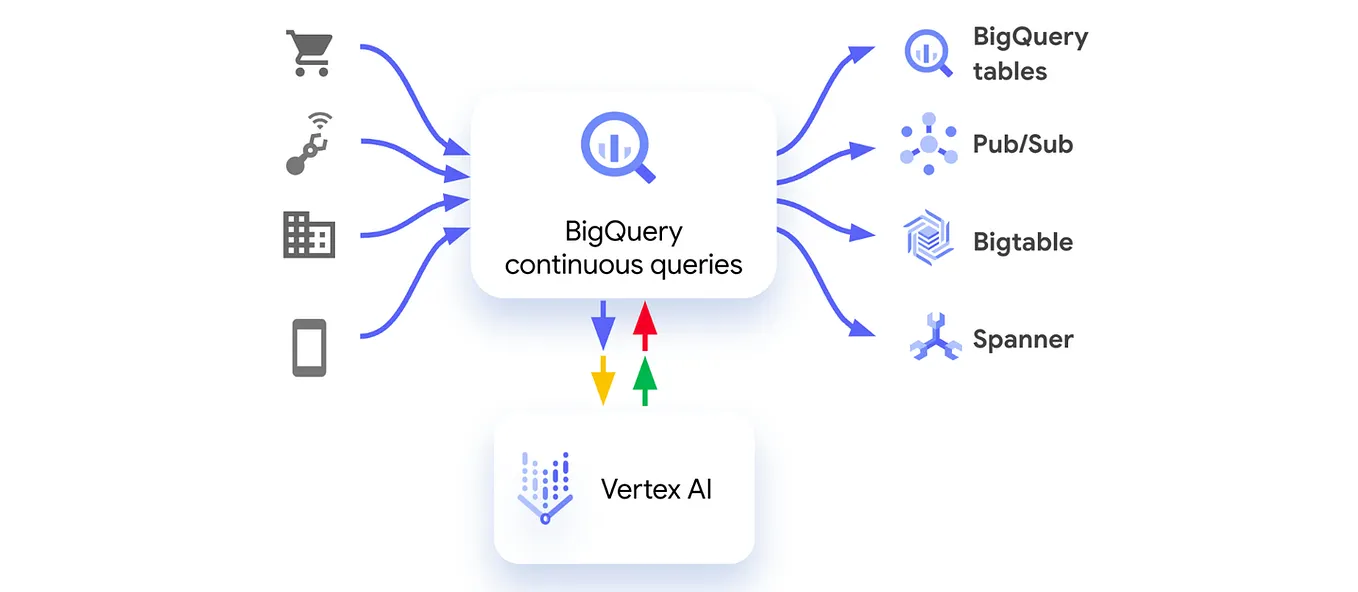
- Batch Loading: Ingests external source files (Avro, Parquet, ORC, CSV, JSON) into native storage. This operation uses isolated system ingestion clusters and is completely free of charge.
- Streaming Ingestion: Real-time pipelines use the BigQuery Storage Write API to insert payloads directly into an active memory table called the Streaming Buffer. Streamed rows are immediately readable by concurrent analytic queries while safely awaiting asynchronous background optimization passes into final block Capacitor layouts.
- Spark and Managed Pipelines: BigQuery integrates seamlessly with external data processing runtimes. Apache Beam pipelines running on Cloud Dataflow handle stateful streaming transformations, while Cloud Dataproc tasks leverage the BigQuery connector to run distributed Apache Spark applications using BigQuery directly as a persistent storage layer.
Query Federation: External Data Sources

BigQuery blurs the conventional boundaries dividing enterprise data warehouses from schema-less object data lakes through native pipeline integrations. Federated queries execute SQL directly over data residing outside of BigQuery’s storage boundary. By registering an external table definition mapping directly to an immutable source URI, users can immediately query live assets.
- Google Cloud Storage: Analyzes text files (CSV, JSON) or structured blocks (Parquet, Avro, ORC).
- Google Drive: Queries operational workbooks or data tracking templates inside Google Sheets directly through SQL.
- NoSQL Engines: Queries low-latency, real-time key-value records within Cloud Bigtable.
- Relational Access: Remote Queries use the
EXTERNAL_QUERY()function to push execution logic directly downstream into active transactional relational database systems like Cloud SQL (MySQL or PostgreSQL), bringing back unified matching datasets.
SELECT c.customer_id, rq.latest_order_date
FROM my_dataset.customer_warehouse AS c
LEFT JOIN EXTERNAL_QUERY(
  'projects/my-gcp-proj/locations/us/connections/mysql_conn',
  'SELECT customer_id, MAX(order_date) AS latest_order_date FROM orders GROUP BY customer_id;'
) AS rq ON rq.customer_id = c.customer_id;
Analytical Power Clauses
Modern enterprise workloads often require advanced analytical operations directly inside the warehouse. BigQuery’s SQL dialect includes several clauses and functions built for this purpose:
QUALIFY: Evaluates conditional filtering logic against the results of window functions directly without requiring an intermediate wrapping subquery or an outerWHEREstep.MERGE: Conducts complex, atomic upsert operations by matching source data streams against a destination target.APPROX_COUNT_DISTINCT: Uses HyperLogLog++ algorithms to estimate unique cardinalities over vast data rows in a fraction of the time required by an exactCOUNT(DISTINCT)operation.
-- Finding the most recent order status using QUALIFY
SELECT order_id, customer_id, order_status, order_date
FROM my_dataset.orders
QUALIFY ROW_NUMBER() OVER(PARTITION BY customer_id ORDER BY order_date DESC) = 1;
Search Indexes and Intelligent Search
BigQuery supports the creation of native text Search Indexes over heavy unstructured string arrays. By using the specialized function SEARCH(), analysts can scan columns or entire logs tables to locate specific text matches or unstructured tokens instantly without triggering a heavy, multi-gigabyte table scan:
CREATE SEARCH INDEX my_logs_index ON my_dataset.application_logs(ALL COLUMNS);

-- Searching across all columns using the text index
SELECT * FROM my_dataset.application_logs WHERE SEARCH(application_logs, 'error 500');
Remote Functions

Remote Functions integrate external API endpoints directly into standard SQL queries. By leveraging user-defined connections, BigQuery passes data row-by-row to a cloud endpoint running inside Google Cloud Functions or Cloud Run. This enables complex real-time tasks such as proprietary token decryption, address validation, or callouts to third-party microservices to execute inside a standard analytical view.
BigQuery ML (SQL Machine Learning Models)

BigQuery natively bridges the gap dividing data storage from statistical model modeling through BigQuery ML (BQML). By using standard SQL statements, data engineers can build, train, evaluate, and forecast advanced statistical models without exporting a single byte of underlying enterprise data over network paths:
-- Training a Linear Regression model directly inside BigQuery
CREATE OR REPLACE MODEL my_dataset.bike_duration_model
OPTIONS(model_type='linear_reg', input_label_cols=['duration']) AS
SELECT duration, start_station_name, hour_of_day
FROM my_dataset.rentals_cleaned;
BQML natively scales across diverse algorithmic variations:
- Built-in Models: Linear Regression, Logistic Regression, K-means Clustering, Matrix Factorization, Time Series forecasting (ARIMA+), and Boosted Trees (XGBoost).
- Vertex AI & External Integrations: Supports callouts to cloud-hosted pipelines running in Vertex AI. It also supports importing custom structures (like TensorFlow or ONNX frameworks) that were trained externally, serving predictions instantly through standard SQL workflows.
Acceleration Engines and Caching
Operating a high-throughput enterprise analytical platform requires rigorous query optimization, and BigQuery includes two major acceleration mechanisms:

- Cached Results: If a newly submitted query string matches a previously completed query exactly, BigQuery bypasses the compute nodes entirely and serves the results instantly from a temporary cached results table for free. Nondeterministic features (like
CURRENT_TIMESTAMP()) or base table changes invalidate this cache. - BI Engine: A specialized, highly parallelized in-memory analysis engine integrated directly into BigQuery. By allocating a memory reservation to a target region, BI Engine automatically caches frequently queried columns or dashboard aggregates. This reduces query latencies down to sub-second runtimes for visual platforms like Looker or Tableau.
System Diagnostics via INFORMATION_SCHEMA
Data platform metrics, performance anomalies, and job states are exposed natively through analytical metadata tables known as INFORMATION_SCHEMA:
-- Auditing the top 5 most expensive queries within a project
SELECT job_id, user_email, total_bytes_processed, total_slot_ms
FROM `region-us`.INFORMATION_SCHEMA.JOBS_BY_PROJECT
ORDER BY total_bytes_processed DESC
LIMIT 5;
Security and Governance
Enterprise use of BigQuery requires rigorous data governance and access control, supported by several integrated mechanisms:
- Column-Level & Row-Level Security: Integrates with Cloud Data Catalog to apply centralized policy tags directly to specific data fields. This restricts data readability based on a user’s security clearance, regardless of their broad dataset viewer permissions.
- Customer-Managed Encryption Keys (CMEK): For businesses requiring total control over encryption lifecycles, BigQuery supports envelope encryption paths integrated directly with Cloud KMS, allowing users to manage, rotate, or delete data encryption keys at will.
- VPC Service Controls (VPC-SC): Mitigates data exfiltration risks by configuring strict network security borders around BigQuery projects, preventing unauthorized data movement across organizational boundaries.
References:
- Google BigQuery: The Definitive Guide Valliappa Lakshmanan, Jordan Tigani book
- https://luminousmen.substack.com/p/bigquery-explained-what-really-happens
- https://vutr.substack.com/p/everything-you-need-to-know-about?utm_source=publication-search
- https://vutr.substack.com/p/i-spent-8-hours-learning-how-google