
Event planning template
Plan, organize, and track all your important activities in one centralized, easy-to-use visual calendar.
BEST FOR
Project management
Marketing
KEY FEATURES
Task planning
Prioritization
Pipeline management
What is an event calendar template?
An event calendar template is a pre-built framework that helps you organize, schedule, and manage activities and events of any size or complexity. This template keeps everything in one place, from company conferences to product launches, so nothing gets overlooked or forgotten.
Event management tool
The event calendar template is your central command center for managing and tracking all events in Jira. It consolidates your entire event ecosystem into a unified platform, turning scattered information into an organized system your team can easily access and understand. With everything from small team meetings to major company events stored in one accessible location, you’ll spend less time searching for information and more on successful event execution.
Visual organizer
The template visually maps out your events by day, week, or month, making it easy to spot scheduling conflicts before they happen. This birds-eye view enables you and your team to manage time more efficiently and ensures you’re never double-booked or overcommitted. The event calendar template works perfectly within our marketing project management software to help teams visualize campaign events and deadlines.
What does the event calendar template include?

Calendar
The Calendar section displays all scheduled events, making it easy to see what’s coming up. You can folder and view events based on timeframes (daily, weekly, monthly), allowing you to focus on what matters most right now or plan further ahead.

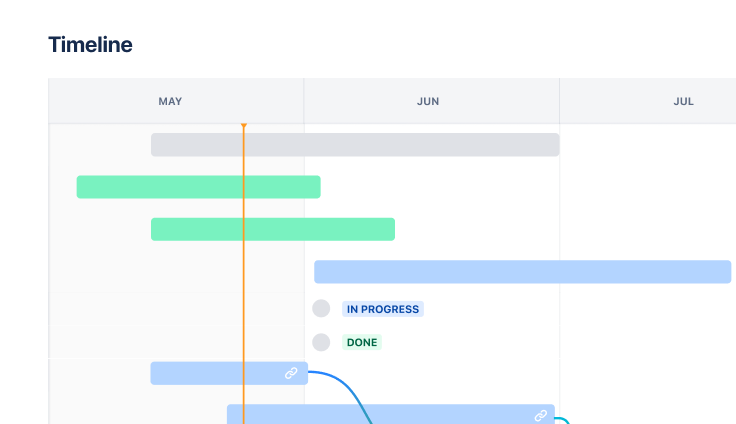
Timeline
The Timeline view shows events chronologically, making spotting overlapping tasks and looming deadlines easier. This view is beneficial during project execution when tracking milestones across various stages, ensuring nothing important gets missed in the shuffle. Use Jira to map dependencies between tasks so your team can anticipate bottlenecks and adjust schedules.

Kanban board
A Kanban board organizes events into columns such as “To Do,” “In Progress,” and “Completed.” This visual workflow management approach lets you and your team move through stages with simple drag-and-drop actions, clarifying what needs attention now.

Lists
Lists provide a text-based way to organize events, tasks, or milestones in a straightforward bullet-point format. This no-frills view allows for quick updates and edits to event details, making it perfect for making changes on the fly. With Confluence + Loom integrations, you can embed video updates directly into your event documentation, providing additional context and improving collaboration.
How to get started with the event calendar template

- 1
Define event categories
Identify and categorize the events you’ll track, such as team meetings, client presentations, product launches, or marketing campaigns. Creating relevant categories that match your specific needs will make filtering and finding events much easier as your calendar fills up. Establishing your event framework is especially important during the project kickoff phase.
- 2
Fill in event details
Add all the essential information for each event, including title, description, date, time, location, and other relevant details. Being thorough at this stage prevents confusion later — your future self (and all stakeholders) will thank you for including the critical specifics upfront when creating your project plan.
- 3
Set reminders and alerts
Don’t rely on memory alone. Set automatic reminders for each event to ensure you’re notified well in advance. These alerts are critical for staying on top of deadlines and appointments, especially when managing multiple events simultaneously or working with a complex annual event calendar template.
- 4
Share and collaborate
Share your calendar with team members and stakeholders to keep everyone aligned. A calendar of events template allows others to add or update information as needed, ensuring real-time collaboration. This transparency helps avoid miscommunication and keeps everyone on the same page, vital for effective decision-making and project management.
- 5
Review and adjust
Review your calendar regularly to ensure everything remains accurate and up-to-date. As changes inevitably occur, adjust dates, times, and details.
Reviewing and adjusting your event calendar ensures it remains a reliable source of information for everyone involved and helps with capacity planning as your events schedule evolves.
- 6
Track progress
Monitor the completion of events and associated tasks to ensure timely execution. Tracking milestones and outcomes helps you evaluate the effectiveness of your event planning process, allowing you to refine your approach for future events and improve overall efficiency.
Use this data when setting goals for your next event or creating an action plan for improvement.
Related templates


Marketing
Jira project management template
Manage activities for completing a business project.