
Project tracking template
Monitor every task and project milestone from conception to completion with a project tracking template.
BEST FOR
Project management
KEY FEATURES
Task planning
Prioritization
Pipeline management
What is a project tracking template?
A project tracking template is a pre-built framework that helps teams organize, monitor, and manage their work from start to finish. This template provides structure for tracking tasks, deadlines, and progress while keeping everyone aligned on project goals.
Using a project tracker template, teams can maintain visibility into their work, identify potential roadblocks early, and ensure nothing falls through the cracks. The template can become your central hub where all project information lives.
The point of a detailed project tracking template is to make it easier for workers and stakeholders to stay informed and make data-driven decisions throughout the project life cycle.
Why use a project tracker template?
A project tracker template simplifies project management by providing a clear structure for tracking tasks, timelines, and progress. Here’s why it’s a valuable asset for any team:
Centralized project oversight: It offers a single platform for tracking all tasks, milestones, and dependencies, improving collaboration and reducing miscommunication.
Improved accountability: Assigning tasks with clear ownership ensures team members are accountable and deadlines are met efficiently.
Enhanced visibility: Keep the project on track, visualize progress, identify potential delays, and address resource bottlenecks early.
Streamlined communication: With accessible timelines and task statuses, stakeholders and team members stay aligned without excessive meetings or updates.
Risk mitigation: Early identification of issues through status monitoring and an integrated issues log helps resolve risks proactively.
What does the project tracking template include?

Kanban board
Kanban boards provide a structured and visual approach to task management, helping teams organize workflows and track progress in real-time. With columns like “To Do,” “In Progress,” and “Done,” teams can easily monitor task statuses and identify bottlenecks in the workflow. By using a Kanban board template, teams benefit from enhanced transparency, improved collaboration, and the flexibility to customize workflows to suit evolving project needs.

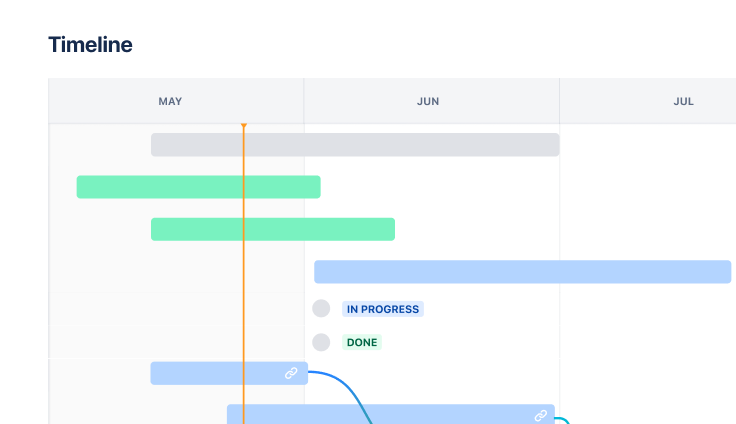
Timeline
Project tracking templates include a project timeline that shows due dates, milestones, and dependencies between tasks. This timeline helps facilitate effective communication between team members and all the various stakeholders, as it provides access to essential information about the project’s status. Comparing actual progress with your projected timeline helps you identify and mitigate potential delays and resource bottlenecks early.

Lists view
A project task tracker template acts as a centralized hub for all pending tasks, utilizing the list view. Proper resource management is crucial when breaking down large tasks into smaller, more manageable subtasks. A template helps visualize the project workflow more accurately. With clear visibility of all project tasks, you can easily assign ownership to specific team members, improving accountability, enhancing efficiency, and ensuring awareness of deadlines and major milestones.

Workflows
Workflows in project tracking templates establish clear pathways for how tasks move from start to finish. They define the different stages work can be in and the rules for moving between those stages. Think of workflows as the roadmap that guides each piece of work through your team's process, whether that's a simple "New → In Progress → Complete" flow or something more complex with review stages and approvals. Having standardized workflows means everyone knows what comes next and reduces confusion about where tasks stand or what actions are needed to move them forward.
How to get started with the project tracking template

- 1
Define the project scope and the work necessary to complete the project
To use the project tracker template in Jira, first articulate the scope of work. Consider these questions:
What are the project’s overall objectives?
What deliverables does the project need to achieve those objectives?
What resources are necessary?
What constraints will the team face?
As the project scope evolves, what is the change control process?
Your answers will help define the project’s scope and clarify the work necessary to complete the project. These answers also help define the processes your team will follow when issues arise. Clearly outlining the process at the start helps alleviate any delays.
Having a solid foundation prevents scope creep and ensures everyone starts with the same understanding. This process also supports strategic planning efforts and helps align the project with broader organizational goals. Taking time to document these details creates a reference point that teams can return to when questions arise during execution.
- 2
List all tasks and break them into manageable subtasks
List all the tasks required to achieve your objectives. Include a due date, assignee, priority, and any dependencies. Break down large tasks into manageable and achievable subtasks to prevent overburdening team members.
This detailed breakdown helps with accurate time estimation and resource allocation across the entire project. It also makes it easier for the project manager to track progress and identify potential bottlenecks before they impact the overall timeline.
When tasks are properly sized, team members feel more confident about completing their work and can better communicate their progress to stakeholders.
- 3
Establish a realistic and manageable project timeline to avoid scope creep
Working backward from the project completion date, map out the due date for every project milestone. This provides goalposts to measure overall progress.
Create a realistic and manageable project timeline that you can track and measure. Consider buffer time for unexpected challenges and dependencies between tasks that might cause delays.
A well-planned timeline can help with decision-making throughout the project when priorities need to shift. This approach also supports your annual planning process by providing realistic delivery dates that stakeholders can count on.
- 4
Assign roles and responsibilities based on your team’s specific skills
Assign each task to a specific team member based on their skills and expertise. Reassign tasks if overload occurs. Agile project management encourages team members to take on tasks they have the bandwidth to handle.
Ensure someone is accountable for seeing each task through to completion. Clear ownership prevents tasks from getting missed.
This alignment supports your overall action plan and ensures resources are used efficiently across the team. Consider each person's current workload and development goals when making assignments, as this approach can contribute to both immediate project success and long-term team growth.
- 5
Regularly monitor and update the template with progress made
Establish a regular cadence for meeting and updating the project tracking template, whether that’s a weekly backlog grooming meeting or a daily standup for an Agile team. This helps foster continuous improvement.
Regular check-ins help teams catch issues early, celebrate wins, and adjust plans as needed to keep everything on track. These sessions also provide opportunities for team members to raise concerns, share learnings, and collaborate on solutions that benefit the entire project.
Consistent monitoring helps ensure your project stays aligned with your original vision, which can help you set goals and create a vision for future initiatives.
Related templates
Marketing
Jira project management template
Manage activities for completing a business project.


Software Development
Scrum template
Visualize, track, and manage your work easily from sprint to sprint.