
 Meet Maggie, PCMag's
Antivirus protection for your PC is imperative, even if you can’t afford it. If your budget is limited, choose a free antivirus tool. Avira Free Security, for example, goes beyond just antivirus, offering VPN, password management, ad blocking, and more. It’s not a typical security suite, though—you won’t find firewall protection, backup, spam filtering, or other common suite components. And many of its features are fully or partially reserved for paying customers. If you're after a slimmed-down free suite, Avast One Free is a better choice. For free protection focused on core antivirus features, try AVG AntiVirus Free. These two are our Editors' Choice winners for free antivirus apps.
Avira is owned by Gen Digital. Gen also owns Avast, AVG, LifeLock, Norton, and a host of other companies. This giant collection didn’t happen all at once. In 2016, Avast acquired AVG. Before long, the two product lines were using the same antivirus engine. Around the same time, Norton acquired LifeLock.
In 2020, Norton acquired Avira. Shortly thereafter, Avira acquired BullGuard, but within a couple of years, Norton shut down the BullGuard brand and migrated its customers to Norton AntiVirus. Rounding out the collection, Norton acquired Avast/AVG in 2021 and created Gen as the parent company for all.
Since 2023, Avast, AVG, and Norton have all relied on the same antivirus engine, called the Gen Stack. Not surprisingly, all three earned precisely the same scores in my hands-on malware blocking test. As you’ll see below, Avira scored the same as the other three. It’s not officially using the Gen Stack, but it still lined right up with the rest.
Similar Products


Bitdefender Antivirus Free for Windows


Avira’s installer is seriously self-sufficient. Once you click Agree & Install, it prompts you to take a few minutes to complete the process. You can choose to continue with a free installation or purchase a license to upgrade to Avira Prime. After installation, Avira offers to run a Smart Scan. I skipped that initial scan for testing purposes.
Avira’s main Status screen displays oversized icons for Security, Privacy, and Performance. A simple menu down the left lets you dig into these three feature areas or return to the Status home page. Finally, you can click a button to run the all-in-one Smart Scan. If you don’t run a Smart Scan immediately after the quick, simple installation, the antivirus will keep nagging you until you do.

Smart Scan checks for active malware, of course, but it does a lot more. It analyzes your settings to identify privacy issues, looks for ways to improve performance, identifies apps that need updating, and checks the network for potential security issues. More about Smart Scan below.
To supplement my hands-on testing of antivirus apps, I turn to regularly issued reports from five independent labs worldwide. The simple fact that a given antivirus appears in a report means that the lab’s experts considered it significant enough to warrant testing and reporting. The more lab results, the better, and, of course, high scores are important. When last tested, Avira had high marks from three of these labs. This time around, its lab scores are sparse and poor.
Of the many reports from AV-Comparatives, I follow three. This lab doesn’t use numbers. Rather, an antivirus that passes the test earns Standard certification. Those that go beyond the basics can earn Advanced or Advanced+ certification. In this lab’s latest tests, Avast, AVG, Bitdefender Antivirus Free for Windows, Kaspersky, and Norton AntiVirus Plus managed three Advanced+ ratings. In the lab's most recent report, Avira earned one Advanced+ and one Standard certification but failed the essential Malware Protection Test. The latest test doesn’t include Avira.
With SE Labs, certification comes in five levels: AAA, AA, A, B, and C. In the past, Avira routinely took AAA certification in this test, but it hasn’t appeared in this lab’s reports for the last couple of years. The latest report from this lab shows nothing but AAA and AA results.
AVLab Cybersecurity Foundation is the most recent addition to my cadre of labs worldwide. Its antivirus efficacy test yields a simple percentage score. Of the products included in its latest report, all but one reached 100%. That collection of test products did not include Avira.
Researchers at AV-Test Institute evaluate each antivirus on three distinct criteria. Naturally, they measure its ability to protect against malware. They also score apps on how well they avoid erroneously flagging legitimate processes as malicious, an index they call usability. And they ensure the antivirus does all this without dragging down performance. An antivirus can earn up to six points for each of the three criteria. More than half the apps tested in this lab’s latest report reached a perfect 18. Avira matched those winners in the protection and usability tests, with a perfect 6. But some serious performance problems dragged that score down to 4.5, for a total of 16.5 points, the lowest score among the tested apps.
As you can see, most labs offer a range of scores to reflect varying levels of capability. Tests by London-based MRG-Effitas are scored differently. In this lab’s reports, an antivirus either exhibits near-perfect protection or fails utterly. In this lab’s all-inclusive consumer assessment, an app that totally blocks every malware attack passes at level 1. An app that misses some initially but wipes out the malware within 24 hours passes at level 2. Anything else is a failure. In the last test, only Malwarebytes Premium Security reached level 1. The rest came in at Level 2, or simply failed. Avira wasn’t tested.
Since all the labs use different scoring systems, I’ve devised an algorithm that maps the scores onto a 10-point scale and generates an aggregate score. As noted, I also consider inclusion by more labs preferable. At present, only Avast and Norton appear in reports from all five, both with an aggregate score of 9.8 points.
Bitdefender also holds a 9.8-point aggregate lab score, though its results come from just four labs. Also tested by four labs, ESET NOD32 Antivirus, Malwarebytes, and McAfee AntiVirus scored 9.4, 8.4, and 7.2, respectively.
As for Avira, with results from just one lab and a failure among those results, it comes in at 7.0 points. I hope to see its scores back up by my next review.
Lab results notwithstanding, I always perform my own hands-on tests. I start by opening a folder of malware samples that I've curated and analyzed myself. Avira immediately started quarantining those that it recognized. It eliminated 74% of the samples on sight, which is rather low. Avast, AVG, and Norton caught 85% at this stage. McAfee managed 91%, and Sophos Home Premium tops the bunch with 98% of the same set of malware samples eliminated on sight. On the plus side, Avira eliminated every ransomware sample on sight. After recording Avira’s initial reaction, I launched the samples that had passed this initial culling.
Looking at both samples eliminated on sight and those caught after they launched, Avira detected 97% of the samples and scored 9.7 out of 10 possible points, the same scores achieved by Avast, AVG, and Norton. In the winners’ circle, Sophos and Malwarebytes both detected 99% overall and scored 9.9 and 9.8 points, respectively.

For many years, Avira’s full scan happened in a separate window titled Luke Filewalker. I don’t know whether George Lucas found out about it, but the slightly cheesy Luke Filewalker window vanished several years ago and was replaced by fully integrated scan reporting. A full scan of a clean test system took 75 minutes, a bit faster than when I last tested Avira, and a lot faster than the current average of 120 minutes. A repeat scan took the same amount of time, suggesting that Avira doesn’t attempt to optimize scanning the way some competitors do. For example, a repeat scan by Bitdefender or ESET completed in around 8% of the time required for the first scan.
Avira offers several browser extensions for Chrome, Edge, Firefox, and Opera. These include a password manager, a shopping helper, and the security-centric Browser Safety extension. Browser Safety aims to prevent malware infection by steering your browser away from malware-hosting URLs. Do be sure to enable Browser Safety. Note that the Web Protection feature, whose toggle you see on the Protection Options page, is a separate feature and not included in this free suite.

To test this feature, I start with a feed of malware-hosting URLs recently discovered by researchers at the British lab MRG-Effitas. I launch each URL, discarding any that are already defunct, and note whether the antivirus blocked all access to it, prevented the malware from being downloaded, or did nothing.

I give equal credit for blocking the URL and for eliminating the download. Last time around, Avira aced this test, achieving 100% protection. This time, it managed 92%, evenly split between blocking access to the malware-hosting URL and eliminating the malware during download. Panda Free Antivirus reached 100% in its own test, while Aura, Emsisoft Anti-Malware, Sophos, and UltraAV managed 99%.
Coding a Trojan horse or other malicious program that can steal passwords while evading antivirus utilities is a tough slog. Tricking unsuspecting consumers into foolishly handing over their login credentials is much easier. Phishing fraudsters simply create a website that’s visually identical to, say, PayPal. Sometimes, they manage a URL that’s close to the real thing, like paypal.loginuser.com. When an unwitting web surfer logs in, the fraudsters capture the username and password, and that unfortunate netizen is hosed. Yes, you can learn to spot fraudulent sites, but the best antivirus apps handle phishing protection even when you’re tired or muzzy.

Avira’s web protection also detects and averts these phishing attacks. To test it, I first scraped hundreds of reported phishing URLs from websites that track such activity, including both verified fraud and pages that were too new to be blocklisted. I launched each URL in a browser protected by Avira, and simultaneously in Chrome, Edge, and Firefox, relying on each browser’s built-in protection. I discarded any that didn’t load properly in all four browsers. I also discarded any that didn’t clearly fit the profile of a phishing fraud. When I got enough data points, I ran the numbers.
Just as when last tested, Avira hit the top—100% detection. A dozen recent apps have reached 100% detection in their latest tests, among them Guardio, Norton, Surfshark One, and Webroot Essentials.
Phishing is completely platform-independent. If you can browse the web on your internet-aware refrigerator, you can give up your login credentials there just as easily as on your computer. However, third-party phishing protection isn’t necessarily the same across platforms. Some antivirus utilities earn wildly different scores on Windows than on macOS. Avira shields you from fraud in Chrome, Edge, Firefox, and Opera across all operating systems. Tested at the same time, Avira Free Antivirus for Mac earned the same perfect score.
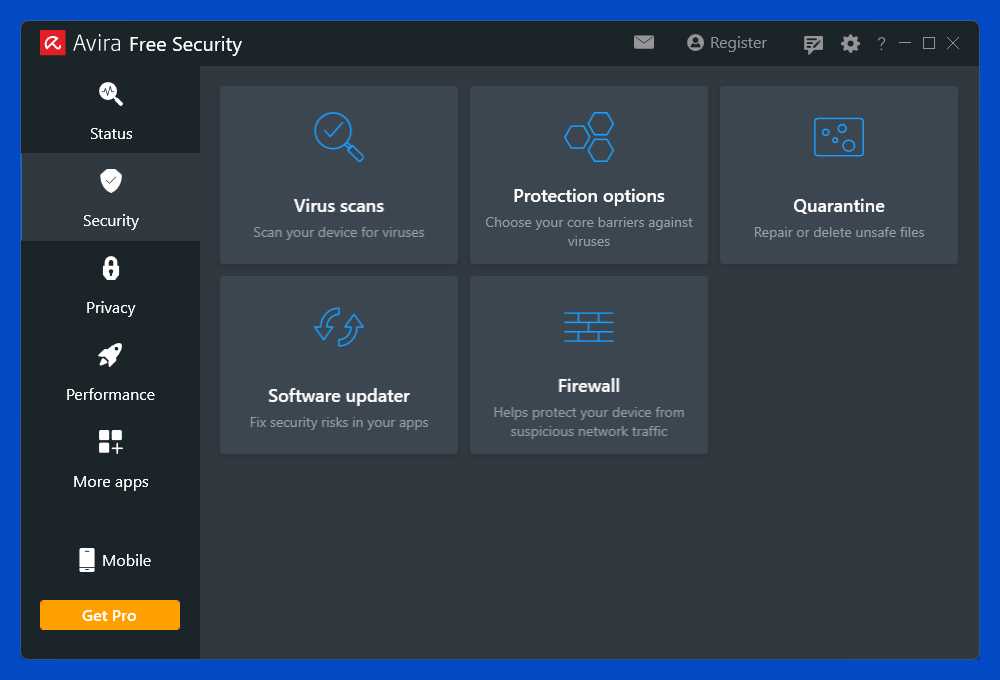
Selecting Security from the left-rail menu opens the Security page, which offers access to five security features: Virus scans, Protection options, Quarantine, Software updater, and Firewall.
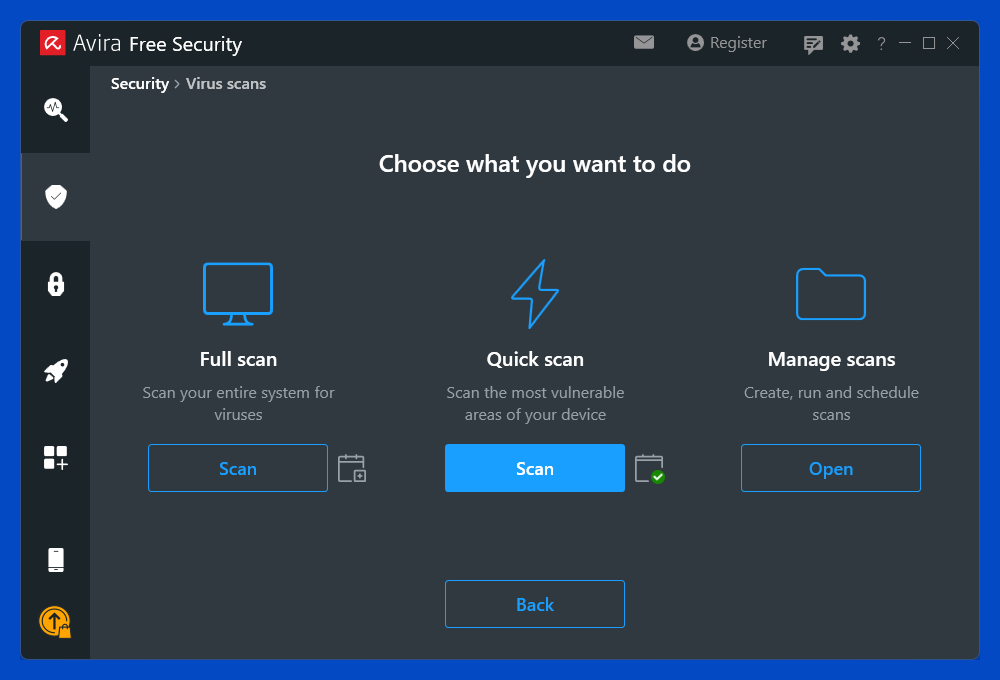
Selecting the Virus scans panel lets you launch a quick or full scan. By default, Avira schedules a weekly quick scan. Clicking Manage scans lets you schedule a full scan daily, weekly, or monthly. You can also schedule or run scans focusing on removable drives, active processes, or Windows system files.
Once the antivirus has trapped some prey, you can click Quarantine to see just what it bagged. Here, you can permanently delete found threats or, in the very unlikely event of a false positive, restore legitimate programs that got quarantined.

Clicking the Protection options panel reveals some features you don’t get for free. In the free edition, only Real-time protection is enabled. If you try to enable web or ransomware protection, you'll see a page advising you to upgrade to Avira Prime. If you decline, Avira offers a 60-day Prime trial to tempt you. Do note that web protection is a browser-independent component, completely distinct from Browser Safety.
When ne’er-do-wells discover security holes in popular programs, they exploit them to the max, knowing that the program’s maker will soon release a security patch to close them. If you don’t install available patches, you put yourself at risk. The Software Updater component scans your installed apps and flags any of them that have outstanding security patches.

The scan doesn’t take long and lists any important apps and components that need significant updates. A big Update All button looks tempting, but clicking it just takes you to an upsell page for Avira Software Updater Pro. Clicking the Update button next to an outdated app opens an Avira Prime upsell window that, for common programs like Chrome and Firefox, includes a link to manually perform the update. Indeed, it’s easy enough to just open each listed app and update it yourself. Avast's product line has a similar app update feature, even in the free edition. But here again, you don't get automated installation unless you spring for the top-of-the-line Avast One suite.
Clicking the big Firewall button opens a window showing the status of Avira Firewall and the built-in Windows Firewall. Alas, clicking the Turn on button for Avira Firewall diverts you to an upsell page for Avira Antivirus Pro. Free users can turn the built-in Windows Firewall on and off, or switch its profile between public and private, but that’s all.
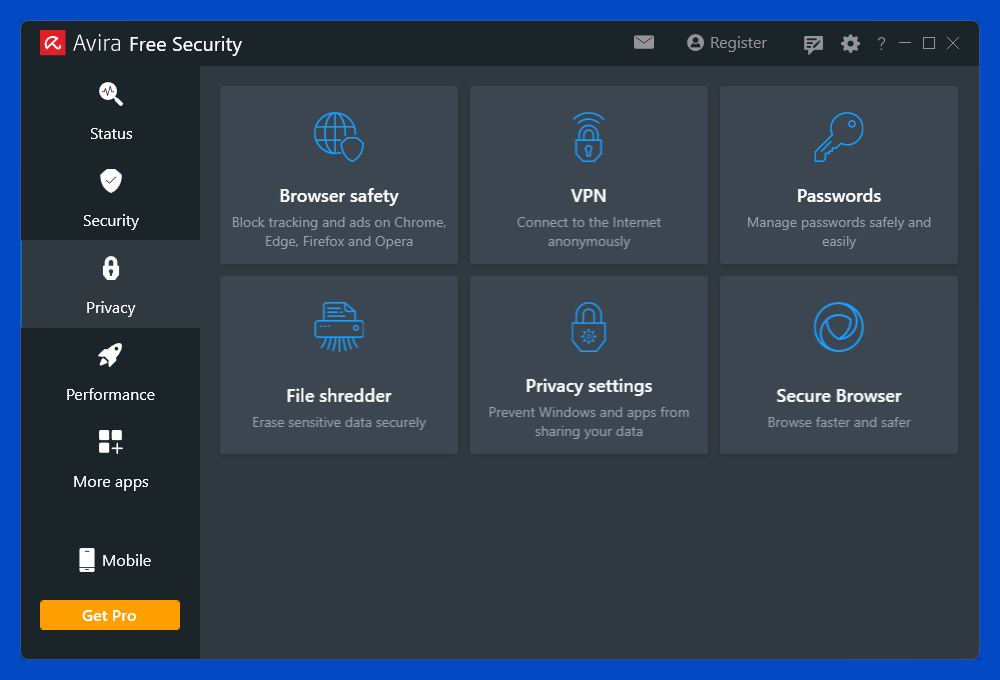
When you click the Privacy option in the left-rail menu, you get six useful privacy-related components: Browser safety, VPN, Passwords, File Shredder, Privacy settings, and Secure Browser. Clicking Browser safety installs the Avira extension in your default browser (provided that your default is Chrome, Edge, Firefox, or Opera). I’ve already discussed how that feature can steer users away from malicious and fraudulent sites, but it can do more if you allow it.
Browser Safety: Beyond Blocking Dangerous Websites
Click the Browser safety toolbar button and click the settings gear to see this extension’s capabilities. By default, it just sends a Do Not Track header with every web page request from the browser, something most browsers can do themselves. Since websites are free to ignore this header, it’s pointless. For actual protection, you must turn on blocking web trackers.
Once you’ve enabled the feature, Avira watches for tracking ads and other third-party trackers and actively stops them from tracking you. A numeric overlay on the browser extension button shows the total number of items blocked, and you can click the button for a breakdown. You can disable blocking for specific sites, but you don’t get the option to exempt certain trackers.

Avira also installs its Safe Shopping extension, though I found I had to enable it manually. Safe Shopping aims to keep you from paying too much online. Its shopping cart icon turns red when you’re on a site that has been verified as safe to shop on.
I spent a little time poking around shopping sites and searching for popular items. In past reviews, I’ve managed to trigger notifications of a better price elsewhere (though often the price was worse, not better). This time around, it offered coupon codes on every major site I visited, but no “better deal” pop-ups. Dedicated online shoppers may find this feature useful.
VPN: Avira’s Free VPN Comes With Serious Limitations
The VPN component is an integrated and feature-limited version of Avira Phantom VPN. The full-scale VPN can connect to 48 locations in 35 countries. More than half the locations are in Europe, and another 30% in North America. That geographic spread doesn’t matter to free users, as the VPN decides which server you’ll use (typically the nearest).
In addition, the free VPN caps your bandwidth at 500MB per month. I found that watching a random YouTube video for five minutes used up almost 20% of my monthly allowance. Removing those limitations costs $117 per year (after a first-year discount). Paying for the all-inclusive Avira Prime is another (and better) way to get unlimited VPN protection.
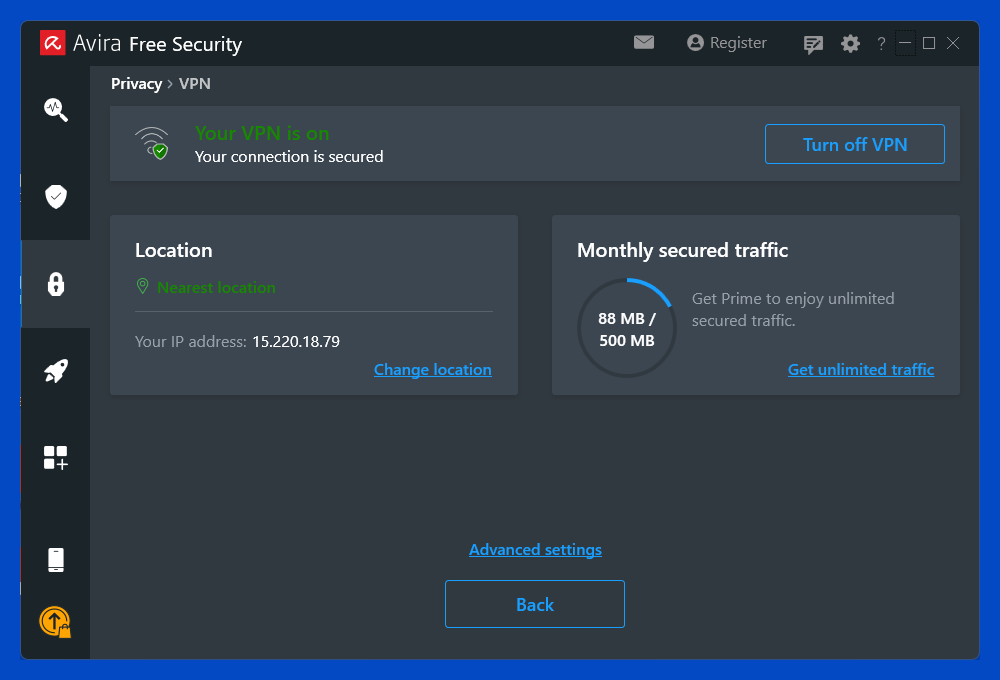
Clicking the Advanced Settings link takes you away from the main Avira app and opens a separate free instance of Phantom VPN, with all the same limitations. From this separate app, you can enable the VPN’s ability to block malicious websites, connect automatically when on specified networks, and launch at Windows startup. The kill switch, which blocks all traffic when the VPN connection drops, is a premium-only feature.

Bitdefender includes a similarly limited VPN with a more generous bandwidth limit of 200MB per day. Lifting Bitdefender’s limits costs $6.99 per month or $69.99 per year, a good bit less than Avira charges.
Password Manager: Handles the Basics But No More
The password manager installs as a browser extension in Chrome, Edge, Firefox, and Opera for Windows or macOS, and offers apps for Android and iOS. It handles basic tasks like capturing login credentials you enter, replaying them as needed, and syncing across all your devices. You can enable multi-factor authentication, which functions by texting a code to your smartphone. But it doesn’t offer form-filling, secure sharing, digital inheritance, or other top-tier features. Avira Password Manager is available separately as a free app with a premium upgrade. See our full review of the password manager to learn more.
File Shredder: Delete Files Securely
When you delete a file, it just goes to the Recycle Bin. That’s handy in case you deleted the wrong file, but not so good if you’re trying to wipe out sensitive data, such as the plaintext original of a sensitive file you encrypted. Even if you empty the Recycle Bin, forensic software can often recover deleted files. To delete files beyond the possibility of forensic recovery, just drop them on Avira’s File Shredder.

Bitdefender, McAfee, and Webroot, among others, offer a similar feature. Some file shredding utilities let you choose the number of times they overwrite data before deletion, or choose specific algorithms such as the three-pass version preferred by the Department of Defense or the way-overpowered 35-pass Gutmann algorithm. Webroot can overwrite files seven times and wipe all traces, which is sufficient to foil even forensic hardware recovery. Avira doesn’t disclose its algorithm, but even a single overwrite pass is enough to prevent software-based recovery.
Privacy Settings: Take Control of Your Privacy
The most significant component on the Privacy page is Privacy Settings. If not configured correctly, Windows and popular apps can potentially leak information about your computer and browser usage. Avira puts you in control of over 140 settings across 17 categories, including Sharing data with Microsoft, Telemetry and user experience, Edge configuration, and OneDrive. A single click can align all your settings with Avira’s expert recommendations. Alternatively, you can dig in to customize the settings or just view exactly what they are.

Curious users will want to choose Custom settings and view the many dozens of privacy settings. Who knew that by default, you were subject to “Microsoft experiments,” for example? In the Custom view, you can see what settings Avira marks as Recommended and what additional settings it changes when you switch to Enhanced.
Secure Browser: Lots of Features But Little Substance
Avast, AVG, Avira, and Norton all include a privacy-focused secure browser. When you click Secure Browser on the Privacy page, it installs the secure browser and, with your permission, makes it the default. This browser is Chromium-based, so if you use Chrome, it will be familiar. What sets it apart is the Security & Privacy Center, a collection of special-purpose items.
The Security & Privacy Center page has undergone a radical change in appearance since my previous review. The page is now divided into four regions: Browser Modes, Security Check, Settings, and Tools. Security Check simply reports statistics on things like phishing sites blocked and dangerous downloads intercepted. As for browser modes, choosing Private Mode just invokes your browser's built-in privacy, such as InPrivate in Edge or Incognito in Chrome. In between those two is a third mode called Screen Sharing. This mode hides sensitive browser elements so you can share your screen without risking exposure.
Under settings, you have Privacy Guard (not to be confused with Private Mode), Web Shield, Password Managers, and Extension Guard. The Tools panel has just two items, Avira Security and Privacy Cleaner.
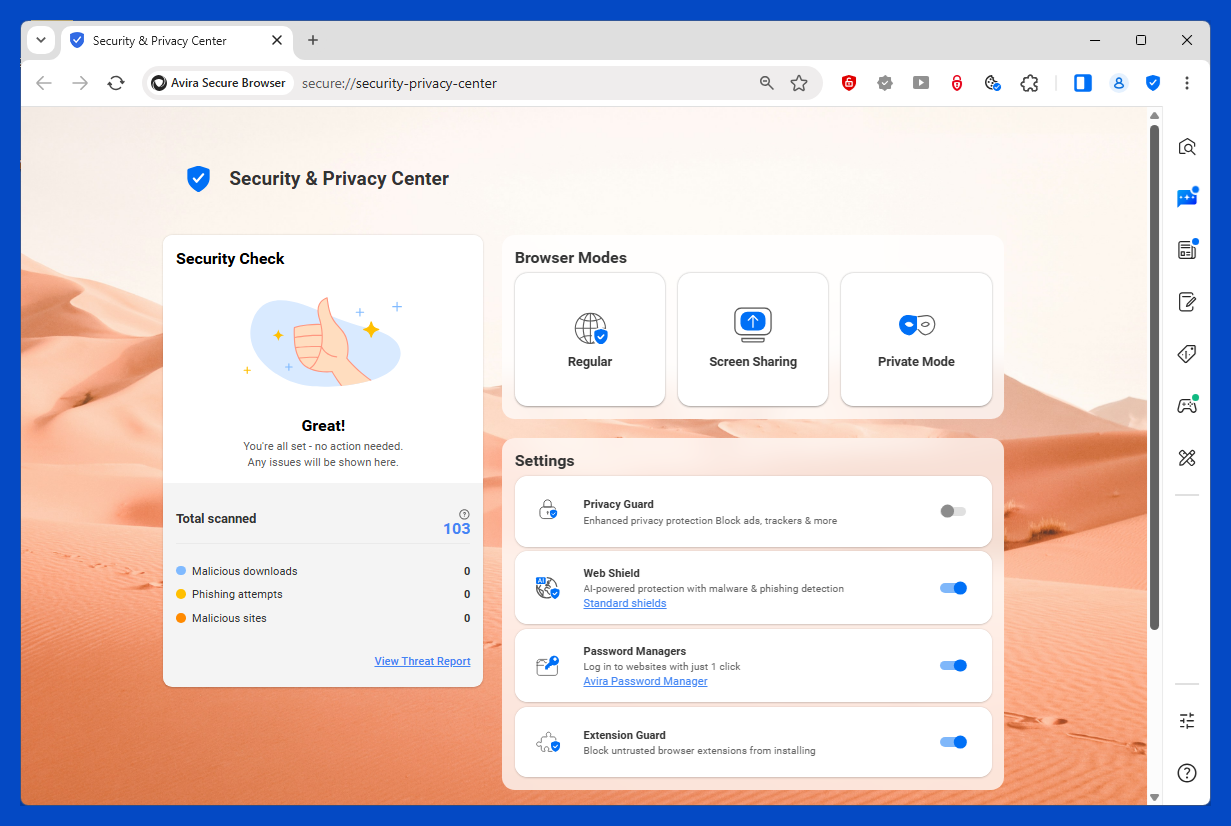
In terms of quantity, this is an impressive collection of features, but most of them don’t offer much. Clicking Avira Security just opens the antivirus, and the Password Managers feature pointlessly lets you swap between using Avira's password manager and the browser’s built-in password feature or turn both off. As for Privacy Cleaner, it’s almost identical to Chrome’s Clear browsing data feature and is reached by the same Ctrl+Shift+Del key combo.
Extension Guard promises to block untrusted browser extensions. Really, though, shouldn’t the antivirus just wipe these out, just as it would any other malware? I didn’t find a way to test this feature.
In the Secure Browser, Web Shield replaces Browser Safety. I don’t know why Gen antivirus products insist on providing two separate components that do the same thing, but I’ve learned they are not exactly the same. To check this, I ran my malicious URL-blocking test again, but this time using Web Shield for defense.
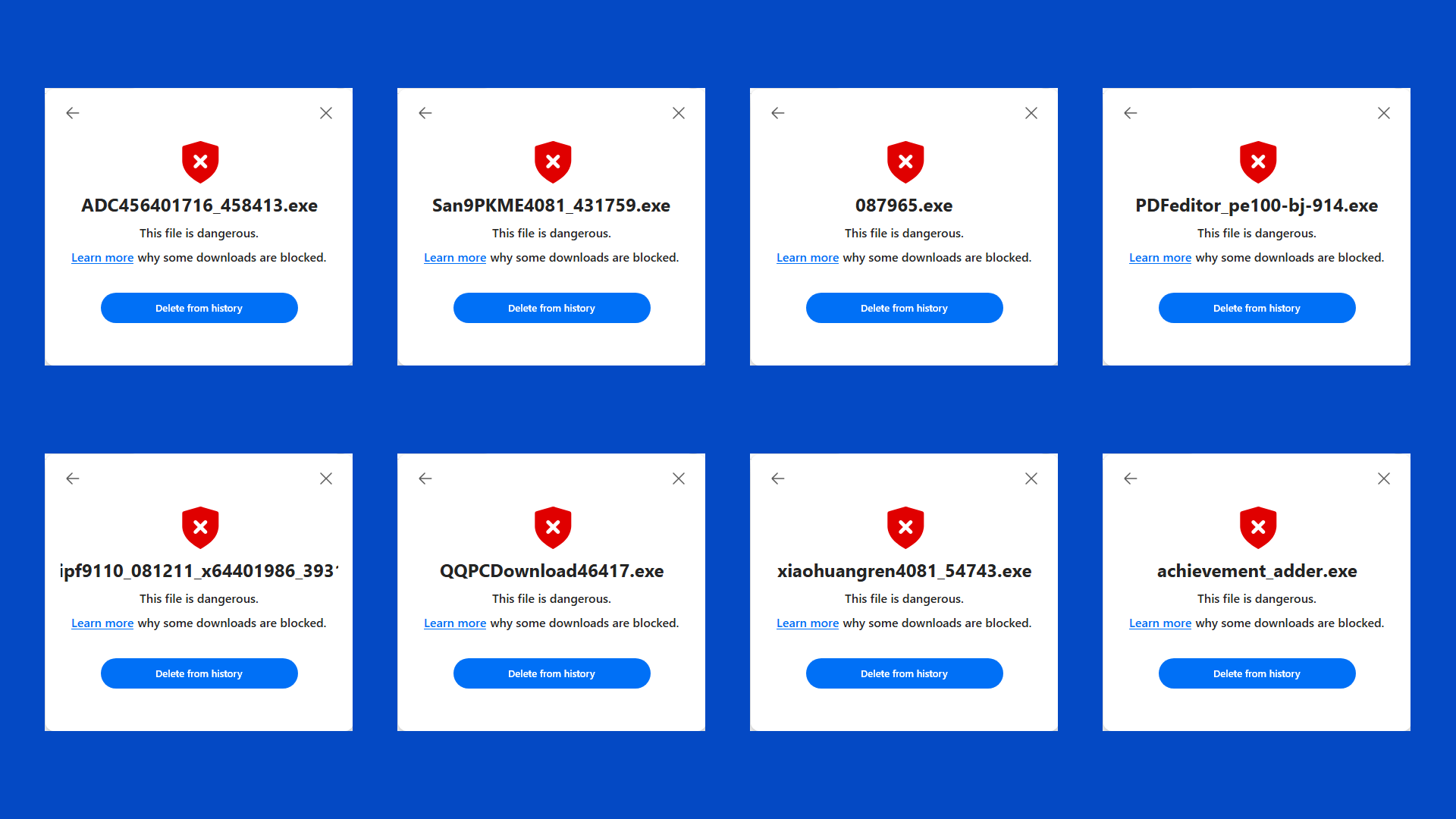
Browser Safety protected the test system against 92% of the malware-hosting URLs, with its success split evenly between blocking all access to the URL and deleting the malware download. With Web Shield protection, it was more of a 60/40 split, with more samples being totally blocked in the browser.

While Browser Safety leaves downloading to the browser (except when it interrupts the process), Web Shield takes over the download. When it blocks a dangerous download, it marks it with a red icon right in the browser’s downloads list. Safe downloads get a green icon. In total, Web Shield scored 94% to Browser Safety’s 92%. That’s not much of a difference.
Privacy Guard is an ad and tracker blocker with more flexibility than Avira’s Browser Safety extension. At its default Basic level, it blocks items that “disrupt your browsing experience.” Leveling up to the Balanced level tells it to block more ads, including ones on social media. At the Strict level, it blocks ads, trackers, browser notifications, and attempts at browser fingerprinting. If you do select Strict blocking, the browser pops up a plea asking you to relent and not block “partners that fund us through…user-friendly ads.”

This feature is both less flexible and less informative than what some competitors offer. For example, Bitdefender’s Anti-Tracker breaks down blocked ads by category and lets you choose its response at the category level. Tracker defense in the IronVest privacy tool shows which trackers it blocked and lets you exempt any specific tracker or site from its scrutiny.
Avira Secure Browser flashes a collection of security features, many of which don’t do much. It is configured for the best security, but you can configure most of the same settings in Chrome. It’s not hardened against attack like some other secure browsers are. It’s a cut above basic Chrome in terms of security, so use it if you like.
A user who blames security software for performance problems (reasonably or not) may just turn off security altogether. That’s not good. Avira heads off that problem with a collection of features aimed at improving performance. Clicking Performance in the left-rail menu reveals a page with six button panels: Optimizer, Battery saver, Driver updater, Duplicate finder, Advanced tools, and Game Booster.
First: There Aren’t as Many Distinct Features as It Seems
Out of these six performance features, Game Booster isn’t available without an upgrade. Three of the buttons (Battery saver, Duplicate finder, and Advanced tools) just launch the corresponding components within the separate Avira System Speedup application. Even more than the rest of this suite, System Speedup is loaded with locked Pro-only features, scans that find problems but won’t fix them without payment, and other upsell attempts.

The simple Optimizer aims to free up space by removing junk files, speed up your device’s performance, and clean up things like cookies and erroneous Registry data. On my sparsely populated test system, it found about 830 MB of junk files and one slow-startup app. One click of the Optimize button cleaned up the junk files, but did nothing about that slow app. The results page offered to unlock my “full cleaning potential.” After clicking the Unlock button, I learned that I could either pay $90.99 per year for Avira’s System Speedup Pro or get it all with Avira Prime.

Driver updater is similar in purpose to the Software updater described above. However, rather than finding missing security patches, it scans your system for device drivers that could be updated for better performance. During testing, the scan ran quickly, reported no drivers requiring an update, and listed all the up-to-date drivers found. In past reviews, clicking to update all outdated drivers took me to an upsell page. However, clicking Update next to a single driver caused Avira to handle the update even in the free edition.
Avira System Speedup: Many System Optimization Features, Mostly Locked
As noted, several items on the Performance page simply open corresponding features within the separate Avira System Speedup. For example, selecting Battery Saver launched Avira System Speedup with the energy management component open. Of course, the virtual machine test system has no battery, but it still lets me choose among five modes, ranging from best energy saving to best performance. Or rather, it offered me three of those modes, as choosing either extreme triggered an offer to purchase System Speedup Pro.
Storing useless temp files and other junk wastes space on your hard drive, but so does storing multiple copies of documents and other files. Clicking Duplicate Finder opens the corresponding component in System Speedup. By default, this scan checks your Music, Documents, Pictures, and Videos folders. You can add other folders if desired and control which types of files it searches for. By default, it ignores “small-sized” duplicates, but you can remove this restriction if it seems appropriate.

In testing, Avira quickly found groups of identical files, marking all but one for deletion in each case. However, clicking the delete button for those redundant files just brought up an upsell screen. If you don’t want to pay up, you’ll have to reference Avira’s report when performing deletions manually, then run the duplicate scan again to be sure you've removed them all.
Going back to the Performance page and clicking for Advanced tools once again opens System Speedup, this time with the Startup Optimizer page selected. After a quick scan, the utility listed apps that may slow down the device and offered to perform a basic optimization. I wasn’t at all surprised to find that full use of this feature required an update to System Speedup Pro.

I ran through the other features of System Speedup and got similar results. Quick Optimizer performed a partial cleanup but noted that its Pro edition could do more. Power Cleaner identified 5.5GB of items that should be cleaned up, but wouldn’t perform the cleanup without payment.
Pulling down the Tools menu reveals that there’s even more to this cleanup tool. You can open a page of features designed to free up disk space and another that aims to improve system performance. You can reach the battery saver page mentioned earlier from this menu. There’s a full page of backup and restore options, though almost all are flagged as Pro-only. A file shredding system goes way beyond Avira’s built-in, with options to choose the file-overwrite algorithm, wipe a disk completely, and overwrite the disk’s free space. That last feature effectively shreds all deleted files ex post facto. Maintenance tasks get their own page, but they’re mostly locked.
The app’s many pages are riddled with orange Pro-only flags. At least when you see those, you know the feature’s not available before you spend time scanning something. Even so, I found the preponderance of Pro-only features in the separate System Speedup component to be seriously annoying. I’d be happier if Avira’s designers continued the integration trend by pulling the handful of available speedup features into Avira Free Security.
Back at the beginning, right after installation, Avira asked to run a Smart Scan. Now that I’ve explained the suite’s many features, I can spell out just how Smart Scan puts them all to work. You click a button on the main page to start the fun.
Smart Scan checks for privacy issues and performance issues. It runs a quick scan for malware and checks for outdated apps. Finally, it scans for network threats. That last item refers to any time you’ve connected to an insecure Wi-Fi network. The whole thing just takes a few minutes.
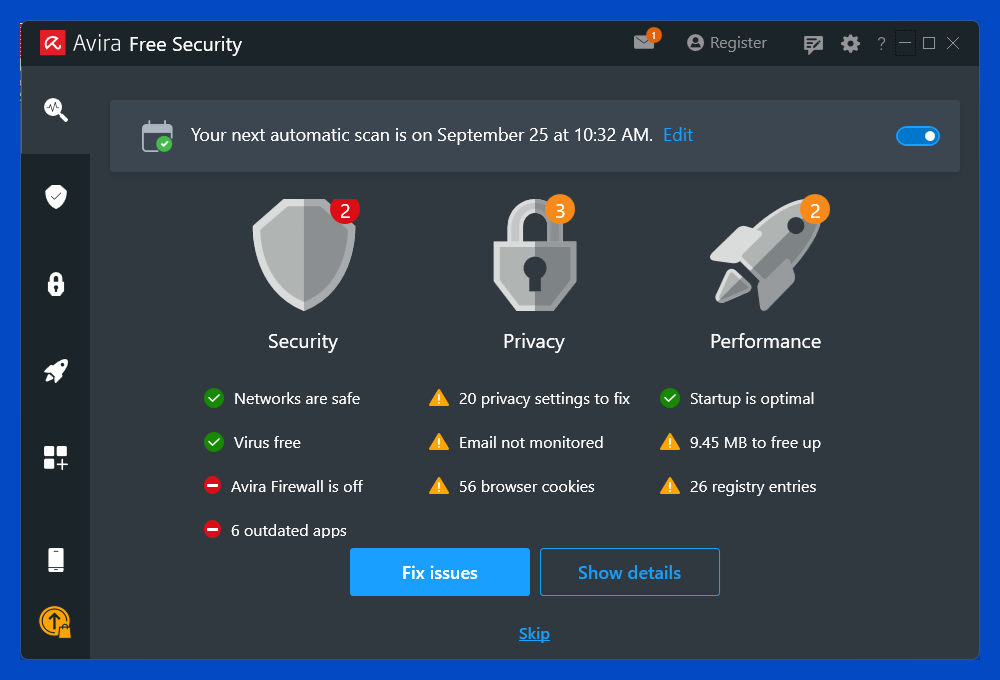
When the scan finishes, it summarizes its findings, broken down into Security, Privacy, and Performance issues. You can click a button to fix everything or choose to view detailed results. Well, fix everything may be the wrong phrase. Avira clears cookies, fixes Registry problems, and frees up some disk space. If you want to fix the rest, including outdated apps, privacy settings, and more wasted disk space, you’ll have to pay for an upgrade.
Final Thoughts
 (Credit: Avira)
Avira Free Security
- 5.0 - Exemplary: Near perfection, ground-breaking
- 4.5 - Outstanding: Best in class, acts as a benchmark for measuring competitors
- 4.0 - Excellent: A performance, feature, or value leader in its class, with few shortfalls
- 3.5 - Good: Does what the product should do, and does so better than many competitors
- 3.0 - Average: Does what the product should do, and sits in the middle of the pack
- 2.5 - Fair: We have some reservations, buy with caution
- 2.0 - Subpar: We do not recommend, buy with extreme caution
- 1.5 - Poor: Do not buy this product
- 1.0 - Dismal: Don't even think about buying this product
Read Our Editorial Mission Statement and Testing Methodologies.
The core antivirus component Avira Free Security gets good scores in our hands-on tests, but its lab test results are lacking. While its Privacy and Security components are completely integrated, most of the Performance features still call on the separate Avira System Speedup app. This suite is bursting with features and utilities, but it doesn’t cover the full range of expected suite components, and many of its features aren’t fully functional without payment. Avast One Free roughly matches Avira feature-wise, but its lab scores are vastly better, its VPN bandwidth limit is much more generous, and it includes protection aimed squarely at ransomware. It's an Editors’ Choice for free antivirus protection, sharing that honor with AVG AntiVirus Free, which sticks to typical antivirus features. Of course, when you’re looking at free antivirus tools, you have the luxury of evaluating as many as you want to pick the one that suits you best.
STILL ON THE FENCE?
About Our Expert
When the IBM PC was new, I served as the president of the San Francisco PC User Group for three years. That’s how I met PCMag’s editorial team, who brought me on board in 1986. In the years since that fateful meeting, I’ve become PCMag’s expert on security, privacy, and identity protection, putting antivirus tools, security suites, and all kinds of security software through their paces.
Before my current security gig, I supplied PCMag readers with tips and solutions on using popular applications, operating systems, and programming languages in my "User to User" and "Ask Neil" columns, which began in 1990 and ran for almost 20 years. Along the way, I wrote more than 40 utility articles, as well as Delphi Programming for Dummies and six other books covering DOS, Windows, and programming. I also reviewed thousands of products of all kinds, ranging from early Sierra Online adventure games to AOL’s precursor Q-Link.
In the early 2000s, I turned my focus to security and the growing antivirus industry. After years of working with antivirus, I’m known throughout the security industry as an expert on evaluating antivirus tools. I serve as an advisory board member for the Anti-Malware Testing Standards Organization (AMTSO), an international nonprofit group dedicated to coordinating and improving testing of anti-malware solutions.
- Avira Prime Review: Solid Unlimited Protection That Stops Just Short of Elite
- Avira Internet Security Review: Not a Big Improvement Over the Free Edition
- The Best Small Business Cybersecurity Suites for 2026
- How Exposed Is Your Data, Really? A Practical Guide to Finding Out (And Fixing It)
- Avira Free Antivirus for Mac Review: Good Baseline Protection Gated by Paywalls
- More from Neil J. Rubenking


