
 Meet Maggie, PCMag's
 The Epson EcoTank ET-3950 ($419.99) is one step down from the top-of-the-line ET-4950 for letter and legal-size home office all-in-one (AIO) printers. But the only difference in capabilities between the two is that the ET-4950 adds faxing to the ET-3950's printing, scanning, and copying. For micro and home offices that don't fax much (which is most of them), that's not worth the $80 difference in price, at least not as long as free online fax services continue to exist. So, while both models stand out for their reversing automatic document feeders (ADFs), which can scan both sides of a page, the ET-3950 is the better value. If you need to scan or copy multipage two-sided documents even once in a while, that's enough to make it an Editors' Choice award winner among inkjet AIOs for a micro or home office.
The ET-3950's paper handling for printing is easily suitable for moderate or heavy-duty use by micro and home office standards, as long as you don't need to switch between different types or sizes of paper very often. The printer can hold up to 250 sheets of paper, automatically duplex (print on both sides of the page), and handle up to legal-size paper. However, refilling or swapping out the paper in the single paper tray—located near the bottom of the front side—is more like refilling a drawer than a typical front tray. You'll generally need to pull the tray out to add or change paper, particularly when the output tray just above it is in printing position, rather than stored.
Epson's maximum recommended duty cycle for the printer is 1,600 pages per month. If you want to keep paper refills down to one a week, however, think in terms of 1,000 sheets maximum (four weeks times 250 pages), which could be 1,000 simplex pages, 800 duplex (with one page on each side of each sheet), or any combination of simplex and duplex that adds up to 1,600 printed pages—400 simplex and 600 duplex, for example.

For scanning and copying, the printer offers both a letter-size flatbed and the 30-sheet reversing ADF, which duplexes by scanning one side of a page, turning it over, and then scanning the other side. The scanning takes more than twice as long as with single-pass ADFs, which scan both sides of a page at the same time, but printers with single-pass ADFs are more expensive. More important, none of the ET-3950's most obvious competition offers any kind of automatic duplexing for scanning. And, to mangle an old saying, in the land of non-duplexing and manual-duplexing ADFs, the reversing ADF is king. Note also that scan options include scanning to email and to the cloud (Google Drive, Dropbox, Evernote, and OneDrive), while the copy feature lets you copy from either one- or two-sided originals to one- or two-sided copies.
Similar Products

Canon Pixma G3270 Wireless MegaTank All-In-One Printer

Epson EcoTank ET-1910 Wireless Color Supertank Printer

Epson WorkForce Pro WF-7840 Wireless Wide-Format All-in-One Printer


Epson EcoTank Pro ET-5850

HP OfficeJet 250 Mobile All-in-One Printer

Canon imagePrograf PRO-1100

Epson Expression Photo XP-8800 Wireless Color All-in-One


The printer weighs just 15.9 pounds and measures 9.4 by 14.8 by 13.7 inches (HWD) with the output tray in the stored position, making it light enough for one person to unpack and move into place, and compact enough to share a desk with. The control panel consists of a 2.4-inch color screen and some physical buttons to let you navigate through the options and give commands.

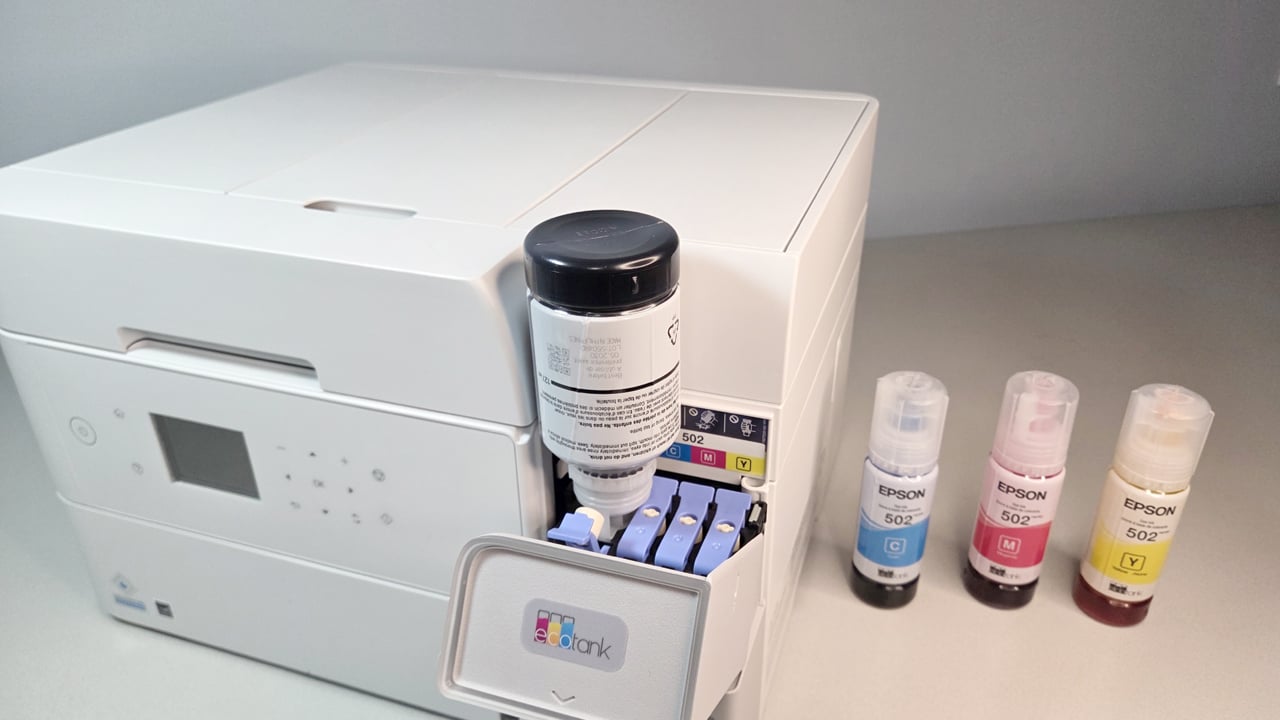
Physical setup is standard for a tank printer, requiring little more than loading paper; pouring the cyan, yellow, magenta, and black ink from bottles into the appropriate tanks; and waiting while the printer loads the initial ink from the tanks. When it finishes, messages on the control panel guide you through printing a page, putting it on the scan bed, and waiting for the printer to scan the page and adjust the alignment.
Software installation for a Windows PC is also standard. For my tests, I connected the printer and our Windows 10 testbed PC to a network by Ethernet and installed the drivers on the PC. Note that in addition to the standard drivers, downloadable Arm-compatible drivers are also available. The printer also supports AirPrint and Mopria, and for mobile printing and scanning, you can download Epson's Smart Panel app for both Android and iOS devices. The app can connect via Wi-Fi Direct or through a network via a Wi-Fi connection. In my tests using an Android phone and Wi-Fi Direct, printing and scanning both worked as promised.
Epson says the ink supplied with the ET-3950 can print 6,600 standard mono pages and 5,500 standard four-color pages—the same count as for the Epson EcoTank ET-2980, which uses the same ink. However, the cost per page for additional ink has climbed a bit since we last calculated it. At this writing, the claimed yield and current prices work out to 0.29 cent per mono text page and 1.1 cents per standard color page. As always, when comparing prices among printers, you'll want to focus on the total cost of ownership rather than initial price or the running cost alone, as we discuss in How to Save Money on Your Next Printer.

For judging performance in context, I compared the ET-3950 with Epson's own ET-2980 and the Canon Maxify GX2020 and GX4020. The last is our previous top pick for a micro or small office inkjet AIO for heavy-duty printing and moderate-duty scanning. All three are tank-based printers that are relatively expensive up front, while offering a low running cost. The Epson ET-4950 isn't included in the comparison, but note that it delivered similar speeds to the ET-3950's for each individual file in our test suite.
For simplex printing, the ET-3950 was the fastest in the batch. As the results above show, it and both the GX4020 and ET-2980 were essentially tied for first-page-out (FPO) time for our Word document, while it and the GX4020 were about 10 seconds faster than the third-place ET-2980 for the full document—enough of a difference to notice. Being faster for each page after the first means that the longer the document, the more noticeable the speed advantage will be.
On our full business applications suite, which adds Excel, PowerPoint, and PDF files along with color and graphics, the ET-3950 took a convincing first place, outpacing even the GX4020, for the entire suite (by about 20 seconds, as shown below). It was the fastest in the group on all but one of the additional files, and tied for first place on that one.
The story for duplex printing was dramatically different. All printers slow down at least a little for duplexing, often by as much as half. However, the ET-3950 slowed to about a third of its simplex speed, taking 142 seconds to print our Word file. The GX4020 was in a convincing first place. When combined with its second place for simplex printing, that gives it the edge overall if you print much in duplex, particularly if you primarily print text documents. If you print almost entirely in simplex, however, the ET-3950 will be the fastest printer in the batch.
For photo printing, the ET-3950 averaged 49 seconds for a 4-by-6-inch photo.
Text quality in our tests was easily good enough for most purposes, but a step below top tier for an inkjet. All the fonts in our tests that you'd most likely use in business documents or similar output were easily readable at 5 points, and some were easily readable at 4 points, but a loupe revealed jagged edges, and lines in some characters were thin enough to make them look gray compared with darker surrounding text. One of the fonts in our tests with heavy strokes qualified as easily readable at 10 points, while the other needed 12 points.
For graphics on plain paper, the default settings delivered visually appealing, reasonably saturated color with smooth fills and gradients, though I saw some minor banding in black and dark colored fills. Thin lines—including one on a black background that disappears entirely with some printers—held impressively well.
Photos printed on the recommended Epson Photo Paper Glossy were at the low end of drugstore quality. I didn't see any serious issues like banding, posterization, or dithering, but most were a little darker than they should be, which hurt contrast a bit, and they also lost some shadow detail. Reds also tended to be oversaturated, and a mono photo showed varying color balance, with a slight reddish-brown shift in some areas, and a vaguely turquoise shift in others, depending on the shade of gray.

For both the plain paper and photo paper we used, black and color inks stood up to our water-resistance test without smudging, although the color graphics dried to show obvious water stains. Text on plain paper also stood up to a highlighter.
Final Thoughts
 (Credit: M. David Stone)
Epson EcoTank ET-3950
- 5.0 - Exemplary: Near perfection, ground-breaking
- 4.5 - Outstanding: Best in class, acts as a benchmark for measuring competitors
- 4.0 - Excellent: A performance, feature, or value leader in its class, with few shortfalls
- 3.5 - Good: Does what the product should do, and does so better than many competitors
- 3.0 - Average: Does what the product should do, and sits in the middle of the pack
- 2.5 - Fair: We have some reservations, buy with caution
- 2.0 - Subpar: We do not recommend, buy with extreme caution
- 1.5 - Poor: Do not buy this product
- 1.0 - Dismal: Don't even think about buying this product
Read Our Editorial Mission Statement and Testing Methodologies.
All of the printers mentioned here are well worth considering, but each offers its own strengths. The EcoTank ET-2980 and Maxify GX2020 are the least expensive in this group, but also the slowest, tying for third place overall. Between them, the ET-2980 costs less at this writing and has a lower cost per page, but it is limited to a flatbed for scanning. The GX2020 has a higher paper capacity for printing and an ADF that offers manual duplexing.
The Maxify GX4020 and the EcoTank ET-3950 are both more expensive to buy than the first two models, but less expensive to run. In this case, however, both cost about the same, while the ET-3950 has the advantage of a lower cost per page. The more important issue in most cases will be the differences in performance and features. The GX4020 offers better paper handling for printing, with higher capacity and more trays. Plus, it's faster for duplex printing and adds faxing to the feature mix. However, it's limited to manual duplexing for scanning. The ET-3950, meanwhile, offers noticeably faster printing overall in simplex, and it's the only printer in this group with a duplexing ADF.
Each of these two models will appeal to offices with slightly different needs. That leaves the GX4020 in place as our top pick for a busy micro or small office that prints a lot and also needs duplex printing, plus moderate-duty scanning. But it also makes the ET-3950 our new Editors' Choice pick for a micro or home office that needs moderate-duty printing and an ADF that auto-duplexes.
STILL ON THE FENCE?
About Our Expert
Most of my current work for PCMag is about printers and projectors, but I've covered a wide variety of other subjects—in more than 4,000 pieces, over more than 40 years—including both computer-related areas and others ranging from ape language experiments, to politics, to cosmology, to space colonies. I've written for PCMag.com from its start, and for PC Magazine before that, as a Contributor, then a Contributing Editor, then as the Lead Analyst for Printers, Scanners, and Projectors, and now, after a short hiatus, back to Contributing Editor.
I'm pretty sure I'm the only person who worked on every "Project Printer" blockbuster PCMag ever produced, often writing 15 or more reviews for the year's big printer blowout. (I snuck in a single review one year when I was writing a book, strictly so I could keep that claim alive.)
I've always worked for PCMag as a freelancer, which has freed me to take time away to write nine books, be a major contributor to four others, and write for other publications, including Wired, Computer Shopper, Projector Central, and Science Digest, where I was Computers Editor. I also wrote a computer column at one point for The Newark Star-Ledger.
Although I started my career primarily as a science (mostly physics and astronomy) and science-fiction writer (published in Analog), my non-computer-related work runs the gamut from the Project Data Book for NASA's Upper Atmosphere Research Satellite (written for GE's Astro-Space Division) to the script for a video overview of a top company in the gaming industry (that would be gambling, not video games). My books include The Underground Guide to Color Printers (Addison-Wesley), Troubleshooting Your PC (Microsoft Press), and Faster, Smarter Digital Photography (Microsoft Press).
Having covered a wide range of subjects, I've developed a serial expertise in many of them. The ones most relevant to my current work at PCMag.com are all imaging technologies.


