
 Meet Maggie, PCMag's
Intuit's QuickBooks Solopreneur accounting app targets sole proprietors, offering basics such as customer and product records, income and expense management, invoices and estimates, and quarterly tax payment estimates. It looks and works like the more advanced apps in the QuickBooks Online family, making for an easy upgrade path as your company grows. It could be a smart choice if you want to keep costs down and minimize complications for your one-person operation, but Wave is our Editors' Choice winner for this group because it has more bill and vendor management tools (despite not being as extensible). If you have more complex needs, consider our other Editors' Choice winners: FreshBooks for service-based companies, or QuickBooks Online for organizations that sell both products and services.
Solopreneur costs $20 per month, but deals are frequently available. It joins Wave Pro ($19 per month) and Zoho Books Standard ($20 per month) on the low end of the range of services I tested. Solopreneur's price is fair, though Wave Pro offers more (including vendor and bill management, as well as standard financial reports) for a dollar less. It's just not as scalable as Solopreneur, which sets you up to use QuickBooks Online later on.
Speaking of which, QuickBooks Online Plus is among the priciest I tested at $115 per month (including five users). That said, FreshBooks Premium can cost even more, depending on the number of people who need access ($65 per month, plus $11 for every team member).
Like competitors, Solopreneur starts by asking you a series of questions. How do you do accounting now? What industry are you in? Is this your main source of income? Do you have employees? What’s your business structure (such as sole proprietor or LLC)? It also asks about your primary goals (more on that later). It then prompts you to connect your bank accounts so you can start importing transactions; alternatively, you can upload bank statements as CSV files.
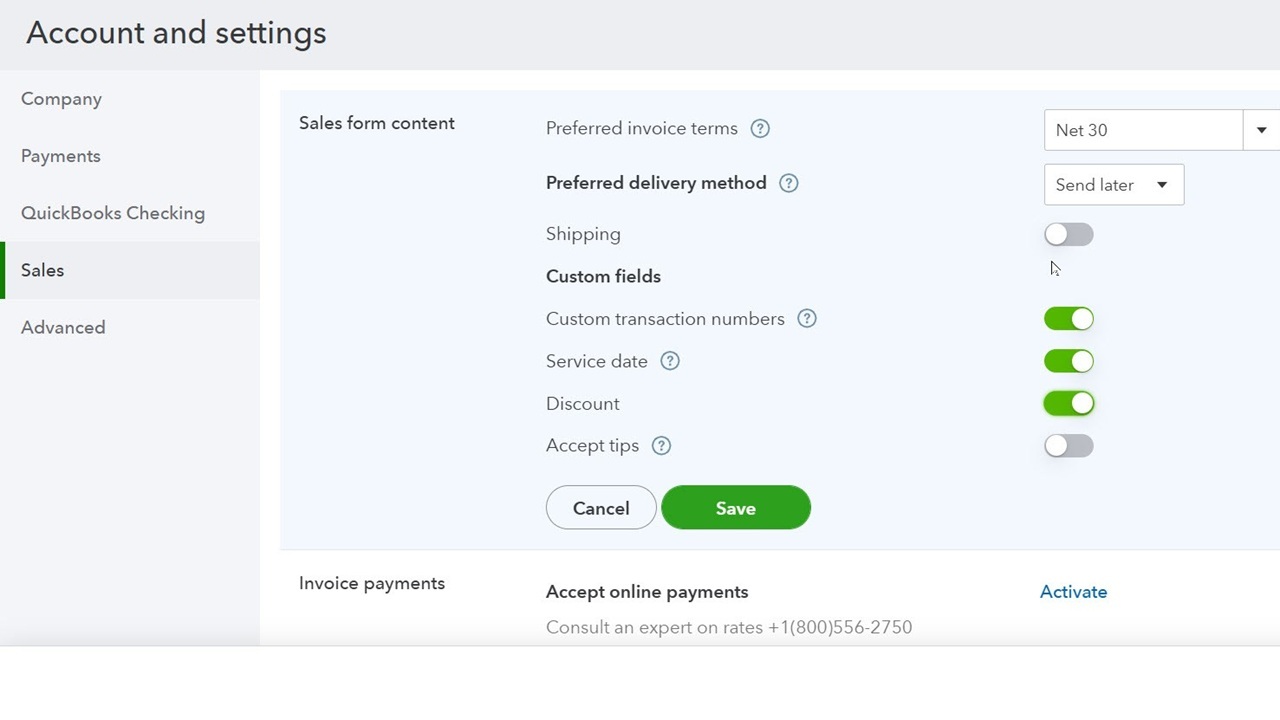
Note that you may need to enable certain features in Solopreneur through the Account and Settings pages. Here, you can also specify your preferences for options, such as automated payment reminders, online payments, and sales form content (including discounts, late fees, and preferred invoice terms). If you encounter any problems or have questions, Solopreneur provides chat and phone support.
Similar Products


Quicken Business & Personal
Intuit is known for creating easy-to-use financial applications for non-accountants. Accordingly, Solopreneur doesn't use technical language or force you to deal with credits and debits. It handles all the bookkeeping work in the background, though you can still visit the Chart of Accounts (more on that later) if you want to.
The user interface is attractive and professional, and its navigation conventions are easy to learn. Your home page, the dashboard, organizes enough data to provide an overview of your finances without being overwhelming. It displays, for example, charts showing your expenses and Profit & Loss, the status of your invoices, and your financial account balances.
Once you connect your bank accounts to Solopreneur, you can see imported transactions in registers. The site displays basic details for each, including category, date, account, payee, amount, and type (such as business or personal). Because Solopreneur helps you prepare for taxes (more on that later), it offers a thorough list of both business (including Schedule C) and personal categories. You can add notes, attach files, and split transactions.
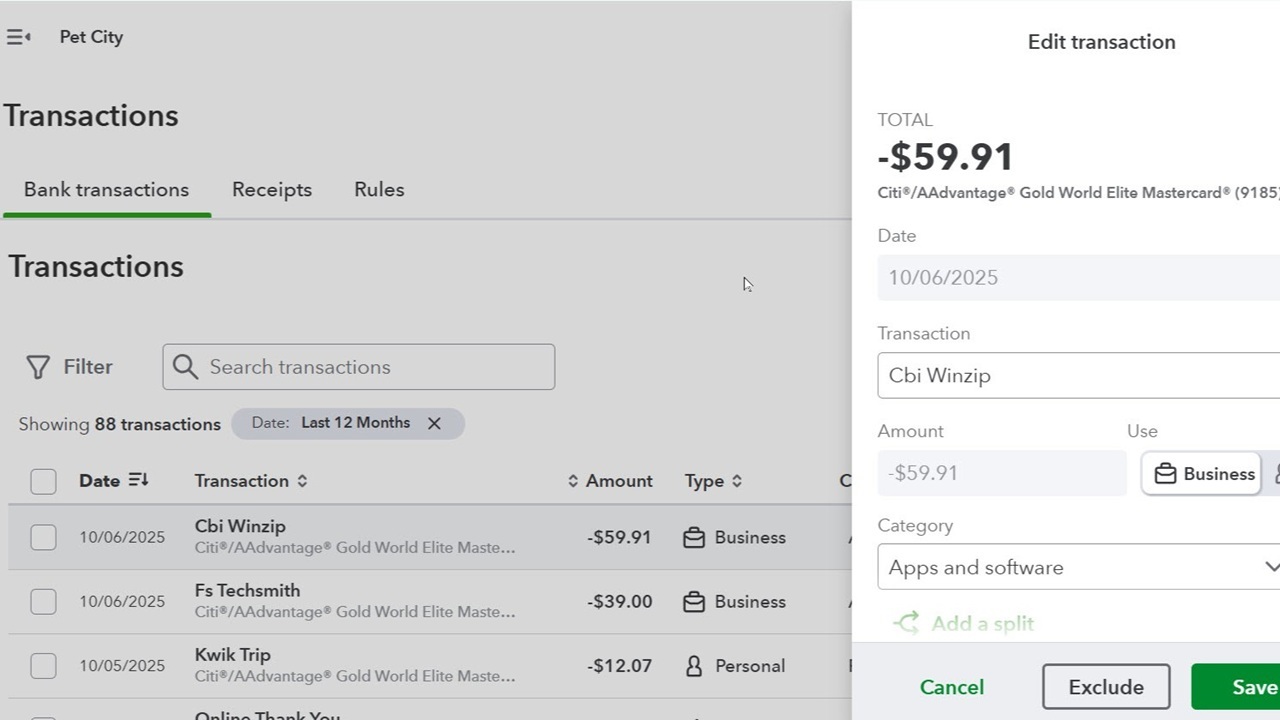
Solopreneur does a fairly good job of guessing at categories, though, understandably, it misses some. You can now add custom subcategories to the default business (based on the Schedule C) and personal categories. The Transactions page can also show receipts that you upload from your phone or your computer. You can also create simple Rules that automate the categorization of transactions that share similar attributes.
Although you can add them on the fly, building a database of customer and item/service records saves time when you’re creating transactions. Solopreneur offers two options: you can enter records manually or import existing customer lists (in CSV, Excel, and Google Sheet formats) and product/service lists (in CSV and Excel formats).
Customer record templates aren’t as extensive as those in Xero, for example, but you can at least enter and store contact information. Completed records, which I think are sufficient to support the site’s capabilities, get dedicated pages with customer information, late fee details, and a transaction list.
Solopreneur doesn’t track inventory like FreshBooks and QuickBooks Online, so you can’t stay on top of stock levels or set reorder points. However, you can create simple records for non-inventory items and services to use in sales transactions, add custom categories for them (separate from those for bank transactions), and upload images.
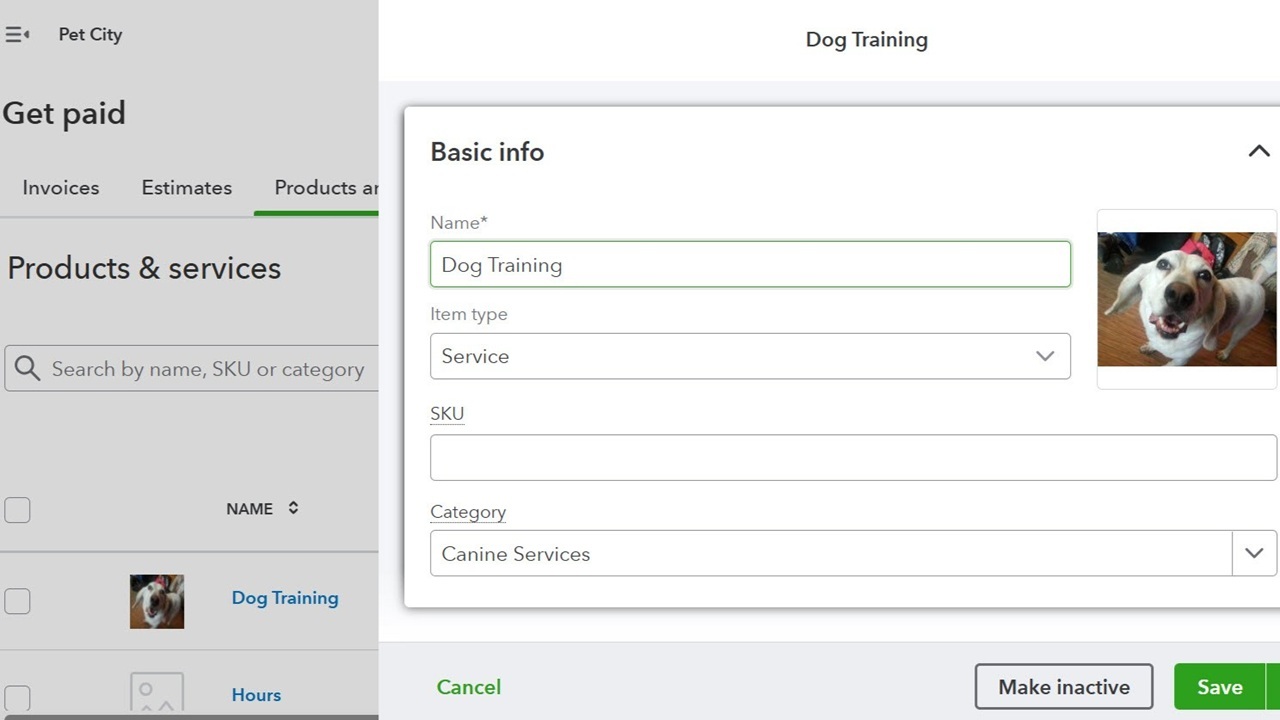
I find it odd that Intuit provides a field for an SKU, which is more typical of inventory items. I also noticed a line about choosing your inventory valuation method on the batch import page that shouldn’t be there, along with an option to track quantity on the settings page, which is not available in Solopreneur. These don’t do any harm, but they’re unnecessary.
Solopreneur supports two kinds of sales transactions: estimates and invoices. Customization options are limited. You can add and remove some fields (such as Ship to and SKU) but can’t modify the design template apart from the color, font, and logo. QuickBooks Online offers greater flexibility here.
In Solopreneur, a panel on the right opens, containing options (convenient, context-sensitive settings) for the current form. If you’re creating an invoice, for example, you can turn on automatic invoice reminders (not as flexible as in Patriot Software Accounting) and specify payment preferences. The invoice templates themselves are sufficient for a small service-based business. They include the expected standard fields, along with some unexpected ones considering the app’s price, such as discount and sales tax.
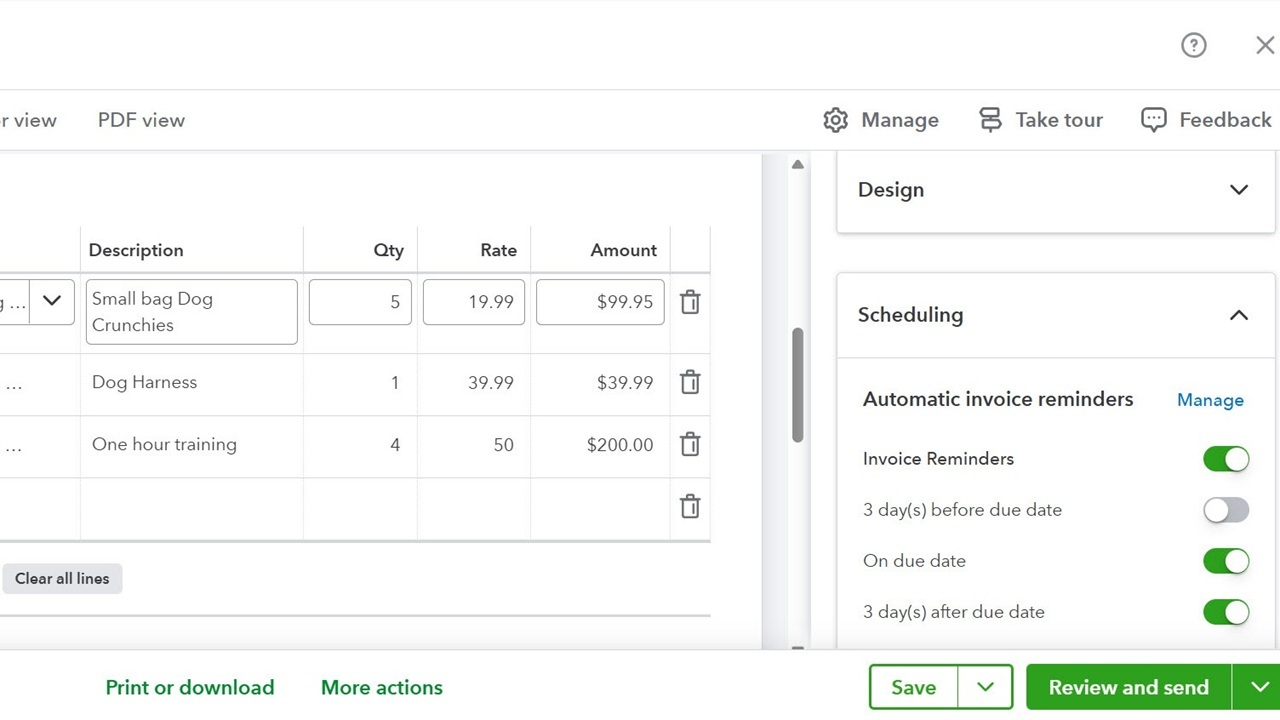
Four views of each invoice are available: Edit, Email, Payor, and PD. Completed invoices are listed on the Get Paid page, where you have multiple options for managing them. For instance, you can view each form’s history, void a form, and record a payment. QuickBooks’ payment service supports ACH, Apple Pay, credit and debit cards, PayPal, and Venmo transactions. Fees are roughly comparable with those of industry leaders.
I like how Solopreneur handles receivables. It’s simple to grasp and doesn’t ask for unnecessary details for a sole proprietor.
You can’t enter or upload bills and mark them as paid in Solopreneur. Of the services I reviewed, only QuickBooks Online and Zoho Books offer electronic bill payment.
That said, QuickBooks Checking, a bank account available through GreenDot Bank, does support ACH payments for bills. It doesn't require a minimum deposit and is FDIC-insured for up to $5 million. You can fund it from an external bank account or set up direct deposit from your paycheck. Any money you move into a savings “envelope” through the account earns 3.00% APY as of this writing.
PCMag does not test or evaluate banking services.
Solopreneur offers a tool that's not common in accounting applications: goal setting. It’s a very simple concept that the app doesn't fully execute. You can set one or both available goals: make more money or get more customers. You quantify your goal and set a target date, then choose from suggested ways to achieve it. The tool helps you gauge your process. This seems more suitable for personal finance software, however, since business development tends to be complex. Intuit hasn't developed this functionality any further since my last review, and the help it offers is minimal.
Solopreneur’s tax tools can come in handy since they help you estimate what you should pay in quarterly income taxes if you’re self-employed. It pulls tax-related data from transactions and categorizes it into the correct Schedule C categories, where it maintains a running tally of your income and expenses throughout the tax year. You will need to provide some of the information, such as business mileage (unless it’s automated) and home office details. Once you have a W-2 for the 2025 tax year and complete the tax profile on the site, supplying data about your filing status and dependents, for example, you can get a better idea during 2026 about what you should be submitting in estimated taxes.
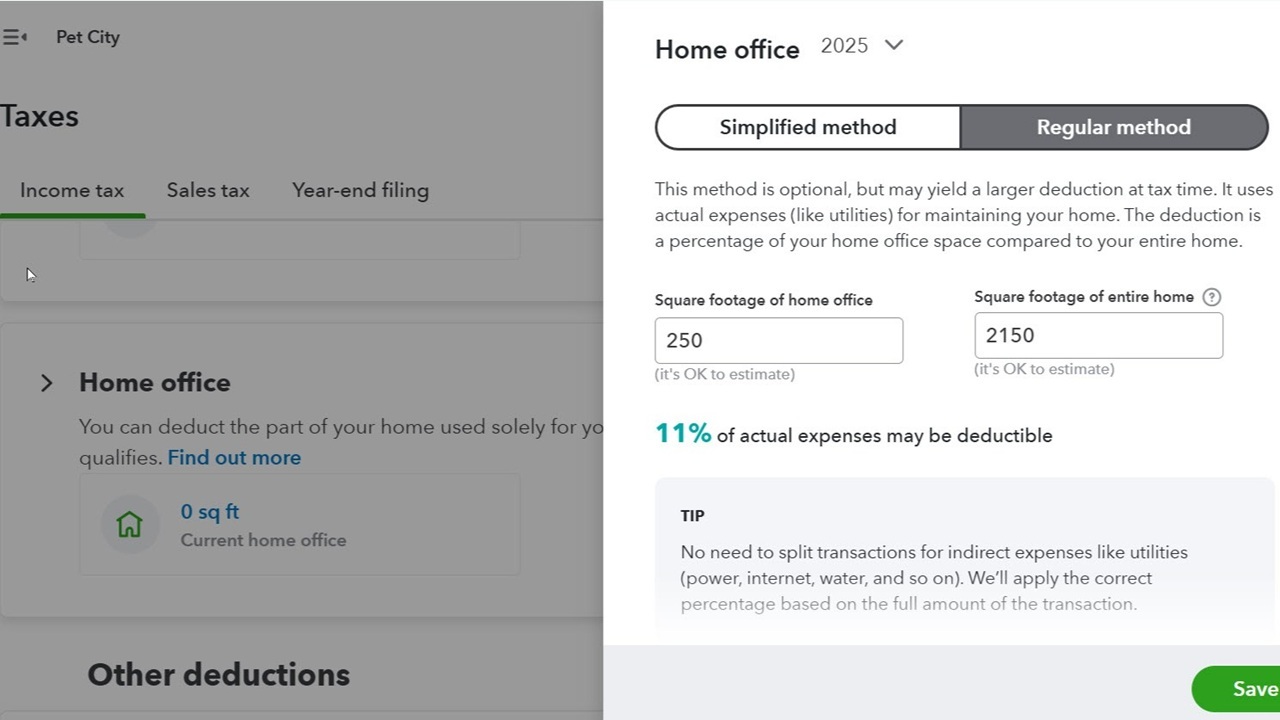
QuickBooks Live Tax is a new service that moves your Solopreneur data into Intuit TurboTax to prepare your income taxes. You have to subscribe to one of the TurboTax Live plans to benefit, which offer year-round, unlimited live help from one of the company's tax experts and cost more than the DIY versions (the prices are not final as of this writing).
If you drive a vehicle for work, you can track your mileage in Solopreneur and get a deductible dollar total for your income taxes. The mobile app (available for Android and iOS) does this automatically as you drive, provided you connect your phone to your car and enable Location Services. FreshBooks offers a similar feature. Alternatively, you can enter trips manually.
Just five reports (three Profit and Loss and two Sales) are available, but at least they’re quite customizable. Although a simple application like Solopreneur doesn’t require a ton of reports, I still expected more. Wave Pro, for example, offers 14 (including standard financial reports).
Intuit says its fraud prevention technology constantly scans the company’s systems and blocks individuals who are up to no good. Employees proactively search for scams and fraud that might impact customers. Multi-factor authentication (MFA) is a requirement, and the company safeguards your data using AES-256 to ensure the highest level of cryptographic security.
Although Solopreneur’s mobile apps aren't as advanced as those for Zoho Books or others, they replicate enough of the browser interface to make them useful when you’re away from your office. The dashboard provides a bird’s-eye view of your most critical data, including your cash balance, totals for profitability and expenses, and unpaid invoices. It also shows your upcoming invoices and estimated taxes. You can create, edit, and view customers, estimates, invoices, and transactions, as well as see your income tax information.

I snapped a picture of a receipt using the app, and it took less than a minute to upload its content and extract key details (amount, date, and vendor). Solopreneur then helps you link the receipt to a matching transaction.
Final Thoughts
 (Credit: Intuit)
Intuit QuickBooks Solopreneur
- 5.0 - Exemplary: Near perfection, ground-breaking
- 4.5 - Outstanding: Best in class, acts as a benchmark for measuring competitors
- 4.0 - Excellent: A performance, feature, or value leader in its class, with few shortfalls
- 3.5 - Good: Does what the product should do, and does so better than many competitors
- 3.0 - Average: Does what the product should do, and sits in the middle of the pack
- 2.5 - Fair: We have some reservations, buy with caution
- 2.0 - Subpar: We do not recommend, buy with extreme caution
- 1.5 - Poor: Do not buy this product
- 1.0 - Dismal: Don't even think about buying this product
Read Our Editorial Mission Statement and Testing Methodologies.
Solopreneur hasn’t changed much since our last review, but its smart combination of basic features makes it an attractive option for sole proprietors. We like that it mirrors the top-notch design of other QuickBooks versions and appreciate that it can compile pertinent income information for tax season. If you’re still doing your accounting manually for your one-person business, you can benefit from the site’s time-saving tools and financial organization. That said, Wave remains our Editors' Choice winner for one-person businesses that don't require payroll, thanks to its additional features and reports. If your company has employees or requires more comprehensive tools, we suggest one of our other Editors' Choice winners, as FreshBooks and QuickBooks Online offer greater customizability and depth.
STILL ON THE FENCE?
About Our Expert
I write about money. I’ve been reviewing tax software and services as a freelancer for PCMag since 1993. Along the way, I took on reviews of other types of business and personal finance technology. Prior to that, I had spent a few years writing about productivity and entertainment applications for 8-bit personal computers (my first one was a Commodore VIC-20) as a member of the editorial staff at Compute!
After working at Lawson Associates, now Lawson Software, I switched my focus to accounting but learned that personal computer applications were more progressive and interesting to cover than mainframe solutions. So I served as editor of a monthly newsletter that provided support for accountants who were just starting to use PCs. I still ghostwrite monthly how-to columns for accounting professionals. From there, I went on to write articles and reviews for numerous business and financial publications, including Barron’s and Kiplinger’s Personal Finance Magazine.
- The Ultimate Business Stack Hack: 7 Reasons to Unify Your Payroll, HR, and Accounting Software
- 9 Year-End Payroll Mistakes to Avoid (And How Software Can Help)
- Is Your Payroll System Starting to Crack? 7 Signs It's Time to Upgrade
- 10 Payroll Features You Need (and 10 You're Paying Too Much For)
- Think Payroll Software Costs Too Much? The Math Says Otherwise
- More from Kathy Yakal


