Consent Mediation
This feature was introduced in its beta version with the release of 2.7.0. Starting from version 2.11.0, it has transitioned to a stable version, offering enhanced functionality.
IMPORTANT
Please make sure to follow all the steps outlined below and that consent is being passed correctly before pushing this feature to production.
To simplify the process of signalling consent to third-party SDKs, we added a mediation feature, that works with APIs of SDKs listed below. This feature will update the consent when necessary within your application. Moreover, this functionality allows you to effortlessly activate Google Consent Mode and connect to advertising and mediation tools that, for instance, may not be part of TCF.
Once correctly implemented, this feature simplifies the transmission of the consent signal and privacy choices to selected third-party SDKs.
However, it is always advisable to review and assess the documentation, privacy policy, and privacy section of third-party vendor SDKs before deciding to work with them or integrating any.
Please note that Usercentrics cannot fully guarantee the compliance of collection mechanisms of third-party vendors and SDKs.
How it works?
The Consent Mediation feature on Unity operates by integrating SDKs APIs in order to stream user consent.
Most Unity SDKs use a native implementation, serving as a bridge to their respective native platforms. Our approach integrates with these native libraries designed for Android and iOS.
The supported SDKs listed below all utilize this integration method. If you encounter a library that doesn't follow a native implementation, please let us know by providing feedback.
You can access a comprehensive overview of the native implementations for mediating consents here.
Enable Mediation
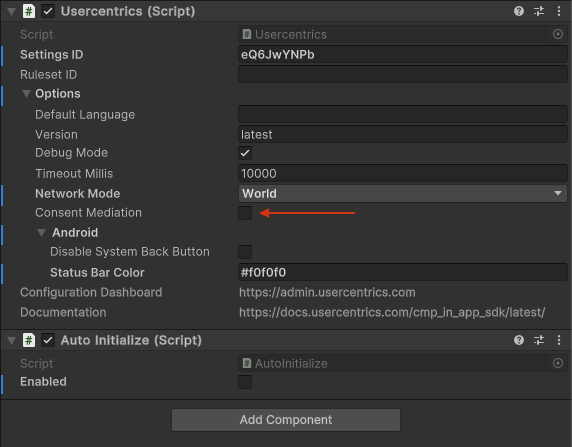
That's it! 🚀 we will now apply consent automatically to all supported SDKs.
Make sure you apply consent to not supported SDKs as well.
Supported SDKs
| SDK | Template ID | Added in version | Source |
|---|---|---|---|
| Google Analytics for Firebase | diWdt4yLB | 2.7.0 | Analytics data collection and usage |
| Google Analytics Advertising for Firebase | GqhZxB-iiydzEk | 2.15.1 | Advertising data collection and usage |
| Unity Ads | hpb62D82I | 2.7.0 | Privacy consent and data APIs |
| AppLovin | fHczTMzX8 | 2.7.0 | Privacy-Consent and Data API for iOS and Android |
| ironSource | 9dchbL797 | 2.7.0 | Regulation Advanced Settings for iOS and Android |
| Crashlytics | cE0B0wy4Z | 2.7.12 | Privacy-Consent and Data API for iOS and Android |
| Adjust | Jy6PlrM3 | 2.7.12 | Privacy-Consent and Data API for iOS and Android |
| Chartboost | IEbRp3saT | 2.11.0 | Privacy API for iOS and Android |
| Singular | OxsYgtMfe7aP8u | 2.21.0 | Privacy-Consent and Data API for iOS and Android |
| AppsFlyer | Gx9iMF__f | 2.21.0 | Privacy-Consent and Data API for iOS and Android |
| AirBridge | 1k_ljMZc28DDOc | 2.22.2 | Privacy-Consent and Data API for iOS and Android |
It is essential to thoroughly review the documentation of each SDK to identify the specific APIs necessary for accurately signaling user consent.
Be aware that some SDKs, such as Crashlytics, may automatically collect data by default.
Although most SDKs maintain consistent contracts for Privacy APIs in their updates, any changes must be noted, and the appropriate API should be used accordingly. Remember, rigorous testing is vital for success. While our feature addresses a majority of scenarios, it is imperative that you personally verify the expected behavior in your specific use case.
Warning
Ensure that the version of the SDK in your application matches the one we currently support.
Unity End-User Consent Mode (Vector)
Unity's Vector ad optimization product requires apps to signal consent through Unity's newer EndUserConsent.SetConsentState API (AnalyticsIntent and AdsIntent), which is conceptually equivalent to Google Consent Mode v2 but for the Unity ad ecosystem. This is separate from the legacy gdpr.consent/privacy.consent MetaData APIs that Unity Ads uses above, and from the automatic Consent Mediation feature described earlier on this page.
Info
UnityConsentMode is opt-in. If you don't enable it, the SDK never calls EndUserConsent.SetConsentState, and your existing Consent Mediation / legacy Unity Ads setup keeps working exactly as before.
UC consent categories are configured per project and don't map to a fixed "analytics" or "advertising" name, so you must tell the SDK which of your configured category slugs correspond to Unity's AnalyticsIntent and AdsIntent signals:
Usercentrics.Instance.Options.UnityConsentMode.Enabled = true;
Usercentrics.Instance.Options.UnityConsentMode.AnalyticsCategorySlugs = new List<string> { "analytics" };
Usercentrics.Instance.Options.UnityConsentMode.AdsCategorySlugs = new List<string> { "advertising" };
Set these before calling Initialize(). Once enabled, the SDK will:
- Call
SetConsentStateonce immediately after initialization, using the user's current consent decision. - Call
SetConsentStateagain automatically whenever the user changes or withdraws consent during the session — no app restart required.
Category-to-intent mapping
The SDK grants a category's intent whenever at least one of your services under that category slug has an active TRUE consent; otherwise it denies the intent. Accept-all and deny-all work automatically, since every service's status changes together in those cases:
| User action | Services under AnalyticsCategorySlugs | Services under AdsCategorySlugs | Result |
|---|---|---|---|
| Accept all | All TRUE | All TRUE | AnalyticsIntent = Granted, AdsIntent = Granted |
| Deny all | All FALSE | All FALSE | AnalyticsIntent = Denied, AdsIntent = Denied |
| Granular — grants analytics category, denies ads category | At least one TRUE | All FALSE | AnalyticsIntent = Granted, AdsIntent = Denied |
| Granular — grants ads category, denies analytics category | All FALSE | At least one TRUE | AnalyticsIntent = Denied, AdsIntent = Granted |
Requires a Unity Engine build that includes EndUserConsent
EndUserConsent ships as part of the Unity Engine itself — it isn't a separate installable package, and its availability depends on your Unity Editor build rather than a fixed version number you set yourself. Unity's official documentation lists it from Unity 6.5 (6000.5) onward; some pre-release/staging builds may include it earlier. The SDK detects this automatically at compile time: if your Editor doesn't include it, enabling UnityConsentMode logs a single warning and skips calling SetConsentState, with the rest of the SDK unaffected. Check your specific Unity Editor's release notes if you need to confirm support ahead of time.
Supported Mediation SDKs
These SDKs mediate consent for selected SDKs themselves. Make sure you set up the correct TemplateIDs to automatically pass consent to mediated SDKs.
Adjust
Check out the documentation page to get an insight on the Partners API. Note that we only support the ones listed below.
| SDK | Template ID |
|---|---|
| Apple Ads | weoN4Lb_MjWLuu |
| ocv9HNX_g | |
| Google Ads | S1_9Vsuj-Q |
| Google Marketing Platform | t-TPeXsRi |
| Snapchat | QcD9GVNXZ |
| Tencent | tMLzMavbHZoxW0 |
| TikTokSan | 6-qobRfu |
| Skj79NodobQ | |
| Yahoo Gemini | HJSPc4ids-Q |
| Yahoo Japan Search | gUbemZYaQwqxss |
Amazon Ads — Amazon Consent Signal (ACS)
Unlike the partners listed above, Amazon Ads is not selected via a Template ID override. There is no native Amazon SDK bridged into Usercentrics — instead, the signal is forwarded through Adjust's granular third-party-sharing API (partner name amazon_dma) automatically whenever both of the following are true:
- Amazon (IAB TCF vendor ID
793, "Amazon.com Services, Inc.") is a declared, consented vendor in your configuration - Adjust itself is configured as a Data Processing Service (DPS) for your tenant (Template ID
Jy6PlrM3)
When both conditions are met, the SDK derives a granular consent object from the TCF purposes and signals it to Adjust:
| Amazon granular flag | Derived from TCF purpose(s) |
|---|---|
ad_storage | Purpose 1 |
ad_user_data | Purposes 1 and 7 |
This mirrors the existing Google Consent Mode signal (vendor 755), except Amazon does not use ad_personalization or eea flags. Added in version 2.29.1.
Info
There is no amazonAdsTemplateId (or similar) override on UsercentricsMediation.Adjust — the vendor ID is fixed and not configurable, unlike the other Adjust-mediated partners above.
Debugging
Debug Mode
To see debug messages, please set the SDK's loggerLevel to DEBUG.
When running your application with Consent Mediation enabled, you should expect the following events:
Enable Confirmation
Immediately after initialization, you will get a confirmation that Consent Mediation is Enabled:
[USERCENTRICS] Consent Mediation is Enabled
Scan
After your configuration has been loaded, the SDK will provide an overview of the supported services:
[USERCENTRICS][Mediation] 2/6 Services are supported: Unity Ads | Google Analytics for Firebase
Mediation
Whenever a user provides consent or the SDK has been initialized, the SDK will apply the latest user choices to each supported SDK:
[USERCENTRICS][Mediation] ✅ Google Analytics for Firebase: TRUE
[USERCENTRICS][Mediation] ✅ Unity Ads: FALSE
Default Consent
On first launch, you will see consent is applied immediately after initialization, even when a user still has not given consent. This happens because the default consent provided in your configuration is being applied.
Warning
If your workflow requires simultaneous initialization of certain SDKs alongside Usercentrics, be aware of potential racing conditions.
These can arise when the Mediation routine is executed while an SDK is still in the process of initialization. To mitigate such issues, we strongly advise initializing SDKs only after obtaining user consent. For more detailed guidance on this approach, please refer to our further recommendations here.