 Meet Maggie, PCMag's
 When we reviewed the $29.99 Arlo Essential Indoor Camera last year, it earned high marks for its affordability, sharp video quality, and strong third-party device compatibility. With the Essential Pan Tilt Indoor, you get all that, plus a handful of new features, including mechanical pan and tilt (a first for Arlo), a 2K camera, and AI-powered event captions, fire detection, and face recognition. As with all Arlo cameras, you’ll need a subscription to view recorded video and access certain features. However, at $49.99, the Essential Pan Tilt Indoor's price, performance, and features easily earn it our Editors’ Choice award for indoor home security cameras.
The Essential Pan Tilt Indoor camera consists of a white and black pill-shaped camera enclosure that is mounted to a stand, which provides 360 degrees of mechanical panning maneuverability and 180 degrees of mechanical tilt. It measures 5.0 by 2.7 by 2.7 inches (HWD) and can be used on a flat surface or mounted on a wall or ceiling using the included bracket and hardware. Also included is a quick start guide, a 78-inch USB-A to USB-C cable, and a USB-A plug-in AC adapter.

The front of the camera holds the lens, a status LED, and a microphone. The camera captures 2K (2,304 by 1,296) video and features a 130-degree field of view, along with a 12x digital zoom. For comparison, the third-generation Nest Cam Indoor ($99.99) also offers 2K (2,560 by 1,440) resolution, with a 152-degree field of view and 6x digital zoom, but does not support mechanical pan and tilt.
The status LED on the Essential Pan Tilt Indoor glows blue when the camera is properly connected and alternates between blue and amber during a firmware update. A speaker is located on the back of the base, along with a USB-C power port, and there's a pairing button on the top of the camera enclosure.
Similar Products


Arlo Essential Indoor Camera (2nd Generation)

TP-Link Kasa Spot Pan Tilt (KC410S)


In addition to features such as motion tracking, dual-band Wi-Fi, night vision, and two-way talk, the Pan Tilt Indoor offers AI-powered Arlo Intelligence for face and vehicle recognition, as well as event descriptions (captions). It also allows you to create custom detections to alert you of events, such as when a light is on or when your dog is on the couch. Smart alerts enable the camera to distinguish between motion caused by people, packages, vehicles, and animals, and also recognize flames in the event of a fire.
The Pan Tilt Indoor does not offer local video storage. Instead, event-triggered video is stored in the cloud and requires an Arlo Secure subscription for access.
The $7.99 per month Arlo Secure Plus plan supports a single camera and provides a 60-day video history, Smart Activity Zones, and Arlo Intelligence, including event captions, object detection, package detection, person and vehicle recognition, audio detection (for sounds like barks, glass breaking, gunshots, screams, and smoke/CO alarms), fire detection, and custom detections. If you have more than one camera, the unlimited Plus plan costs $17.99 per month. A $24.99 per month Secure Premium plan provides everything from the Plus plan, including unlimited camera support, and adds 24/7 professional monitoring, one-touch emergency response, and select home insurance discounts with some insurers.
For comparison, the Nest Cam Indoor supports Gemini AI-powered features, including daily summaries of recorded events, descriptive event notifications, event descriptions, and video search, with a $20 monthly Google Home Premium plan that also includes 60 days of cloud storage.
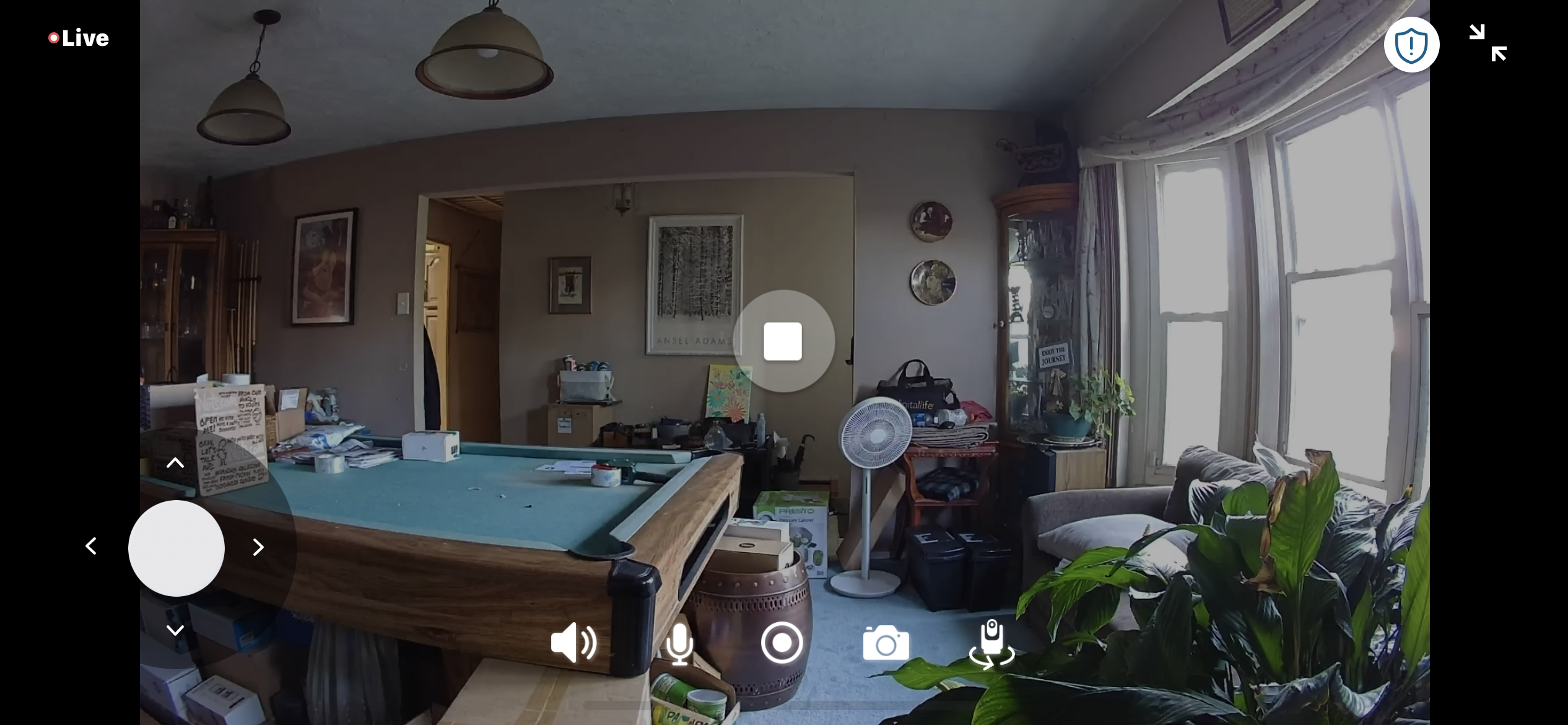
The Essential Pan Tilt Indoor works with Alexa, Google, SmartThings, and IFTTT. Arlo says that HomeKit support will be available in 2026. It utilizes the Arlo Secure mobile app (available for Android and iOS) and appears on the Devices screen in a panel that displays the most recent captured image. The panel has a gear icon for accessing the device settings menu, a play arrow, and an Emergency Response button. Tap the arrow to open a home screen with a live stream that can be viewed in full-screen mode by tapping the two arrows in the upper right corner. At the bottom edge of the video panel are buttons for manually recording video, taking a snapshot, muting the speaker, and initiating two-way talk. There’s also a button that opens a large four-way dial for panning and tilting the camera.

When you tap the Emergency Response icon, it opens a screen where you can activate a siren or tap a button to call a friend or contact an emergency response agent. In device settings, you can connect to Wi-Fi, enable auto-tracking, configure video and audio settings, create activity and privacy zones, adjust motion sensitivity, and set the siren volume.
To view the recorded video, tap the Feed button at the bottom of the home screen. This opens a list of events, each with a thumbnail of the associated video. Tap any thumbnail to play the video and read the event caption. Here you can share, save, and delete the video.
In testing, I had the Pan Tilt Indoor up and running in no time. I already had the Arlo Secure app installed, but if this is your first product from the brand, you’ll have to download the app and create an account. I tapped Add a Device on the Devices screen, then tapped Pan Tilt Cameras and selected the Pan Tilt Indoor Camera. I plugged in the camera, and when it was finished calibrating, I tapped Continue, allowed Bluetooth, and pressed the pairing button for three seconds until the LED began flashing blue. I tapped Continue, and the app immediately recognized the camera. I selected my Wi-Fi SSID from the list, entered my password, and after a few seconds, the camera was connected. I gave it a name, and after a quick firmware update, the camera restarted. I verified that the Wi-Fi signal was strong, chose a mounting option (flat surface, wall, or ceiling), and pressed Continue to complete the installation.
The Essential Pan Tilt Indoor performed well in testing. Daytime video was sharp with excellent color saturation, and black-and-white night video appeared well-lit and crisp.

Pan and tilt maneuverability was smooth and easy to control using the four-way dial. Pan and tilt presets and motion tracking worked smoothly, and motion alerts were correctly identified.
Arlo Intelligence worked flawlessly, offering useful event captions that not only described the action being recorded but also provided accurate details of the room, right down to an Ansel Adams print hanging on the wall. Face recognition also worked as intended.
Alexa voice commands to play video from the camera on an Echo Show smart display worked without issue, as did my Alexa routine to have a Pure Smart TruColor A19 Wi-Fi Enabled Smart Bulb turn red when the camera detected motion.
Final Thoughts
 (Credit: John R. Delaney)
Arlo Essential Pan Tilt Indoor
- 5.0 - Exemplary: Near perfection, ground-breaking
- 4.5 - Outstanding: Best in class, acts as a benchmark for measuring competitors
- 4.0 - Excellent: A performance, feature, or value leader in its class, with few shortfalls
- 3.5 - Good: Does what the product should do, and does so better than many competitors
- 3.0 - Average: Does what the product should do, and sits in the middle of the pack
- 2.5 - Fair: We have some reservations, buy with caution
- 2.0 - Subpar: We do not recommend, buy with extreme caution
- 1.5 - Poor: Do not buy this product
- 1.0 - Dismal: Don't even think about buying this product
Read Our Editorial Mission Statement and Testing Methodologies.
With the Arlo Essential Pan Tilt Indoor, you can keep an eye on every corner of the room thanks to its smooth pan-tilt mechanism. You get a boatload of features for $49.99, including 2K video, integrations with numerous home automation platforms and third-party smart devices, motion tracking, and dual-band Wi-Fi. A cloud storage subscription unlocks useful AI features, including smart alerts that tell you what triggered the motion sensor, detailed event descriptions, and the ability to create custom alerts. All this earns the Arlo Essential Pan Tilt Indoor our Editors’ Choice award for indoor security cameras.
STILL ON THE FENCE?
- ● Don't Overpay: 100 Expert-Tested Tech Budget Buys That Save You Serious Cash
- ● The Best Pet Cameras for 2026
- ● The Best Indoor Home Security Cameras for 2026
- ● The Best Smart Home Devices for 2026
- ● The Best Smart Home Products for Renters in 2026
- ● Best Tech of the Year: PCMag Editors Select the Top Products of 2025
About Our Expert

I’ve been working with computers for ages, starting with a multi-year stint in purchasing for a major IBM reseller in New York City before eventually landing at PCMag (back when it was still in print as PC Magazine). I spent more than 14 years on staff, most recently as the director of operations for PC Labs, before hitting the freelance circuit as a contributing editor.
- The Best Smart Locks for 2026
- The Best Outdoor Home Security Cameras for 2026
- Tenda ME6 Pro Review: This Budget Wi-Fi 7 Mesh Delivers Just the Basics
- Tenda BE12 Pro Review: This Cheap, Fast Wi-Fi 7 Router Claws Away the Extras
- The Best NAS (Network Attached Storage) Devices for 2026
- More from John R. Delaney


