Claude Code vs. Antigravity: Core Differences
Now that you have a sense of how each tool works on its own, let me walk through the differences that actually matter when choosing between them.
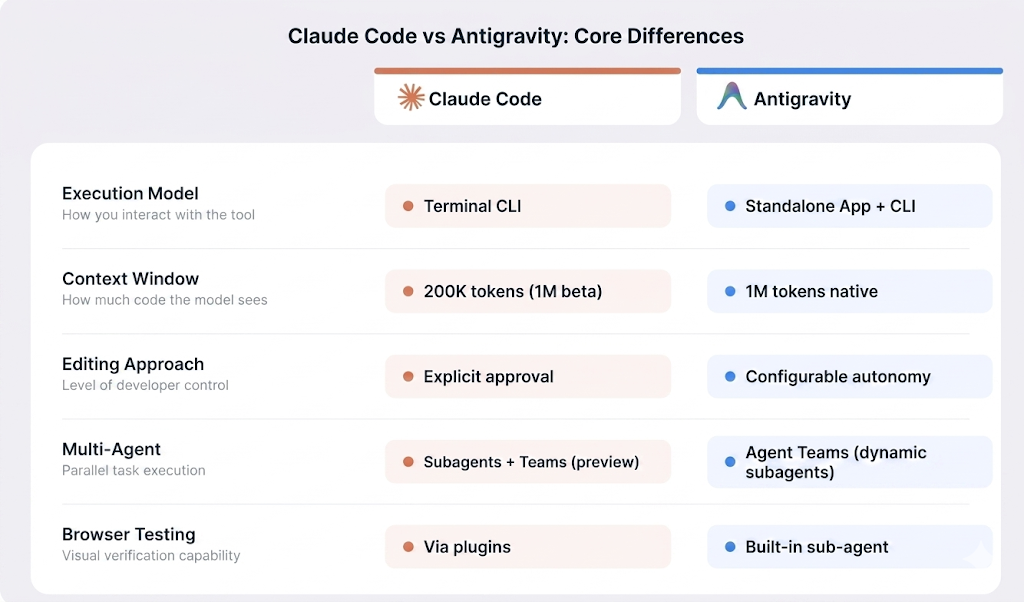
Claude Code versus Antigravity architecture comparison. Image by Author.
Execution model
Claude Code is a terminal-first tool that you run alongside whatever editor you already use. It operates through a command-line interface (CLI) with a full set of flags for scripting, piping, and automation. Antigravity 2.0 is a standalone desktop application, and as of Google I/O 2026, it also ships an Antigravity CLI written in Go for developers who prefer terminal workflows. The desktop app replaces your editor; the CLI works alongside it.
This distinction matters practically. If your workflow involves tmux, Neovim, or heavily customized terminal setups, Claude Code works alongside that without requiring any changes to your setup. If you prefer a graphical IDE with visual file management and integrated browser testing, Antigravity's desktop app is designed around that. If you prefer the terminal, the new Antigravity CLI covers that side too.
Context handling
As mentioned earlier, Claude Code's context window is 200K tokens standard, with a 1M token beta through the API. It manages that context by using agentic search to scan and map your codebase on demand, rather than loading everything at once. The CLAUDE.md file I mentioned earlier acts as persistent memory across sessions.
Antigravity uses Gemini 3.5 Flash's native 1M token context window. It also stores persistent knowledge in a .gemini/antigravity/knowledge/ directory and supports a Skills system for reusable instructions at the project level and across all your projects.
Editing behavior
Claude Code makes structured, multi-file edits with explicit developer approval. Before writing to any file, running any shell command, or making any git commit, it shows you exactly what it plans to do and waits for confirmation. This keeps you in control, but it also means you need to stay present during the session.
Antigravity lets you set how much control you want to keep. In its most autonomous mode, agents plan and execute across the editor, terminal, and browser without stopping for approval. The Artifacts system provides a paper trail of what was done, but the agent can move much faster when given full control.
Autonomy and multi-agent support
Claude Code is primarily a single-agent tool, though it supports subagents with isolated 200K token context windows for complex tasks. A newer feature called Agent Teams, currently in research preview with Opus 4.6, allows multiple Claude Code sessions to work in parallel with a shared task list.
Antigravity was built around multi-agent orchestration from the start. Version 2.0 made this a first-class concept: the planner agent can dynamically spawn subagents at runtime, so a complex request expands the team automatically. Each agent gets their own sandbox and shared project context, meaning the reviewer already sees decisions the coder made without re-reading the full chat.
Browser capabilities
Claude Code does not have a built-in browser. You can add browser-related functionality through MCP servers or plugins, but it is not part of the core experience.
Antigravity includes a native browser sub-agent. As described earlier, agents can launch a full Chromium instance and use it to interact with pages, capture screenshots, and record walkthroughs. For frontend and UI work, this means visual verification happens inside the tool itself without switching to a separate browser.
Claude Code vs. Antigravity: Code Generation and Refactoring
Both tools go well beyond autocomplete. They plan, write, and verify code across entire projects. But they approach it differently, and the differences show up most clearly in specific task types.
Writing new features
Claude Code tends to work well when you describe a feature in natural language and let it plan the implementation. It reads your project structure, traces dependencies, and maps out the changes across files before writing anything.
Antigravity leans on its multi-agent architecture. Parallel agents can handle different aspects of a feature at the same time, though the tool may need more explicit direction on complex tasks.
Large-scale refactoring
Claude Code takes a sequential approach to refactoring across interconnected files. Its agentic search traces through dependencies and applies coordinated changes one step at a time.
Antigravity uses parallelism instead, spawning multiple agents across different parts of a refactoring task to finish the job faster overall. The tradeoff is coordination: individual agent outputs may occasionally need restructuring, while Claude Code's sequential approach makes it easier to follow what changed and why.
Debugging
Claude Code's debugging loop works by adding logging, reading output, tracing root causes, and iterating. The extended thinking feature in Opus 4.6 helps on complex dependency chains.
Antigravity brings browser testing into the debugging process. For UI bugs, its browser sub-agent can reproduce the issue visually, take screenshots, and compare expected versus actual rendering, something Claude Code cannot do natively.
Claude Code vs. Antigravity for Real-World Workflows
How these tools compare in theory matters less than how they fit into the way you actually work. Here are the scenarios I find most useful for thinking through the decision.
Solo developer projects
If you are comfortable in the terminal, Claude Code has low overhead. No IDE to install, no GUI to learn. The Pro plan at $20/month gets you in.
Antigravity is free during preview and gives solo developers multi-agent orchestration. The Manager View is more than most solo projects need, but the browser sub-agent is relevant for anyone doing frontend work.
Startup teams
Claude Code offers a Team plan at $25 per user per month, with shared CLAUDE.md files, native GitHub Actions for automated PR reviews, Slack integration, and SOC 2 Type II certification.
Antigravity does not have per-seat team pricing yet, though enterprise access is available through the Gemini Enterprise Agent Platform. Its concurrent agents are useful for sprint-style work, and the Pro tier at $20/month matches Claude Code's entry price. The product is still relatively new, and Google's record of discontinuing products is a consideration.
Enterprise and legacy codebases
Claude Code has the more documented enterprise feature set. It offers SSO, SCIM provisioning, audit logs, HIPAA readiness, and deployment through Amazon Bedrock, Google Vertex AI, or Microsoft Foundry.
Antigravity is now available to enterprise customers through the Gemini Enterprise Agent Platform on Google Cloud, with companies like AirAsia, Deloitte, and WPP reporting production use. Specific security certifications comparable to Claude Code's SOC 2 and HIPAA coverage have not been publicly documented.
For large legacy codebases, Claude Code has been in use longer and has more documented patterns for dependency tracing and complex migrations. Antigravity's larger native context window helps load entire repositories at once, but its shorter market history means less real-world evidence on how it handles that kind of work.
Rapid MVP building
Antigravity is a reasonable fit for rapid prototyping. The browser sub-agent can catch UI bugs early, parallel agents can scaffold different parts of a project simultaneously, and the $20/month Pro tier keeps cost friction low during evaluation. Early users in 2026 report that getting a working prototype to a viewable state moves quickly.
Claude Code is a different tradeoff for MVP work. Its sequential, approval-based approach gives you a clear audit trail of every change. If your prototype is also your first production deployment, that visibility may matter more than raw speed.
Claude Code vs. Antigravity Integration and Ecosystem
Integration support is where the two tools differ most. Here is how they compare across the areas that matter most in practice.
Claude Code works as a CLI alongside any editor. It has official extensions for VS Code (including forks like Cursor and Windsurf), a JetBrains plugin in beta, and it works natively with terminal-based editors like Neovim and Emacs.
Antigravity now spans two surfaces: a standalone desktop application and a Go-based CLI for terminal workflows. The desktop app supports importing settings from VS Code or Cursor on first setup and uses the Open VSX extension registry. An Antigravity SDK also provides programmatic access for embedding agents into custom tooling or CI pipelines.
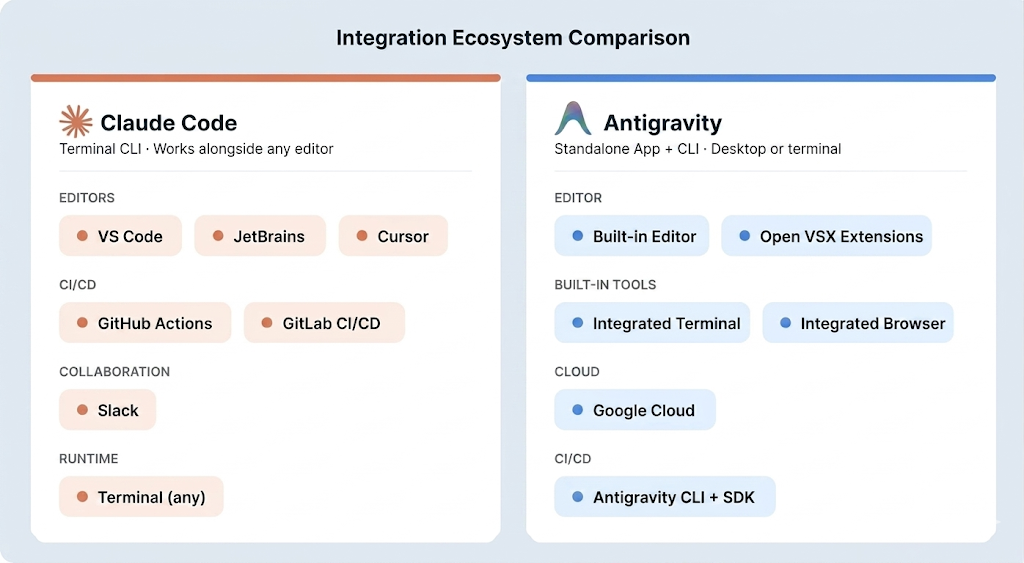
Integration ecosystem for both AI coding tools. Image by Author.
On git and CI/CD, Claude Code goes deep: native commit generation, branch management, merge conflict resolution, worktrees, and official integrations with GitHub Actions and GitLab CI/CD. You can tag @claude in GitHub PRs to trigger automated reviews.
On top of that, Claude Code now includes a Code Review feature in research preview for Team and Enterprise plans, which runs a dedicated team of agents on each pull request for a deeper pass than the standard GitHub Action alone.
Antigravity handles CI/CD through its CLI and SDK, which let agents automate pipeline configuration and run scheduled background tasks. Native platform integrations comparable to Claude Code's GitHub Actions support have not been announced.
For collaboration, Claude Code integrates with Slack and supports shared workspaces through Team and Enterprise plans. Antigravity's collaboration is built around its Artifact commenting system and shared agent context across squads. Formal multi-user team features are still in development.
Claude Code vs. Antigravity: Performance and Context
Both tools handle large repositories, but how they manage context and where they become unreliable are worth understanding before you commit to either.
Claude Code uses agentic search to selectively read files on demand rather than loading everything at once, and subagents provide additional isolated context windows for complex sub-tasks. Antigravity splits context across multiple agents, each working within Gemini 3.5 Flash's 1M token window. Both tools can degrade over long sessions: Claude Code's /compact command helps manage this, while Antigravity lacks a documented checkpoint or rollback system.
Both tools hallucinate, and the risk goes up as sessions grow longer. Claude Code's failure patterns are well-documented; Antigravity's are less cataloged given its shorter history. I would not rely on either to self-verify anything that touches production data or security-critical logic.
Claude Code vs. Antigravity Pricing Comparison
The pricing gap between the two tools is real and worth factoring in early.
Claude Code starts at $20/month (Pro, Sonnet 4.6) and goes up to $100 or $200/month for Opus 4.6 on the Max plan. Teams pay $25 per user per month. I have seen developers burn through a week's allowance in a single afternoon of agent work, so check your usage patterns before committing to the Pro tier.
Antigravity still offers a free tier during its preview period, though rate limits can slow things down during busy hours. Google formalized paid tiers at I/O 2026: Google AI Pro at $20/month, a new Google AI Ultra at $100/month with five times the Pro quota, and a top-tier plan at $200/month (down from $250) with twenty times the quota. Verify current rates on the Claude pricing page and Antigravity pricing page before deciding.
Pros and Cons of Claude Code vs. Antigravity
Here is what stands out as genuine strengths and real limitations for each, based on verified capabilities rather than marketing claims.
| Category | Claude Code | Antigravity |
|---|---|---|
| Editing approach | Sequential, approval-based edits across files | Multi-agent orchestration in one workspace |
| Interface | CLI that works with any editor | VS Code–style interface |
| Execution | Runs locally, keeping code on your machine | Standalone app and CLI; runs locally |
| Automation / CI | Integrates with GitHub Actions and GitLab | CLI and SDK for pipeline automation |
| Review / Tracking | Code review tools and checkpoints for undo | Artifact system tracks agent actions |
| Context & Models | Context can degrade in long sessions | 1M-token context (Gemini 3.5 Flash); supports multiple models |
| Enterprise readiness | SOC 2 Type II, SSO, and HIPAA-ready | Gemini Enterprise Agent Platform on Google Cloud |
| Cost | No free tier; heavy use can consume limits | Free preview tier; paid from $20/month (Pro) to $200/month |
| Maturity | More established tooling and workflows | Growing enterprise adoption (AirAsia, Deloitte, WPP) |
Is Claude Code Better Than Antigravity?
There is no single winner. The right choice depends on how you work and what tradeoffs you accept.
Choose Claude Code if your workflow is terminal-centered, you need CI/CD integration with GitHub or GitLab, you are working on complex backend or legacy codebases, or your organization needs enterprise compliance features today.
Choose Antigravity if you want to try the free preview tier or match Claude Code's $20/month entry price, your work is front-end-heavy and benefits from browser testing, you prefer a visual IDE, or you want to run multiple agents on different tasks at the same time.
Consider using both if your workflow splits between backend and frontend work. Claude Code's sequential, file-level approach suits complex refactoring and CI/CD automation, while Antigravity's parallel agents and browser testing work well for frontend builds and rapid prototyping.
The best way to evaluate either tool is to test it on a real project. Claude Code starts at $20/month, and Antigravity offers a free preview tier with paid plans from $20/month for higher rate limits.
|
Feature |
Claude Code |
Antigravity |
|
Primary interface |
Terminal CLI |
Standalone IDE |
|
IDE support |
VS Code, JetBrains (beta), Neovim, Emacs |
Antigravity only (Open VSX extensions) |
|
Context window |
200K standard, 1M beta |
1M native (Gemini 3.1 Pro) |
|
Multi-agent |
Subagents + Agent Teams (preview) |
Manager View (up to ~5 agents) |
|
Browser testing |
Via MCP plugins |
Built-in Chromium sub-agent |
|
CI/CD integration |
GitHub Actions, GitLab CI/CD |
Antigravity CLI + SDK |
|
Persistent context |
|
|
|
Individual pricing |
From $20/month |
Free preview; $20–$200/month paid |
|
Team pricing |
$25/user/month |
Not available yet |
|
Enterprise |
SOC 2 Type II, SSO, HIPAA |
Gemini Enterprise Agent Platform |
|
Checkpoint/rollback |
Yes |
Agent timeline with pause/kill per agent |
Final Thoughts
Claude Code fits better when your workflow is terminal-centered, you need CI/CD integration with GitHub or GitLab, or you are working through complex backend and legacy code where a sequential, approval-based approach helps you stay in control.
Antigravity fits better when you want visual verification built in, prefer a graphical IDE, need multi-agent parallelism, or just want to start with the free preview tier.
Your choice really comes down to where you spend most of your time, what kind of tasks you handle day to day, and how much control you want to keep over what the agent does. Both tools are moving fast, and features that separate them today may look different in a few months.
If you're looking to go further with AI coding tools, I recommend these resources:
- Our Cursor vs. GitHub Copilot article covers how these agentic tools compare to line-by-line assistants, which is useful if you want the full picture of the AI coding landscape.
- Our Software Development with GitHub Copilot course is worth exploring if you want to combine an agentic tool with a real-time coding assistant in the same workflow.
- Our AI-Assisted Coding for Developers course builds the habits that make either tool more useful, regardless of which one you end up using.


