Rigodotify
A downloadable plug-in
NOTE: If github downloads the file with a longer name than just "Rigodotify.zip" rename it to just the base name before install.
A dual purpose Rigify feature set and Blender rig converter plugin. Recently reworked to add compatibility across all major game engine retargeters: Godot, Unity, and Unreal standards are used to make retargeters auto-detect bone structure and more happily share animations across models.
Rigs can be converted in a button press to make them game engine compatible. Convert the rig before parenting it to your mesh and your model will be ready for animating for games!
Bonus metarigs optimized for for Quaternius Animation packs, Base Characters and Clothing kits!
Purpose:
Skeletons and rigs used for game development are distinct to those used for animation. They tend to be placed in T-Pose, have far fewer bones, and a hierarchical bone order. This makes animations more efficient for processing and also aids in animation transferring to other characters, and keeping in-engine IKs working as expected.
This plugin and feature set produces standard Godot, Unity and Unreal skeletons with extra Rigify bones removed, the bone order fixed, and friendlier names given for mapping them in engine. Leaf bones are added for Unreal, and constraints adjusted to minimize scale errors, and animation jitters in engines.
Install:
The installation has 2 parts. The plugin install, and the Rigify extension install. The plugin portion is the buttons and code, while the Rigify feature set portion adds new base metarigs to choose form set to handy portions and positions for game dev.
Part 1:
Download the 'Rigodotify.zip' file. And install it like any other Blender plugin:
Edit >Preferences >Add-Ons (or Get Extentions)
Select the drop down arrow in the corner and select "Install from File"
Browse and select the Rigodotify.zip File
After, make sure the checkbox shows the plugin is enabled.
Part 2:
Enable or browse to the built-in Rigify plugin.
Select it's dropdown and click the button "Install Feature Set from Frile..."
You'll see it appear in the feature set list if successful.
Usage:
- Add an Armature as you would through the normal menus.
- Select the new armature options "Rigodotify Rigs"
- Make adjustments to scale, and position as needed
- From the Armature menu select "Generate Rig"
- With the new Rigify Rig selected, click button "Convert to Rigodotify rig" button
- Parent the game dev compatible rig to your meshes as you normally would.
Skeleton Hierarchy
root
-pelvis
--spine_01
---spine_02
----spine_03
-----breast_l
-----breast_r
-----clavicle_l
------upperarm_l
-------lowerarm_l
--------hand_l
---------index_01_l
----------index_02_l
-----------index_03_l
------------index_04_leaf_l
---------middle_01_l
----------middle_02_l
-----------middle_03_l
------------middle_04_leaf_l
---------pinky_01_l
----------pinky_02_l
-----------pinky_03_l
------------pinky_04_leaf_l
---------ring_01_l
----------ring_02_l
-----------ring_03_l
------------ring_04_leaf_l
---------thumb_01_l
----------thumb_02_l
-----------thumb_03_l
------------thumb_04_leaf_l
-----clavicle_r
------upperarm_r
-------lowerarm_r
--------hand_r
---------index_01_r
----------index_02_r
-----------index_03_r
------------index_04_leaf_r
---------middle_01_r
----------middle_02_r
-----------middle_03_r
------------middle_04_leaf_r
---------pinky_01_r
----------pinky_02_r
-----------pinky_03_r
------------pinky_04_leaf_r
---------ring_01_r
----------ring_02_r
-----------ring_03_r
------------ring_04_leaf_r
---------thumb_01_r
----------thumb_02_r
-----------thumb_03_r
------------thumb_04_leaf_r
-----neck_01
------Head
-------Jaw
-------eye_l
-------eye_r
--thigh_l
---calf_l
----foot_l
-----ball_l
------ball_leaf_l
--thigh_r
---calf_r
----foot_r
-----ball_r
------ball_leaf_r
FAQ:
- It won't install? Make sure the file name is "Rigodotify.zip
- It throws errors and won't generate the new rig?! Make sure the rigify rig is named something normal like "Armature" or "rig" and not a multiple of the rig like "Armature.001" etc.
- Still not working? Try deleting former rigoditified rigs, their WGTS_rig objects, and even hit "Purge" in the "Unused Data" section to remove old rig references and give it a truly fresh start.
Download
Click download now to get access to the following files:
Development log
- Rigodotify v2.4.0 is live!28 days ago
- Rigodotify v2.0.0 released!Jun 16, 2025
- Maintenance Update v1.0.5Mar 15, 2024
- Maintenance Update 1.0.4Feb 13, 2024


Comments
Log in with itch.io to leave a comment.
Any chance we could get an option to use the default naming that godot's humanoid skeleton profile uses?
https://docs.godotengine.org/en/stable/classes/class_skeletonprofilehumanoid.htm...
Afraid not, but in Godot at the import menu adding the humnaoid profile it auto detects in to Godot already automatically, and Godot importer will rename the bones it it's standard already too. So there is no need.
Meanwhile the other engines are WAY more fussy than Godot's. I specifically had to change a bunch of bone names so it's work automatically for Unity and Unreal as well.
Are you familiar with those Godot import steps? The steps to make the rig compatible across other animation libraries? If not I can send links , or just look through my YouTube videos on retargeting in Godot. I have several
I’m familiar with godot’s bone mapping flow, but haven’t really used this blender plugin much.
Last night when importing a character rigged with this plugin, I still had to manually fill out the humanoid bone map and reimport.
Was there an export step I missed somewhere that would help Godot figure out the mapping?
Possibly, it should have been automatic, unless you do something like accidentally leaving your Meta rig, or export more than deformation bones.
When you export from lender, be sure to check the box to export defamation bones only, and maybe hide the meta rig and only export visible objects. That way you're only getting the real skeleton you need for Godot
I understand that my setup might be a bit unconventional, but I was trying to use this in conjunction with the mfpb extension to then export to unreal and for some reason despite having a full torso labelled mch the only bones on the skeleton that was being exported was something that looked like this I am trying to figure out why that would be but I dont understand enough about how to the general rig is supposed to work to make much headway
Indeed, very unconventional. To the point that none of the deformation bones here look like Rigify or Rigodotify at all. Like, there is no evidence if this photo that Rigodotify was used at all. And so there is little i can offer for support, because it'd be me mostly taking guess about how MFPB is working.
Sigh. Even still, here are my guesses. Looking quickly into MFPB's more recent updates it looks like they have overhauled their Rigify setup since May, so i'd say make sure you're using their latest version if you are rigging through them. Looking at this bone structure, it seems they are trying to do similar cleanup that I do to assist the game engines with retargeting. But the lack of arms here makes me think either 1. You don't have arms on your rig, or 2. Their version of Rigify suffers from the same annoyances of vanilla rigify where the bone heirarchy is all out of order and unsusable for retargeting in game engines (part of the point of making Rigodotify).
As for your bone structure and seeing the bones that you do, when you export from Blender, in their export menus,check the box to export "deformation bones only". All other bones are markers, control bones, etc used only within Blender and will be useless and only cuase confusion in engines. So always check that box. The result after that will be you'll only see those "DEF" marked bones in engine, those are the 'real' skeleton bones, the ones that actually do the moving of the body parts. Everything else is unnecessary.
I hope that gives you the best shot of fixing your issue. Whatever aspects of Rigodotify you think you're using, aren't being used, just an FYI. I see no evidence of it in the screenshot. For me when i've used teh older versions of MFBP to make a character, i chose not to use their rigging system, and only used it to make the model. Then i used Rigodotify all on its own with the model. In generally things can get really messy when you mix and match rigging systems. So it's best to avoid it when you can. Pick on thing that works for you, and stick with it. Once you understand more about rigging and custom setups, start going more out of the box at that point because you'll know how to fix anything that gets messy from the mix and match.
Thank you so much for the advice. I assume its probably number 2 for the mfpb problem then since they definitely have arms. I will try using just rigify->rigoditfy like you then, I was hoping to avoid doing a bunch of weight painting but even auto weights should be enough to test whether it exports properly.
I manually did it an this time the skeleton did export over so it was definitely related to mfpb. When I set the new skeleton as a compatible skeleton for the Ue4mannequin however it did ended up looking very messed up but I am unsure if thats even related to the extension it could be due to the root bone scale issue(common on unreal exports) or something else on my rig.
This latest version that I just put out hasn't been put through the ringer of tests in all engines yet. Just Godot and Unity. Although the most recent changes should still be tight for scale restraints for the bones that'd normally struggle bones. Are you sure you applied all transforms to the meta rig before generation and conversion of the control rig (and that you scale is applied to all your meshes and final control rig too just in case)?
Because wacky issues with unreal we had solved in the last version and the new version only slightly tweaked a few alone constraints so hopefully nothing is too messed up.
Either way, I'll be doing more tests this next week to be sure it's not something on the Rigodotify side. If you find your issue/solution in the meantime, please share with here.
I managed to fix the scale issue by seting unit scale to 0.01 and then applying a scale by 100 to everything, then to get the rig to cooperate i needed to rename to root and remove one node. then when I imported with ue4mannequin as the skeleton it didnt complain but unfortunately the preview of my animation blueprint was messed up(I will try and edit this with some screens later but itchio was refusing to let me post with them)
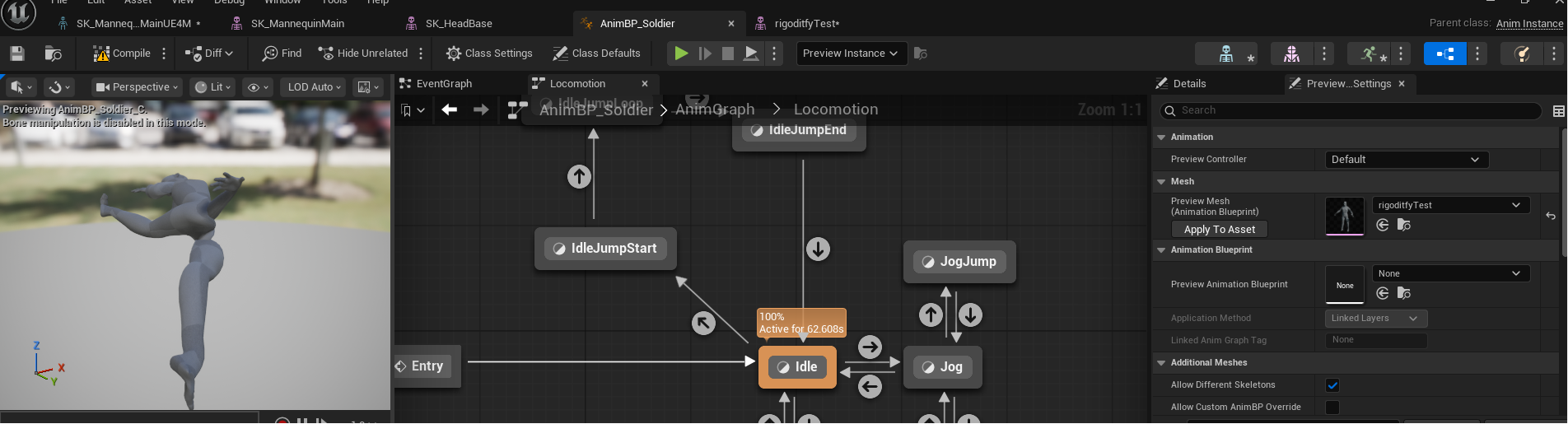
this is the last step in getting my custom characters in so I will keep working on this and post updates in this thread as I have any.
when importing feature sets to rigify during the setup stage the issue keeps popping up: ‘The feature set archive must contain one base directory’
tried both this and github version, cant install these.
My bad, hotfix re-uploaded, version 2.4.1 grab it when you can.
Remove the old feature set.
Restart blender
Add the feature set again, it should add error-free like normal.
This was simply my fault, bundling up the .zip with the whole plugin at the zip's root, instead of creating a single Rigodotify folder, with everything in it, and zipping that.
Blender is picky, and didn't like it.
all’s working now, thank you for super quick hotfix~ 💜
hello, im not sure if this is the intended behavior or not, but converting to godot rig seems to alter the behavior of the hip saddle control: before if works like normal (curling the 2 bottom spine DEF bones according to it's rotation) but after the bones become stuck to each other and move like one big bone when you rotate the control.
perhaps im looking at the wrong bones or the action of curling to bottom part of the spine have been moved to another control?
im on blender 5.1.2 and it seems to happen to all metarigs.
That was something I thought we had fixed a few versions back. Are you definitely on the latest Rigodotify version from GitHub/here?
I don't know if it's related to issue I'm seeing, but throwing out information in case it helps. When I convert a human metarig (in this case I'm using Natural Human 5 Fingers) to Rigodotify rig, the controls stop working for the shoulders and breasts. When I unhide DEF, I can see they are still grey compared to everything else being green. I can get them to work again by following your "add a bone" instruction, but I would expect it would just work on armatures provided along with the plugin. This is also Blender 5.1.2, using the latest Rigodotify from GitHub.
Update: resolved issue by renaming to "Armature"
Indeed, the armature being able to be named Armature is important, one annoyances if you've spun up a few rigs, and regenerated it a few times, the data inside the blend file can make the script confused, attempting to run on OTHER armatures that you are no longer using.
Clearing out the old rigs by purging them and or just opening a fresh blend file with the model and doing it clean one time through can help avoid little bugginess when the rig generates.
im not sure actually, i did try redownloading the new 2.3 version from both here and github but when i open blender_manifest toml it says 2.2, the issue behaves the same
Sorry for the late reply
Oh dear, digging deeper I see what you're talking about. It'll try to find a solution that keeps compatibility and get this patched soon. I have some ideas I just need to run a bunch of tests to be sure.
And in case you want the backend information. In order to avoid a bunch of errors in the different game engines, we have to remove any 'stretch to' bone constraints. Because they'll throw scale errors on certain bones. But that means I have to find replacement constraints that can provide a similar effect to the deformations.
I've got a working fix, It's not identical to the rigify deformations, but it's close. I'll just need to punch that into the script and we'll be ready to patch soon after I test for issues
Alright, Rigodotify v2.4.0 is live with your needed fixes!
Awesome, thank you so much!!
Turns out i did in fact was stupid and used the outdated version originally because blender caches extensions into its own .config folder rather that using local files directly so my original issue may or may not have actually been fixed on 2.3 all along..
Either way thank you for such fast and nice tech support
Any way to make it have two forearm bones? for pronation aka twisting
Nope, If you want that just use normal Rigify. It has two for each arm bone and leg.bone. That also makes it incompatible for game dev retargeting to any skeletons following the Game Dev standard
There is a standard skeleton that the major Game engines use and expect. It's a specific number of bones, in a specific hierarchy. If you stray from it, you can't retarget animations sourced from different places or libraries. So Rigodotify is strict because its purpose is for Game Dev primarilu, and so won't stray from the standards the industry is using.
Hey, just purchased after watching a Quaternius video - hopefully this will ease the pain of trying to fix broken Mixamo animations. Thanks
Hope it's helpful to you. A lot of focus was on compatibility when retargeting in engines, so hopefully you can mix and match whatever animations you need in engine.
If you just need to edit Mixamo animations. They have their own plugin but they don't update it much. You'd likely need to use and older Blender version for compatibility sake.
I'm not using Mixamo any more, just the Quaternius ones. Mixam was too time consuming :-)
That's a good way to go, and honestly, dealing with mixamo and their rigger and plugin is what inspired me to work in on Rigodotify. Theirs is just too frustrating and awkward in the long run. It was useful for a time, but eventually needed more than it offered, and wanted to get away from Adobe
Not sure if it's user error, but in 4.5.3 i've had issues with the "prepare rig for godot". I'm using the human 5 fingers godot rig. The naming scheme doesn't match the scheme mentioned above.
Are you using the lastest Rigodotify? There was a big change recently former versions of the plugin used a different final skeleton, but the past one (or two?) versions use a new naming scheme that makes it more compatible with Unreal and Unity and not just Godot.
So if you're using s former version than v2, youl'll likely see a different bone structure and names.
I believe it's the latest unless you've made changes since last friday. Maybe I somehow grabbed an older version than v2. Let me take a look.
Side question - is the newer bone structure and naming different than the one you've posted in the description above?
The one in the description above is the lastest. But note, that is the name of the deform bones only. Not the control or other auxiliary bones that Rigify uses while in blender.
So when you export, with deform bones only, and import your model into Godot, you will see the bones listed above. But in blender, you will only see those bones if you really dig into the rig, because they're SUPER nested in their hierarchy, and even if you enable deform bones to be visible (because they are hidden in blender by default) the control bones are on top of them nearly exactly and will make them hard to click. So there is a little bit of "trust me they're there". Or just use the search bar in the scene viewer and type a bone name in question, you should see it pop up.
Are you getting any sort of errors at all when you hit the "prepare for Godot" button? if not, then it's likely everything is working correctly.
Alright - figured it out.
Itch.io version of the plugin is outdated. If I click "download now" at the top of the page, go straight to downloads, and select itch.io v2, it gives me a version with a python script that is only 300-some lines of code. While directly downloading from github gives me a script that is 500-some lines of code and aligns more with the description above.
OH MY GOD. Thank you so much for not giving up! I've correct the mistake!
Sheesh, i keep former versions as I work and did not realize that I had re-uploaded a former v1 version on Itch, even though the Github had the latest. This explains so many questions i've had from users lately. Thanks so much for getting to the bottom of it for me.
I've fixed it, it should be good now, and i'll be more careful in the future!
Noticed some differences in the zip file's name were giving some folks trouble. I've updated the github release's name to hopefully solve that for folks. It should just be named 'Rigodotify.zip', and should avoid any errors or headaches like that.
Hi ! I'm still having trouble installing the plugin, getting the error "No module named "Rigodotify-2". I'm on Windows 11 and using Blender 4.5
Edit: the itchio zip file works perfectly, only the github release zip gives me the error.
That is like, exactly the issue i thought i solved on github the other day. Ugh. I'll go fight with it again.
Thank you!
blender 4.2 compatible?
Yup, exclusively works in 4 and up. Does not work on older pre-4 versions.
This plugging is excelent! Thanks!
Glad you dig it!
hey, this plugin is incredible! thank you.
So glad you dig it! I love it too. I don't know how i lived without it