Building Data Clean Rooms on Snowflake: From Audience Overlap to Activation

A practical guide to the Collaboration API — with two working GitHubrepositories, one for SQL and notebooks, one for custom apps you deploy inside Snowflake.

Every marketer has had this conversation. You want to know how many of your customers also buy from a partner brand. The partner wants to know the same thing. Both of you have the data that would answer it. Neither of you is allowed to send it to the other.
For years the workaround was a trusted third party, a signed contract, and asix-week wait. Data clean rooms replace that with something you can run in an afternoon — and in Snowflake, without moving a single row out of your account.
This article covers what a data clean room is, how Snowflake implements one, and then gets practical: two complete, runnable tutorials that take you from an empty account to an activated audience segment sitting in a table you own.
Both tutorials are published as public GitHub repositories:
- SQL and Snowflake Notebooks —
https://github.com/arzamuhammad/dcr-collaboration-api-tutorial
- Custom applications (Streamlit and React) —
https://github.com/arzamuhammad/snowflake-dcr-custom-apps
Everything in them has been run end to end across two real Snowflake accounts. The numbers quoted in this article are the numbers those runs produced.
=============================
1. WHAT IS A DATA CLEAN ROOM?
=============================
A data clean room is a controlled environment where two or more organisations can analyse their combined data without any of them getting access to the others’ raw records. The critical word is *combined*. This is not data sharing with extra paperwork. In a clean room, the analysis runs across both datasets at once, but the only thing that comes out is an aggregate — a count, a distribution, a model score. The rows themselves never become visible to anyone who did not already own them. Think of it as a room with two locked mail slots and one small window. Both parties post their data through their own slot. A pre-agreed calculation runs inside. The answer appears in the window. Nobody can reach in.
WHAT MAKES IT A CLEAN ROOM RATHER THAN JUST A QUERY
Four properties, and you need all four:
**Neither party can read the other’s rows.** Not restricted to reading them, not audited when reading them — genuinely unable to. This is enforced by the platform, not by policy.
**Only approved analyses can run.** The party contributing data decides which calculations are permitted against it. An analyst cannot invent a new query that happens to leak individual records.
**Results are aggregated, with a floor.** A count of “1” tells you a specific person is in both datasets. Clean rooms enforce a minimum group size — commonly five — below which no result is returned at all.
**Every operation is logged.** Who ran what, against which data, when. This is what makes the arrangement defensible to a regulator or an internal audit committee.

WHY THIS MATTERS MORE THAN IT USED TO
Three things converged. Privacy regulation — GDPR, CCPA, and their equivalents across Asia-Pacific — made casual data transfer legally expensive. Third-party cookies stopped being a reliable identity backbone. And retail media networks turned “measure my campaign against your transactions” into a mainstream commercial request rather than an exotic one.
The result is that a technique which was once the preserve of large advertising holding companies is now something a mid-sized retailer needs to be able to do with a dozen suppliers.
======================
2. HOW SNOWFLAKE HELPS
Most clean room products are a separate platform. You extract your data, load it somewhere else, and now you have a second copy of your most sensitive asset in a vendor’s environment — which is precisely the problem you were trying to avoid.
Snowflake Data Clean Rooms work differently, and the difference comes from something Snowflake already had.
NO DATA MOVEMENT
Snowflake’s sharing model lets one account grant another account query access to an object without copying it. The data stays in the provider’s account, under the provider’s governance, and is billed to whoever runs the query.
A clean room is built on top of this. When you contribute a dataset to a collaboration, you are not uploading it. You are registering a reference to atable that never leaves your account. Revoke the grant and the collaboration loses access immediately — there is no copy to chase down.
This is the single biggest structural advantage. Your legal team’s first question is usually “where does the data go?” The answer is “nowhere.”
GOVERNANCE YOU ALREADY CONFIGURED
Because the data stays put, everything you already applied to it still applies inside the clean room. Masking policies, row access policies, object tags, classification results — all of it travels with the object because the object never travelled. You do not build a parallel governance model for the clean room. You inherit the one you have.
THE ANALYSIS RUNS WHERE THE DATA IS
Snowflake’s compute runs against the data in place. There is no export step, no staging bucket, no intermediate file to secure. For a 10-million-row overlap against a 1-million-row audience, the work happens inside Snowflake’s engine and returns an aggregate.
NATIVE, NOT BOLTED ON
Data Clean Rooms is a Snowflake feature, generally available in supported regions. That has practical consequences: it is covered by your existing Snowflake contract and security review, it uses your existing warehouses and roles, and support goes to the same place as the rest of your Snowflake support.
Two caveats worth knowing up front. Clean rooms are not available in all regions — check the supported region list before you promise a delivery date. And they are not available in government or VPS deployments.
WHAT YOU STILL HAVE TO DO YOURSELF
Snowflake gives you the enforcement mechanism. It does not give you the agreement. You still need to decide with your partner which columns are shareable, which analyses are permitted, what the identity key is, and how the results may be used. The platform makes those decisions enforceable; it does not make them for you.
— -
3. SNOWFLAKE DCR AND THE COLLABORATION API
==========================================
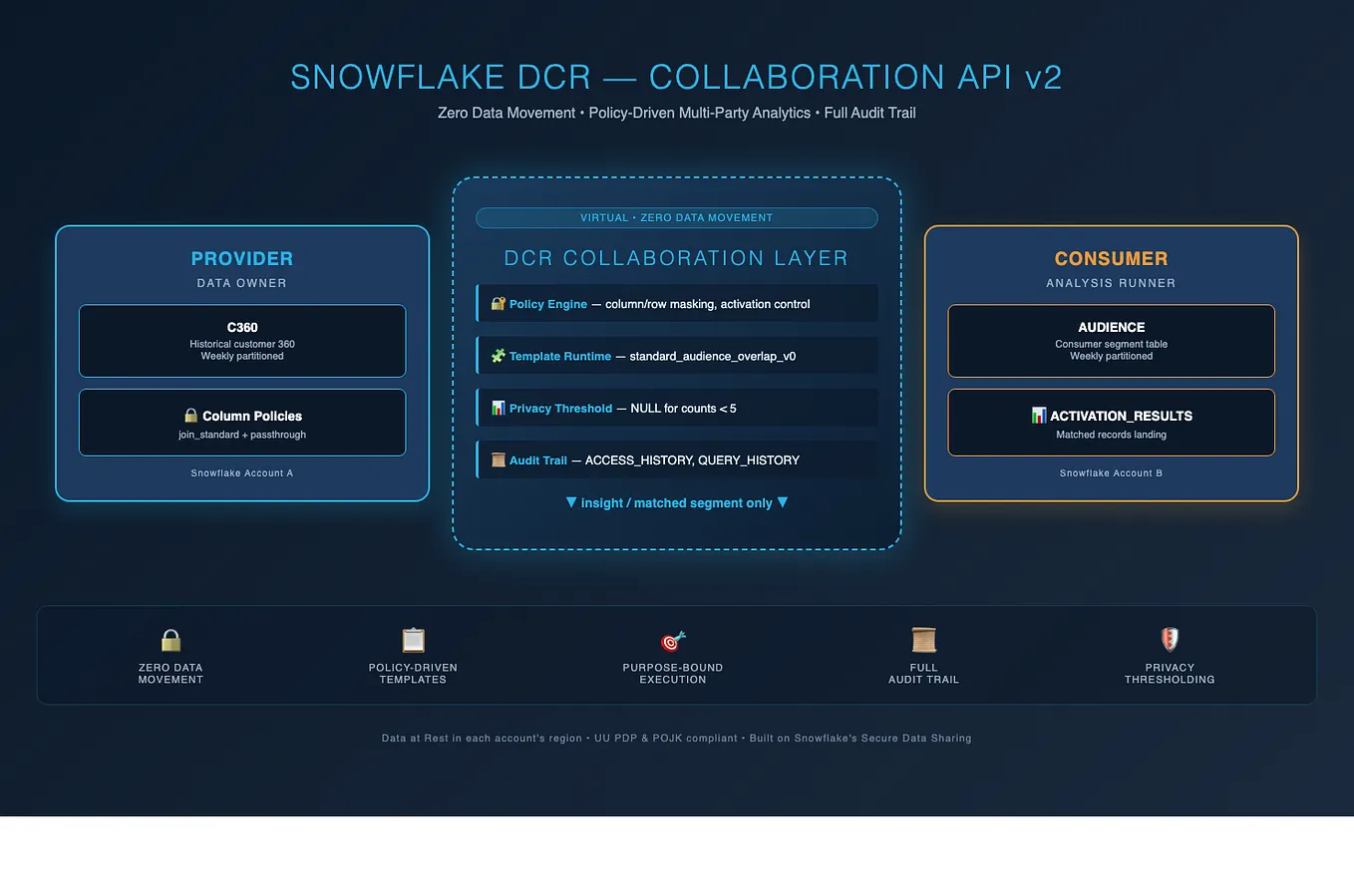
Snowflake is introducing a clean room architecture called **Collaboration Data Clean Rooms**. The word that matters in the official description is *symmetric*.
WHY SYMMETRY IS THE HEADLINE
Earlier clean room designs — Snowflake’s included — were asymmetric. One party was the provider. One party was the consumer. The provider published; the consumer queried. Two-party, one direction.
That model breaks as soon as reality intrudes. A retailer and a brand both want to contribute data *and* both want to run analyses. Add a measurement partner and now there are three parties, each with a different combination of rights.
Collaboration Data Clean Rooms drop the provider/consumer split and replace it with roles you assign per collaborator:
- **Owner** — creates the collaboration and decides who holds which roles.
- **Data Provider** — contributes data and specifies the policies that apply to it inside the collaboration.
- **Analysis Runner** — runs templates, using data they have been granted.
A single collaborator can hold more than one role. In a two-party audience overlap, both sides are typically Data Provider *and* one of them is also Analysis Runner. In a three-party measurement setup, the agency might be Analysis Runner only, holding no data at all.
This is also where a rule catches people out: **every collaborator needs at least one role.** Listing an account without assigning it a role fails collaboration creation with an error about collaborators having no role. If a party genuinely contributes nothing and runs nothing, they should not be in the collaboration.
TWO INTERFACES
Per the documentation, there are two ways to work with clean rooms:
Get Muhammad Ardiyan’s stories in your inbox
Join Medium for free to get updates from this writer.
**Developer APIs** — a complete programmatic surface for a technical audience, including the ability to build custom applications and to customise analysis templates and ML models.
**The DCR UI in Snowsight** — a point-and-click interface for managing collaborations, aimed at both technical and semi-technical users. It also integrates with Cortex Code, so you can manage collaborations in natural language.
These are not competing options. The API is the foundation; the UI is a surface over it. Which you use depends on who is doing the work.
There is a third option that the documentation does not frame as one, and it is the reason for Part 3 of this series: **you can build your own UI on the API.** If your business users need an interface shaped like your process rather than like Snowflake’s, that is a supported thing to do — and it is what the Developer APIs explicitly exist for.
WHAT THE API ACTUALLY LOOKS LIKE
Once clean rooms are installed, the API lives in a local database in your own account, organised into schemas:
SAMOOHA_BY_SNOWFLAKE_LOCAL_DB.REGISTRY register your data offerings
SAMOOHA_BY_SNOWFLAKE_LOCAL_DB.COLLABORATION create, join, link, run
SAMOOHA_BY_SNOWFLAKE_LOCAL_DB.ADMIN install, privileges, version
SAMOOHA_BY_SNOWFLAKE_LOCAL_DB.LIBRARY templates

Calls are stored procedures that take a YAML specification. There are three specification types, all versioned `api_version: “2.0.0”`:
**`data_offering`** — the contract on your data. Which table, which columns are exposed, and what each column may be used for.
**`collaboration`** — who is involved, what role each plays, which offerings and templates each Analysis Runner may use, and where results may be activated.
**`analysis`** — a single run. Which template, which views on each side, and the arguments.
Here is a data offering, trimmed:
CALL SAMOOHA_BY_SNOWFLAKE_LOCAL_DB.REGISTRY.REGISTER_DATA_OFFERING($$
api_version: “2.0.0”
spec_type: data_offering
name: telco_provider_offering
version: “v1_0”
datasets:
- alias: subscribers
data_object_fqn: MY_DB.DATA.TELCO_SUBSCRIBERS
allowed_analyses: template_only
object_class: custom
schema_and_template_policies:
HASHED_MSISDN: { category: join_standard, column_type: hashed_phone_sha256, activation_allowed: false }
ARPU_BAND: { category: passthrough, activation_allowed: true }
CHURN_RISK: { category: passthrough, activation_allowed: true }
$$);
The `category` on each column is the enforcement point:
- **`join_standard`** — a standard identity key. Usable for matching, and Snowflake knows what kind of identifier it is.
- **`join_custom`** — a matching key that is not a standard PII type.
- **`passthrough`** — usable in filters, grouping, and activation output, but not for matching.
- **`timestamp`** / **`event_type`** — for event-shaped data.
And `activation_allowed` decides, per column, whether that value may leave the clean room in an activated segment. This is the control your privacy team will ask about.
— -
4. USE CASES
============
Audience overlap is the entry point, not the destination. Here is where clean rooms are actually being used.
AUDIENCE OVERLAP AND ACTIVATION
The canonical case, and the one both tutorials implement.
A brand and a retailer want to know how many customers they share. They run an overlap and get a count — say 249,778 out of a million, just under 25%. That number alone justifies or kills a co-marketing budget.
Then they go further. The matched audience is *activated* into the brand’s own account as a table, enriched with attributes both sides agreed to expose: the retailer’s purchase frequency band alongside the brand’s loyalty tier. The brand can now build a segment that neither party could have built alone — and neither party saw the other’s customer list.
CAMPAIGN MEASUREMENT
A brand runs advertising on a publisher’s platform. The publisher knows who saw the ad. The brand knows who bought. Neither will hand over their side.
In a clean room, exposure data and transaction data are joined on a hashed identifier, and the analysis returns conversion rates by segment. The brand learns which placements worked. The publisher proves its inventory has value.
Nobody learns which individual person saw an ad and then bought. This is the use case that funds most clean room programmes, because the alternative is last-click attribution and mutual suspicion.
RETAIL MEDIA NETWORKS
A retailer with first-party transaction data sells advertising against it. Every supplier brand wants measurement, and there may be hundreds of them. The multi-party symmetry of Collaboration Data Clean Rooms matters here. The retailer registers its transaction data once as an offering with a defined contract, then creates a collaboration per brand — same offering, same templates, different counterparty. What would otherwise be a bespoke integration per brand becomes a repeatable configuration.
FINANCIAL SERVICES: FRAUD AND RISK
Two banks both see fragments of a fraud pattern. Neither can share account-level data, for regulatory reasons that are not negotiable.
A clean room lets them run a pre-agreed analysis across both datasets — how many accounts flagged at bank A also show anomalous behaviour at bank B — and return only counts. This is one of the cases where the audit trail matters as much as the privacy: the regulator will ask what was run, and there is an answer.
Credit risk works similarly. A lender can test whether an alternative data signal improves its model without the data provider handing over a raw file that could be copied indefinitely.
HEALTHCARE AND LIFE SCIENCES
A pharmaceutical company wants to study real-world outcomes. The data sits with providers and payers, under HIPAA or its local equivalent.
Cohort analysis in a clean room returns aggregate outcomes by treatment arm without any party seeing patient records. The minimum-group-size floor is doing real work here: it is what stops a cohort narrowing to one identifiable patient.
TELECOMMUNICATIONS
A telco holds network, device, and location signals with genuine commercial value, and regulatory exposure that makes selling raw data impossible.
Clean rooms let the telco monetise the *insight*. A retailer can learn the propensity distribution of its own customer base against telco-derived segments — and the telco’s subscriber records never leave its account. This is the pattern in the tutorial repositories, because it makes the column-level contract concrete: the hashed phone number is a join key that is explicitly *not* activatable, while the ARPU band is.
SUPPLY CHAIN
A manufacturer and a distributor both hold inventory and demand data. Sharing it outright would expose margin structure. In a clean room, joint demand forecasting returns aggregate signals that improve both parties’ planning without either learning the other’s cost base.
— -
THE PATTERN
Every one of these has the same shape:
1. Both parties hold data with real value to the other.
2. Neither can transfer it, for legal, regulatory, or competitive reasons.
3. The answer they need is an *aggregate*, not the rows.
If your problem has that shape, it is a clean room problem. If you actually need the rows, it is not — and no clean room will give them to you.
— -
WHERE THIS GOES NEXT
That is the whole conceptual apparatus: a contract on your data, a collaboration, and an analysis. Everything after this is mechanics.
Part 2 runs the mechanics in SQL. Two accounts, a provider offering, a collaboration, a waterfall overlap, and an activated segment landing in a table you own — with a ground-truth query so you know the right answer before the clean room gives it to you.