PixZels

v.006

Stop drawing every angle. Start creating.
Pixel artists: Stop wasting hours manually calculating perspective for isometric or 8-16-direction views. PixZels is a lightweight productivity app that transforms 1 to 3 orthographic images (Front, Side, Top) into a precise 3D pixelated model.
Using internal painting and modeling tools, you can generate a full set of professional, pixel-perfect sprites in seconds.

- Input: Load your Front, Side, and Top views (or draw them directly in-app).
(Is it possible to create the model importing 2 or 3 separated PNG images "Front_Side_Top" or also the model could be created using a single PNG ortho image sprite sheet of 6-sides).

Upload any combination of all 6 possible sides:

2. Generate: Watch the app project your art into a 3D pixelated space and work any tiny details (add colours, add geometry, add outline, add lighting).

3. Fine detail: No more time-consuming on getting right orthographic projections, no more perspective "guessing." Just pure, efficient art. Within the app gives the freedom to the artist adding the needed detail (painting and modeling) at any desired angle straight into the 3d model using simple tools:

3. Export: Choose your desired PNG sprite sheet and hit "Export."


3D-Ortho: Model your 3d pixel art using the ¨3D Orthographic projection¨ Button.
Work the deails with full pixel control.
Pixelart Pencil tools: Paint at any precise depth using cube selections.
More precise control with SELECTION mode:
-Backspace (erase).
-Bucket (fill selection with pixles)
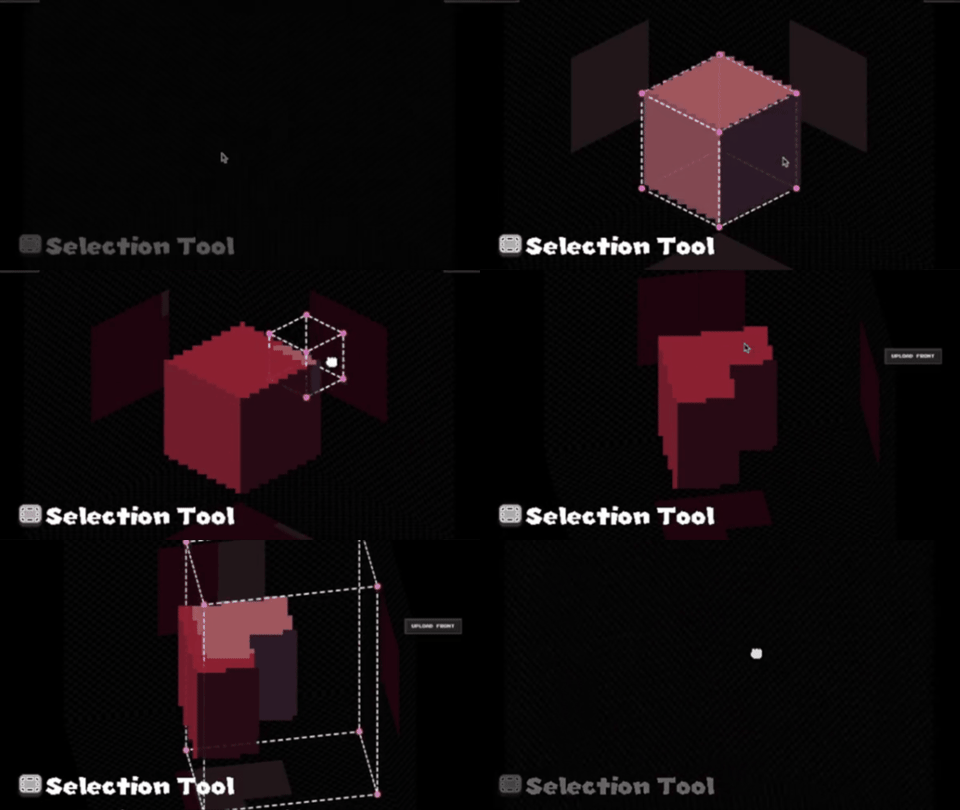
Move-Copy Operations:
-Shift+Drag mouse: Move pixels.
-Control+Drag mouse: Copy pixels.


Create geometry Minecraft style.
-Switch between the pixelated model and the 3D model to work with precision:


A pixel art tool for Pixelartist.
Efficiency shouldn't come at the cost of style. As a pixel artist myself, passionate about isometric art (https://pixel-salvaje.itch.io/), I know that Pixzels is designed specifically for pixel artists who demand precision. It preserves the "SOUL" of your original 2D art while handling the math of the third dimension for you.
Save days of production time on every project and focus on what you do best: creating.
The stand-alone paid version includes:
-Full export features: 8-Directions Top-Down, 16 Directions Top-Down, Snap-Shot at any desired angle, RPG Maker sprites, Animated Gif, 3d export OBJ.
Z Orthogonal Export: Export your model as an orthogonal PNG sprite (Front_Back_Sides-Top_Bottom), edit this image with any pixel art software, and re-import it back into PixZels to seamlessly rebuild your 3D model with the new details.
New: Slider to control camera tilt.. From side view to Top-Down view.


-Windows, Mac (Universal) and Linux (x64) versions.
-No internet connection required to work. Install and enjoy.
-Save and Load your 3d pixelart model (JSON file) for future adjustments.
--------------------------------------------------------------------------------------------------------------------------------------------------------------------------------------------------------------------
(This app is v0.06, and it is currently in hard development. At this time, I´m working on improving the overall experience and planning new features. Please share your feedback, which is super important for me... and thanks for your support).
Please  Many Thanks :)
Special Thanks to @Shadowregister, the Code Dev.
Thanks to Keeny Assets @kenney.nl
@Pixel_Salvaje
----------------------------------------------------------------------------------------------------------

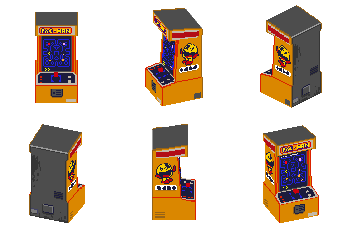
#MadeWithPixZels:




----------------------------------------------------------------------------------------------------------

Purchase
In order to download this PixZels you must purchase it at or above the minimum price of $14 USD. You will get access to the following files:
Download demo
Development log
- PixZels v 0.006 is out with new features!2 days ago
- PixZels 0.005 is Here!36 days ago
- PixZels v 0.004 is out!50 days ago
- PixZels Linux Versions x2Mar 30, 2026
- PixZels v0.03 — UpdateMar 24, 2026
- PixZels v0.02: Performance & Precision Update.Feb 27, 2026
- Added a Linux Version for PixZelsFeb 17, 2026
- PixZelsFeb 14, 2026

Comments
Log in with itch.io to leave a comment.
Features you need to add ASAP:
1] Being able to include the Back image too, since there are models which will have unique details in their back (it's the case of all models i work with;
2] Add export for magicalvoxel .vox format, so, we can work with other tools beyond yours too.
3] Export obj with mtl material file too.
Also, do you have an email which i can send more suggestions to?
Hello Wakawakamush.
1-The back Image (and all 6 sides images) could be added using Upload sides Button:
2-The magicalvoxel .vox format needs to be tested. But I think it won't be possible because behind PixZels, the tech is not voxels. Voxels have a unique colour for each voxel, and PixZels uses 6 colours on each voxel (each side could have a different colour). That is done to create more precision when the user builds the models. (The models are nicer imo).
3- Obj with mtl it's a must, yes ... Many Thanks,
You can post your feedback here or send me mail (cartade1y0@gmail.com) I write down all the ideas.
Many Thanks for your feedback... That really help me a lot :)
You need to change the program to let us upload images of different sizes than 16,32,64 and 128 pixels. I have sprites of various sizes and that limit is very annoying.
When you're adding the mtl file to be exported alongside obj one?
Hello, congratulations on the development of Pixzels. When I import 6 images, one by one to build my model, saving the model doesn't work. However, when I import 6 views into a single image, saving works correctly. Please, could you look into this?
Also, could you add a new export format in a future version that supports the VOX format (MagicaVoxel V1 format, 126x126x126, for example)? Thank you.
Hello Coderzxy... Interesting bug... Many thanks for your info. I was looking into what was triggering this not-saving bug. I'll check it out.
This is a really cool app, is there an official discord where we can make suggestions or ask for help? I think the program would benefit from a video tutorial series as the learning curve is a bit steep. Otherwise a really great app! Some immediate suggestions would be:
Thanks for developing this great app and making it available across multiple platforms! Highly recommend it for anyone on the fence!
Hello Shyufo.
Awesome features that you think of... Some of them I already have on my to-do list. Definitely, I will be adding them because I love all of them :)
Im working atm on a new version and within the coming expansions; I will head in that direction.
I do not have Discord for it but I write down all the comments that I receive from Itch and X.
Many thanks for your feedback. :)
Thank you so much for the quick and kind reply! I love that some of the stuff is already on the to-do list! :) Will definitely support it going forward.
I've linked below an example of the preview window. It's from an abandoned app called SpritePile on itch:
https://www.youtube.com/watch?v=s356D76-nFQ
It has the option to the show a preview window on the bottom right which is constantly rotating while you're building. A few similar programs also have this feature.
Also one final suggestion to add is a shape/geometry tool in addition to line tool. So that we can create flat or 3d boxes/spheres easier! Cheers, and thanks again :)
I've just bought one ! You are walking the path of Greatness !
Is it normal that the obj export gave me a 3d model without material ? i tried to add the gameboy sample assets in the godot engine and in blender, i only see a good looking grey gameboy ^
never mind i found it ! I had to activate Vertex color and use it as albedo in Godot.
Glad that u found the way... Im not familiar so much on 3d OBJ... I do think vertex color is not the best color export for a 3d model. I will work on export OBJ + MTL
Thanks for the feedback Veveo.
You're welcome !
Also about the 3D export, the mesh looks a like a voxel export with a lot of triangles. When you have time it will be great to add some polygone optimisation during the export. The actual models are un necessary heavy on polycount.
Anyway good job !
hm, i need my assets other way around - i have isometric perspectives so it would me neat to get front/side from them. i assume it's not possible, right?
I think it will not be easy to achieve this :/
Hello, I would like to thank you for the Pixzels app, however i am working on win7(64 bit) and it is not compatible, is there a version/patch that makes it compatible?
On win10 it works fine.
Thanks.
Hello Gkakisdf.
Can we contant via Discord. I will try to fix that. Thanks
(efebe_)
This is becoming more and more of a tool unlike any other especially with the recent update. The potential is all over the place in the best way possible for creatives and hobbyists of the low poly/pixel art community.
Much love for the most recent update @pixel_Salvaje. I don't know how you do it, but much love for the effort that you are putting into this amazing tool this far. 0.005 is definitely a great leap already and can't wait to see what's next in store.
Many Thanks for your words Psychojack88 ♡♡♡
Hello Pixel_Salvaje,
First of all, thank you for developing PixZels.
I would like to ask if a symmetry / mirror editing feature is planned.
For pixel art workflows, it would be extremely helpful to have an option to paint or edit one side of the model while automatically mirroring the changes to the opposite side.
Is this kind of symmetry editing feature something you are already considering for future versions?
Many thanks for your work. PixZels has a lot of potential.
A mirror editing Feature will be added yes... I think is important. Many Thanks
when uploading the example images seperate, the side, top and front, i get many artifacts in the model, why is that? and why does it seem like the example inside the app does not have it? hmm? is there something im missing? will me basing my painting on the example images be wrong? thank you so much for clarifying in advance
I see the issue...
-Need to check the ambulance files, but I think they need to be updated.
-The example model (from the examples button) it is already a cleanup model.
-The main reason is that Pixels cannot determine hidden geometry using ortho images only... Let's say if geometry pixels are inside a fridge model, the ortho images do not give information to the model for the inside of this fridge... The same principle happens on the ambulance... Usually, after creation, I need to cut geometry and paint details to make it perfect. I usually do it with a selection box.
Need to apply some ideas to maybe fix this issue. Need to test.
Thanks for the feedback :)
Oh thank you, yeah logical obscured pixels shouldn’t even be allowed to happen, I thought the like example art would be a great starting point to understand the usage, may I kindly ask you update to like the working ambulance from the examples? I want to be able to open it as sprite and build upon it to create more vehicles, also just to be safe may I ask what’s the license on the example art? I can totally like edit the ambulance and create more vehicle skins right? Once again thank you for responding, the software is great it’s just confusing if I should handle it like a totally 2D editor, or a 3D voxel engine lol
XD I updated the ambulance ortho images... Still, this model, when it is created based on images, has these voxels wrongly extruded due to the geometry... The best way to get the model is to use the JSON upload (Load Model Button) is the clean version of the model.
The ambulance example could be used as personal or commercial use... I have some cars already (Police Car, Pickup and Old Van) on sale using PixZels Json file names that are on sale and can be used for personal or commercial use. I think it is a good option to take existing cars and make modifications to get more different models... It is a good base.
Looking forward to seeing your creations.
Thanks.. If you need anything different let me know.
Is there a workflow for the obj export to set up the textures, or should we just do a triplanar to UV setup?
I could try to export as Obj + Mtl file also.. Maybe it will be better?
Will this ever be out on steam?
Yes, planning to release on Steam.
The ones who purchased on itch will get a key for Steam.
doesn't seem to really work for me? thought it would try and match details or something and trying to draw in it is basically impossible. is this only intended for square objects? none of your examples show a character spinning or anything fully round. don't really get the point of this if it doesn't work for complex shapes/requires you to draw the sprites in full anyway.
Hello Yua Nizu.
The app is not really good atm for organic shapes. Although it is possible, it is more suitable for blocky assets.
Working on implementing rounded or circular selections, which will help a lot for character creation :)
Many Thanks for your feedback :)
can it export FBX files?
It can export as 3d OBJ Model (v0.05)
:)
Hello! I've found this on Twitter recently and I found it very cool. I have some questions about it:
1. Are LLMs used in any way for this? The word "generate" always give me chills, but you didn't mention anything of the sort so I'm hopeful.
2. Can I export the generated 3D models themselves?
Hello Ruffles Teiv :)
1-The app is a 100% standalone desktop program. When it 'generates' an image, it uses pure mathematical orthogonal interpolation Just classic, predictable code and geometry.
2-I,m planning soon a 3d export for it... Need to hard-test more... The result exported will be a similar of a voxel model.

Thank you very much for your answer!! I'll purchase a copy soon :]
Hello Pixel_salvaje,

First of all, thank you so much for developing this program.
It seems that the program struggles with depth, protruding ceilings in particular. For testing purposes, I drew a simple farmhouse with a hay bale on its left side. This is the Z-Ortho image file I used:
The goal was to have the beige roof extend slightly beyond the brown rectangle, and having a rounded hay bale on a single side. Instead, the result was the following:
The hay bale was cut in half and the brown rectangle was extended beyond its intended limits, resulting in a displeasing protrusion. However, the fridge example you included by default does seem to have complex depth (the blue box inside the fridge that cannot be seen from the Z-Ortho file). How can one replicate such effect?
Hello DanClypse.
I see the issue... PixZels cannot find hidden extrusions correctly.
As with the inside of the fridge, I need to work out the geometry manually because I can only determine the depth of orthogonal views, not hidden geometry... Not sure If I can add a colour detection to fix that missing geometry.
My workaround is to work on these issues after model creation using selections. It is what works best for me so far. :/
Really cute house :) ... Also need to find a way to fix these slopes, like the roof, to be more pleasant to see.
Many Thanks for your feedback; it helps me a lot in finding issues. :)
Thank you for the quick response! I believe I have found an idea that could possibly solve this problem without the need for complex color analysis, through the use of multiple voxel layers. I separated the house in three different Z-Ortho files: one for the base, one for the roofing, and another one for the hay bale, like so:


I loaded each of them individually in Pixzels, and then combined them in Photopea to demonstrate the shape I originally intended to make:
However, it would be amazing to have all shapes loaded at the same time in the program, so that they can cast shadows on one another, and to easily export several angles. Thanks again for your time and effort!
The tool is very cool though it struggles a bit with very small canvas (8x8 and 16x16). it seems that this does not work with voxels because when you edit the "model" it changes the original sprite.
This is really an awesome tool if somehow you could manage some workflow of 1. initial sprite- 2. a voxel model- 3. edit the voxel model toggling on and off the pixelation shader and changing the amount of pixelization/resolution- 4. pixel art touch ups on the export side while navigating with the arrow keys like you do now but between the exported perspectives. Could be a game changer for me
this has a lot of potential but for my needs of very small canvas it might not do the magic well enought for the moment.
i'll keep an eye on it tho
Many Thanks for your feedback, CrisLoyal.
Working in that direction... I will include a voxel model workaround in the next updates :)
I'm gonna take a look at the struggles with the very small canvases issue; it might be an unknown bug.
I think for smaller canvas its just because it doesn't have a lot of space and/or lack of a way of identifying key features
I'll give my feedback as someone who needed this for a game but unfortunately couldn't get it to work the way I expected, and also as a professional pixel artist with years of experience in game development.
I tried making a bus that was around 154 px wide. Even though the program says it supports 256 px, it wouldn't let me go beyond 128 px. It would also be nice to support irregular dimensions instead of forcing square sizes.
The side of the bus is horizontal because the bus itself is rectangular. When I imported the roof, the bus got squashed, and it took me hours to realize that the top image was supposed to be vertical. That wasn't very intuitive.
I'd personally rather draw the back side in Aseprite (I don't need the bottom side for my game). But imagine making a game where the bus flips over on the road, you would need the underside.
I can understand this one, since it's probably a difficult problem to solve.
The brush is the only tool that worked reliably for me. I also struggled with the selection tool. It was difficult to understand where to drag, even when using the corner handles. The mouse cursor representation wasn't very intuitive either.
There should be a File menu and other standard menus for importing images instead of relying only on dragging files into the center of the screen. Also, I can't drag the window around in Windows because there isn't a title bar to grab.
It takes up a lot of space and feels unnecessary. Less is more, especially in a tool I would use frequently.
It would be great to have the option to export more viewing angles.
If I were you, I'd prioritize the tool itself rather than painting features inside the program. Those can always be added later. I think the main purpose should be assembling the pieces and exporting them from multiple directions. Sprite touch-ups can be done in other software.
When painting tools are eventually expanded, the colors and palette should always be visible. Having to click the color to open a modal is poor UX. Aseprite's approach of keeping colors visible on the left side works much better.
I would also remove the entire right panel and move those options into standard menus like File, Edit, etc.
For the viewing options, I think it would be more intuitive to have a rotatable cube or directional controls similar to what 3D software uses.
That's all I can think of for now. If I remember anything else, I'll add it later. I really hope this tool improves because the concept itself is excellent, and I'm looking forward to future updates.
Many many thanks for your constructive feedback Skullbrow, that info means a lot for me.
I appreciate your deep analysis.. I see that you are a pixel artist and understand the medium.
Some of the points are fixed already in the newly v0.004 released yesterday... I will be working on the next points through intensive testing.
I'm aware the tool is not 100% perfect atm, but pushing for getting a professional tool, so far is a very useful tool for my daily work but still needs to improve. Thanks.
If you want to keep on contact and discuss some issues or needs, we can connect via Discord if you feel like (efebe_).
So I'm going to download this new version, I didn't see that one was released yesterday. "Te ad" is the name inside the parentheses, right? Or do I add it using parentheses?
Not sure what you mean by your question...
A new version went live yesterday. If you are running the older version, please delete this old build to get the new fixes. No need to manually rename anything or add extra tags to the folders. :)
You will put this tool in Steam? I want buy, but prefer by Steam, just to concentrate in one place
Yes, I will added on Steam... SO, for future Updates will be automatic to update...
Atm working on more precision and more features for this tool... When I have a good version (within a few months), I will upload it to Steam.
If anyone bought PixZels on Itch and wants a Steam version, I will deliver a key for it.
Many Thanks, Skullbrow.
So I'll buy here because I needed that now and send me a key when ready, please
Yes, sure Skullbrow. :) Everyone who bought on Itch this project will get a Steam Key if they need it... It is like a thanks for your support during this development time; that help and feedback is really necessary for me... Many thanks.
This is so cool! I'd love to know how this was made, it's seriously Impressive! I'm definitely going to buy this.
Please also include a slice export option for sprite-stacked models sometime! Animation would also be amazing <3
Im not sure if sprite-staked integration would be possible... Need to try this :)
Many Thanks Michael.
Hey! Great software. I am considering buying now for future projects, but also for a project I am working on at the moment. I would be curious to know if it's possible to generate slices for sprite-stacked assets from Pixzels?
Hello Iinacho.
Not at moment... But it is a good idea to have this integration... I will consider that on future builds.
Many thanks :)
Could you please add to your demo, ships from your asset pack -> https://pixel-salvaje.itch.io/free-boat-16-directions ?
I'm looking for a program where I can design ships like these, and I'm wondering if it's possible to create more complex vessels. Two- or three-masted ones? That’s why I’d like to experiment with the demo and see if it’s worth buying your program. I’d appreciate it if you could add these models to the demo so I can test them, because so far I haven’t been able to recreate these models in the program.
Hello Brickfiction. :)
Can u contact me throught Discord?
efebe_
An awesome tool that I anticipate will make my game much easier to produce! My immediate thoughts is it would be useful to allow the user to hand-choose which perspectives they export (for example, a given sprite in the game I am working on would only need 4 for a given sprite). Maybe even just let the user set custom presets?
Again, this will already save me tremendous time as it is, so thank you!
Many thanks for your words :)
Thinking of a way for users to choose any specific angles to export.
Android version in the works?
I have no Android version on the roadmap atm...
Oh, i guess i have to wait then 😭
Hello, love the tool!
Will this at some point allow users to export the 3D object as a 3D file, such as .obj or .glb?
Im considering this option... Need to make some tests to see what I got. Thanks :)
That's great! Looking forward to it :)
For me too, I would buy it if it had 3D export feature
Hi. demo is amazing. I tried making a 3DS, but the lines would get weird effects on them with the color... is there any guide for use?
Thanks!
I will be buying to support.
Hey Jasperidone, Thanks for the feedback.
Show if u can the artifacts.. That would help me to understand and fix the problem... The app is not perfect atm but working on pixel perfect precision :)
Hello Jasperidone. Sorry for the late reply.
I see the issue: -Behind Pixzels is working a kind of a voxel engine but with single-sided coloured cubes and other things to get the most precise approach for a pixelart outcome... In your case when they are slopes with different colours cubes, the cubes display the colours of each side and create this artifacts. Im working on some ideas to apprach this cases in a intuitive way for the user.
Many thanks for your feedback.
Ei I really love your 3ds :O super nice :) If u want to share your artwork send me the giv I will display on itch.
:)
I also had this issue. Is the solution to use the paint tool and paint the under-side of the voxels in PixZels manually?
Would it be possible to purchase the ortho images from the PixelWheels series to use with this tool?
I would like to create a lower camera angle version of the iso versions available for mode 7 style rendering.
Hello Rastervision, unfortunately, the current Pixewheels cars were made before I created PixZels. Although I,m considering to redo all of the current cars to improve and add more to them...
I will include the PixZels file for future cars.
Many Thanks.
Sounds good. Thanks for the reply.
Hey, it looks great but I couldn't make it work. Does it work only with squares and simple shapes like a car? I tried making a 2d humanoid character but it just created a scrambled blob. I used your vending machine template to place the different views in the correct format.
Hello Creed :)
Organic shapes are rather difficult to work with... can u share your images and see what the challenge is?
Many thanks :)
hi pixel salvaje.I didn't know you opened a patreon.i didn't see it anywhere.i didn't have bluesky and checked recently.is there anything planned?
https://www.patreon.com/PixelHeatCity?utm_campaign=creatorshare_fan
Hello Stereo, thanks for your words :)
I did work on the possibility of Patreon for my next upcomming project, working on an isometric city kind gta style...
Although I'm still considering whether to work with Patreon or not... Because at the current times I'm quite full of work and if I open a Patreon, I want to spend time giving bakers a nice quality exclusive content...
wow 🤩 it looks great!! i would love to see it! but i don't want to overwhelm you with work if you already got plenty 😅 good artists are human.🫡
Hello Pixel_Salvaje,
I find Your tool very interesting! Are you planning to release a 3D exporter for Your tool, for example OBJ+Texure ? I would buy Your tool, if you would implement the 3D exporter! That would be amazing!
Thank You very much for Your answer in advance!
Hello nbalint.
Im not sure if I want to turn Pixzels into a 3d tool... My dream is to create a painting pixelart tool that creates pixelart keeping the painting feeling (Paint, erase, selection...) like a Photoshop or Aseprite but on 3d... As a pixel artist, I enjoy painting, not modelling.
Besides of that, the 3d exporter will be looking like a blocky mesh kind of a voxel model... Not sure if users are looking for work on voxel models.
Still considering options... Many Thanks. :)
We found more bugs with the tool. We learned that we can upload strip in pixzels and it will generate 3D model automatically, and we made this archy wall. Then when we made another strip, it stop working. It won’t generate 3D model.
Hello IristoId.
Many thanks fro your feedback... Sorry for the late reply I was out tocuhing grass :)
I was trying to replicate your bug but I did not succed... I can upload many 6 sprites strip with no problem and even mix some different sprites and still keeps building...
Maybe I do not understand your bug. If u still find this bug let me know... Intereted on crush on it :)
Thanks :)
If we encounter it again we’ll let you know ‘w’)7
Seems like a pretty cool tool, but I think I'll hold off on paying for the full version till it has more development progress, like perhaps 3D character animation? Here's to hoping the project will age like a fine wine!
Many thanks James, for your feedback, with your comments I can see what are the main interested points needed :)
Definitely character build and animation would be a needed addon... Not sure how I will implement that yet, need to test some ideas first, but going in that direction :)
Hi! I've been using this for a few days now and it's been a lot of fun, it's an awesome tool!
My experience so far has mostly been smooth but there were a bunch of things I hope can be improved.
I'm running PixZels on Windows 10 in-case that's important.
Issues I ran into:
- Pure black (RGB "0, 0, 0") is being set as transparent when exporting as a GIF.
- The outline doesn't match the color you set it to if it's a more complex shade. For example, if you use RGB "132, 132, 46" within your sprite and then set the outline to the same values, the outline doesn't match in color and actually shows up as RGB "190, 190, 118" instead.
- Camera angle snapping makes it really hard to edit the details of some models when you require a camera angle that's slightly off from the designated ones. Maybe this could be toggleable?
- If you're dragging the Camera Tilt slider and your mouse leaves the Export Options window while still holding down, it counts as a click to close the export window.
- Maximizing the window causes it to overlap over the task bar.
Some (feature) suggestions:
- Selection rotation.
- Hex code input/support in the regular color picker.
- Make the outline color picker match the regular one, not just for theme consistency but the outline one doesn't allow you to paste stuff into it.
- Number value input for Camera Tilt.
- More GIF export options like rotating on different angles, back and forth between specific angles or maybe a sequence of angles to follow.
- Ability to export the actual model and/or texture as well as re-import them. I know you've stated you're still unsure about this one in another reply but it would be quite useful for models that can't be directly recreated from the ortho exported textures alone.
Anyway, loving the work so far! Thank you for making something so useful :)
Hello Eugeen.
I'm honestly flattered by such a thoughtful and detailed review! Very very usefull for me :) Thank you for the bug reports and addons, the RGB/transparency notes; they are incredibly helpful for my next steps. Your ideas for Hex support and precision camera controls are spot-on and will definitely be on my roadmap. I’m still considering the model export/import, but your feedback makes a strong case for it—thanks again for the support!
You really have a good eye :)
Hey! Just wanted to clarify with you: if I put my UV map in there that I created somewhere else, it 'puts it together' or like I can put it together for a full object and it generates a rotated sprite sheet?
Not sure if I understand your question... Sorry.
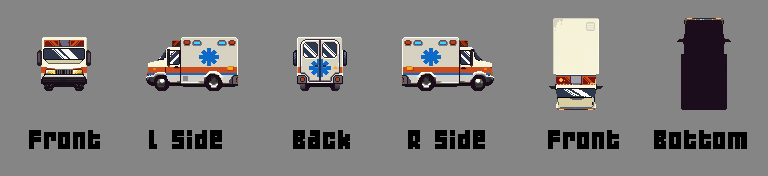
If you import an ortho image Uv (one sprtie front) it will create a flat geometry... After this, if u upload a side image, the program will interpolate both images and find matching pixels to create the 3d model on volume... The third image (top) can define missing geometry constraints.
Alternatively you can upload directly a 6 sprites image (using any upload button) and it creates the whole geometry at one shot.
You can mix any images to see the results, try the online version and test it by yourself. (up on this page).
Hi! I just purchased this and am attempting to run it on Arch Linux, but it appears the AppImage is only for ARM. Is there an x86 build?
Thanks!
Hello BlueLemming.
I did update the Linux version; now both versions (arm and x86) are included in the zip file.
Let me know if it works for you and if u experience any bugs. At the moment, I do not have a way to playtest those versions. Long time I did not use Linux, but Im big fan of this Os.
Many Thanks. :I)
It seems to work! Thanks a ton. I will be sure to report any bugs if I find any.
<3
Great tool, can be a massive timesaver for making car animations.
However, when I try to import a predrawn sprite from all angles I can't seem to find a way to import the back or under view (like in the ambulance example).
Am I missing an option / hotkey or is it not possible?
My best approach (out of my tests) is to start the model with just importing 2 or 3 images. From there u can get of the most needed models... After I export as ortho image and work on Photoshop or Aseprite the rest of the missing textures on the Ortho exported image, before reimporting this file back into the app... Is it possible to import this ortho image (6 sprites) using any upload button. Also, if u prefer, you can paint the missing textures using the PixZels app if u prefere. I do like beter to work on Photoshop.
Many Thansk PixelHenkie :)
Thank you for your swift response!
I just tried it out and while it's not the most intuitive way, it is indeed working so I'm very happy with that. :)
Again, great job on making this tool, it's already very impressive and a massive timesaver!
You are right :) Need to find a way to make it uploads more intuitive :) Thinking about.
Many thanks PixelHenkie :)
It'd be handy if this could support 1-3 images imports for quick prototyping (for example, creating tiles).
e.g. here was something I made in Aseprite to try and make a tile, note how the first 4 frames are the same image. It'd be nice if I could trim this down to 3 images (this could even be 1 image if i used one shade of green, the first frame could be used to interpolate top/bottom)
Not sure if i get your point BlueLemming :)
At current state the app can create this tile with only 2 images (front and side) and both images are exactly the same...
If you would like to work on the top image outside the app (on Aseprite or Photoshop..) You can export the Ortho image (6 sprites) and work on the image before reimporting back into the app to create the rotation sprites.
It is not needed to start with a 6 sprites image always (a 6 sprite image is rather complicated to perfectly create), mostly 2 or 3 images are enough for simple common geometry.
Hope I answer your doubts.. Many thanks for your feedback :)
Sorry, I'll try to re-explain! I am using Aseprite, so your suggestion to export ortho & edit would work, but if I want to edit the "side" image then I have to update all of the first 5 sprites too.
It'd be nice if there were maybe a "import" button that could handle spritesheets that aren't ortho images? For example, maybe it could work like this:
1 sprite = use sprite for all sides
2 sprites = 1st sprite for all sides, 2nd for top
3 sprites = 1st sprite for side, 2nd sprite for front, 3rd sprite for top,
...etc
If I imported this (2 sprites):
I would get this:
Magnificent!
Failed to draw a mushroom ;)
Don't really like installers, could you please make the portable exe ?
Also, can't set 40 degrees on export
Hello George Rahmanenko.
You are right! :( at current build is not possible to export as 40 degrees.. The slider snaps too early... Many thanks for the info, I will fix it next build. :)
The current exe file is not the portable version desired?
This tool is great to create asstes... but organic shapes like mushroms are difficult to setup.. XD Working on some ideas for it.
Many thanks for your feedback. :)
I’m having an issue with the Linux version. I’m on Linux Garuda and cannot launch the app. Gear Lever says ‘it may not be compatible with your system architecture’ whatever that means.
Hello Lau.
Can I contact you via Discord or mail? Lets find out what is the correct Linux version needed. Thx
Absolutely! My Discord is jibsjerky
Thanks for the help! :)
Amazing stuff, please bring it to Steam so we can auto update!
Yes for sure... Atm Im still looking for precision and perfection for this tool.. But when I got a nice complete build I will launch it into Steam.
Many Thanks Alavi.
Thank you, take your time! Best of luck.
Is it possible to support a timeline? Thank you.
What do you mean?
Not OP, but I'm guessing he's asking for tools to make animations, similar to Asesprite.
Amazing work! Just a quick question — are these real 3D models (like made in Blender and usable in a game engine), or are they more like voxels?
Thanks.
The core of Pixzels is a dedicated voxel engine with some specific tricks to accomplish a real pixel art feeling. The model is not real Voxels but similar tech. Atm the export options are 2d pixelart (power of 2) sprites usable for any game engine. As a pixelartist if I export as 3d obj it would lose all the pixelart feeling that I was looking for this tool. Working still on it, I might include 3d export on the future updates,... Not sure yet. Many Thanks Fluffy Sheferd. :)
Thanks for creating this! Keep up the good work!