
The Tidyverse is a collection of R packages designed specifically for data science. These packages share a consistent philosophy, grammar and design structure, making data manipulation, visualization and analysis more intuitive and efficient. Instead of learning many unrelated functions, the Tidyverse provides a unified and readable approach to working with data in R.
- Designed for data science workflows
- Follows consistent syntax and design principles
- Makes data import, cleaning, transformation and visualization easier
The Tidyverse consists of eight core packages that are automatically loaded when you install and load the tidyverse package.
Install and Load Tidyverse
install.packages("tidyverse")
library(tidyverse)
Core Tidyverse Packages
| Category | Packages |
|---|---|
| Data Visualization | ggplot2 |
| Data Wrangling | dplyr, tidyr |
| Data Import | readr |
| Data Structures | tibble |
| String Handling | stringr |
| Categorical Data | forcats |
| Functional Programming | purrr |
In addition to these, there are specialized packages such as:
- DBI: Working with databases
- httr: Working with web APIs
- rvest: Web scraping
These are not loaded automatically.
Data Visualization in Tidyverse
1. ggplot2
ggplot2 is a data visualization package based on the Grammar of Graphics.
- Builds plots layer by layer using data, aesthetics (aes()) and geometric objects.
- Supports charts like bar plots, scatter plots, histograms and boxplots.
- Allows easy customization of themes, labels and colors.
Example: We will be using 6 different data points for the bar plot and then with the help of the fill argument within the aes function.
install.packages("ggplot2")
library("ggplot2")

df <-data.frame(
    x=c('A', 'B', 'C', 'D', 'E', 'F'),
    y=c(4, 6, 2, 9, 7, 3))

ggplot(df, aes(x, y, fill=x)) + geom_bar(stat="identity")
Output:

Data Wrangling and Transformation
1. dplyr library
dplyr is a data manipulation library in R. It has five important functions that are combined naturally with the group_by() function that can help in performing these functions in groups. These functions include:
- mutate() function which can add new variables that are functions of existing variables.
- select() function that selects the variables based on their names.
- filter() function that picks selects the variables based on their values.
- summarise() function that reduces multiple values into a summary.
- arrange() function that arranges the arranges the row orderings.
Example: We are using the dplyr package to filter the starwars dataset, selecting only the rows where the species is "Droid" and displaying the result with print().
install.packages("dplyr")
library(dplyr)

print(starwars %>% filter(species == "Droid"))
Output:

2. tidyr library
tidyr helps clean and organize messy data into tidy format.
- Converts data between wide and long formats using pivot_longer() and pivot_wider().
- Handles missing values and reshapes datasets efficiently.
- Ensures each row is an observation and each column is a variable.
Example: The gather() function in tidyr will take multiple columns and collapse them into key-value pairs, duplicating all other columns as needed.
install.packages("tidyr")
library(tidyr)
library(dplyr)

n <- 10
tidy_dataframe <- data.frame(
  S.No = 1:n,
  Group.1 = c(23, 345, 76, 212, 88, 199, 72, 35, 90, 265),
  Group.2 = c(117, 89, 66, 334, 90, 101, 178, 233, 45, 200),
  Group.3 = c(29, 101, 239, 289, 176, 320, 89, 109, 199, 56)
)

head(tidy_dataframe)

long <- tidy_dataframe %>%
  pivot_longer(
    cols = Group.1:Group.3,
    names_to = "Group",
    values_to = "Frequency"
  )

head(long)
Output:

3. Stringr library
stringr simplifies string manipulation.
- All functions start with str_ for consistency.
- Includes functions like str_detect(), str_replace() and str_length().
- Makes text cleaning and processing easier.
Example: We are using the stringr package to calculate the length of the string "GeeksforGeeks" with the str_length() function, which returns the number of characters in the string.
install.packages("stringr")
library(stringr)

str_length("GeeksforGeeks")
Output:
13
4. Forcats library
forcats is an R library designed to handle issues related to factors or categorical variables which are vectors that can only take a predefined set of values. It helps manage tasks like reordering these vectors or adjusting the order of their levels. Some useful functions in forcats includes:
- fct_relevel() which lets you manually reorder a vector
- fct_reorder() which reorders a factor based on another variable
- fct_infreq() which orders factors by their frequency.
Example: Below is a example of forcats library.
install.packages("forcats")
library(forcats)

head(starwars %>% filter(!is.na(species))
           %>% count(species, sort = TRUE))
Output:

Data Import and Management
1. readr library
readr is used for fast and simple data import.
- Reads files like CSV, TSV and other delimited formats.
- Automatically detects column types.
- Functions include read_csv(), read_tsv() and read_delim().
Example: We are using the readr package to read a tab-separated file ("geeksforgeeks.txt") without column names using the read_tsv() function. The data is stored in the variable myData.
install.packages("readr")
library(readr)

myData = read_tsv("geeksforgeeks.txt", col_names = FALSE)
print(myData)
Output:
A computer science portal for geeks.
We are using the readr package to read a tab-separated file ("geeksforgeeks.txt"). Ensure that the file exists in the current working directory before running the code.
2. tibble library
tibble is a modern version of a data frame.
- Prints data in a clean and compact format.
- Does not change variable names automatically.
- Provides better error messages and handling for large datasets.
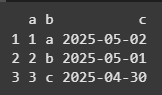
Example: We are using the tibble package to create a data frame named data with three columns: a, b and c. The column a contains numbers from 1 to 3, b contains the first three letters of the alphabet and c contains dates from the previous 3 days.
install.packages("tibble")
library(tibble)
data <- tibble(
  a = 1:3,
  b = letters[1:3],
  c = Sys.Date() - 1:3
)
print(data)
Output:
Functional Programming
1. purrr library
Purrr supports functional programming in R.
- Replaces many loops using functions like map().
- Provides type-safe functions like map_dbl() and map_chr().
- Makes repetitive operations cleaner and more readable.
Example: We are using purrr to split the mtcars dataset by the cyl column, apply a linear regression model to each subset, extract the summary and then return the R-squared values for each group.
install.packages("purrr")
library(purrr)

list(1, 2, 3) %>%
  map(~ .x * 2)
Output:
1.2
2.4
3.6
You can Download the complete source code from here.