The Best Music Transcription Software and Common Alternatives
Discover the best music transcription software for accurate and efficient music notation. Explore top tools and alternatives to enhance your process.

The emergence of music transcription software programs has made the process of transforming audio into music notation relatively accessible to a wider range of musicians. Traditionally, this type of activity has been reserved for professionals with a trained ear and years of experience required to pick out subtle notes and nuances, but today everyone from composers to amateur musicians uses music notation software to make the transcription process easier.
Using the right music transcription software gives you access to helpful features such as adjustable playback speed for clearer listening, automation to identify notes and chords, built-in transposition to shift keys up or down, and convenient options to print, export, and share your finished transcriptions.
This article introduces you to the three best transcription software programs to help you transcribe music accurately. We’ll also discuss a few alternatives to these programs and highlight their main features and functions.
The 3 best software programs for music transcription
Your choice of software can be the difference between a smooth or difficult transcription. Ideally, you should opt for software that is user-friendly and comprehensive in its functions.
Explore our top three picks to consider when looking for the best music transcription software.
Transcribe!

Transcribe! offers a multitude of features that help musicians and songwriters decipher an audio track to write or play it. The application also lets users loop audio files and use the integrated piano keyboard for more accurate transcription.
Keep in mind that this is not an automatic music transcription tool, but rather an assistant that facilitates the process by providing transcription-specific features. Additionally, Transcribe! can be used for speech transcription.
Transcribe! is compatible with Windows, macOS, and Linux operating systems.
Features include:
- A record function that lets users record audio from analog sources
- Audio waveform display
- Video file display
- A note-guessing and chord-guessing feature for interpreting spectrum information
- Adjustable speed
- Audio processing effects, such as slowdown, pitch change, and EQ filtering
Pricing: Transcribe! has a 30-day trial period and then costs $39 for a single copy. The cost goes down for each copy purchased by an organization at one time.
ScoreCloud

ScoreCloud is a comprehensive transcription tool that lets musicians quickly turn songs into sheet music. It accommodates different formats like audio and MIDI files and puts several editing tools at the user’s disposal.
ScoreCloud lets you automatically save your songs online and syncs your edits to all devices. This is convenient if you want to share a piece of music and collaborate with others.
ScoreCloud is available for Windows and macOS computers as well as iPhones and iPads.
Features include:
- Transcription of polyphonic and monophonic music recording
- Sync across all devices
- Simple and intuitive editing
- Instant score from MIDI and audio files
- The ability to print, export, and share the transcription
Pricing: ScoreCloud has a free version and three paid plans:
- ScoreCloud Plus ($5.99 per month or $59 annually)
- ScoreCloud Songwriter ($11.99 per month or $119 annually)
- ScoreCloud Pro ($20.99 per month or $149 annually)
The paid plans come with a 10-day free trial and offer additional features, such as unlimited songs, no watermark, and the ability to export MusicXML.
AnthemScore

AnthemScore is an automatic music transcription that converts WAV and MP3 files into sheet music. To ensure maximum accuracy, the application uses a neural network trained on millions of data samples and leverages machine learning to detect and arrange notes.
Users can also tweak notes using several powerful editing tools, customize their playback instrument, and print or save files as XML, PDF, and MIDI.
AnthemScore works with Windows, Linux, and macOS computers.
Features include:
- Advanced editing tools
- Customization options for different instruments
- The ability to slow down playback without modifying pitch
- Automatic note detection
- Transpose settings that allow you to adjust pitch by a fixed number of octaves and semitones
- Visual representation of the audio spectrum
Pricing: AnthemScore offers a 30-day free trial and three paid plans.
- AnthemScore 5 Lite has a one-time payment of $31 and offers automatic transcription and the option to view, save, and print sheet music
- AnthemScore 5 Professional costs $42 and adds the ability to edit notes, play back audio, and view a spectrogram, virtual piano, and timeline
- AnthemScore 5 Studio costs $107 and offers all the aforementioned features, plus lifetime free software updates and priority for customer support
Get help from top-rated music transcriptionists today. Find music transcribers on Upwork with the skills you need for your next project.
Other common music transcription software
While the above applications cover the full scope of music transcription, they aren’t the only available options. Three alternatives worth considering are:
Sibelius
If you’re a beginner looking to dip your toes into music transcription, Sibelius from Avid might be the ideal option for you. It has a built-in library for users to extract music as audio files and allows the export of scores as individual parts.
The software also has a wide selection of instruments, making it suitable for ensembles. It’s available on macOS, Windows, and iOS devices.
Features include:
- Import and export MIDI files
- Library of score templates
- Magnetic layout for a more streamlined workflow
- The ability to load scores from MIDI files
- Downloadable plug-ins to extend the functionality of the application
Pricing: Sibelius is available across subscription-based and perpetual license options:
- Sibelius Artist is available as a subscription for $12.99 per month (billed monthly) or $99 per year (billed annually).
- Sibelius Ultimate is available as a subscription for $27.99 per month (billed monthly) or $133 per year (billed annually).
- Sibelius Ultimate Perpetual Bundle requires a one-time purchase of $539 that provides a lifetime license, with optional paid updates available after the initial support period.
Soundslice

Soundslice is an easy-to-use sheet music editor that features a notation editor, allowing you to create notations synced with real recordings. The software is entirely web-based and allows the import of music from other programs. Soundslice also comes with intuitive practice tools that let you slow down the recording, make a loop, transpose, and more.
Soundslice works with any browser updated in the last few years and across multiple devices, including desktops and smartphones.
Features include:
- Video and audio playback
- Instrument visualizations
- See tablature alongside video and audio
- Customize notation
- Create loops of the recording
- Slow down audio without affecting the pitch
- View a virtual piano keyboard and fretboard
Pricing: Soundslice is available in four plans:
- Free
- Plus ($5 per month or $50 billed yearly)
- Teacher ($20 per month for 100 users or $200 billed yearly)
- Licensing ($100 for 200 users, which is billed monthly)
NCH TwelveKeys
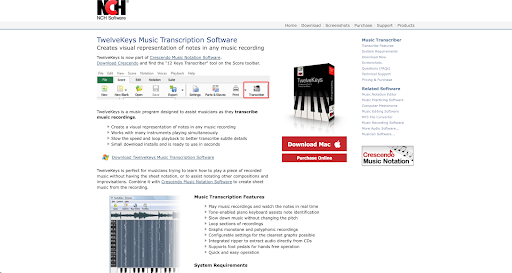
TwelveKeys is a simple program that helps musicians transcribe music by creating a visual representation of notes in any recording. The interface is intuitive, so becoming adept at using it comes with virtually no learning curve. The software accommodates multiple instruments playing simultaneously and gives users the option to slow the recording and loop playback so no detail goes unnoticed.
TwelveKeys works with Windows and macOS computers.
Features include:
- Tone-enabled piano keyboard for note identification
- Compatible with foot pedals
- Graphs monotone and polyphonic recordings
- Watch notes in real time
- The option to extract audio from a CD
- Loop sections of the audio recording
Pricing: You can access TwelveKeys through Crescendo Music Notation Software, which is available under the following pricing options:
- Master’s Edition (single installation license): A one-time purchase of $79.99 for permanent use on one device. Users can optionally add a quarterly subscription that costs $7.16 per month (billed quarterly) to unlock additional features and updates.
- Home Edition (non-business use): A one-time purchase of $59.95 for personal, non-commercial use.
Factors to consider when choosing music transcription software
With so many transcription tools available, finding the right fit depends on your workflow, skill level, and the kind of music you plan to transcribe. Not everyone will need every feature, so be aware of the things you really need and avoid paying for things that don’t impact your process.
Here are some factors to keep in mind before committing to a specific program:
- Level of automation. Some tools automatically detect notes and chords, while others provide support features that help you work through the transcription manually instead of generating a full notation for you.
- Editing capabilities. Look for features such as note adjustments, notation editing, and customizable playback, especially if you’re working with vocals and want more control over the final score.
- Device and operating system compatibility. Make sure the software works with your setup, whether you rely on Windows, macOS, Linux, iPad, or mobile devices.
- Supported file formats. Consider whether you need to import audio, MIDI, or video files, and whether you need export options like XML, PDF, or MIDI.
- Ease of use. Examine for a clear interface, intuitive controls, and a minimal learning curve that can save time, especially for beginners.
- Playback and practice tools. Features like looping, slowing audio without changing pitch, and transposition can make the transcription process smoother and more accurate.
- Collaboration options. If you work with other musicians, cloud sync or sharing tools may help streamline your workflow.
- AI-powered features. Consider whether the software uses artificial intelligence to speed up the transcription process. AI features can assist with tasks like improving note detection accuracy, separating instruments, suggesting harmonies, or cleaning up timing.
- Pricing and trial options. Look for free versions or trial periods to test the software before paying for a subscription or one-time license.
- Availability of tutorials. Transcription tools can sometimes be overwhelming, so software with built-in guides or YouTube videos showcasing the transcription process can help you learn the workflow faster.
Hire a music professional for the best results
While the software solutions discussed in this article are effective in transcribing music, the results are never guaranteed and can vary greatly from person to person. Variables like musical experience and the ability to get comfortable with new software will ultimately affect transcription accuracy. Consider hiring an independent music transcriptionist for the best possible results.
Upwork provides access to top independent music transcriptionists to assist you. Letting a professional handle transcription can yield precise, clear, and reliable results in a timely fashion.
Upwork is not affiliated with and does not sponsor or endorse any of the tools or services discussed in this article. These tools and services are provided only as potential options, and each reader and company should take the time needed to adequately analyze and determine the tools or services that would best fit their specific needs and situation.
Prices are current at the time of writing and may change over time based on each service’s offerings.


Author Spotlight

Upwork is the world’s largest human and AI-powered work marketplace that connects businesses with independent talent from across the globe. We serve everyone from one-person startups to large organizations with a powerful, trust-driven platform that enables companies and talent to work together in new ways that unlock their potential.