How Upwork's Search Features Help Clients and Freelancers Quickly Connect
Upwork’s advanced search features help clients and freelancers seamlessly connect with one another and quickly begin working on relevant projects.

At Upwork, we’re committed to helping clients and qualified freelancers connect with one another as quickly and seamlessly as possible. Upwork’s advanced search features simplify the process of finding exactly what you’re looking for on the platform.
As a client, finding and hiring the right freelancers fast enables you to stay on track with project deadlines and achieve positive business outcomes. As a freelancer, standing out in search results to relevant clients can help you secure projects that align with your skills and experience to grow your freelance business.
Many of the updates to our search features were a result of direct feedback from clients and freelancers like you. Upwork’s smarter search features return faster, more accurate results and adapt to your needs with dynamic filters, personalized suggestions, and tailored ranking. Whether engaging freelancers or searching for your next project, you’ll connect with the right match faster—and with more confidence.
Upwork’s search enhancements include:
- Uma-powered search to redefine the user experience
- Guided search to improve freelancer discovery
- Enhanced search result rankings to access qualified freelancers
- Enterprise-specific search filters to find freelancers in your network
- Smarter filters in the Invite Freelancers tab to customize your search
- Dynamic freelancer profiles to stand out in search results
Uma-powered search to redefine the user experience
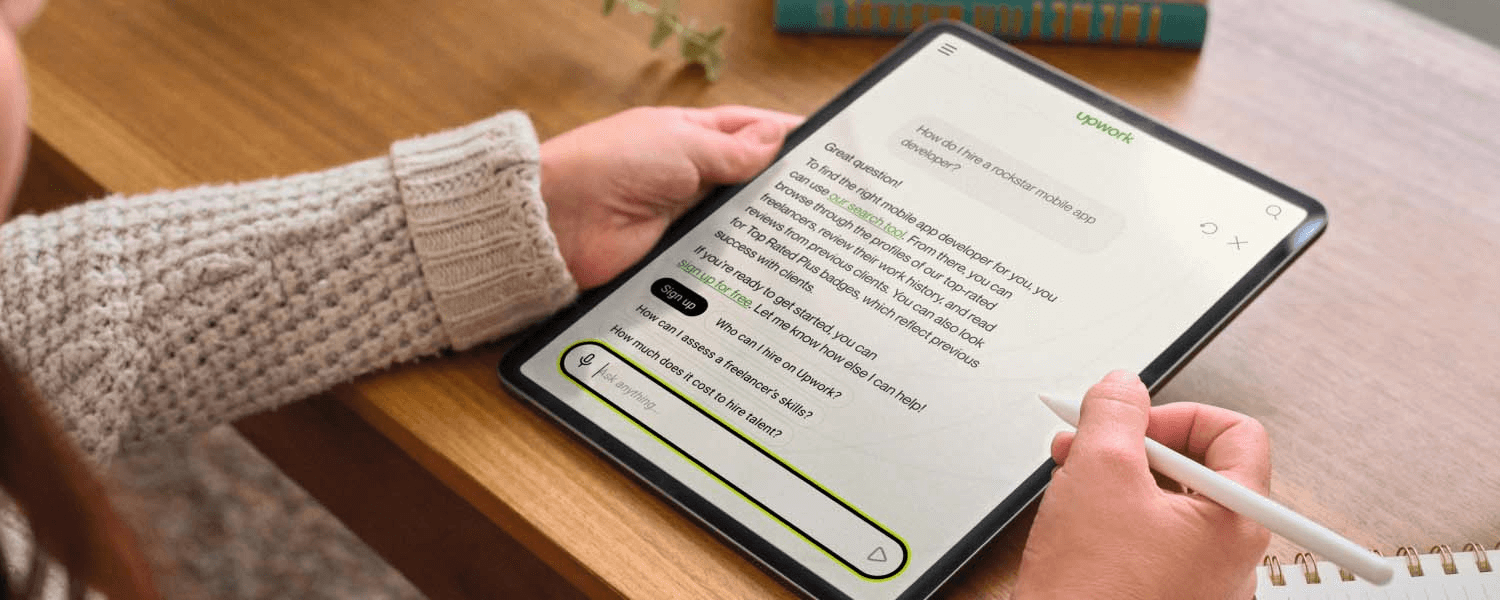
Upwork is reinventing how work gets done by combining qualified freelancers and AI to deliver outcomes at scale. One of the features of our human and AI-powered work marketplace is Uma-powered search, an immersive search bar.
Uma-powered search offers Upwork users a centralized, AI-powered search bar to instantly answer a range of queries on the platform. For example, as a client, you may just be getting started on Upwork and search how to post a job. Or, you may have a job post ready and search for relevant freelancers with a specific job title.
Using Uma’s conversational AI capabilities, the search feature can answer questions, offer suggested queries based on recent job posts, help you reconnect with freelancers you previously hired, and more.

Guided search to improve freelancer discovery
When you search for freelancers on Upwork, finding qualified individuals for your open jobs should be as quick and efficient as possible. Because millions of freelancers are available on Upwork, simply searching for a generic or vague job title—such as a writer or web developer—can lead to many pages of results, which takes time to weed through.
In addition to existing search filters on the left-hand side of search results, with guided search features, you can more effectively narrow down your search using top rail filters (above the search results) and recommended relevant categories.
Filters include:
- Location
- Skills
- Languages
- Level of English proficiency
Examples of relevant categories include suggesting more specific search queries like web designer, graphic designer, or UX designer when you simply input a query for a designer.

Enhanced search result rankings to access qualified freelancers
Finding the most relevant, high quality, and available freelancers for your specific business needs can help you quickly achieve business outcomes. In addition to advanced filters to discover qualified freelancers for your open jobs, search results are now ranked based on your specific business needs and previous account activity.
Ranking freelancers in search results now takes into account criteria such as:
- Freelancer profile relevance to the search query
- Category-based hiring patterns
- Specific client account activities, including previous searches, as well as active and previous open jobs
- Client intent, like browsing versus actively searching to fill an open job
- Client price preferences
Enterprise-specific search filters to find freelancers in your network
If you have an Upwork Enterprise account, additional search filters are available to help you search for known freelancers based on your unique needs. Rather than starting a search from scratch or manually searching through profiles of freelancers previously hired by your company, Enterprise search filters enable you to further narrow down results and quickly access qualified freelancers in your network.
In addition to existing search filters on the platform, Enterprise-specific filters include:
- Hired by you
- Hired by colleagues
- BYO talent (freelancers hired outside the Upwork platform)
- A dropdown to search talent lists for specific freelancers, such as saved freelancers, specific projects, or freelancers hired by a certain department

Smarter filters in the Invite Freelancers tab to customize your search
As a client, each time you post a job on Upwork, you have the option to invite freelancers whose profiles align with your open job to submit proposals. This feature, available through the “Invite Freelancers” tab, now includes advanced filters to generate more relevant results based on your job requirements and preferences.
Filter improvements include:
- Customizable filter ranges, such as specific hourly rates, to deliver results that align with your exact needs
- Contextual awareness to preset filters based on criteria outlined in your job post, such as location, skills, and hourly rate
- A consistent experience with universal search features on Upwork to make the process of inviting freelancers more user-friendly
- Inclusion of Boosted Profiles in filtered search results to see qualified freelancers who are most interested in your open jobs

Dynamic Profiles to preview freelancers in search results
As a client, saving time with reviewing and selecting qualified freelancers can help you move forward with projects sooner. And as a freelancer, standing out to potential clients can help you earn relevant projects that align with your skills and increase your earnings.
Using the Dynamic Profiles search feature, clients can more easily see a preview of freelancer profiles in search results and quickly review the most relevant details based on an open job or search query. Dynamic Profiles include a search slider at the top of each profile preview to help clients navigate to the most relevant section of a freelancer profile they’re interested in reviewing. This experience enables clients to identify and engage the most qualified freelancers faster than ever.
The search slider includes options to quickly jump to the following sections of a freelancer profile:
- About
- Client reviews
- Work history
- Portfolio
- Employment history
- Skills
- Certifications
- Education
If you’re a freelancer, increase the likelihood of your profile getting noticed by clients using the Dynamic Profiles search feature by creating a detailed profile that includes relevant information about your skills, expertise, and work history to stand out from other freelancers.

Experience Upwork’s advanced search features firsthand
Clients and freelancers on Upwork can benefit from smarter, faster search—now with dynamic filters, personalized recommendations, and improved ranking based on relevance and preferences. Whether hiring or looking to expand your client base, Upwork helps you find the right match, fast. The experience of working on Upwork—and achieving the results you’re looking for—is now faster and more seamless than ever.
Log in to your Upwork account to experience the latest search features on Upwork for yourself. And learn about other Upwork enhancements on Upwork Updates.


Author Spotlight

Beth Kempton is a B2B writer with a passion for storytelling and more than a decade of content marketing experience. She specializes in writing engaging long-form content, including blog posts, thought leadership pieces, SEO articles, case studies, ebooks and guides, for HR technology and B2B SaaS companies. In her free time, you can find Beth reading or running.