
When working with large datasets in Excel, lookup functions help you quickly find specific information. Two of the most commonly used functions are VLOOKUP and INDEX MATCH. While VLOOKUP is simple and widely used, INDEX MATCH offers more flexibility and works better with dynamic datasets. In this guide, we will compare INDEX MATCH vs VLOOKUP, explain their formula differences, and help you understand which one is better for efficient data analysis in Excel.
What is INDEX MATCH in Excel
The Following Formula is the blend of two capabilities in Excel: INDEX and MATCH. Consolidated, the two equations can gaze upward and return the worth of a cell in a table in light of vertical and level standards.
=INDEX() returns the worth of a cell in a table in light of the segment and column number.
=MATCH() returns the place of a cell in succession or segment.
Index Match Vs VLOOKUP: Formula Differences
When comparing INDEX MATCH and VLOOKUP, the primary distinction lies in how these formulas operate and their flexibility in handling data lookups. Below is a breakdown of their formula structures, along with their use cases and key differences.
VLOOKUP Formula
The VLOOKUP function is used to search for a value in the first column of a range and return a value in the same row from another column.
=VLOOKUP(lookup_value, table_array, col_index_num, [range_lookup])
Parameters:
- lookup_value: The value to look for in the first column of the range.
- table_array: The table or range containing the data to search.
- col_index_num: The column number in the range from which to retrieve the result.
- range_lookup (optional):
- TRUE for an approximate match (default).
- FALSE for an exact match.
INDEX MATCH Formula
The INDEX MATCH formula is a combination of two functions:
INDEXretrieves a value from a range based on row and column numbers.MATCHfinds the relative position of a value in a range.
Syntax for INDEX:
=INDEX(array, row_num, [column_num])
Syntax for MATCH:
=MATCH(lookup_value, lookup_array, [match_type])
Combined Syntax:
=INDEX(array, MATCH(lookup_value, lookup_array, [match_type]), column_num)
Comparison Table for Formula Differences
| Feature | INDEX MATCH | VLOOKUP |
|---|---|---|
| Direction of Lookup | Can look in any direction (left, right, up, down). | Can only look up values to the right of the lookup column. |
| Column Reference | Dynamic: Uses MATCH to find the column. | Static: Requires manual input of the column index. |
| Flexibility | Flexible with table structure changes. | Breaks if columns are rearranged. |
| Performance | Faster for large datasets with exact match lookups. | Slower for larger datasets. |
| Approximate Match | Requires additional setup (sorted data). | Built-in functionality for approximate matches. |
| Multiple Criteria | Supports multiple criteria using boolean logic. | Does not support multiple criteria natively. |
| Case Sensitivity | Can be case-sensitive using the EXACT function. | Not case-sensitive. |
How to Use the INDEX Formula in Excel
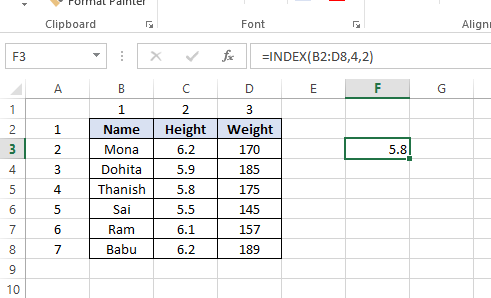
The following is a table showing individuals' names, levels, and weights. We need to utilize the INDEX equation to look into Thanish's level, here is an illustration of how to make it happen. Following these means,
- Type "=INDEX(" and select the region of the table, then, at that point, add a comma
- Type the column number for Thanish, which is "4," and add a comma
- Type the section number for Height, which is "2," and close the section
- The outcome is "5.8."
How to Use the MATCH Formula in Excel
Staying with a similar model as over, we should utilize MATCH to sort out what column Thanish is in.
Following these means,
- Type "=MATCH(" and connection to the cell containing "Thanish"… the name we need to turn upward.
- Select every one of the cells in the Name section (counting the "Name" header).
- Type zero "0" for a definite match.
- The outcome is that Thanish is in column "4."

How to Combine INDEX and MATCH
Presently we can take the two MATCH equations and use them to supplant the "4" and the "2" in the first INDEX recipe. The outcome is an INDEX MATCH equation.
Following these means,
- Cut the MATCH equation for Thanish and supplant the "4" with it.
- Cut the MATCH equation for Height and supplant the "2" with it.
- The outcome is Thanish's Height is "5.8."
- Congrats, you currently have a powerful INDEX MATCH equation!

What is VLOOKUP in Excel
VLOOKUP means 'Vertical Lookup'. A capability makes Excel look for a specific worth in a segment (the purported 'table cluster'), to return a worth from an alternate section in a similar column. This article will show you how to utilize the VLOOKUP capability.
A VLOOKUP capability exists in 4 parts,
- The worth you need to turn upward;
- The reach wherein you need to find the worth and bring esteem back;
- The quantity of the section inside your characterized range, that contains the bring esteem back;
- 0 or FALSE for an accurate coordinate with the worth you are searching for; 1 or TRUE for an estimated match.
Syntax: VLOOKUP([value], [range], [column number], [false or true])
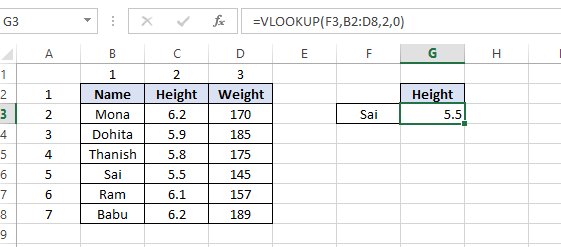
In our model, we have a rundown of Names, Height, and Weights. We need to find the Height of Sai rapidly in this table. In the first place, select a cell in which you need to distribute the Height:

Along these lines, in our chosen cell we begin composing: =VLOOKUP( :

Then, at that point, we select the worth we need to look into, for this situation, it's 'Sai' in cell F3,

Next, we enter ',' and select the reach (or table cluster) in which we need to find the query esteem and the bring esteem back. For this situation it is range (B2:D8):

Then, at that point, we enter ',' and the quantity of the section inside the characterized range wherein we need to search for the bring esteem back. For this situation, it is segment 2, trailed by ',' and '0' or Misleading for a definite coordinate with the query esteem 'Sai':

At the point when we press enter, we get the comparing cost from the column that holds esteem 'Sai' inside the chosen table exhibit:
In this example, we have a small list of names, but in real scenarios you may work with large datasets and need to use specific values in different parts of a worksheet. Using VLOOKUP (or HLOOKUP), changing a value in one place automatically updates it in related cells. However, when the exact lookup value is not known, an approximate match can be useful.
Estimated Match in VLOOKUP
At the point when we enter the word 'Sia' in our query esteem cell G3, the VLOOKUP capability as we planned gets confounded, because it can't track down this worth in the table exhibit. It returns the standard Excel blunder #N/A:

Be that as it may, when we change the '0' (or 'False') part of our VLOOKUP capability to '1' or 'Valid':
=VLOOKUP(F3,B2:D8,2,1)
Presently we have requested that the capability search for an estimated coordination with 'Sia'. On the off chance that it can't find the specific match, it will search for the nearest match to the worth 'Sia', not as much as 'Sia', which is 'Sai':

5 Reasons INDEX MATCH Is Better Than VLOOKUP
When choosing a function for vertical lookups, most Excel experts agree that INDEX MATCH outperforms VLOOKUP. Despite this, many users stick with VLOOKUP, mainly because it’s easier to use and they may not fully realize the advantages of INDEX MATCH in Excel. Without a clear understanding of its benefits, few are motivated to spend the time learning the more complex INDEX MATCH syntax.
Dynamic Column Reference Leads to Fewer Errors
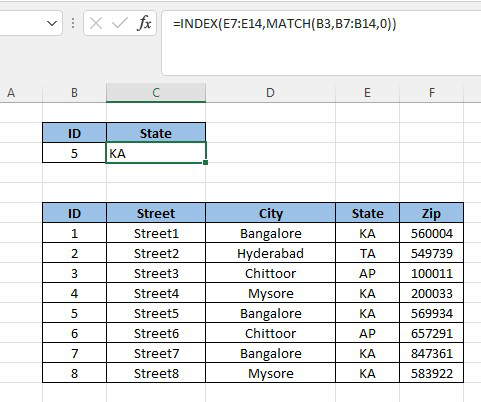
The main difference between INDEX MATCH and VLOOKUP is how they reference columns. VLOOKUP uses a fixed column number, while INDEX MATCH uses a dynamic column reference. With INDEX MATCH, you directly select the column that contains the value you want to return, which makes the formula more flexible and reduces errors.
With the VLOOKUP language structure, you determine your whole table exhibit, AND THEN you determine a section reference to show which segment you need to pull information from.
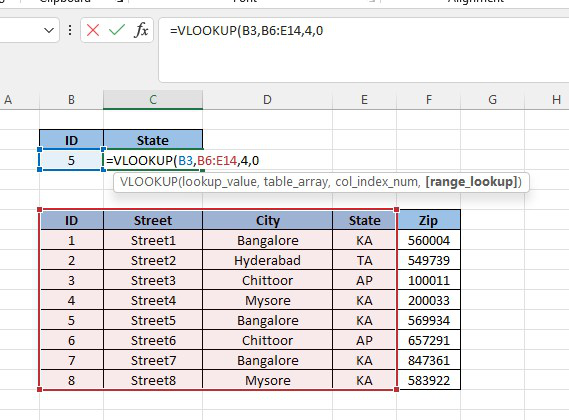
Although the difference seems small, VLOOKUP’s need to manually count columns can cause errors, especially in large tables. INDEX MATCH removes this issue because it directly references the required column. While VLOOKUP’s limitation can be handled using combinations like VLOOKUP + MATCH, learning INDEX MATCH is simpler and offers the added benefit of dynamic column references.
Insert Column Immunity
A major advantage of INDEX MATCH over VLOOKUP is that inserting or deleting columns does not affect the lookup result. In large datasets, columns are often added or changed, which can break VLOOKUP formulas because they rely on a fixed column number. INDEX MATCH avoids this issue by directly referencing the required column.
If we insert a column in the middle of the table array, the new result is now “Bangalore”; we are no longer pulling the correct value for State and must change the column reference.
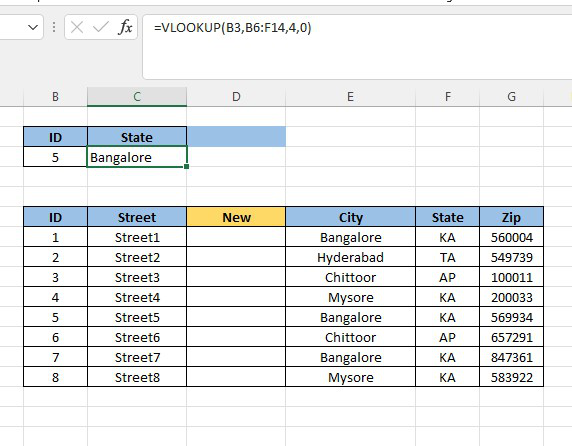
INDEX MATCH as an embed section insusceptibility, so you can embed and erase segments without stressing over refreshing each related query equation.
Easier to Drag and Copy
When working with large datasets, you often need to copy formulas across multiple cells. However, VLOOKUP can return the same value repeatedly because it relies on a fixed column reference. This limitation occurs because VLOOKUP requires a specific column number to return values, making it less flexible when dragging formulas across cells.
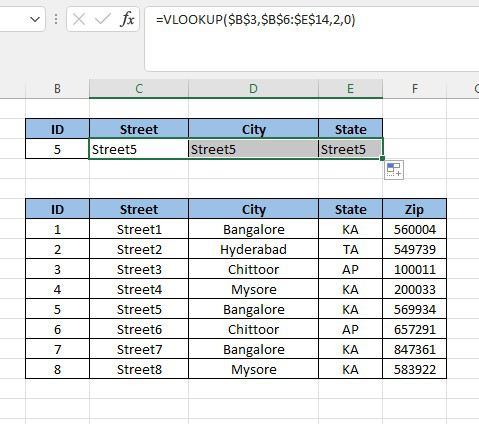
With INDEX MATCH, since you can set the return section to drift (basically by not reference locking it) the return segment will move as you duplicate your equation over, giving you the various fields as they show up.

No Array Restriction
One more key impediment of VLOOKUP is that it expects you to determine a square table cluster wherein your segment reference can't move past. The key circumstance when this turns into an issue is the point at which you add another field to your dataset past your unique table cluster. Consider the model beneath:

Assuming we add another segment to this dataset, we can't utilize my unique VLOOKUP recipe to pull values from that new section. If we change my section reference to "6," the recipe returns a mistake because my table is just 5 segments wide. To make the recipe work, we need to refresh the table exhibit we determined each time we added another segment.

With INDEX MATCH, you don't have to determine a table cluster and hence don't deal with this issue.
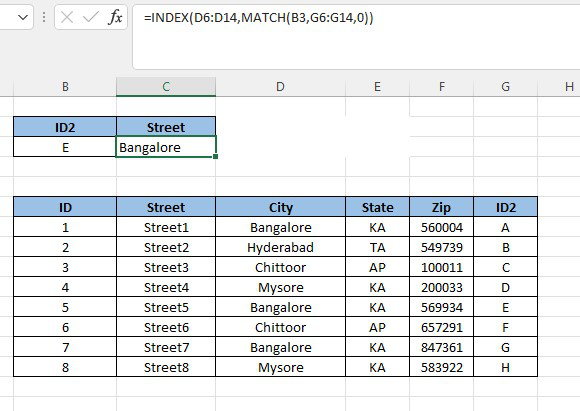
INDEX MATCH formula to look up from right to left
One key advantage of INDEX MATCH is that it allows lookup values from both the left and right sides of a table. You can even create new lookup keys and place them anywhere in the dataset. Unlike VLOOKUP, which only searches from left to right, INDEX MATCH works regardless of the column position, making it more flexible.
Comparison Table: Reasons to Opt for INDEX MATCH Over VLOOKUP in Excel
VLOOKUP | INDEX MATCH |
| VLOOKUP utilizes the static information reference while looking into the qualities. | INDEX MATCH utilizes powerful information ranges while looking into the qualities. |
| Embedding or Deleting a section influences the VLOOKUP result. | Embedding or erasing a section doesn't influence the INDEX MATCH result. |
| VLOOKUP must be utilized for looking into values from Left to Right. | INDEX MATCH can look into the qualities from Left to Right as well as Right to Left. |
| VLOOKUP just can query through vertical lines, for example, segments, and not through columns. | INDEX MATCH can query values through lines as well as segments. |
| VLOOKUP has a breaking point for lookup_value size. It ought not to be surpassing 255 characters. | INDEX MATCH has no restriction of size or length for matching qualities. |
| VLOOKUP isn't well disposed of with regards to duplicate and drag. | INDEX MATCH is more well disposed of with regards to duplicating and dragging the equation across different cells. |
| VLOOKUP is straightforward as well as recollect in examination with INDEX MATCH. | INDEX MATCH is difficult to comprehend as well as recollect because of mind-boggling nature consolidates two capabilities/formulae. |
| VLOOKUP isn't generally as quick as the INDEX MATCH when we are managing enormous informational collections. | INDEX MATCH is generally quicker than the VLOOKUP. |