
Arrays in VBA store multiple values of the same data type, making it efficient to handle large datasets in Excel. For example, instead of declaring 300 variables for student scores, you can use one array to store all values. Arrays can be fixed (set size) or dynamic (resizable), and they support operations like joining or splitting.
1. Declaration of Array
Arrays are declared using Dim, specifying size and data type. Fixed arrays have a set size, while dynamic arrays are resized later with ReDim.
Syntax:
Dim ArrayName(size) As DataType ' Fixed array
Dim ArrayName() As DataType ' Dynamic array
Note: In other programming languages, like C, C++, javascript, python etc. If an array of size n is created, then the indexes, range from [0, n-1], where 0 and n-1 are included, but in VBA by default, if an array of size n is created, then the indexes, range from [0, n], where 0 and n are included. Hence, VBA array of declaration n, is ultimately an array of size n+1.

2. Assigning Values to Arrays
Values are assigned to array elements using their indices, either directly or via loops. Arrays can also store Excel range data.
Assigning values means that an element is set to the value. For example, an array name arr of 50 is declared. Then a loop is passed on the array, and each element of the array is assigned the value 30.
Syntax:
ArrayName(index) = value

3. Changing Array Bounds
By default, VBA arrays are 0-based (indices 0 to n for size n). Use Option Base 1 or the To clause to change the lower bound.
As, we discussed, above in a Note. That, arr(50), has an array size 51. So, what if we want to create an array of size 50, with 0-based or 1-based indexing? For example, if we want to change the lower bound from 0 to 1 then we can do it two ways:
Note: By default, the lower bound of an array is 0, and the upper bound of an array is n.
where,
lower bound is the lowest index of the array,
upper bound is the highest index of the array.
3.1 Using "Option Base"
Option Base statement is written at the top of the module to change the default index from 0 to 1.

3.2 Using the "To" clause
We can, Explicitly, can set the lower bound using the To clause. For example, arr(1 To 51), this array has a size of 50, with 1-based indexing.

4. Storing Variant data in Arrays
Variant arrays can hold mixed data types (e.g., strings, numbers, dates). There are two methods:
- Method 1: Predefined Size: Declare a fixed-size array and assign different types.
- Method 2: Array() Function: Create a dynamic array directly.
4.1 Method 1
The size of the array is predefined, i.e. 3. For example, an array of 2 is created. The value of arr[0] is a string, arr[1] is also a string, and arr[2] is a number.

4.2 Method 2
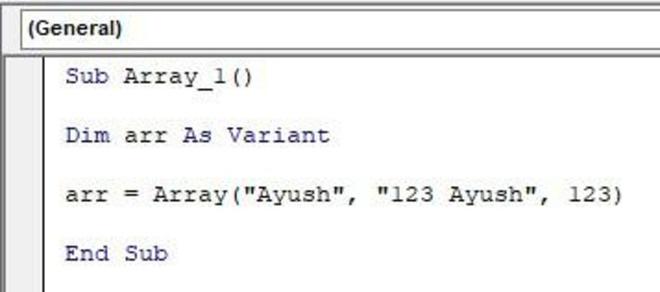
The size of the array is not predefined, and the values are assigned, directly to the array. Use, Array() function to achieve this. For example, arr = Array("Ayush", "123 Ayush", 123).
5. Multidimensional Arrays
Multidimensional arrays store data in rows and columns, ideal for tables or matrices.
5.1 Declaration of a Multidimensional Array
We can declare a 2-dimensional array, by adding an additional size by comma separation. For example, if we want to create an array of 4 rows and 6 columns. Then the array declaration could be, Dim arr(1 To 4, 1 To 6) As Currency.
Syntax:
Dim ArrayName(Rows, Columns) As DataType

5.2 Assigning Values to a Multidimensional Array
We will use a nested For Next loop to assign the values in the multidimensional array. The below Picture illustrates the nested for loop, assigning of values in a multidimensional array.
Syntax:
arr(i, j) = value
where,
i = index of the row,
j = index of the column,
value = the value which has to be assigned.

6. Array Functions
VBA provides functions to manipulate arrays:
There are ten-plus in-built functions in an array. These functions, help make our task more handy and easy. Here, we will discuss some of the most commonly used functions in arrays in VBA.
6.1 Erase
The Erase function clears all the elements in the array. For example, we have declared an array of size 3, and assigned values to them. Now, we want to erase all the elements in the array, i.e. Erase arr.
Syntax:
Erase Array_name
where,
Array_name = It is the name of the array, whose elements are to be deleted.

6.2 ReDim
The ReDim() function is used to change the dimension of the array. For example, initially, we declared an array of size 3, now we want to reassign the value of dimension to 2 in the array. The ReDim arr(1 To 2) can be used to achieve this.
Syntax:
ReDim Array_name(row, column)
where,
Array_name = It is the name of the array, for which the dimension has to be changed,
row = number of rows to be reassigned,
columns = number of columns to be reassigned

6.3 Join
The Join() function is used to join the elements of arrays into one variable. For example, an array of size 3, is created, and the values, assigned, to them are 10, 20, and 30. Now, if we want to concatenate, all the elements. Then, Join(arr) function can be used. The final output of the program will be 102030.
Syntax:
 Join(Array_name)
where,
Array_name: It is the name of the array. For example, arr in the below image.

6.4 Split
The Split() function, is used to split the string into an array, using a delimiter as a separator. For example, we have a string month_12 = "april,may,june", now, we want to convert this string into an array, where each element is the name of the month. We can use Split(month_12, ","), to achieve, this task. The final array will be (april, may, june).
Syntax:
 Split(string, delimiter)
where,
string = It is the string, from which the array has to be created,
