
BigQuery Tutorial for Beginners: From Setup to First Query

Learn what BigQuery is, how it works, its differences from traditional data warehouses, and how to use the BigQuery console to query public datasets provided by Google.
Updated May 21, 2026  · 9 min read

My exposure to big data started 10+ years ago as a software engineer working in Ad-Tech. Back then, datasets started to grow fast and explode in size. At the same time, this was a big opportunity but also a challenge. Queries to answer basic but critical reporting questions suddenly took hours.

As a response, I started using column-oriented databases such as BigQuery in 2013. Since they are cloud-based, they allowed us to run analytical loads performantly and cost-effectively and to scale resources if needed. In the last few years, I led a large team of data engineers that built a 10+ PB BigQuery data warehouse to keep up with a fast-growing catalog of home goods products and growing analytical needs.

Now, as the CTO of DataCamp, I lead different engineering and content teams helping our users learn and practice exactly these skills (among many others). I am convinced that cloud data warehouses like BigQuery can make many workflows far more efficient. That's why I want to share my experiences with you in this tutorial.

In this guide, you'll learn what BigQuery is, how it works, and its differences from traditional data warehouses. You will learn how to use the BigQuery console to query public datasets provided by Google with a practical example of how to query Google Trends to learn about popular topics.

TL;DR

  • BigQuery is Google Cloud’s fully managed, serverless data warehouse that lets you query petabytes of data using standard SQL
  • It separates storage from compute, so each scales independently without infrastructure management
  • The free sandbox gives you 1 TiB of queries per month and access to public datasets with no credit card required
  • BigQuery uses a columnar storage format optimized for analytical (OLAP) workloads, unlike row-oriented OLTP databases
  • BigQuery ML lets you build and deploy machine learning models directly in the warehouse using SQL

What is BigQuery?

BigQuery is a fully managed, serverless data warehouse developed by Google for storing and analyzing data at scale. Organizations use it to run analytical queries across petabytes of data using SQL, without managing any infrastructure.

You can interact with BigQuery through the Google Cloud console, the bq command-line tool, or client libraries for Python, Java, Go, Node.js, C#, PHP, and Ruby.

BigQuery also includes built-in machine learning (BigQuery ML), which lets you create and run ML models directly in the warehouse using SQL. You can also import externally trained models from Vertex AI or other frameworks.

This tutorial is for data analysts, data engineers, and data warehouse administrators getting started with BigQuery. If you'd like to go deeper afterward, our Introduction to BigQuery course covers query optimization and advanced workflows. You can also explore our BigQuery Sandbox guide and complete GCP data warehousing tutorial

Associate Data Engineer in SQL

Gain practical knowledge in ETL, SQL, and data warehousing for data engineering.
Explore Track

Traditional vs Cloud Data Warehouse

A traditional data warehouse is deployed on-premise, typically requiring high upfront costs, a skilled team to manage it, and proper planning to meet increasing demand due to the rigid nature of traditional data center resource scaling.

A cloud data warehouse, by contrast, is managed and hosted by a cloud services provider. Examples include Google BigQuery, Amazon Redshift, and Snowflake.

Advantages of cloud data warehouses

Typically, a cloud data warehouse has several advantages over traditional data warehouses:

  • They’re built for scale and tapping into the flexibility of the cloud environment
  • They have improved speed and performance
  • Flexible pricing and a cloud environment enable cost optimization (e.g., scale down in times of low demand)
  • They can be fully or partially managed, which reduces operational costs.

Row vs Column-Oriented Databases

Example of a row-oriented database:

image20.jpg

Example of a column-oriented database:

image17.png

Row-oriented databases work well for full row lookups, inserting records, and updates. But they struggle with analytical workloads.

For example, if you query three columns from a 50-column table, a row-oriented database still reads all 50 columns for every row. A column-oriented database reads only the three columns you need, which is much faster for analytics like product forecasting or ad-hoc reporting.

Row-oriented databases are typically well suited for online transaction processing (OLTP), and column-oriented databases for online analytical processing (OLAP).

OLTP vs OLAP

  • OLTP is a type of database system used in transaction-oriented applications. "Online" means that such systems are expected to respond to user requests and process them in real-time (i.e., process transactions).
  • The term contrasts with online analytical processing (OLAP), which instead focuses on data analysis.

Summary of comparison:


Row-oriented database

Column-oriented database

Storage

By Row

By Column

Data retrieval

Complete records

Relevant columns

Typical application

OLTP

OLAP

Fast operations

Insertion, Updates, Lookups

Querying for reporting purposes

Load data

Typically a record at a time

Typically in a batch

Popular options

Postgres, MySQL, Oracle, Microsoft SQL Server

Snowflake, Google BigQuery, Amazon Redshift

How Does BigQuery Work?

BigQuery separates its compute engine from storage, so each can scale independently. The result: you can query terabytes of data in seconds and petabytes in minutes.

When BigQuery runs a query, the query engine distributes the work in parallel, scanning the relevant tables in storage, merging results, and returning the final data set.

image13.png

BigQuery Key Features in 2026

Since BigQuery launched, Google has added several features that extend it beyond a traditional data warehouse:

  • BigQuery ML — Build, train, and deploy machine learning models using SQL. Supports linear regression, classification, time-series forecasting, and more.
  • Gemini in BigQuery — AI-powered assistance for writing queries, understanding schemas, and generating data insights through natural language.
  • BigQuery Studio — A unified workspace for SQL, Python notebooks, and Spark within the BigQuery console.
  • Federated queries — Query data in Cloud SQL, Cloud Storage, Bigtable, and other sources without moving it into BigQuery.
  • BigQuery Omni — Run BigQuery analytics on data stored in AWS or Azure without copying it to Google Cloud.

How to Get Started with BigQuery

The BigQuery sandbox lets you try BigQuery without providing a credit card or creating a billing account. In this section, I'll walk through how to access BigQuery and set up your first project using the sandbox.

BigQuery can be accessed through the Google Cloud Console. You will need to log in with a Google account (or create one). Once logged in, a welcome screen should appear:
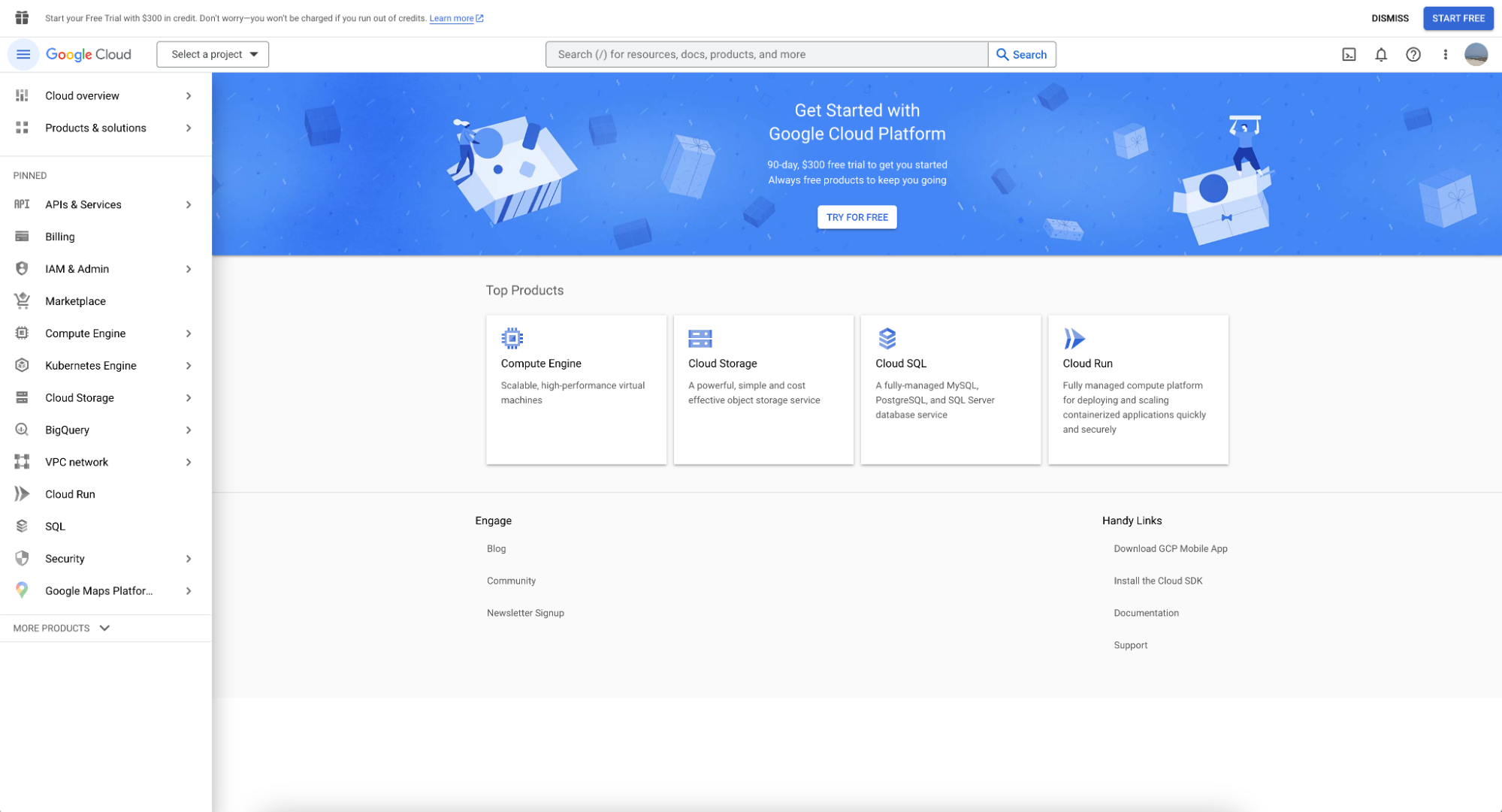
image4.png

You can find BigQuery in the left menu bar. Clicking on it will take you to the screen below:

image1.png

Using the BigQuery sandbox

In order to use the BigQuery sandbox, first create a project by clicking on ‘Select Project.’

image14.png

Followed by clicking on ‘New Project’:

image3.png

You’ll need to provide a project name; for this guide, we’re using datacamp-guide-project

image7.png

A sandbox notice is now displayed on the BigQuery page, showing you have successfully enabled the BigQuery sandbox.

image16.png

With the BigQuery sandbox now enabled, you can use your new project to load data and query as well as query Google public datasets.

Create a dataset and table

Before creating a table, you need to create a dataset in your new project. A dataset is a top-level container used to organize and control access to a set of tables and views. To create a dataset, click on the project’s ‘Actions’ icon:

image18.png

For the purpose of this guide, we’ll fill in ‘Dataset ID’ with ‘main’.

image8.png

You can create a table using SQL. BigQuery uses GoogleSQL, which is ANSI compliant.

CREATE TABLE datacamp-guide-project.main.users (
  id INT64 NOT NULL,
  first_name STRING NOT NULL,
  middle_name STRING,
  last_name STRING NOT NULL,
  active_account BOOL NOT NULL
);

You can also use the BigQuery Console interface:

image19.png

Note: It is not possible to insert data while in a sandbox environment. If you want to try inserting data, you need to enable the free trial. The next sections focus on querying public datasets provided as part of Google Cloud.

Query a public dataset using BigQuery Console

To query a public dataset follow the steps below:

1. Click ‘Add’ next to Explorer.

image10.png

2. Then, choose a dataset.

image2.png

3. Search for ‘Google Trends’ and choose Google Trends, followed by clicking the ‘View dataset’ button.

image6.png

4. bigquery-public-data will show up with a long list of datasets. Star bigquery-public-data so that it becomes “sticky” in the explorer

image5.png

We will use the table top_terms:

image12.png

Click the top_terms table to open, and inspect the Details and Preview table to learn more about top_terms data.
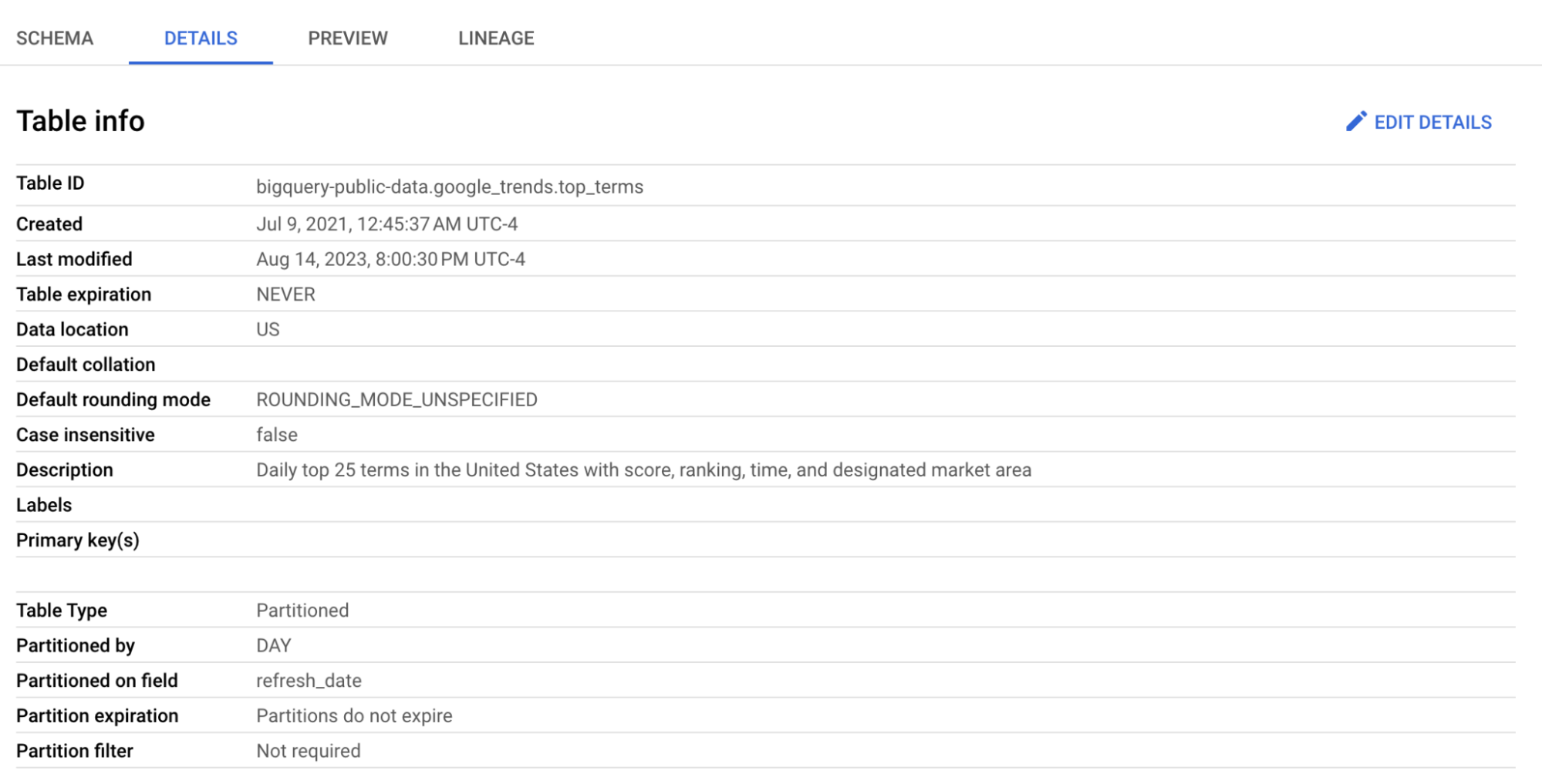
image9.png

image21.png

You can query the dataset, example below to fetch terms that ranked in first position in the last two weeks:

SELECT
  term
FROM
  bigquery-public-data.google_trends.top_terms
WHERE
  rank = 1
  AND refresh_date >= DATE_SUB(CURRENT_DATE(), INTERVAL 2 WEEK)
GROUP BY
  term

Results (will vary):

image11.png

BigQuery Pricing

BigQuery pricing has two main components: compute (query processing) and storage.

Component Free tier Paid pricing
On-demand queries 1 TiB per month $6.25 per TiB
Storage (active) 10 GiB $0.02 per GiB/month
Storage (long-term) 10 GiB $0.01 per GiB/month
Streaming inserts N/A $0.05 per 200 MB

For teams with predictable workloads, BigQuery also offers flat-rate pricing through capacity reservations (BigQuery Editions). Check the official pricing page for current rates.

Final Thoughts

BigQuery is one of the most accessible entry points into cloud data warehousing. The sandbox gives you a risk-free environment to experiment, and the 1 TiB of free queries per month means you can explore public datasets without spending anything. When you need more, Google Cloud's free trial provides $300 in credits.

If you want to build on what you've learned here, I recommend the Introduction to BigQuery course on DataCamp, which covers query optimization and working with larger datasets. For a broader view of data engineering, the Data Engineer in Python track covers the full pipeline from ingestion to warehousing.

You can also explore how BigQuery compares to alternatives in our BigQuery vs Redshift and BigQuery vs Snowflake comparisons, or get ready for interviews with our BigQuery interview questions guide.


Eduardo Oliveira's photo
Author
Eduardo Oliveira
LinkedIn

DataCamp Chief Technology Officer and General Manager of Learning Platform. In my role, I manage the teams focused on building the technology as well as the curriculum that powers DataCamp learners' experience.

Topics

Get Started with Data Engineering Today!

Track

Associate Data Engineer in SQL

30 hr
Learn the fundamentals of data engineering: database design and data warehousing, working with technologies including PostgreSQL and Snowflake!
See DetailsRight Arrow
Start Course
See MoreRight Arrow
Related

blog

Google BigQuery vs Snowflake: A Comprehensive Comparison

Learn more about the unique advantages of both Snowflake and Google BigQuery to decide which cloud data warehouse solution is better for your business.
Tim Lu's photo

Tim Lu

12 min

Tutorial

The Complete Guide to Data Warehousing on GCP with BigQuery

Discover how Google BigQuery provides scalable, flexible, and cost-effective data warehousing and analytics solutions that seamlessly integrate with other GCP services.
Josep Ferrer's photo

Josep Ferrer

Tutorial

BigQuery Sandbox: A Guide to Google's Free SQL Playground

Spin up a no-cost BigQuery environment, practice real-world SQL on public and private data, and build dashboards while staying within generous free-tier limits.
Aryan Irani's photo

Aryan Irani

Tutorial

Google Cloud for Data Science: Beginner's Guide

Learn to set up a data science environment on Google Cloud: create an instance on Google Compute Engine, install Anaconda and run Jupyter notebooks!
Alexis Perrier's photo

Alexis Perrier

code-along

Getting Started with BigQuery

Eduardo Oliveira, CTPO at DataCamp, walks you through how to master the syntax and structure of SQL within the BigQuery environment.
Eduardo Oliveira's photo

Eduardo Oliveira

code-along

Getting Started in SQL

Learn how to write basic queries in SQL and find answers to business questions.
Kelsey McNeillie's photo

Kelsey McNeillie

See MoreSee More